Our Short List of 3
All 4 Picks at a Glance
| Product | Specs | Action |
|---|---|---|
 1. Keychron V6 Max | Check price on Amazon | |
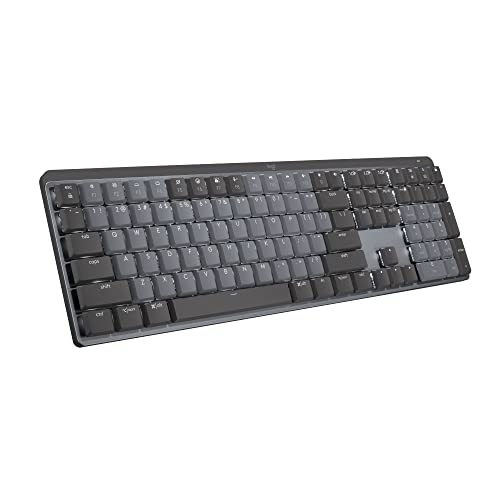 2. Logitech MX Mechanical | Check price on Amazon | |
 4. Ducky One 3 Pure White | Check price on Amazon | |
 5. HyperX Alloy Elite 2 | Check price on Amazon |
Key takeaways
- Best full size mechanical keyboards compared: five 100 percent picks with number pads, from hot-swappable customs to low-profile wireless boards for work.
As an Amazon Associate we earn from qualifying purchases.
A full size mechanical keyboard is the layout that gives nothing up. The number pad stays on the right for spreadsheets, accounting software, CAD work, and data entry. The navigation cluster stays in its standard place, the function row runs across the top, and every key a desktop program expects is present without layers or compromises. In exchange, the board takes up real desk width and pushes the mouse further out, which is exactly why so many smaller layouts exist. This guide is for buyers who have done that maths and landed on the full layout anyway: the pad gets used every day, the desk has the room, and the only question left is which mechanical board deserves the space.
That question is narrower than it first looks. Mechanical is the first filter, because a full size board can just as easily be a membrane or scissor design, and those feel and age very differently. Full size is the second filter, and it needs care: listings use the term loosely, and 96 percent boards squeeze a number pad into a tighter frame with rearranged navigation keys, which is not the same thing as a true 100 percent layout. Every pick below is a genuine full size mechanical keyboard with a standard layout and an integrated number pad, checked against its listing and manufacturer details. The five cover the main reasons people buy this format: a customisable wireless board with programmable firmware, a quiet low-profile board for office work, a slim wireless gaming board, a wired enthusiast board with hot-swappable switches, and a steel-framed gaming board with media controls.
How to choose a full size mechanical keyboard
Start by confirming the layout in the specification, not the headline. A true full size board carries around 104 to 108 keys depending on extras such as a knob or macro keys, keeps a full navigation cluster with separate arrow keys, and places the number pad in its own block on the right. If the arrow keys are tucked under the Enter key or the navigation keys are compressed into the main block, the board is a 96 percent design wearing a full size label. Neither layout is wrong, but they feel different under the fingers, and muscle memory built on a standard board transfers cleanly only to the standard layout.
Switch feel is the next decision, and on a mechanical board it is a real one. Linear switches press smoothly from top to bottom and suit fast, repeated inputs. Tactile switches add a small bump partway down, giving confirmation without extra noise. Clicky switches add the bump and an audible click, satisfying at a solo desk and a genuine problem in a shared room. Low-profile mechanical switches shorten the travel and bring the board closer to a laptop feel while keeping individual switches under each key. Several picks below are sold in more than one switch variant under different listings, so the switch named in the listing title should match the feel being bought.
Hot-swappable sockets are worth deciding on early. A hot-swappable board lets switches be pulled and replaced without soldering, so a feel that turns out wrong can be corrected, and a single failed switch does not retire the keyboard. Soldered and low-profile boards trade that flexibility for a slimmer body or a lower build cost. Keycaps follow a similar logic: double-shot PBT caps resist shine and keep legends readable for years, while ABS caps, including the translucent pudding style used for bright backlighting, can polish smooth under heavy use. Wired boards never need charging and suit a fixed desk. Wireless full size boards come in two flavours: Bluetooth and 2.4 GHz models aimed at multi-device office work, and low-latency gaming models built around a dedicated receiver with a wired fallback. Battery claims depend heavily on backlight level, so a rating given with lighting off should not be compared directly with one given at full brightness. Finally, measure the desk: a full size board is roughly 440 to 470 mm wide before any wrist rest, and the mouse still needs travel room to the right.
Quick comparison
- Keychron V6 Max: wireless custom board with QMK programming, a gasket mount, and hot-swappable switches.
- Logitech MX Mechanical: low-profile, quiet tactile switches, built for multi-device office work.
- Logitech G915 X Lightspeed: slim full size gaming board with tri-mode connection and a metal volume roller.
- Ducky One 3 Pure White: wired enthusiast board with hot-swappable Cherry MX switches and double-shot PBT keycaps.
- HyperX Alloy Elite 2: steel-framed wired gaming board with a light bar, media keys, and pudding keycaps.
1. Keychron V6 Max
The Keychron V6 Max, in the Gateron Jupiter Banana switch version covered by the ASIN above, is the customisable centre of this guide. Keychron describes it as a full size 100 percent layout, and the board keeps the complete key set: function row, navigation cluster, and number pad, with a knob in the top corner on the knob version.
The Banana switch is the distinctive choice here. It is a tactile switch with an early, pronounced bump, which gives strong feedback for typing without the sound of a clicky design. The sockets are hot-swappable and accept standard MX-style switches, so the feel can be changed later without replacing the board. A gasket mount and sound-absorbing foam soften the bottom-out of each press, and the keycaps are double-shot PBT, which suits a board bought as a long-term typing tool rather than a lighting display.
Programming is the second strength. The V6 Max supports QMK and VIA, so keys and layers can be remapped in detail, including the number pad, which data-entry users can reshape around their software. Connection covers 2.4 GHz wireless through a receiver, Bluetooth for up to three devices, and wired USB-C, with Mac and Windows keycaps included. The battery is rated at 4,000 mAh in manufacturer materials, with the usual caution that backlight use shortens any wireless rating considerably. Choose the V6 Max if remapping, switch swapping, and wireless freedom all matter on one full size desk. Choose a simpler pick below if the board will be plugged in once and never adjusted, because much of what this model offers lives in that adjustability.
2. Logitech MX Mechanical
The Logitech MX Mechanical, in the full size Tactile Quiet version in Graphite covered by the ASIN above, is the office specialist. It should not be confused with the smaller MX Mechanical Mini, which drops the number pad; this listing is the full size model, at about 434 mm wide with the pad included. The switches are low-profile mechanical, and the Tactile Quiet variant gives a defined bump with muted sound, a combination aimed at shared rooms, calls, and long typing days rather than at gaming desks.
The board belongs to Logitech’s MX productivity line, and the details follow that brief. Smart backlighting reacts to approaching hands and adjusts to room light, and the board connects by Bluetooth or the included Logi Bolt receiver to up to three computers, switching between them from the keyboard. That matters on locked-down work laptops, where a receiver is often easier than Bluetooth pairing. Logi Options+ software handles key customisation on supported systems. The metal top case keeps the slim body rigid, and the battery is rechargeable over USB-C, with manufacturer ratings measured in days with backlighting active and far longer with it off.
The honest trade-offs are the low-profile feel itself and the fixed switches. Travel is shorter than on a standard-height board, which some typists love and others never take to, and the switches are not hot-swappable, so the Tactile Quiet feel is the feel for the life of the board. Linear and clicky versions exist under different listings, so the variant should be confirmed before ordering. Choose the MX Mechanical if the full size layout serves quiet, multi-device office work. Choose the V6 Max instead if switch swapping or deep remapping matters, and the G915 X below if the same slim shape is wanted with gaming-grade wireless and media hardware.
3. Logitech G915 X Lightspeed
The Logitech G915 X Lightspeed, in the full size Black version with GL Clicky switches covered by the ASIN above, takes the low-profile idea to a gaming desk. Logitech lists this model, number 920-012704, as the full size version, distinct from the G915 X TKL sold under separate listings. The frame is only about 23 mm tall, finished with an aluminium top, yet it still fits the complete layout: number pad, a row of programmable G-keys, dedicated media controls, and a metal volume roller along the top edge.
Connection is tri-mode. Lightspeed wireless over the receiver is the gaming-grade link, Bluetooth covers a second machine such as a laptop, and a USB-C wired mode handles charging and fallback use. The GL switches are low-profile mechanical with a short 1.3 mm actuation point in Logitech’s specification, which is why the board feels quick despite its slim build. The Clicky variant covered here adds an audible click to each press; tactile and linear GL versions exist under different listings for buyers who share a room. Battery ratings from Logitech run from tens of hours at full backlight brightness to far longer with lighting off, and the board can be used while it charges.
Keycaps are double-shot PBT, a durability step up from the caps on the earlier generation of this design, and the lighting is per-key RGB controlled through G Hub, which is also where the G-keys are programmed. The cautions are size and sound: even at 23 mm thin, a full size board with a G-key column is wide, and clicky switches are the loudest choice in this guide. Choose the G915 X Lightspeed if the desk hosts fast games, media control matters, and a slim wireless board is worth more than switch swapping, which this model does not offer.
4. Ducky One 3 Pure White
The Ducky One 3 Pure White, covered by the ASIN above in its Cherry MX Blue version, is the traditional enthusiast pick: wired, standard height, and built around proven parts. The model number on the listing, DKON2108ST, is Ducky’s full size 100 percent chassis, and the dimensions on the listing, about 17.7 inches wide, match that layout with the number pad in place. Where the Logitech boards above go slim and wireless, the One 3 stays with the classic formula and spends its effort on typing feel and build details.
Every switch socket is hot-swappable using Kailh sockets, so the fitted Cherry MX Blue switches can be replaced with almost any MX-style switch later. Blue switches are the clicky option in the Cherry range, with a tactile bump and a distinct click that suits a private room and annoys almost any shared one; other switch versions of this board exist under different listings. The keycaps are thick double-shot PBT with clean legends, the stabilisers are Ducky’s tuned V2 design, and the case uses layered padding as part of the Quack Mechanics design programme, which aims at a controlled, dampened sound from the larger keys.
Connection is a detachable braided USB-C cable, with a 1,000 Hz polling rate and N-key rollover in the specification. There is no wireless mode and no companion software suite; macros and lighting are handled on the board itself through key combinations, which some buyers prefer and others find slow. Three-stage adjustable feet set the typing angle. Choose the One 3 if a wired connection is no hardship, standard-height switches and keycap sets are part of the appeal, and the board is expected to evolve through switch changes over years of use. Choose the V6 Max if wireless and software remapping matter more than the classic wired formula.
5. HyperX Alloy Elite 2
The HyperX Alloy Elite 2, in the HyperX Red switch version covered by the ASIN above, is the gaming board that leans into hardware controls and lighting. HyperX lists the form factor as full size, and the layout keeps the number pad while adding a dedicated media key row, a large volume wheel, and a light bar running across the top of the steel frame. For a desk that splits time between games, video, and music, those physical controls are the reason this board exists.
The frame is solid steel, which gives the board real weight and keeps it planted during fast play. The switches are HyperX’s own mechanical design, and the Red variant on this listing is linear, pressing smoothly with a short actuation suited to repeated inputs. N-key rollover and a Game Mode are part of the specification, customisation runs through HyperX NGENUITY software, and a USB pass-through port on the board handles a mouse receiver or a charging cable without reaching behind the computer. The connection is a fixed braided cable, so this is a permanent-desk board by design.
The keycaps define the look. They are ABS pudding caps, with translucent sides that let the per-key RGB lighting glow through far more brightly than standard caps allow. The trade-off is material: ABS can develop a shine on heavily used keys over time where PBT resists it. Other switch versions have existed in the range, so the Red linear variant should be confirmed against the listing title. Choose the Alloy Elite 2 if media hardware, a bright lighting display, and a heavy steel frame top the list. Choose the Ducky or the Keychron instead if keycap material and switch swapping matter more.
Which full size mechanical keyboard fits which desk
For a customisable home desk, the Keychron V6 Max is the most complete answer: full layout, wireless and wired connection, programmable firmware, and switches that can be changed as preferences develop. For a quiet office, the Logitech MX Mechanical fits better, because its low-profile Tactile Quiet switches and multi-device switching were designed for that routine. For gaming with a slim board and proper media hardware, the Logitech G915 X Lightspeed is the pick, accepting that its clicky variant belongs in a room of its own.
For a wired setup, the Ducky One 3 offers the classic standard-height formula with hot-swappable Cherry MX switches and PBT keycaps, while the HyperX Alloy Elite 2 offers a steel frame, a volume wheel, and the brightest lighting in the guide at the cost of ABS keycaps and a fixed cable. Across all five, the shared checks stay the same: confirm the listing shows the full size version rather than a TKL or Mini sibling, confirm the switch variant named in the title, and measure the desk before the board arrives.
Frequently asked questions
Is a full size keyboard better than tenkeyless?
Neither is better in general; they serve different habits. A full size board keeps the number pad, which speeds up spreadsheet work, accounting, and any task built on number entry, and it keeps every key where desktop software expects it. A tenkeyless board frees desk space and brings the mouse closer, which many players and some typists prefer. If the pad is used daily, full size earns its width. If it is touched once a month, a separate USB number pad beside a smaller board covers the same need.
What does 100 percent layout actually mean?
It means the complete standard key set is present on the board: the main typing block, a function row, a separate navigation and arrow cluster, and a number pad. Boards described as 96 percent also include a number pad, but they compress the navigation keys into a tighter block to save width, which changes some key positions. Checking the key count and the layout diagram on the listing is the reliable way to tell the two apart, since headline wording is not consistent between brands.
Are low-profile mechanical switches still mechanical?
Yes. A low-profile mechanical keyboard still uses an individual mechanical switch under each key; the switch body and travel are simply shorter, so the board sits lower and the press feels closer to a fast laptop key with a defined mechanical action. The MX Mechanical and the G915 X Lightspeed in this guide both work this way. The practical differences are shorter travel, a slimmer board, and parts that are usually specific to the low-profile format rather than interchangeable with standard-height ones.
Which switch type suits a shared room?
Tactile or linear switches are the safer choices, ideally in a quiet or silent variant where one exists. Clicky switches, including the Cherry MX Blue version of the Ducky One 3 and the GL Clicky version of the G915 X Lightspeed covered above, produce a sharp sound on every press that carries across a room. Switch choice can be changed later only on hot-swappable boards, so on the soldered picks in this guide the variant chosen at purchase is the one that has to suit the room.
Disclosure
Disclosure: This article contains affiliate links. If you buy through those links, a commission may be earned at no additional cost to you. Product information was taken from the listings and manufacturer details available at the time of writing, and specifications should be confirmed on the live listing before purchase.
FAQ
Is a full size keyboard better than tenkeyless?
What does 100 percent layout actually mean?
Are low-profile mechanical switches still mechanical?
Which switch type suits a shared room?
More from Amazon
Programs that pair well with the guide above. Offers and eligibility are set by Amazon and may change.
Free shipping on eligible items, Prime Video and more. Eligible new members can start with a free trial.
Start a Prime free trialA Prime membership for ages 18-24 with a trial period. Eligibility is set by Amazon.
See Prime for Young AdultsAudiobooks and podcasts to listen to on the go. Eligible new members can start with a free trial.
Try Audible freeAd-free music streaming. Eligible new subscribers can start with a free trial.
Try Music Unlimited freeAs an Amazon Associate we earn from qualifying purchases.