
Our Short List of 3

- Best for: Programmers who remap keys heavily and like to swap switches.
- Layout: Tenkeyless, 87 keys
- Switches: Gateron G Pro Brown, hot-swappable and pre-lubed
- Firmware: QMK/VIA support for remapping and macros
- Keycaps: Double-shot PBT, OSA profile
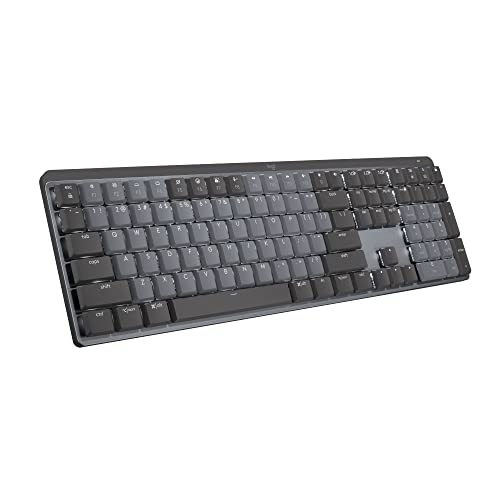
- Best for: Developers who want a quiet, standard full-size board for office and home desks.
- Layout: Full-size with number pad
- Switches: Tactile Quiet low-profile mechanical
- Backlighting: Backlit keys
- Connectivity: Bluetooth or Logi Bolt USB receiver

- Best for: Programmers dealing with wrist or shoulder strain who want a truly split layout.
- Layout: Split two-module design with 20-inch linking cable
- Switches: Hot-swappable Gateron Pro v1 tactile
- Programming: SmartSet engine with onboard remapping, macros, and 9 profiles
- Backlighting: Per-key RGB
All 4 Picks at a Glance
| Product | Specs | Action |
|---|---|---|
| Keychron K8 Pro |
| Check price on Amazon |
| Logitech MX Mechanical |
| Check price on Amazon |
| Kinesis Freestyle Edge RGB Plus |
| Check price on Amazon |
 HHKB Professional Hybrid Type-S |
| Check price on Amazon |
Key takeaways
- Four keyboards for coding compared on specs from their Amazon listings: a programmable Keychron, a quiet Logitech, a split Kinesis and the compact HHKB.
The real decision when buying a keyboard for coding is not the switch brand printed on the box. It is how the board fits the way you actually work: whether you live in a terminal, how much you remap keys, whether your wrists ache by mid-afternoon, and how many machines you switch between during a day. A board that fights your editor shortcuts or forces awkward wrist angles quietly costs you focus on every line you write.
This roundup serves four kinds of programmers: tinkerers who want firmware-level remapping, developers who want a quiet full-size board for shared spaces, coders chasing split ergonomics, and minimalists who prefer a compact Unix-style layout. Every pick below is a keyboard sold for programming or heavy typing, chosen from the names and specifications on its Amazon product page, and each one takes a clearly different approach to layout, switches, and customization.
Quick Picks
As an Amazon Associate we earn from qualifying purchases.
| Product | Best for | Key spec from title |
|---|---|---|
| Keychron K8 Pro | Remapping and switch swapping | QMK/VIA programmable, hot-swappable Gateron G Pro Brown |
| Logitech MX Mechanical | Quiet full-size typing | Tactile Quiet switches, backlit keys, Bluetooth and USB-C |
| Kinesis Freestyle Edge RGB Plus | Split ergonomics | Split design, hotswap tactile switches, lift kit included |
| HHKB Professional Hybrid Type-S | Minimalist compact layout | Silent Topre switches, 60-key layout, Bluetooth and USB |
How to Choose
Layout and the keys you reach for most
Start with the keys your editor habits depend on. If you lean on a function row for debugging shortcuts, a tenkeyless or full-size board keeps those keys in place, while a compact board moves them behind a layer. Arrow keys matter more than most people expect: vim users often remap them away, but anyone who navigates logs, spreadsheets, or database consoles all day usually wants them present and easy to find. A number pad only earns its desk space if you key in figures regularly; otherwise the smaller footprint lets your mouse sit closer and keeps your shoulder in a more natural position.
Switch feel and noise over long sessions
Switch choice shapes how eight hours of typing feels. Tactile switches give a small bump that confirms each press without bottoming out hard, which many programmers find helps accuracy during long stretches. Linear switches feel smooth and consistent, while clicky switches add an audible snap that can annoy anyone sharing the room. Actuation force matters too: lighter switches tire fingers less during marathon sessions, while heavier ones reduce accidental presses. If you can, match the switch to your environment first and your preference second, because a board that disturbs calls or coworkers will not stay on your desk.
Remapping, macros, and layers
Programmers repeat the same keystrokes thousands of times, so programmability pays for itself quickly. Boards with QMK or VIA support let you remap any key, build macros for boilerplate, and place symbols like brackets and backticks where your fingers expect them. Onboard memory is the detail to check: layouts stored on the keyboard itself travel between machines and operating systems without extra software. Proprietary apps from larger brands are usually easier to learn, but they may need an account or a background process. Decide how deep you want to go before buying, because the two approaches feel very different day to day.
Connectivity and your desk setup
Decide how the keyboard connects before anything else, because it affects latency, clutter, and how many machines you can serve. Bluetooth boards that pair with several devices suit programmers who move between a work laptop, a personal machine, and a tablet, and a wired fallback keeps the board usable when the battery runs low. A purely wired board removes charging from your routine and never drops a connection mid-session, at the cost of a cable across the desk. Also check operating system support and whether Mac and Windows keycaps are included, since legends in the wrong places slow you down.
The 4 Best Options
Keychron K8 Pro
- Best for: Programmers who remap keys heavily and like to swap switches.
- Layout: Tenkeyless, 87 keys
- Switches: Gateron G Pro Brown, hot-swappable and pre-lubed
- Firmware: QMK/VIA support for remapping and macros
- Keycaps: Double-shot PBT, OSA profile
Programmers who remap keys heavily and like to swap switches.
Confirm you are ordering the fully assembled hot-swappable version; the barebone kit ships without switches or keycaps, and wireless polling is slower than the wired mode.
The K8 Pro is the board for programmers who treat their keyboard as part of their tooling. Its QMK and VIA support means every key can be remapped and layered, so bracket pairs, terminal shortcuts, and boilerplate macros can live exactly where your hands expect them. The hot-swappable Gateron G Pro Brown switches pull out without soldering, which makes experimenting with feel cheap and reversible. A tenkeyless layout keeps the function row and arrow keys while freeing mouse space, and Bluetooth pairing for three devices plus a wired mode covers most desk setups without fuss or extra dongles.
Watch out for: Confirm you are ordering the fully assembled hot-swappable version; the barebone kit ships without switches or keycaps, and wireless polling is slower than the wired mode.
Logitech MX Mechanical
- Best for: Developers who want a quiet, standard full-size board for office and home desks.
- Layout: Full-size with number pad
- Switches: Tactile Quiet low-profile mechanical
- Backlighting: Backlit keys
- Connectivity: Bluetooth or Logi Bolt USB receiver
Developers who want a quiet, standard full-size board for office and home desks.
The Tactile Quiet model is this listing; Clicky and Linear versions sit under separate listings, so check the switch named in the title before ordering.
The MX Mechanical takes the opposite approach: a full-size board that disappears into a professional desk setup. Its low-profile Tactile Quiet switches deliver a defined bump with muted sound, which suits shared offices and frequent calls. You keep a number pad, a function row, and backlit keys that light as your hands approach, so nothing about a standard layout has to be relearned. It connects over Bluetooth or the included Logi Bolt receiver, charges over USB-C, and works across Windows, macOS, Linux, and Chrome OS, which makes it an easy recommendation for mixed-platform teams.
Watch out for: The Tactile Quiet model is this listing; Clicky and Linear versions sit under separate listings, so check the switch named in the title before ordering.
Kinesis Freestyle Edge RGB Plus
- Best for: Programmers dealing with wrist or shoulder strain who want a truly split layout.
- Layout: Split two-module design with 20-inch linking cable
- Switches: Hot-swappable Gateron Pro v1 tactile
- Programming: SmartSet engine with onboard remapping, macros, and 9 profiles
- Backlighting: Per-key RGB
Programmers dealing with wrist or shoulder strain who want a truly split layout.
It is wired only, with no Bluetooth option, and the split layout takes days of adjustment before typing speed fully recovers.
The Freestyle Edge RGB Plus splits into two separate modules, so each hand can sit at shoulder width with a straighter wrist angle than any one-piece board allows. The included lift kit adds tenting, raising the inner edges of each half, and detachable palm supports round out the ergonomic package. It stays fully programmable through the onboard SmartSet engine, with remaps and macros stored on the keyboard across nine profiles, and the hot-swappable tactile switches can be changed without tools. For programmers whose wrists or shoulders already complain, this is the most adjustable option here.
Watch out for: It is wired only, with no Bluetooth option, and the split layout takes days of adjustment before typing speed fully recovers.
HHKB Professional Hybrid Type-S
- Best for: Touch typists and Unix or vim users who want the smallest possible footprint.
- Layout: 60 keys, compact
- Switches: Silent Topre electrostatic capacitive, 45 g actuation
- Keycaps: Blank PBT, charcoal
- Connectivity: Bluetooth for up to four devices, or USB-C wired
Touch typists and Unix or vim users who want the smallest possible footprint.
Blank keycaps and the HHKB layout are polarizing: there are no dedicated arrow keys or function row, and legends-free caps punish anyone who still hunts for symbols.
The HHKB was designed by programmers for programmers, and its 60-key layout puts Control beside the A key, removes the number row’s dedicated function keys, and keeps every common character within a short reach. Its silent Topre electrostatic capacitive switches feel smooth and quiet, with a soft tactile response that suits long, focused sessions. This Hybrid Type-S version pairs over Bluetooth with up to four devices or connects by USB-C, runs custom keymaps, and its blank PBT keycaps reward touch typists who never look down. It is a specialist tool, and it makes no apology for that.
Watch out for: Blank keycaps and the HHKB layout are polarizing: there are no dedicated arrow keys or function row, and legends-free caps punish anyone who still hunts for symbols.
Which One Fits Your Situation
You remap everything and swap switches for fun
Choose the Keychron K8 Pro. QMK and VIA give you layers, macros, and per-key remapping stored on the board, and hot-swappable sockets mean a switch experiment costs a small bag of switches rather than a new keyboard. It is the only pick here that grows with your configuration habit instead of asking you to adapt to a fixed layout.
You code in a shared office or spend hours on calls
The Logitech MX Mechanical fits best. Tactile Quiet switches keep the noise down for the people around you, the full-size layout needs no relearning, and the Logi Bolt receiver gives a stable connection for work laptops where Bluetooth pairing is restricted. Backlit keys also help in dim rooms during early or late calls.
Your wrists and shoulders are already complaining
Go with the Kinesis Freestyle Edge RGB Plus. Separating the halves lets your arms rest at a natural width, the lift kit adds tenting, and the palm supports keep your wrists off the desk edge. Expect an adjustment period of several days, after which most touch typists recover their speed with a noticeably straighter hand position.
You want the smallest board that still feels premium
Pick the HHKB Professional Hybrid Type-S. The 60-key footprint frees a large amount of desk space and travels easily between home and office, while four Bluetooth pairings cover a laptop, desktop, and tablet. It suits confident touch typists who like the Unix-style Control placement and rarely reach for a function row.
Common Mistakes
- Buying a compact board before checking where your editor’s essential keys land on its layers.
- Choosing clicky switches for a shared office or a home with thin walls and frequent calls.
- Ignoring whether remaps are stored on the keyboard itself, then losing your layout on a second machine.
- Ordering the wrong switch variant because several versions share one product family name.
- Skipping the adjustment period on a split board and judging it after a single afternoon.
Frequently Asked Questions
Is a mechanical keyboard actually better for coding?
It can be, mainly because you choose the switch feel, layout, and remapping depth instead of accepting a fixed membrane board. Tactile feedback helps many programmers type accurately for longer stretches, and features like layers and macros remove repetitive keystrokes. The benefit comes from the fit to your habits, not from the switch technology alone.
Which switch type suits long typing sessions?
Tactile switches are the common middle ground: a small bump confirms the press, the sound stays moderate, and your fingers can float instead of bottoming out. Linear switches feel smoother and quieter still, while clicky switches add noise that rarely suits shared spaces. If possible, start with a tactile or silent tactile option and adjust from there.
How long does a split keyboard take to get used to?
Most touch typists need several days to two weeks before their speed returns, because the hands must unlearn drifting toward the center. Starting with the halves close together and widening them gradually helps. Programmers who already keep their fingers on the home row usually adapt fastest, since the split layout rewards exactly that discipline.
Can one keyboard serve a work laptop and a personal machine?
Yes, if it supports multiple pairings or a receiver plus Bluetooth. The Keychron K8 Pro and the HHKB Hybrid Type-S both remember several Bluetooth devices, and the Logitech MX Mechanical can switch between a Logi Bolt receiver and Bluetooth connections. A purely wired board like the Kinesis instead needs a cable swap or a USB switch.
FAQ
Is a mechanical keyboard actually better for coding?
Which switch type suits long typing sessions?
How long does a split keyboard take to get used to?
Can one keyboard serve a work laptop and a personal machine?
More from Amazon
Programs that pair well with the guide above. Offers and eligibility are set by Amazon and may change.
Free shipping on eligible items, Prime Video and more. Eligible new members can start with a free trial.
Start a Prime free trialA Prime membership for ages 18-24 with a trial period. Eligibility is set by Amazon.
See Prime for Young AdultsAudiobooks and podcasts to listen to on the go. Eligible new members can start with a free trial.
Try Audible freeAd-free music streaming. Eligible new subscribers can start with a free trial.
Try Music Unlimited freeAs an Amazon Associate we earn from qualifying purchases.









