
Our Short List of 3

- Best for: Players who want a current RTX 50-series laptop with a fast 165Hz screen for everyday gaming at 1080p and 1200p.
- Processor: Intel Core i7-14650HX
- Graphics: NVIDIA GeForce RTX 5060 Laptop GPU, 8GB GDDR7
- Display: 16-inch FHD+ (1920 x 1200) 16:10, 165Hz, 3ms
- Memory: 16GB DDR5

- Best for: Players who want the strongest graphics chip in this group plus a sharp QHD screen for demanding titles and creative work.
- Processor: Intel Core i9-14900HX (24 cores)
- Graphics: NVIDIA GeForce RTX 5070 Laptop GPU, 8GB GDDR7
- Display: 15.6-inch QHD (2560 x 1440), 165Hz, IPS-Level, 100 percent DCI-P3
- Memory: 32GB DDR5

- Best for: Desk setups that pair a flagship-class processor with a 240Hz screen and 32GB of memory for gaming plus streaming or editing.
- Processor: Intel Core Ultra 9 275HX
- Graphics: NVIDIA GeForce RTX 5060 Laptop GPU
- Display: 16-inch WQXGA (2560 x 1600), 240Hz, IPS
- Memory: 32GB DDR5
All 4 Picks at a Glance
| Product | Specs | Action |
|---|---|---|
| ASUS ROG Strix G16 (2025) |
| Check price on Amazon |
| MSI Katana 15 HX |
| Check price on Amazon |
| Acer Predator Helios Neo 16 |
| Check price on Amazon |
 Lenovo Legion 5 |
| Check price on Amazon |
Key takeaways
- Compare four current gaming laptops on Amazon: ROG Strix G16, MSI Katana 15 HX, Predator Helios Neo 16 and Legion 5, all with RTX 50-series graphics.
The real decision with a current gaming laptop is not which brand logo you like; it is which combination of graphics chip, screen and processor will still feel right two or three years from now. Models turn over fast, and last year’s flagship can sit next to this year’s mid-range machine with a confusingly similar name. Getting the balance right means matching the graphics tier to the screen it has to drive, then checking that memory, storage and cooling leave you room to grow.
This roundup is for players replacing an aging machine, students who game in dorm rooms, and creators who want one laptop for play and projects. Every model below is a current-generation design sold on Amazon US, chosen from the names and specifications on the product pages themselves: RTX 50-series graphics, modern HX and Ultra processors, high-refresh screens and DDR5 memory throughout.
Quick Picks
As an Amazon Associate we earn from qualifying purchases.
| Product | Best for | Key spec from title |
|---|---|---|
| ASUS ROG Strix G16 (2025) | Everyday gaming with a fast screen | NVIDIA GeForce RTX 5060 Laptop GPU |
| MSI Katana 15 HX | Strongest graphics in this group | NVIDIA GeForce RTX 5070 Laptop GPU |
| Acer Predator Helios Neo 16 | High-refresh desk setups | 16-inch WQXGA 240Hz display |
| Lenovo Legion 5 | Portable play with an OLED screen | 15.1-inch WQXGA OLED 165Hz display |
How to Choose
Start with the graphics chip
The graphics chip decides which settings and resolutions a laptop can handle, so fix your target screen first and work backwards. An RTX 5060 is a sensible match for 1080p, 1200p and 1600p panels at high settings, while the RTX 5070 in the Katana adds headroom for 1440p and 1600p play. Both chips here are current RTX 50-series parts with GDDR7 memory and DLSS 4 support. Also check the listed power figure where a listing states one, because the same chip can run at different wattages in different chassis, and that changes what it can sustain.
Match the screen to how you play
Screen choice shapes every session. A 165Hz panel suits most players and keeps motion clear in fast games, while the Acer’s 240Hz screen rewards competitive players who chase the highest frame output their chip can feed. Resolution matters just as much: 2560 x 1600 screens on the Acer, MSI and Lenovo show more detail but ask more of the graphics chip than the ASUS FHD+ panel. Panel type is the final call, with the Legion’s OLED offering the deepest contrast in this group and the IPS panels prioritizing refresh and response.
Processor, memory and storage
Every processor here is a modern multi-core chip, so the differences that matter day to day are memory and storage. Sixteen gigabytes of DDR5 is the working minimum for current games alongside a browser, chat and recording tools, and 32GB gives streamers and editors comfortable headroom. For storage, 1TB is the practical floor now that big releases routinely pass 100GB installed; all four models meet it. Where a listing names memory speed or drive generation, note it, because those details separate otherwise similar configurations that share a model name.
Size, cooling and connections
A 16-inch laptop is a desk machine that can travel; a 15-inch model like the Legion 5 is the one you will actually carry daily, so be honest about how often the laptop leaves home. Check the port list against your gear: HDMI 2.1 for a fast external monitor, USB-C with DisplayPort output, and wired Ethernet if your wireless is unreliable. Wi-Fi 7 on the ASUS and Lenovo is the newest standard here, while Wi-Fi 6E on the MSI and Acer is still quick. Cooling design matters too, since slim chassis run louder under load.
The 4 Best Options
ASUS ROG Strix G16 (2025)
- Best for: Players who want a current RTX 50-series laptop with a fast 165Hz screen for everyday gaming at 1080p and 1200p.
- Processor: Intel Core i7-14650HX
- Graphics: NVIDIA GeForce RTX 5060 Laptop GPU, 8GB GDDR7
- Display: 16-inch FHD+ (1920 x 1200) 16:10, 165Hz, 3ms
- Memory: 16GB DDR5
Players who want a current RTX 50-series laptop with a fast 165Hz screen for everyday gaming at 1080p and 1200p.
Several Strix G16 configurations share similar names, including a 2.5K 240Hz version, so confirm the model code G615JMR-AS74 and the FHD+ 165Hz panel on the listing before ordering.
The Strix G16 is the safe pair of hands in this group: a 2025 model with an RTX 5060, a 14th-generation HX processor and a 165Hz screen that suits fast shooters as well as slower story-driven games. The 16-inch 16:10 panel gives you a little more vertical room than a standard widescreen, which helps in strategy titles and everyday work alike. Sixteen gigabytes of memory and a 1TB drive cover a typical game library without immediate upgrades, and Wi-Fi 7 keeps wireless play current. Choose it if you want balanced, current hardware without chasing the highest tier.
Watch out for: Several Strix G16 configurations share similar names, including a 2.5K 240Hz version, so confirm the model code G615JMR-AS74 and the FHD+ 165Hz panel on the listing before ordering.
MSI Katana 15 HX
- Best for: Players who want the strongest graphics chip in this group plus a sharp QHD screen for demanding titles and creative work.
- Processor: Intel Core i9-14900HX (24 cores)
- Graphics: NVIDIA GeForce RTX 5070 Laptop GPU, 8GB GDDR7
- Display: 15.6-inch QHD (2560 x 1440), 165Hz, IPS-Level, 100 percent DCI-P3
- Memory: 32GB DDR5
Players who want the strongest graphics chip in this group plus a sharp QHD screen for demanding titles and creative work.
Katana 15 HX configurations vary by region, and memory and storage differ between them, so check the exact configuration on the listing before ordering.
The Katana 15 HX is the performance pick here, built around an RTX 5070 and a 24-core Core i9-14900HX. Its 15.6-inch QHD screen runs at 165Hz with full DCI-P3 color coverage, so it suits players who want sharper detail than 1080p and creators who also edit video or photos. With 32GB of memory and a 1TB solid-state drive, it handles large libraries and heavy multitasking as listed. Pick this one if graphics power and screen sharpness matter more to you than having the newest wireless standard or the lightest chassis in the group.
Watch out for: Katana 15 HX configurations vary by region, and memory and storage differ between them, so check the exact configuration on the listing before ordering.
Acer Predator Helios Neo 16
- Best for: Desk setups that pair a flagship-class processor with a 240Hz screen and 32GB of memory for gaming plus streaming or editing.
- Processor: Intel Core Ultra 9 275HX
- Graphics: NVIDIA GeForce RTX 5060 Laptop GPU
- Display: 16-inch WQXGA (2560 x 1600), 240Hz, IPS
- Memory: 32GB DDR5
Desk setups that pair a flagship-class processor with a 240Hz screen and 32GB of memory for gaming plus streaming or editing.
This is a large, desk-first 16-inch chassis; if you plan to carry your laptop daily, the lighter Legion 5 in this list is easier to live with.
The Predator Helios Neo 16 pairs Intel’s Core Ultra 9 275HX with an RTX 5060 and the fastest screen in this group: a 16-inch WQXGA panel at 240Hz. That combination targets players who split time between competitive titles, where the refresh headroom counts, and demanding single-player games at 2560 x 1600. It also ships with 32GB of DDR5 memory and a 1TB drive, the joint-largest memory and storage pairing here, plus Killer Wi-Fi 6E networking. Choose it for a desk-based setup that doubles as a streaming or editing station.
Watch out for: This is a large, desk-first 16-inch chassis; if you plan to carry your laptop daily, the lighter Legion 5 in this list is easier to live with.
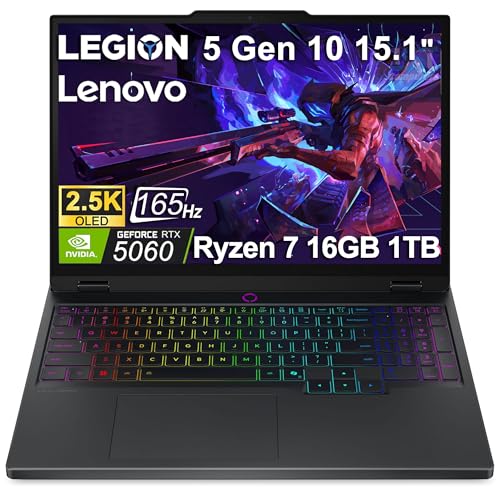
Lenovo Legion 5
- Best for: Players who move around and want an OLED screen, current graphics and a lighter 15.1-inch chassis for dorm, office and travel use.
- Processor: AMD Ryzen 7 260 (8 cores, up to 5.1GHz)
- Graphics: NVIDIA GeForce RTX 5060, 8GB GDDR7
- Display: 15.1-inch WQXGA (2560 x 1600) OLED, 165Hz, G-SYNC, 100 percent DCI-P3
- Memory: 16GB DDR5
Players who move around and want an OLED screen, current graphics and a lighter 15.1-inch chassis for dorm, office and travel use.
This listing is sold by a third-party seller rather than by Amazon or Lenovo, so confirm the seller and the exact configuration on the listing before ordering.
The Legion 5 is the one to carry. At 15.1 inches and just over four pounds as listed, it is noticeably easier to move than the 16-inch models here, yet it still pairs an RTX 5060 with an AMD Ryzen 7 260 and a 1TB drive. Its OLED screen is the visual standout of the group, with 2560 x 1600 resolution, a 165Hz refresh and G-SYNC support. A 5MP webcam and a full set of ports, including wired Ethernet, make it practical for calls and dorm or office desks.
Watch out for: This listing is sold by a third-party seller rather than by Amazon or Lenovo, so confirm the seller and the exact configuration on the listing before ordering.
Which One Fits Your Situation
You play fast competitive games
Prioritize refresh and response. The Acer’s 240Hz WQXGA screen gives competitive players the most headroom in this group, and its Ultra 9 processor keeps frame output consistent in busy matches. If desk space is tighter, the ASUS Strix G16 at 165Hz covers the same ground with a slightly larger 16:10 view. Either way, pair the laptop with wired Ethernet where you can for steadier matches.
You game and create on one machine
Look at the MSI Katana 15 HX first. Its RTX 5070, 24-core i9 processor and QHD screen with full DCI-P3 coverage suit video editing, 3D work and streaming alongside play, and 32GB of memory keeps big projects open. The Acer runs it close with the same memory and a taller 2560 x 1600 panel, which some editors prefer for timeline space.
You carry your laptop most days
The Lenovo Legion 5 is the natural pick. It is the smallest and lightest model here as listed, its OLED screen looks good in bright rooms, and Wi-Fi 7 plus a wired Ethernet port cover both library and dorm setups. The 5MP webcam is also the sharpest in this group for calls. You give up nothing in graphics: it runs the same RTX 5060 as two larger rivals.
You are upgrading from an older gaming laptop
Any of the four is a generational jump if your current machine predates RTX graphics, but the ASUS Strix G16 is the most straightforward replacement: current chip, fast screen, 1TB of storage and the newest wireless standard, with no configuration surprises. If your old laptop felt held back by its graphics chip most, step up to the MSI and its RTX 5070 instead.
Common Mistakes
- Comparing laptops by graphics chip name alone, without checking the screen it has to drive or the power figure the listing states.
- Settling for 512GB of storage when current game installs are large, then juggling an external drive from day one.
- Assuming two laptops with the same model name share one configuration, when memory, storage and panel often differ by listing.
- Overlooking who actually sells the listing; some are sold by third-party sellers rather than the manufacturer or Amazon, which changes who handles support.
- Buying the largest screen for a laptop you carry daily, then leaving it at home because the bag is too heavy.
Frequently Asked Questions
What counts as a current gaming laptop in late 2026?
Current means the parts inside are from the latest generation: RTX 50-series graphics, recent Intel HX or Core Ultra or AMD Ryzen processors, DDR5 memory and fast solid-state storage. All four laptops here meet that bar. Older models can still play well, but they miss newer features such as DLSS 4 and the latest wireless standards.
Should I choose the RTX 5060 or step up to the RTX 5070?
Choose by screen. If the laptop has a 1080p, 1200p or 1600p panel and you play at native resolution, the RTX 5060 models here are well matched. The RTX 5070 in the MSI earns its place when you want 1440p or 1600p detail with settings turned up, or when you also render video and 3D work on the same machine.
How much memory and storage do current games need?
Sixteen gigabytes of DDR5 is the sensible minimum in this group, and it is what the ASUS and Lenovo ship with; the MSI and Acer carry 32GB for heavier multitasking. For storage, treat 1TB as the floor: every model here has it, and a handful of large current releases can fill half of it quickly.
Can I use one of these laptops with an external monitor?
Yes. Each model here lists HDMI 2.1 output, and several also send a display signal over USB-C, so a fast external monitor is an easy upgrade for a desk setup. Check the listing’s port list for the exact mix before ordering, especially if you want to run two external screens or charge over the same cable.
FAQ
What counts as a current gaming laptop in late 2026?
Should I choose the RTX 5060 or step up to the RTX 5070?
How much memory and storage do current games need?
Can I use one of these laptops with an external monitor?
More from Amazon
Programs that pair well with the guide above. Offers and eligibility are set by Amazon and may change.
Free shipping on eligible items, Prime Video and more. Eligible new members can start with a free trial.
Start a Prime free trialA Prime membership for ages 18-24 with a trial period. Eligibility is set by Amazon.
See Prime for Young AdultsAudiobooks and podcasts to listen to on the go. Eligible new members can start with a free trial.
Try Audible freeAd-free music streaming. Eligible new subscribers can start with a free trial.
Try Music Unlimited freeAs an Amazon Associate we earn from qualifying purchases.









