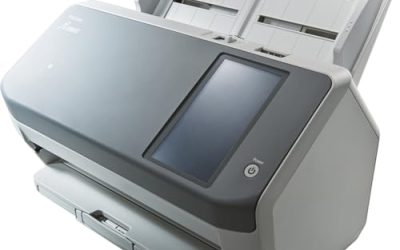
Key takeaways
- Compare the best network adf scanners for record archiving with key specs, pros, cons, and buying guidance. See verified Amazon US picks with ASINs.
As an Amazon Associate we earn from qualifying purchases.
Disclosure: This article contains affiliate links. If you buy through links on this page, we may earn a commission at no extra cost to you. Product availability on Amazon US can change; check the product page for current details before ordering.

Record archiving projects have a different rhythm from everyday office scanning. Teams work through boxes of files and backlog folders that need to become searchable digital archives. A network ADF scanner for this work must sustain duplex throughput for hours, accept large batches with minimal reloading, and send output directly to shared storage for indexing.
This guide covers four network-connected models suited to backlog conversion. Each supports duplex scanning and Ethernet or Wi-Fi routing to folders, so batches move straight into an archive workflow. The differences that matter most are daily volume, feeder capacity, and raw speed.
Quick Picks
| Product | Best For | Key Spec | ASIN |
|---|---|---|---|
| Fujitsu fi-8170 | Best for Archiving Backlogs | 70 ppm / 140 ipm, 100-sheet ADF | B0BZZ9W6V1 |
| Kodak Alaris S2080W | Best Throughput | 80 ppm / 160 ipm, 80-sheet ADF | B076CVP7Y6 |
| Kodak Alaris S2060W | Best Network Value | 60 ppm / 120 ipm, 80-sheet ADF | B076CX5G1H |
| RICOH fi-7300NX | Best PC-Free Archiving Station | 60 ppm / 120 ipm, 80-sheet ADF | B07H85KW2L |
How We Selected These Picks
We selected network ADF scanners with the daily volume and duplex speed that archiving projects demand. Backlog conversion can run thousands of pages in a single session, so expected daily volume and feeder capacity were weighted heavily. A scanner rated above the planned daily total finishes batches faster and with less strain over a multi-week project.
Network connectivity was also required. Archiving teams often place the scanner in a records room and route output to shared archive storage. Ethernet provides a stable path for large files, while Wi-Fi allows a temporary station. USB-only models were left out because they tie output to one workstation.
1. Fujitsu fi-8170 – Best For Archiving Backlogs
ASIN: B0BZZ9W6V1
Amazon US: https://www.amazon.com/dp/B0BZZ9W6V1
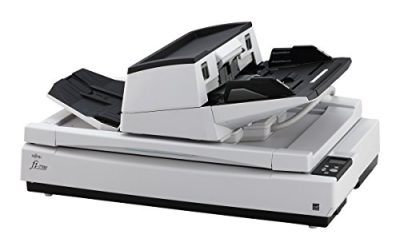
The Fujitsu fi-8170 is the most backlog-ready network model here. It scans at 70 ppm and 140 ipm duplex, holds 100 sheets, and carries an expected daily volume of 10,000 sheets. Ethernet and USB let a team place it on a wired segment and route batches to shared storage.
The 100-sheet feeder means fewer interruptions to reload, keeping operators focused on preparation and quality checks. Combined with 70 ppm speed, a full feeder clears quickly. The limitation is connectivity: there is no Wi-Fi, only wired Ethernet. For a fixed archiving station that is usually acceptable and often preferable for stability.
Pros
– 100-sheet feeder reduces reloads during backlog sessions
– 70 ppm / 140 ipm duplex with 10,000-sheet expected daily volume
– Ethernet routing to shared archive storage
Cons
– No Wi-Fi; wired Ethernet only
– Best suited to a fixed archiving station
2. Kodak Alaris S2080W – Best For Throughput
ASIN: B076CVP7Y6
Amazon US: https://www.amazon.com/dp/B076CVP7Y6
The Kodak Alaris S2080W is the fastest desktop-class scanner in this pool at 80 ppm and 160 ipm duplex. It holds 80 sheets and is rated for up to 12,000 pages per day, the highest daily figure among these network models. USB, Wi-Fi, and Ethernet are all included.
For projects with a firm deadline, that throughput shortens the schedule. Two-sided records clear at 160 ipm, and the daily rating gives room for long sessions. The feeder needs planning: at 80 sheets it reloads more often than the 100-sheet fi-8170. If raw speed matters more than load size, the S2080W leads this group.
Pros
– Fastest here at 80 ppm / 160 ipm duplex
– Up to 12,000 pages per day
– USB, Wi-Fi, and Ethernet connectivity
Cons
– 80-sheet feeder needs reloading on very large batches
– Smaller load size than 100-sheet rivals
3. Kodak Alaris S2060W – Best For Network Value

ASIN: B076CX5G1H
Amazon US: https://www.amazon.com/dp/B076CX5G1H
The Kodak Alaris S2060W brings 60 ppm and 120 ipm duplex scanning with an 80-sheet feeder and up to 9,000 pages per day. It connects by USB 3.2, Wi-Fi 802.11b/g/n, and Ethernet, and touchscreen job buttons can be assigned to archive destinations.
For a moderate backlog, that specification covers a full day of conversion work. Job buttons help rotating operators send each batch to the correct folder, reducing misfiling. The limitation is the older wireless radio without Wi-Fi 6 and a 2017 platform date. For wired stations, speed and daily rating remain well matched to conversion work.
Pros
– 60 ppm / 120 ipm duplex with up to 9,000 pages per day
– Touchscreen job buttons for archive routing
– USB 3.2, Wi-Fi, and Ethernet
Cons
– Older Wi-Fi radio without Wi-Fi 6 support
– Platform introduced in 2017
4. RICOH fi-7300NX – Best For PC-Free Archiving Stations
ASIN: B07H85KW2L
Amazon US: https://www.amazon.com/dp/B07H85KW2L
The RICOH fi-7300NX scans at 60 ppm and 120 ipm duplex with an 80-sheet feeder and an expected daily volume of 9,000 sheets. Wi-Fi on the 5 GHz band, Ethernet, and USB are included. Its distinguishing feature is PC-free operation from a shared touchscreen, sending batches to folders or email without a host computer.
That suits stations where operators rotate and a dedicated PC would sit idle between batches. Staff load a folder, select the destination on screen, and move on to preparation. The feeder holds 80 sheets, smaller than the fi-8170, so long files need splitting. Speed and rating match the S2060W; the choice often comes down to workflow preference.
Pros
– PC-free touchscreen scanning to archive folders
– 60 ppm / 120 ipm duplex with 9,000-sheet expected daily volume
– Wi-Fi 5 GHz, Ethernet, and USB
Cons
– 80-sheet feeder is smaller than the 100-sheet fi-8170
– Long files must be split into smaller loads
Buying Guide: What to Look For
Daily Volume and Project Timeline
Estimate total backlog pages, divide by available scanning days, and choose a scanner whose expected daily volume sits above that daily target. The S2080W rating of up to 12,000 pages per day and the fi-8170 rating of 10,000 sheets suit aggressive timelines, while the 9,000-sheet class covers moderate projects.
Feeder Capacity and Duplex Throughput
Feeder capacity determines reload frequency, and duplex speed in ipm determines how fast two-sided records clear. A 100-sheet feeder at 140 ipm keeps a backlog moving with fewer interruptions, while an 80-sheet feeder at 160 ipm clears each load faster. Single-pass duplex on all four picks keeps page order intact.
Network Routing to Archive Storage
Decide where completed batches land before scanning begins. Ethernet routing to a shared folder keeps large files off individual workstations. Touchscreen destinations and job buttons reduce routing errors when several operators share one station. Confirm permissions and naming patterns with IT.
Compatibility and Setup Notes
Prepare documents before loading: remove staples, unfold corners, and separate fragile pages. Test typical record types, including two-sided forms, to confirm orientation settings. Keep a simple batch log tying box numbers to archive folders.
Comparison Table
| Product | Speed (ppm / ipm) | ADF Capacity | Daily Volume | Connectivity | ASIN |
|---|---|---|---|---|---|
| Fujitsu fi-8170 | 70 / 140 | 100 sheets | 10,000 sheets expected | Ethernet, USB | B0BZZ9W6V1 |
| Kodak Alaris S2080W | 80 / 160 | 80 sheets | Up to 12,000 pages/day | USB, Wi-Fi, Ethernet | B076CVP7Y6 |
| Kodak Alaris S2060W | 60 / 120 | 80 sheets | Up to 9,000 pages/day | USB 3.2, Wi-Fi, Ethernet | B076CX5G1H |
| RICOH fi-7300NX | 60 / 120 | 80 sheets | 9,000 sheets expected | Wi-Fi 5 GHz, Ethernet, USB | B07H85KW2L |
FAQ
How much daily volume does an archiving project need?
Divide total backlog pages by available scanning days, then add headroom for re-scans. Projects clearing several thousand pages per day fit the 9,000-sheet class, while larger backlogs benefit from the 10,000-sheet fi-8170 or 12,000-page S2080W rating.
Is Ethernet or Wi-Fi better for archiving stations?
Ethernet is generally steadier for large archive files and fixed stations. Wi-Fi helps when a temporary station cannot reach a cable. Models with both connections let the team choose per location.
Does feeder size matter for record conversion?
Yes. A 100-sheet feeder means fewer reloads over a full day of backlog work. An 80-sheet feeder is workable, but operators stage documents in smaller loads and reload more often.
Final Verdict
For record archiving, the Fujitsu fi-8170 is the strongest backlog choice thanks to its 100-sheet feeder, 70 ppm duplex speed, and 10,000-sheet expected daily volume over Ethernet. The Kodak Alaris S2080W wins on raw throughput at 80 ppm and up to 12,000 pages per day when a deadline drives the decision.
The Kodak Alaris S2060W covers moderate backlogs with touchscreen job buttons, and the RICOH fi-7300NX suits PC-free stations where operators scan from the touchscreen to shared folders. Match daily rating and feeder size to your backlog total and timeline.
FAQ
How much daily volume does an archiving project need?
Is Ethernet or Wi-Fi better for archiving stations?
Does feeder size matter for record conversion?
More from Amazon
Programs that pair well with the guide above. Offers and eligibility are set by Amazon and may change.
Free shipping on eligible items, Prime Video and more. Eligible new members can start with a free trial.
Start a Prime free trialA Prime membership for ages 18-24 with a trial period. Eligibility is set by Amazon.
See Prime for Young AdultsAudiobooks and podcasts to listen to on the go. Eligible new members can start with a free trial.
Try Audible freeAd-free music streaming. Eligible new subscribers can start with a free trial.
Try Music Unlimited freeAs an Amazon Associate we earn from qualifying purchases.