
Our Short List of 3

- Wi-Fi standard: Wi-Fi 6 (802.11ax), tri-band
- Speed class: AX11000, up to 11,000 Mbps class
- Processor: 1.8 GHz quad-core
- Gaming port: 2.5G gaming port
- Wi-Fi standard: Wi-Fi 6 (802.11ax), dual-band
- Speed class: AX5400, up to 5,400 Mbps
- Channels: 160 MHz channel support
- Gaming features: dedicated gaming LAN port, Mobile Game Mode

- Wi-Fi standard: Wi-Fi 6 (802.11ax), dual-band, 6-stream
- Speed class: AX5400, up to 5.4 Gbps
- Processor: triple-core 1.5 GHz
- Software: DumaOS 3.0 (geo-fencing, ping heatmap, Application QoS)
All 4 Picks at a Glance
| Product | Specs | Action |
|---|---|---|
| 1. ASUS ROG Rapture GT-AX11000 |
| Check price on Amazon |
| 2. ASUS RT-AX82U |
| Check price on Amazon |
| 3. NETGEAR Nighthawk Pro Gaming XR1000 |
| Check price on Amazon |
 4. ASUS RT-AX86U |
| Check price on Amazon |
Key takeaways
- Compare the best Wi-Fi 6 gaming routers: ASUS GT-AX11000, RT-AX82U, RT-AX86U and NETGEAR XR1000, with gaming ports, QoS and mesh support explained.
Wi-Fi 6 is not the newest wireless standard anymore, but it remains the sweet spot for gaming households: the hardware is mature, the gaming-specific features are proven, and every current console, PC, and handheld supports it. The four routers in this guide are all Wi-Fi 6 (802.11ax) models with published gaming features — dedicated gaming ports, gaming QoS, game-traffic accelerators, or gaming-focused software. Three come from ASUS’s ROG and gaming lines, and one is NETGEAR’s DumaOS-powered Nighthawk Pro Gaming model.
One honesty note before the picks: when we verified these listings, none of the four product pages showed a featured buy offer in the copies we could open. That is an availability snapshot, not a verdict — listings change constantly. Use the Amazon links and the ASIN reference table at the end of this article to check the live listing for each exact model before you buy.
As an Amazon Associate, we earn from qualifying purchases.
Quick answer
If you want the most gaming hardware in one box, the ASUS ROG Rapture GT-AX11000 is the flagship pick: tri-band Wi-Fi 6 in the AX11000 class, a 2.5G gaming port, WTFast support, and a dedicated gaming band. If your budget and your internet plan are more modest, the ASUS RT-AX82U covers the gaming essentials — a dedicated gaming LAN port, Mobile Game Mode, and AiProtection Pro — in a dual-band AX5400 design. The ASUS RT-AX86U sits between them, adding a 2.5G port and Adaptive QoS in an AX5700 package. If software is your priority, the NETGEAR Nighthawk Pro Gaming XR1000 runs DumaOS 3.0, with geo-fencing and a ping heatmap that no router here matches for connection control.
Key takeaways
- All four picks are true Wi-Fi 6 (802.11ax) routers — no Wi-Fi 6E or Wi-Fi 7 models are mixed in.
- The GT-AX11000 is the only tri-band model here; the other three are dual-band designs.
- Every pick offers some form of game prioritization: a gaming port, gaming QoS, WTFast, or DumaOS.
- The three ASUS models are AiMesh compatible, so they can later become nodes in an ASUS mesh system.
- The XR1000’s DumaOS 3.0 is the strongest tool here for controlling which game servers you connect to.
- Check the live Amazon listing for your exact ASIN before buying — the copies we verified showed no featured offer for any of the four.
The picks
1. ASUS ROG Rapture GT-AX11000
- Wi-Fi standard: Wi-Fi 6 (802.11ax), tri-band
- Speed class: AX11000, up to 11,000 Mbps class
- Processor: 1.8 GHz quad-core
- Gaming port: 2.5G gaming port
The GT-AX11000 is ASUS’s flagship Wi-Fi 6 gaming router, built around a tri-band AX11000 design with a combined 11,000 Mbps speed class and a 1.8 GHz quad-core processor. The third band matters for gaming households: ASUS positions one 5 GHz band as a dedicated gaming band with DFS channels, so game traffic can sit on its own band while streaming and downloads use the others. A 2.5G gaming port gives a wired PC or console a faster-than-gigabit link, and the router supports WTFast, the game-traffic acceleration service, alongside Game Radar ping checks that help you see server latency before you connect.
Beyond raw gaming features, it is a full-featured router: AiMesh compatibility lets it anchor or join an ASUS mesh network, AiProtection provides lifetime internet security powered by Trend Micro, and it can run a VPN connection and a regular connection simultaneously. Aura RGB lighting rounds out the ROG presentation. This is the pick for a household that games on multiple devices at once and wants the router to sort the traffic out by itself.
See the ASUS ROG Rapture GT-AX11000 on Amazon
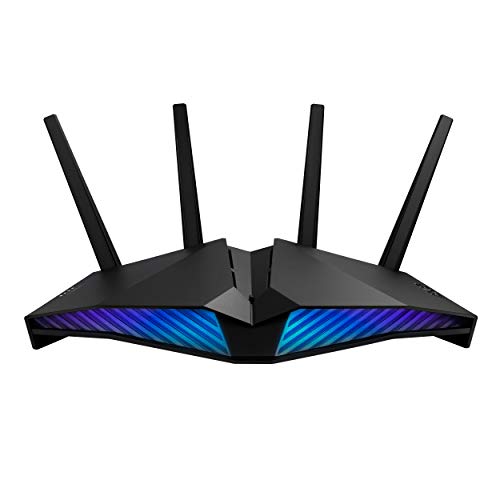
2. ASUS RT-AX82U
- Wi-Fi standard: Wi-Fi 6 (802.11ax), dual-band
- Speed class: AX5400, up to 5,400 Mbps
- Channels: 160 MHz channel support
- Gaming features: dedicated gaming LAN port, Mobile Game Mode
The RT-AX82U is the accessible gaming pick: a dual-band Wi-Fi 6 router in the AX5400 class, rated for up to 5,400 Mbps with 160 MHz channels. It keeps the features gamers actually touch — a dedicated gaming LAN port that prioritizes whatever is plugged into it, and a Mobile Game Mode that prioritizes phone and tablet gaming through the ASUS Router app. Aura RGB lighting gives it the gaming look, and under the surface it runs the same ASUSWRT platform as its bigger siblings.
That platform brings AiProtection Pro with WPA3 — lifetime free and powered by Trend Micro — plus Instant Guard VPN for secure remote access and AiMesh compatibility for future expansion. With 512 MB of RAM, four antennas, and five ports in total, it is sized for an apartment or a single gaming room rather than a whole house full of players. If your internet plan is gigabit or below and you game on one or two devices, this is the sensible shape of router to buy.
See the ASUS RT-AX82U on Amazon
3. NETGEAR Nighthawk Pro Gaming XR1000
- Wi-Fi standard: Wi-Fi 6 (802.11ax), dual-band, 6-stream
- Speed class: AX5400, up to 5.4 Gbps
- Processor: triple-core 1.5 GHz
- Software: DumaOS 3.0 (geo-fencing, ping heatmap, Application QoS)
The XR1000 takes a different approach from the ASUS models: the hardware is a dual-band Wi-Fi 6 AX5400 six-stream router with a triple-core 1.5 GHz processor, but the headline is DumaOS 3.0. DumaOS gives you a geo-filter to limit the distance of the game servers and hosts you connect to, a ping heatmap to visualize server quality, and Application QoS to allocate bandwidth by activity. For players whose lag problem is bad server selection rather than raw speed, this software is the most direct fix in this guide.
The wired side is straightforward: four 1-gigabit Ethernet ports and one USB 3.0 port. Wireless features include MU-MIMO, OFDMA, and Beamforming+, and security runs on WPA3 with NETGEAR Armor available (the listing notes a 30-day free trial). NETGEAR markets the XR1000 with a claim of reduced ping rates of up to 93 percent; that figure comes from the manufacturer’s own footnoted testing, so treat it as a marketing claim rather than a guaranteed result. What is verifiable is the toolset — and for competitive players, the geo-filter alone justifies this router’s place here.
See the NETGEAR Nighthawk Pro Gaming XR1000 on Amazon
4. ASUS RT-AX86U
- Wi-Fi standard: Wi-Fi 6 (802.11ax), dual-band
- Speed class: AX5700, up to 5,700 Mbps
- Ports: 2.5G port plus dedicated gaming port
- Gaming features: Mobile Game Mode, Adaptive QoS, GeForce NOW Recommended
The RT-AX86U is the understated all-rounder of this group: a dual-band Wi-Fi 6 router in the AX5700 class, rated for up to 5,700 Mbps and for internet connections up to 2 Gbps. It pairs a 2.5G port with a dedicated gaming port, so a wired gaming PC gets both priority and headroom, while Mobile Game Mode covers wireless play on phones. Adaptive QoS lets you prioritize gaming traffic across the whole network, and the model carries NVIDIA’s GeForce NOW Recommended designation for cloud gaming.
Like the other ASUS picks, it supports AiMesh, includes lifetime free AiProtection Pro with WPA3, and offers Instant Guard VPN. It skips the RGB showpiece styling of the GT-AX11000 and AX82U in favor of a conventional tower design, which makes it the easiest of the four to live with in a shared space. For a single high-performance gaming setup on a fast internet plan, this is the balanced choice.
See the ASUS RT-AX86U on Amazon
How to choose
Start with your internet plan. A router’s speed class only matters up to the speed you actually buy: an AX5400 dual-band model fully serves a gigabit plan, while the GT-AX11000’s tri-band design earns its keep when several devices stream, download, and game at the same time. If your plan is faster than gigabit, look for a 2.5G port — the GT-AX11000 and RT-AX86U have one; the AX82U and XR1000 are gigabit-port routers.
Next, decide how you game. Wired players should prioritize a dedicated gaming port, which both mid-range ASUS models and the flagship offer. Wireless and mobile players benefit from Mobile Game Mode on the ASUS side. Competitive online players who suffer from distant servers should look hardest at the XR1000’s DumaOS geo-filter, which addresses a problem raw bandwidth cannot fix.
Finally, think about the rest of the house. The three ASUS routers are AiMesh compatible, so any of them can grow into a mesh system with additional ASUS nodes if coverage becomes an issue. All four include modern security — WPA3 across the board, lifetime AiProtection on the ASUS models, and NETGEAR Armor on the XR1000 — so security should not be the deciding factor. One practical step: whatever you choose, verify the exact ASIN on the live listing before ordering, and confirm the listing shows a live offer, since the copies we checked did not display one.
Who should skip
Skip this entire category if your ISP gateway already gives you strong Wi-Fi 6 coverage and you game wired through a switch — a gaming router will not improve a connection that is not the bottleneck. Skip the flagship GT-AX11000 if you live in a small space with a modest internet plan; its tri-band design solves multi-device contention you may never have. Skip the XR1000 if you never play competitive online titles, because DumaOS’s server-control tools are wasted on single-player and co-op gaming. And skip all four if you specifically want the 6 GHz band — that is Wi-Fi 6E or Wi-Fi 7 territory, and none of these Wi-Fi 6 models offers it.
FAQ
Is Wi-Fi 6 still worth buying for gaming, or should I wait for Wi-Fi 7?
For most households, Wi-Fi 6 is still a sound gaming buy: every current console and gaming handheld supports it, and the features that reduce lag — gaming ports, QoS, and traffic prioritization — are mature on these models. Wi-Fi 7 mainly adds capacity for very dense device environments, which most gaming setups do not have.
Does a gaming port actually reduce ping?
A dedicated gaming port prioritizes the connected device’s traffic over other traffic on your own network. That helps when your household’s downloads or streams compete with your game, but it cannot shorten the path to a distant game server — that is the problem the XR1000’s DumaOS geo-filter is designed to address.
Can these routers work as part of a mesh system?
The three ASUS models — GT-AX11000, RT-AX82U, and RT-AX86U — are AiMesh compatible, so they can form or join an ASUS AiMesh network. The NETGEAR XR1000 is a standalone router and does not join AiMesh.
Which of these is best for a gigabit internet plan?
Any of the four can carry a gigabit plan. The RT-AX82U is the natural fit if you want gaming features at the core of a gigabit setup; choose the RT-AX86U or GT-AX11000 if you want a 2.5G port for a future plan upgrade, and the XR1000 if server selection matters more than port speed.
Final verdict
The GT-AX11000 is the maximum-capability pick: tri-band Wi-Fi 6, a 2.5G gaming port, and WTFast in one flagship box. The RT-AX86U is the balanced recommendation for most serious gamers — AX5700 speeds, a 2.5G port, and Adaptive QoS without the flagship’s bulk. The RT-AX82U delivers the essential gaming features at the simplest tier, and the XR1000 is the specialist’s choice for players who want DumaOS control over their connections. All four are legitimate Wi-Fi 6 gaming routers; match the feature set to your actual bottleneck, then confirm availability on the live listing for the exact ASIN below before you order.
Product and ASIN Reference
| Product | ASIN | Wi-Fi class | Key gaming feature |
|---|---|---|---|
| ASUS ROG Rapture GT-AX11000 | B07MRD1LDZ | Wi-Fi 6 tri-band, AX11000 | 2.5G gaming port, WTFast, dedicated gaming band |
| ASUS RT-AX82U | B08BJJ3RGW | Wi-Fi 6 dual-band, AX5400 | Dedicated gaming LAN port, Mobile Game Mode |
| NETGEAR Nighthawk Pro Gaming XR1000 | B08FWNNWTB | Wi-Fi 6 dual-band, AX5400 | DumaOS 3.0 geo-filter and ping heatmap |
| ASUS RT-AX86U | B08BJHS3X7 | Wi-Fi 6 dual-band, AX5700 | 2.5G port, Adaptive QoS |
More from Amazon
Programs that pair well with the guide above. Offers and eligibility are set by Amazon and may change.
Free shipping on eligible items, Prime Video and more. Eligible new members can start with a free trial.
Start a Prime free trialA Prime membership for ages 18-24 with a trial period. Eligibility is set by Amazon.
See Prime for Young AdultsAudiobooks and podcasts to listen to on the go. Eligible new members can start with a free trial.
Try Audible freeAd-free music streaming. Eligible new subscribers can start with a free trial.
Try Music Unlimited freeAs an Amazon Associate we earn from qualifying purchases.









