
Our Short List of 3

- Best for: Travellers and minimalists who charge one phone or tablet at a time.
- Single USB-C port, up to 30W output
- GaN technology
- PPS support
- Foldable prongs on the US version

- Best for: One-device charging where a phone, tablet, or small laptop needs more than 30 watts.
- Single USB-C port, up to 45W output
- Built-in smart display
- 180-degree foldable prongs
- GaN technology
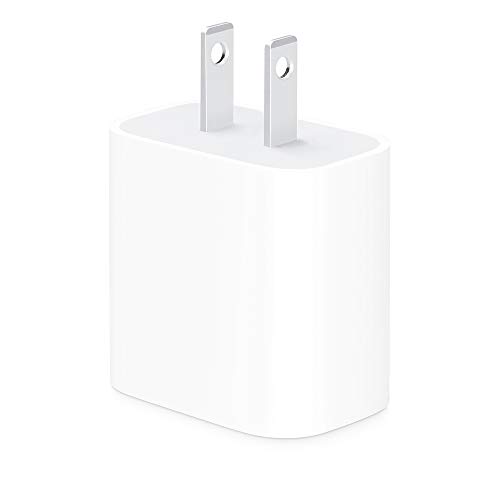
- Best for: One Apple device at a time, where the official adapter is the safe choice.
- Single USB-C port, 20W output
- USB-C Power Delivery
- Charging cable sold separately
- Compact Apple adapter design
All 5 Picks at a Glance
| Product | Specs | Action |
|---|---|---|
| Anker 511 Nano 3, 30W |
| Check price on Amazon |
| Anker Nano 45W Smart Display |
| Check price on Amazon |
| Apple 20W USB-C Power Adapter |
| Check price on Amazon |
 UGREEN Nexode 65W |
| Check price on Amazon |
 Belkin 3-Port 67W |
| Check price on Amazon |
Key takeaways
- Five USB chargers compared, from a pocket 30W single-port Anker to 65W and 67W multi-port GaN bricks, plus the Apple 20W adapter for one-device charging.
The right USB charger is decided by two numbers: how many watts your device can take, and how many devices you charge at once. A phone fast-charges at 20 to 30 watts, a tablet wants more, and a laptop usually needs 45 watts or above. The five chargers below cover that whole range, from a single-port pocket cube to three-port GaN bricks that run a laptop, a phone, and earbuds from one outlet.
This roundup is for anyone tired of a drawer full of mismatched adapters, from travellers who pack one charger to families sharing a single outlet strip. Every pick comes from its Amazon listing, with the port count, output, and charging standard stated there. Two of the chargers ship without a cable, so the total cost of switching includes a cable you may already own, and multi-port models share their watts between ports rather than giving every port the full amount.
Quick Picks
As an Amazon Associate we earn from qualifying purchases
| Product | Best for | Key spec from title |
|---|---|---|
| Anker 511 Nano 3, 30W | One phone in a pocket | Single USB-C port, 30W |
| Anker Nano 45W Smart Display | A phone and a tablet | 45W with smart display |
| Apple 20W USB-C | One Apple device | Single USB-C port, 20W |
| UGREEN Nexode 65W | Laptop plus phone plus earbuds | Two USB-C and one USB-A |
| Belkin 3-Port 67W | Three USB-C devices at once | Three USB-C ports, 67W |
How to Choose
Match watts to the device
Wattage is the first filter, and it is set by the device, not the charger. Most current phones fast-charge at 20 to 30 watts, so a 30W charger covers them fully and a 20W charger covers an iPhone’s fast-charging speed. Tablets and handheld consoles sit higher, and most USB-C laptops need 45 watts or more to charge while in use. A charger weaker than the device wastes time; a charger stronger than the device is harmless, since the device only draws what it can take. The mistake is buying a 20W cube for a laptop and wondering why the battery drains while plugged in.
Count ports before you count watts
A charger’s headline wattage is its total, not what each port gets at once, and multi-port models share that total between active ports. The UGREEN Nexode 65W and the Belkin 67W both split their output when several devices plug in, so a laptop that needs 45 watts gets less of it while a phone charges beside it. Single-port chargers avoid the whole problem: the Anker 511 Nano 3 gives its full 30 watts to one device, and the Apple 20W gives its full 20 watts to one device. Before you buy, list the devices that charge at the same time, then check how the watts split.
GaN and size
Gallium nitride, or GaN, is the reason modern chargers are small for their power. A GaN charger runs cooler and packs more watts into a smaller brick than an older silicon charger, which is why a 65W three-port brick now fits in a jacket pocket. The Anker 511 Nano 3 is the extreme case: about 40 grams and barely larger than the old 5W iPhone cube, yet it delivers 30 watts. Size still follows power, so the 65W and 67W bricks are bigger than the single-port cubes, but none of the five picks here is a desk-hogging block.
Cables and plugs
Two details catch buyers after the charger arrives: the cable and the plug. The Anker 511 Nano 3 and the Apple 20W adapter ship without a charging cable, so you need a USB-C cable of your own, and the cable’s own rating matters for fast charging. The Anker models use foldable prongs on the US version, which pack flat in a bag, while the Belkin and UGREEN bricks are fixed-plug designs that take more pocket space. Check the prongs, check the cable, and check that the charger’s USB-C port matches the cable you already own.
The 5 Best Options
Anker 511 Nano 3, 30W
- Best for: Travellers and minimalists who charge one phone or tablet at a time.
- Single USB-C port, up to 30W output
- GaN technology
- PPS support
- Foldable prongs on the US version
Travellers and minimalists who charge one phone or tablet at a time.
One port only, and no cable in the box.
The Anker 511 Nano 3 is the smallest charger that still means something: a single USB-C port delivering up to 30 watts from a GaN brick about the size of the old 5W iPhone cube. That 30 watts covers fast charging for most current phones, plus earbuds, e-readers, compact tablets, and handheld consoles, and its PPS support keeps Samsung fast charging working properly. The US version folds its prongs flat, so it disappears into a pocket or a carry-on pouch. The limit is the port count: one device at a time, and the charging cable is not included.
Watch out for: One port only, and no cable in the box.
Anker Nano 45W Smart Display
- Best for: One-device charging where a phone, tablet, or small laptop needs more than 30 watts.
- Single USB-C port, up to 45W output
- Built-in smart display
- 180-degree foldable prongs
- GaN technology
One-device charging where a phone, tablet, or small laptop needs more than 30 watts.
Still a single port; it cannot charge a laptop and a phone at the same time.
The Anker Nano 45W Smart Display is the step up for buyers whose phone is not the only thing charging. Its single USB-C port delivers up to 45 watts, which covers fast charging for phones and tablets and keeps a small laptop topped up, and its built-in display shows the charging status at a glance instead of leaving you guessing. The 180-degree foldable prongs pack flat for travel, and the GaN design keeps the brick compact for its output. Like the Nano 3, it is a one-device charger, so it suits a desk with one cable rather than a family outlet strip.
Watch out for: Still a single port; it cannot charge a laptop and a phone at the same time.
Apple 20W USB-C Power Adapter
- Best for: One Apple device at a time, where the official adapter is the safe choice.
- Single USB-C port, 20W output
- USB-C Power Delivery
- Charging cable sold separately
- Compact Apple adapter design
One Apple device at a time, where the official adapter is the safe choice.
No cable in the box, and 20 watts is too little for a laptop.
The Apple 20W adapter is the simplest charger in this roundup, and for Apple owners that simplicity is the point. Its single USB-C port delivers 20 watts with USB-C Power Delivery, which is the fast-charging speed Apple designs its iPhones around, and it works just as well for AirPods, an Apple Watch charger, or an iPad at a slower pace. There is nothing to configure, no display to read, and no second port to think about. The cable is sold separately, which surprises first-time buyers, so pair it with a USB-C cable you already own or buy one alongside.
Watch out for: No cable in the box, and 20 watts is too little for a laptop.
UGREEN Nexode 65W
- Best for: A laptop, a phone, and an accessory charging from one compact brick.
- Two USB-C ports and one USB-A port
- Up to 65W total output
- GaN technology
- Power shared across ports when all are in use
A laptop, a phone, and an accessory charging from one compact brick.
The 65 watts is a shared total, not 65 watts per port.
The UGREEN Nexode 65W is the charger to buy when one brick has to cover a whole desk. Its two USB-C ports and one USB-A port deliver up to 65 watts in total, which runs a USB-C laptop alongside a phone and a pair of earbuds, and its GaN design keeps the brick compact for a three-port charger. The port mix is the practical part: USB-C for the laptop and phone, USB-A for older accessories that still use the old connector. Power is shared when all three ports are in use, so the laptop gets less than the full 65 watts while the phone charges beside it.
Watch out for: The 65 watts is a shared total, not 65 watts per port.
Belkin 3-Port 67W
- Best for: Three USB-C devices charging at once from one brick.
- Three USB-C ports
- Up to 67W total output
- Up to 67W from one port; 45W plus 20W with two ports; 25W plus 20W plus 20W with three ports
- GaN technology
Three USB-C devices charging at once from one brick.
No USB-A port for older accessories, and the power split is fixed rather than dynamic.
The Belkin 3-Port 67W is the only charger here with three USB-C ports and nothing else, which suits households that have fully moved to USB-C. One port alone delivers up to 67 watts, two ports split to 45 watts plus 20 watts, and all three together split to 25 watts plus 20 watts plus 20 watts, so the split is predictable rather than a surprise. That layout runs a laptop, a tablet, and a phone from a single brick, and its GaN build keeps it compact for the output. Unlike some rivals it does not shift wattage dynamically between ports, so the split stays fixed while devices charge.
Watch out for: No USB-A port for older accessories, and the power split is fixed rather than dynamic.
Which One Fits Your Situation
You charge one phone and nothing else
The Anker 511 Nano 3 fits here. Its single USB-C port gives a full 30 watts to one phone, its foldable prongs pack flat, and it weighs about 40 grams. The Apple 20W adapter is the alternative for buyers who want the official Apple charger and nothing else. Either way, one cable and one outlet cover the whole job.
You travel with a laptop, phone, and earbuds
The UGREEN Nexode 65W fits here. Its two USB-C ports and one USB-A port cover a laptop, a phone, and earbuds from one compact GaN brick, so a single charger replaces three. The Belkin 67W is the alternative if every device you own already uses USB-C. Pack one brick and one cable per device, and the whole kit fits in a jacket pocket.
You want one charger for the whole family
The Belkin 3-Port 67W fits here. Its three USB-C ports charge a laptop, a tablet, and a phone at once, with a predictable split of 25 watts plus 20 watts plus 20 watts when all three run together. The UGREEN Nexode is the alternative if an older USB-A accessory still needs a port.
You want the smallest charger that still fast-charges a phone
The Anker 511 Nano 3 fits here. At about 40 grams with foldable prongs, it is barely larger than the old 5W cube, yet its 30 watts cover fast charging for most current phones. The Apple 20W adapter is smaller in output but just as simple, if 20 watts is enough for your phone.
Common Mistakes
- Buying a 20W adapter for a laptop and wondering why the battery drains while plugged in.
- Assuming a 65W charger gives 65 watts to every port at once; the headline figure is a shared total.
- Using a worn or low-rated cable that cannot carry the wattage the charger offers.
- Buying a charger without checking PPS support, which Samsung phones need for their fastest charging.
- Leaving a single-port charger as the only charger for a desk where a laptop, a phone, and earbuds all charge together.
Frequently Asked Questions
How many watts does a phone need to fast-charge?
Most current phones fast-charge at 20 to 30 watts, so a 30W charger covers them fully and a 20W charger covers an iPhone’s fast-charging speed. Tablets and handheld consoles sit higher, and most USB-C laptops need 45 watts or more to charge while in use.
Do GaN chargers run cooler and smaller than older chargers?
Yes. Gallium nitride lets a charger pack more watts into a smaller brick while running cooler than an older silicon design, which is why a 65W three-port charger now fits in a jacket pocket. The size advantage grows with the wattage, so it matters most on multi-port bricks.
Can I leave a USB charger plugged in all the time?
Yes, with a sensible caveat. A charger draws almost no power with nothing attached, and modern devices stop drawing current when their battery is full. Unplug it during a long trip away, and keep it away from damp places and covered outlets.
Does the cable matter for fast charging?
Yes. The charger and the device agree on a wattage, but a cable rated below that wattage becomes the bottleneck, so a worn or bargain cable can slow charging even on a 65W brick. Two of the chargers here ship without a cable, so check the rating on the cable you pair them with.
FAQ
How many watts does a phone need to fast-charge?
Do GaN chargers run cooler and smaller than older chargers?
Can I leave a USB charger plugged in all the time?
Does the cable matter for fast charging?
More from Amazon
Programs that pair well with the guide above. Offers and eligibility are set by Amazon and may change.
Free shipping on eligible items, Prime Video and more. Eligible new members can start with a free trial.
Start a Prime free trialA Prime membership for ages 18-24 with a trial period. Eligibility is set by Amazon.
See Prime for Young AdultsAudiobooks and podcasts to listen to on the go. Eligible new members can start with a free trial.
Try Audible freeAd-free music streaming. Eligible new subscribers can start with a free trial.
Try Music Unlimited freeAs an Amazon Associate we earn from qualifying purchases.









