
Key takeaways
- Compare affordable gaming laptops under 500 dollars by graphics class, refresh rate, memory and storage, with five picks for 1080p and esports play.
A gaming laptop under 500 dollars is a study in trade-offs, and knowing which ones matter is the whole game. At this budget you are not choosing between good and bad machines so much as between different kinds of compromise: an older graphics chip with a fast screen, a newer processor with a small drive, a light chassis with a modest battery. The good news is that the compromise can land in the right place. The models that rotate through this tier are previous-generation gaming laptops built around the GeForce GTX 1650, RTX 2050 and RTX 3050, and that hardware still runs esports titles and older AAA games well at 1080p.

This guide is specific to the under-500-dollar tier, which behaves differently from the general budget category. Stock here is mostly end-of-line configurations and configurations that dip into the tier during sale periods, so the exact model matters more than the brand. The five picks below are real gaming laptops with dedicated graphics, each checked against its Amazon listing, and the How to Choose section explains how to judge any other model you find sitting in this budget on the day you shop.
As an Amazon Associate, we earn from qualifying purchases.
Quick Picks
Our Short List of 3
- Best for: Buyers who want the most complete specification in this tier with nothing to upgrade on day one
- Processor: AMD Ryzen 5 7535HS
- Graphics: NVIDIA GeForce RTX 2050, 4GB GDDR6
- Display: 15.6-inch Full HD (1920 x 1080), 144Hz
- Memory: 16GB DDR5 RAM
- Best for: Players who want the strongest GPU in this tier and a chassis that welcomes upgrades
- Processor: Intel Core i5-10300H
- Graphics: NVIDIA GeForce RTX 3050, 4GB GDDR6
- Display: 15.6-inch Full HD IPS, 144Hz
- Memory: 8GB DDR4 RAM

- Best for: Students and mixed-use buyers who want six-core CPU strength alongside honest 1080p gaming
- Processor: AMD Ryzen 5 5600H (6 cores, up to 4.2 GHz)
- Graphics: NVIDIA GeForce GTX 1650
- Display: 15.6-inch Full HD, 120Hz
- Memory: 8GB RAM
All 5 Picks at a Glance
| Product | Specs | Action |
|---|---|---|
| HP Victus 15 (Ryzen 5 7535HS, RTX 2050) |
| Check price on Amazon |
| Acer Nitro 5 AN515-55-53E5 |
| Check price on Amazon |
| Lenovo IdeaPad Gaming 3 |
| Check price on Amazon |
 MSI GF63 Thin 11SC-693 |
| Check price on Amazon |
 ASUS TUF Gaming F15 FX506LH-AS51 |
| Check price on Amazon |
How to Choose
The graphics chip sets the ceiling. In this tier the realistic dedicated GPUs are the GeForce GTX 1650, RTX 2050 and RTX 3050, all with 4GB of video memory. The RTX cards add DLSS upscaling and ray tracing cores, which helps in supported games; the GTX 1650 has neither but remains fine for esports and older titles at medium settings. What you should not accept at this budget is a laptop with integrated graphics only being sold as a gaming machine. If the listing does not name a dedicated GPU, it is not a gaming laptop in the sense this guide means.
Refresh rate is the visible upgrade. Most picks here pair their GPU with a 120Hz or 144Hz panel, and that is where this tier quietly beats similarly priced general laptops with 60Hz screens. In fast games the higher refresh rate is easy to feel, and the GPUs listed above can drive esports titles fast enough to use it. Check the listing carefully, because the same model family often sells in both 60Hz and high-refresh versions.
Memory: 8GB is the floor, 16GB is the comfort zone. Several machines in this tier ship with 8GB of RAM, which runs games but leaves little room for a browser, chat and recording tools alongside. The Victus in this guide ships with 16GB, which is one reason it leads the list. If you buy an 8GB model, confirm it has a second memory slot or a replaceable stick so an upgrade stays possible; the Nitro 5 and TUF F15 both have a long history of owner upgrades.
Storage fills faster than you expect. A 256GB SSD holds the operating system and two or three large games; 512GB is meaningfully easier to live with. Every pick here uses an NVMe SSD, so loading speed is not the issue, capacity is. Models with a second M.2 slot or a 2.5-inch bay let you add storage later, which matters more in this tier than in any other.
Expect previous-generation processors, and judge them fairly. The CPUs here span the Intel Core i5-10300H and i5-11400H and the AMD Ryzen 5 5600H and 7535HS. All are proper H-series gaming processors with four to six cores, and none will bottleneck a GTX 1650 or RTX 2050 class GPU. A newer chip helps with battery life and everyday responsiveness, but at this budget the GPU and screen deserve your attention first.
New, renewed and end-of-line stock are all normal here. Because this tier is fed by discontinued configurations, listings may be new old stock, manufacturer refurbished or renewed units from third-party sellers. Read the condition line on the listing, check who the seller is, and confirm the return window before ordering. A well-described renewed unit from a reputable seller is a legitimate way this budget works; a vague listing is not.
Best Options
HP Victus 15 (Ryzen 5 7535HS, RTX 2050)
- Best for: Buyers who want the most complete specification in this tier with nothing to upgrade on day one
- Processor: AMD Ryzen 5 7535HS
- Graphics: NVIDIA GeForce RTX 2050, 4GB GDDR6
- Display: 15.6-inch Full HD (1920 x 1080), 144Hz
- Memory: 16GB DDR5 RAM
Buyers who want the most complete specification in this tier with nothing to upgrade on day one
This configuration moves in and out of the under-500 tier with sale cycles, so confirm the exact configuration on the listing before ordering
The Victus 15 is the most current machine in this guide and the one that asks for the fewest compromises. Its Ryzen 5 7535HS is a modern six-core processor, the RTX 2050 brings DLSS support that the GTX 1650 machines lack, and it ships with 16GB of DDR5 memory and a 512GB SSD, the two specifications buyers in this tier most often have to upgrade on other models. The 15.6-inch Full HD screen runs at 144Hz, matching the esports focus of the hardware.
The design is deliberately plain, with a silver chassis that looks like an ordinary work laptop, which some buyers will count as a benefit. The backlit keyboard, Wi-Fi 6 and a proper webcam round out a package that handles school, office work and gaming without any part feeling like an afterthought. If one machine in this tier can be bought and simply used for years without opening it up, this is the one.
Watch out for: This configuration moves in and out of the under-500 tier with sale cycles, so confirm the exact configuration on the listing before ordering
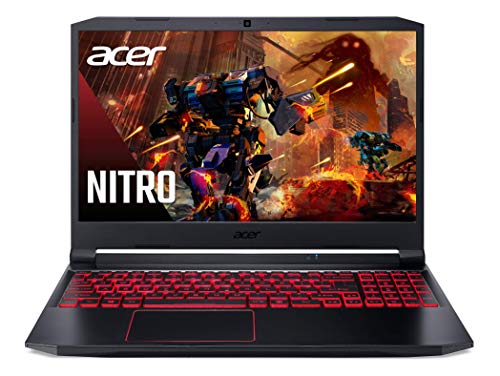
Acer Nitro 5 AN515-55-53E5
- Best for: Players who want the strongest GPU in this tier and a chassis that welcomes upgrades
- Processor: Intel Core i5-10300H
- Graphics: NVIDIA GeForce RTX 3050, 4GB GDDR6
- Display: 15.6-inch Full HD IPS, 144Hz
- Memory: 8GB DDR4 RAM
Players who want the strongest GPU in this tier and a chassis that welcomes upgrades
The 256GB SSD fills quickly with modern game installs, and 8GB of memory is the first upgrade most owners should plan
The Nitro 5 is the enthusiast pick of this tier. Its RTX 3050 is the strongest graphics chip in this guide, with DLSS and ray tracing support, and it sits behind a 15.6-inch 144Hz IPS panel that suits competitive games. The Core i5-10300H is an older four-core processor, but paired with this GPU it still delivers smooth 1080p play in esports titles and respectable results in older AAA games at adjusted settings.
Where the Nitro 5 earns its place is what happens after purchase. The chassis has a well-earned reputation for owner upgrades, with accessible memory and storage, so the modest 8GB of RAM and 256GB SSD it ships with are a beginning rather than a fixed limit. Cooling is handled by dual fans with Acer’s CoolBoost controls, and the red backlit keyboard and aggressive styling make no secret of what the machine is for. Buy it as a platform, improve it over time, and it stays useful longer than most of this tier.
Watch out for: The 256GB SSD fills quickly with modern game installs, and 8GB of memory is the first upgrade most owners should plan
Lenovo IdeaPad Gaming 3
- Best for: Students and mixed-use buyers who want six-core CPU strength alongside honest 1080p gaming
- Processor: AMD Ryzen 5 5600H (6 cores, up to 4.2 GHz)
- Graphics: NVIDIA GeForce GTX 1650
- Display: 15.6-inch Full HD, 120Hz
- Memory: 8GB RAM
Students and mixed-use buyers who want six-core CPU strength alongside honest 1080p gaming
The 256GB drive is the smallest here alongside the Nitro 5, and the GTX 1650 has no DLSS to lean on in demanding games
The IdeaPad Gaming 3 builds its case on the processor. The Ryzen 5 5600H is a six-core Zen 3 chip that outperforms the older Intel parts in this guide in heavily threaded work, which makes this the natural pick for anyone mixing gaming with coursework, streaming tools or light content creation. The GTX 1650 handles 1080p gaming at medium settings, and the 15.6-inch screen refreshes at 120Hz, a step above basic panels and enough to make fast games feel responsive.
Lenovo kept the styling restrained, so the machine sits comfortably in a classroom or office. Storage is the tight constraint: the listing configuration pairs 8GB of memory with a 256GB drive, so plan your game library accordingly or budget for an upgrade later. It also ships with Windows 10 Home in this configuration, which is worth noting if you specifically want the newer operating system out of the box.
Watch out for: The 256GB drive is the smallest here alongside the Nitro 5, and the GTX 1650 has no DLSS to lean on in demanding games
MSI GF63 Thin 11SC-693
- Best for: Students and commuters who carry their gaming laptop daily and feel every extra pound
- Processor: Intel Core i5-11400H
- Graphics: NVIDIA GeForce GTX 1650
- Display: 15.6-inch Full HD, thin-bezel design
- Memory: 8GB RAM
Students and commuters who carry their gaming laptop daily and feel every extra pound
The slim chassis has less cooling headroom than the Nitro 5 or TUF designs, and storage is limited to 256GB
The GF63 Thin exists for the buyer who has to carry the laptop, not just use it. MSI built this line slimmer and lighter than the typical budget gaming chassis, with thin bezels around the 15.6-inch screen and a weight that makes a daily commute or a full day of classes realistic. Inside, the Core i5-11400H is a six-core processor, a generation newer than the Intel chips in the Nitro 5 and TUF F15 here, and the GTX 1650 covers esports and older titles at 1080p.
The compromises are the familiar ones: 8GB of memory and a 256GB NVMe SSD, and a single-fan cooling design that has less headroom than the dual-fan systems in bulkier rivals. For gaming sessions at a desk between classes, that trade is reasonable. For long sessions in heavy games, the thicker machines in this guide manage heat better. Choose this one for the bag, not the desk.
Watch out for: The slim chassis has less cooling headroom than the Nitro 5 or TUF designs, and storage is limited to 256GB
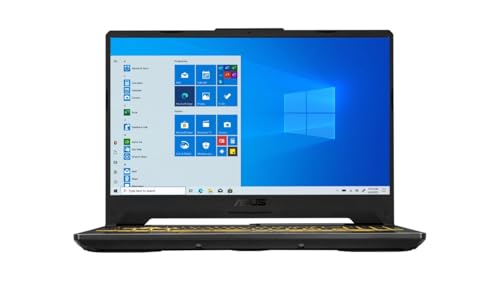
ASUS TUF Gaming F15 FX506LH-AS51
- Best for: Buyers who prioritise a durable chassis, a 144Hz screen and roomier storage
- Processor: Intel Core i5-10300H
- Graphics: NVIDIA GeForce GTX 1650, 4GB GDDR6
- Display: 15.6-inch Full HD IPS-type, 144Hz
- Memory: 8GB DDR4 RAM
Buyers who prioritise a durable chassis, a 144Hz screen and roomier storage
The processor is the oldest in this guide, and the bold gaming styling will not suit every workplace
The TUF F15 sells durability and a fast screen. The TUF line is built around toughness testing that the other brands in this tier do not emphasise, and this configuration pairs its GTX 1650 with a 15.6-inch 144Hz IPS-type display, the joint-fastest panel in this guide. Storage is a step up from most rivals here at 512GB, which delays the storage juggling that 256GB owners face.
The Core i5-10300H is a four-core chip from an older generation, adequate for the GTX 1650 it feeds but the least powerful processor in this list, and memory is 8GB. Neither is a problem for esports and older games, which is the honest workload of this tier. The chassis is chunky and the styling is overtly military, so it looks like a gaming laptop wherever it goes. If your priority is a machine that survives bags, dorm rooms and daily travel while still playing well, this is the pick.
Watch out for: The processor is the oldest in this guide, and the bold gaming styling will not suit every workplace
Which One Fits
You want to buy once and not upgrade anything: take the HP Victus 15. It is the only pick here that arrives with 16GB of memory and a 512GB SSD together, and its processor and graphics are the most current pairing in the tier.
You play competitive games and like improving your hardware: take the Acer Nitro 5. The RTX 3050 and 144Hz screen give the best gaming ceiling here, and the chassis rewards the owner who adds memory and storage later.
You split time between games and demanding coursework: take the Lenovo IdeaPad Gaming 3. The six-core Ryzen processor is the hardest worker in this list outside gaming, and the 120Hz screen keeps play smooth.
You carry the laptop all day, every day: take the MSI GF63 Thin. It is the one designed around portability, and the performance you give up is smaller than the weight you save.
You are hard on your gear: take the ASUS TUF Gaming F15. The durability focus, 144Hz display and 512GB of storage suit dorm rooms, travel and shared spaces.
Common Mistakes
Paying gaming money for integrated graphics. The most common trap in this tier is a general laptop with a gaming-adjacent name and no dedicated GPU. Every pick in this guide names its GeForce chip in the listing; if a listing you are considering does not, keep looking.
Comparing model names instead of configurations. The Victus 15, Nitro 5 and TUF F15 each sell in many configurations with different chips, screens and drives. The ASINs in this guide point to the exact configurations described. A cheaper listing under the same model name usually has a weaker GPU or a 60Hz screen hiding inside it.
Ignoring the condition line. End-of-line and renewed stock are normal at this budget, but new, refurbished and used are different purchases with different warranties. Read the condition and seller details on the listing itself rather than assuming.
Forgetting the cost of the first upgrade. An 8GB, 256GB machine is a fair buy if you plan the memory and storage upgrade; it is a frustrating one if you do not. Count the whole purchase, not just the laptop, when you compare an 8GB model against the 16GB Victus.
Expecting current AAA games at high settings. This tier plays esports titles beautifully and older AAA games well at medium settings. The newest releases at maximum settings are a different budget. DLSS on the RTX models helps, but it does not rewrite the hardware.
FAQ
Can a gaming laptop under 500 dollars run modern games?
It runs esports titles such as shooters and MOBAs smoothly at 1080p, and older AAA games well at medium settings. The newest demanding releases will need reduced settings, and on the RTX 2050 and RTX 3050 models, DLSS upscaling helps hold playable frame rates.
Is the GTX 1650 still worth buying in this tier?
Yes, for the right workload. It has no DLSS or ray tracing, so it suits esports, indie games and older AAA titles rather than new releases. If your library is mostly competitive games, the GTX 1650 machines here with 120Hz or 144Hz screens make sensible use of a tight budget.
Should I buy a renewed gaming laptop at this budget?
It can be the right call, because much of this tier is end-of-line or renewed stock. Buy from a seller with a clear condition description and a return window, confirm the exact configuration and ASIN on the listing, and check the battery and warranty terms before ordering.
Which single upgrade matters most for an 8GB model?
Memory first. Moving from 8GB to 16GB removes the stutter that appears when a game, voice chat and a browser compete for RAM, and it is usually the cheapest upgrade these chassis accept. Storage comes second, once your game library outgrows the drive.
Final Verdict
The under-500-dollar tier rewards buyers who shop configurations instead of brands. The HP Victus 15 is the easiest recommendation: the most current processor and graphics pairing here, 16GB of memory, a 512GB SSD and a 144Hz screen in one box. The Acer Nitro 5 is the pick for players, with the strongest GPU in the guide and real upgrade headroom. The Lenovo IdeaPad Gaming 3 brings the best all-round processor, the MSI GF63 Thin is the one to carry, and the ASUS TUF F15 is the one to knock around. Match the machine to the compromise you can live with, verify the exact ASIN and condition on the listing, and this budget buys more gaming than it has any right to.
More from Amazon
Programs that pair well with the guide above. Offers and eligibility are set by Amazon and may change.
Free shipping on eligible items, Prime Video and more. Eligible new members can start with a free trial.
Start a Prime free trialA Prime membership for ages 18-24 with a trial period. Eligibility is set by Amazon.
See Prime for Young AdultsAudiobooks and podcasts to listen to on the go. Eligible new members can start with a free trial.
Try Audible freeAd-free music streaming. Eligible new subscribers can start with a free trial.
Try Music Unlimited freeAs an Amazon Associate we earn from qualifying purchases.









