Our Short List of 3

- Best for: competitive gamers who also work at the same desk
- Screen size: 27 inches
- Resolution: QHD 2560 x 1440
- Panel type: IPS
- Refresh rate: 300Hz

- Best for: 4K gaming across PC and console at one desk
- Screen size: 27 inches
- Resolution: 4K UHD 3840 x 2160
- Panel type: IPS
- Refresh rate: 144Hz

- Best for: gamers who want OLED contrast with high refresh rates
- Screen size: 27 inches
- Resolution: QHD 2560 x 1440
- Panel type: OLED
- Refresh rate: 240Hz
All 4 Picks at a Glance
| Product | Specs | Action |
|---|---|---|
| LG UltraGear 27G640A-B |
| Check price on Amazon |
| LG UltraGear 27GR93U |
| Check price on Amazon |
| LG UltraGear 27GX704A-B |
| Check price on Amazon |
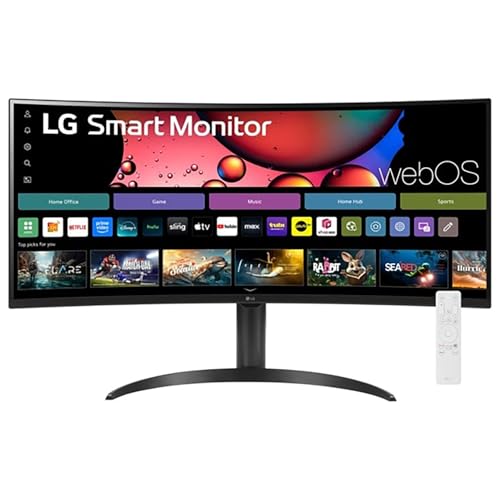 LG 34SR65QC-B |
| Check price on Amazon |
Key takeaways
- Compare the best LG monitors for gaming, office work and streaming, from fast UltraGear panels to wide curved screens with USB-C docking for any desk.
Choosing an LG monitor usually comes down to one decision: do you build the desk around speed for games, sharpness for documents and spreadsheets, or width for juggling several windows at once. LG sells all three directions under overlapping names, so the model number matters more than the badge. Panel type, resolution, refresh rate and connection options separate a screen that suits your routine from one that fights it every day.
This guide is for home office workers, laptop users who want a single-cable docking screen, and players who split evenings between work and games. The picks below come straight from current LG listings: a 300Hz UltraGear QHD gaming monitor, a 4K UltraGear with HDMI 2.1, a QHD OLED UltraGear, a 34-inch UltraWide with a built-in KVM switch, and a curved smart monitor running webOS for streaming without a computer.
Quick Picks
As an Amazon Associate we earn from qualifying purchases
| Product | Best for | Key spec from title |
|---|---|---|
| LG UltraGear 27G640A-B | Fast competitive gaming | QHD IPS at 300Hz |
| LG UltraGear 27GR93U | 4K gaming on PC and console | 4K UHD IPS at 144Hz |
| LG UltraGear 27GX704A-B | OLED contrast and response | QHD OLED at 240Hz |
| LG UltraWide 34WQ73A-B | Two-computer desk work | 34-inch curved IPS with KVM |
| LG 34SR65QC-B | Streaming without a PC | 34-inch curved smart monitor with webOS |
How to Choose
Resolution and Screen Size
Resolution decides how much fits on screen and how crisp text looks. A 27-inch QHD panel at 2560 x 1440 gives spreadsheets and code comfortable room without the scaling quirks that 4K can cause in older software. The 27GR93U steps up to 3840 x 2160, which suits photo work and fine detail but asks more of your graphics card in games. The two 34-inch picks stretch to 3440 x 1440 in a 21:9 shape, trading vertical height for side-by-side windows. Match the resolution to your daily software first, then check that your laptop or graphics card can drive it at the native refresh rate.
Panel Type and Refresh Rate
IPS panels hold color and brightness at wide viewing angles, which is why the 27G640A-B, 27GR93U and 34WQ73A-B all use them for mixed work and play. OLED, as in the 27GX704A-B, switches each pixel individually for deep blacks and a 0.03ms response, though static office toolbars deserve the panel care features LG builds in. Refresh rate separates the lineup sharply: the gaming models run at 144Hz, 240Hz or 300Hz for smooth motion, while the productivity ultrawide runs at 60Hz and the smart monitor at 100Hz. If you rarely play fast games, a lower refresh rate costs you nothing in documents or video.
Connections and Docking
Ports decide how tidy the desk stays. The 34WQ73A-B is the docking pick: USB Type-C with up to 90 watts of power delivery charges a laptop while carrying the picture, and its built-in KVM plus Dual Controller feature let one keyboard and mouse run two computers. The 27G640A-B also includes USB Type-C alongside HDMI 2.1. Console players should note the HDMI 2.1 inputs on the 27GR93U and 27GX704A-B, which support high refresh rates at full resolution. Before ordering, count your devices, check whether your laptop outputs video over USB-C, and confirm the listing includes the cables your setup needs.
Stand Adjustment and Desk Fit
A monitor you cannot position well will annoy you long after the panel specifications are forgotten. The 27G640A-B offers tilt, height, swivel and pivot adjustment, and the 27GR93U adds a virtually borderless design with tilt, height and pivot. The 34WQ73A-B uses a one-click stand with height and tilt, helpful given its 34-inch width and roughly 32-inch-wide footprint. Measure your desk depth before choosing a curved ultrawide, leave room for the stand base, and check the VESA mount pattern in the listing if you plan to use a monitor arm instead of the supplied stand.
The 5 Best Options
LG UltraGear 27G640A-B
- Best for: competitive gamers who also work at the same desk
- Screen size: 27 inches
- Resolution: QHD 2560 x 1440
- Panel type: IPS
- Refresh rate: 300Hz
competitive gamers who also work at the same desk
your graphics card needs to push high frame rates at QHD to use the 300Hz panel fully
This is the pick for players who value frame rate above everything else and still need a civilised screen for daytime work. The QHD IPS panel runs at 300Hz with a 1ms response, so fast shooters and racing games stay fluid, while the resolution keeps text sharper than a same-size Full HD screen for documents and browsing. NVIDIA G-Sync and AMD FreeSync Premium cover both graphics card families, VESA DisplayHDR 400 adds contrast in supported games, and the stand adjusts every way that matters. USB Type-C input makes it easy to plug in a laptop between gaming sessions on the desktop PC.
LG UltraGear 27GR93U
- Best for: 4K gaming across PC and console at one desk
- Screen size: 27 inches
- Resolution: 4K UHD 3840 x 2160
- Panel type: IPS
- Refresh rate: 144Hz
4K gaming across PC and console at one desk
gaming at native 4K and high refresh rates needs a strong graphics card
The 27GR93U suits players who want 4K sharpness without giving up gaming speed, plus console owners who need proper HDMI 2.1 support. Its 27-inch UHD IPS panel runs at 144Hz with a 1ms GtG response, carries VESA DisplayHDR 400 with up to 95 percent DCI-P3 coverage, and supports up to 120Hz on current consoles through HDMI 2.1. DTS Headphone:X through the 4-pole headphone jack adds spatial audio for headset users. During the day the same pixel density makes text and images look crisp for office and creative work, and the stand covers tilt, height and pivot.
LG UltraGear 27GX704A-B
- Best for: gamers who want OLED contrast with high refresh rates
- Screen size: 27 inches
- Resolution: QHD 2560 x 1440
- Panel type: OLED
- Refresh rate: 240Hz
gamers who want OLED contrast with high refresh rates
OLED panels need sensible habits with static images, so use the built-in panel care features for long office sessions
Choose the 27GX704A-B when picture quality in dark scenes matters as much as speed. Its QHD OLED panel answers in 0.03ms and refreshes at 240Hz, a combination aimed at players who notice both blur and washed-out blacks. Because OLED pixels produce their own light, night scenes in games and films keep the deep contrast that LCD panels struggle to match. VESA Display HDR TrueBlack 400 certification reflects that strength, and both NVIDIA G-Sync compatibility and AMD FreeSync Premium Pro are on board for tear-free play. HDMI 2.1 and DisplayPort inputs cover PC and console connections without adapters.
LG UltraWide 34WQ73A-B
The 34WQ73A-B is built for the two-computer desk. Its curved 34-inch IPS screen stretches 3440 x 1440 pixels across a 21:9 frame, wide enough for a document, a spreadsheet and a chat window side by side. The built-in KVM switch and Dual Controller feature let one keyboard and mouse pair run two machines, and USB Type-C delivers up to 90 watts to charge a laptop through the same cable that carries the picture. HDR10 support and sRGB coverage of 99 percent keep color dependable for reports and light creative work, while Reader Mode and Flicker Safe features target long reading sessions.
Specs
- Screen size: 34 inches
- Resolution: 3440 x 1440 QHD Ultra Wide
- Panel type: IPS, curved
- Aspect ratio: 21:9
- Refresh rate: 60Hz
- Response time: 5ms
- HDR: HDR10 compatibility
- Color gamut: sRGB 99 percent
- Features: built-in KVM and Dual Controller
- Connections: HDMI, DisplayPort and USB Type-C
- USB-C power delivery: up to 90 watts
- Stand: height and tilt adjustable
Best for: professionals switching between a work laptop and a personal computer
Watch out for: the 60Hz refresh rate and 5ms response suit office work far better than fast competitive games
LG 34SR65QC-B
- Best for: a bedroom or studio desk that also serves as the streaming screen
- Screen size: 34 inches
- Resolution: WQHD 3440 x 1440
- Shape: curved UltraWide
- Refresh rate: 100Hz
a bedroom or studio desk that also serves as the streaming screen
smart features depend on your home network and streaming subscriptions, and it lacks the docking focus of the 34WQ73A-B
The 34SR65QC-B fits rooms where the monitor doubles as the television. It is a 34-inch curved UltraWide with WQHD resolution and webOS built in, so streaming apps run on the screen itself with the included Magic Remote, no computer or streaming stick required. AirPlay 2 support lets Apple devices send video to it directly. For desk duty it still behaves like a proper monitor, with a 100Hz refresh rate, HDR10 support and sRGB coverage of 99 percent for documents and browsing. The adjustable stand helps split the difference between a viewing angle for films and a working angle for email.
Which One Fits Your Situation
You Play Fast Games After Work
If evenings mean competitive shooters or racing titles, start with the 27G640A-B and its 300Hz QHD panel, which keeps motion smooth while staying friendly to mid-range graphics cards. Step to the 27GX704A-B if you also watch films at the same desk and want OLED blacks with your 240Hz refresh rate. Either way, check that your graphics card and cable can output the full refresh rate before ordering.
You Run a Laptop-Based Home Office
A laptop desk benefits most from fewer cables and more width. The 34WQ73A-B charges through USB-C at up to 90 watts, replaces two smaller screens with one curved panel, and its KVM switch earns its keep if a personal desktop shares the desk. Confirm your laptop supports video over USB-C; if it does not, the same monitor still connects over HDMI or DisplayPort.
You Mix Console and PC Gaming
Console players should look first at the 27GR93U, whose HDMI 2.1 input supports high refresh rates at 4K on current consoles while the PC side gets 144Hz over its gaming connections. The 4K panel also future-proofs the desk for sharper console titles. Measure your viewing distance, since 27 inches at 4K rewards sitting reasonably close.
You Want One Screen for Work and Streaming
When the desk is also the entertainment corner, the 34SR65QC-B removes the extra hardware: webOS runs the streaming apps, the Magic Remote handles the sofa side of the room, and AirPlay 2 covers quick casting from a phone. Its 100Hz panel remains comfortable for daytime documents, so the compromise lands on docking features rather than picture quality.
Common Mistakes
- Buying a high-refresh monitor before checking whether your graphics card and cable can actually output that refresh rate at the native resolution.
- Picking 4K for a small desk and then fighting tiny text, instead of choosing QHD at 27 inches or planning your scaling settings in advance.
- Forgetting to confirm that a laptop supports video over USB-C before counting on a single-cable docking setup.
- Ordering a 34-inch ultrawide without measuring desk width and depth, leaving no comfortable room for keyboard, speakers or the stand base.
- Comparing HDR labels across panel types without noting that OLED TrueBlack certification and LCD DisplayHDR 400 describe different strengths.
Frequently Asked Questions
Is QHD or 4K better for a 27-inch monitor?
QHD at 27 inches suits most mixed desks because text stays readable without scaling and games run at high frame rates on mid-range hardware. The 27GR93U shows why 4K still appeals: finer detail for creative work and sharper console images. Choose by your graphics card and software, not by the bigger number alone.
Can one LG monitor charge my laptop and show its picture?
Yes, if the model and laptop both support it. The 34WQ73A-B carries video, data and up to 90 watts of charging over a single USB Type-C cable. Check your laptop manual for USB-C video output, sometimes called DisplayPort alternate mode, because a charging-only port will power the machine without sending an image.
What does a built-in KVM switch actually do?
A KVM switch lets one keyboard, mouse and monitor serve two computers, changing which machine you control without swapping cables. On the 34WQ73A-B it pairs with LG Dual Controller software, so moving between a work laptop and a personal desktop becomes a menu choice. It suits shared desks and people who keep separate machines for separate tasks.
Are curved ultrawide monitors good for office work?
For document-heavy work they can be, because the 21:9 shape of the 34WQ73A-B or 34SR65QC-B holds several windows side by side and the gentle curve keeps the far edges at a more even distance. Spreadsheets and timelines gain the most. If your work is mostly single documents, a flat 27-inch screen may feel simpler and cheaper to place.
FAQ
Is QHD or 4K better for a 27-inch monitor?
Can one LG monitor charge my laptop and show its picture?
What does a built-in KVM switch actually do?
Are curved ultrawide monitors good for office work?
More from Amazon
Programs that pair well with the guide above. Offers and eligibility are set by Amazon and may change.
Free shipping on eligible items, Prime Video and more. Eligible new members can start with a free trial.
Start a Prime free trialA Prime membership for ages 18-24 with a trial period. Eligibility is set by Amazon.
See Prime for Young AdultsAudiobooks and podcasts to listen to on the go. Eligible new members can start with a free trial.
Try Audible freeAd-free music streaming. Eligible new subscribers can start with a free trial.
Try Music Unlimited freeAs an Amazon Associate we earn from qualifying purchases.