Our Short List of 3

- Best for: Buyers who want the lowest-cost route into current-generation RTX gaming.
- Processor: Intel Core i5-13420H
- Graphics: NVIDIA GeForce RTX 4050 Laptop GPU with DLSS 3
- Display: 15.6-inch Full HD IPS, 144Hz
- Memory: 8GB DDR5

- Best for: Buyers who want generous storage and memory straight out of the box.
- Processor: AMD Ryzen 7 7735HS
- Graphics: NVIDIA GeForce RTX 4050 Laptop GPU, 6GB GDDR6
- Display: 15.6-inch Full HD, 144Hz, full sRGB coverage, G-Sync
- Memory: 16GB DDR5

- Best for: Players who want a newer processor alongside RTX 4050 graphics.
- Processor: AMD Ryzen 7 8845HS
- Graphics: NVIDIA GeForce RTX 4050, 6GB GDDR6
- Display: 15.6-inch Full HD, 144Hz
- Memory: 16GB RAM
All 5 Picks at a Glance
| Product | Specs | Action |
|---|---|---|
| Acer Nitro V 15 ANV15-51-51H9 |
| Check price on Amazon |
| ASUS TUF Gaming A15 FA507NU-DS74 |
| Check price on Amazon |
| Lenovo LOQ 15 83DX00B2US |
| Check price on Amazon |
 MSI Katana 15 B13VGK-484US |
| Check price on Amazon |
 HP Victus 15 |
| Check price on Amazon |
Key takeaways
- Five economic gaming laptops with RTX graphics, fast screens and DDR5 memory, compared spec by spec to help you pick the right value machine.
Buying an economic gaming laptop is really a decision about where your money does the most work. Spend too much on the processor and the graphics card becomes the bottleneck; chase the strongest graphics chip and you may end up with too little memory or storage for the games you actually install. The sensible goal is balance: a current graphics card, enough RAM, a fast screen and an SSD that holds a real library.
This guide is for students, first-time buyers and casual players who want smooth 1080p gaming without paying flagship prices. The picks below are the Acer Nitro V 15, ASUS TUF Gaming A15, Lenovo LOQ 15, MSI Katana 15 and HP Victus 15, chosen from their Amazon listings for sensible specification combinations at the value end of the market.
Quick Picks
As an Amazon Associate we earn from qualifying purchases
| Product | Best for | Key spec from title |
|---|---|---|
| Acer Nitro V 15 ANV15-51-51H9 | Lowest-cost route into RTX 4050 gaming | Intel Core i5-13420H with GeForce RTX 4050 |
| ASUS TUF Gaming A15 FA507NU-DS74 | Buyers who want storage headroom | Ryzen 7 7735HS with 1TB PCIe SSD |
| Lenovo LOQ 15 83DX00B2US | Players who value a newer processor | Ryzen 7 8845HS with GeForce RTX 4050 |
| MSI Katana 15 B13VGK-484US | Stepping up to stronger graphics | Core i7-13620H with GeForce RTX 4070 |
| HP Victus 15 | The most restrained budget pick | Ryzen 5 7535HS with GeForce RTX 2050 |
How to Choose
Put the graphics card first
In this price class the graphics card decides how a laptop ages, because it cannot be replaced later. An RTX 4050 is the realistic entry point for modern titles at 1080p, with DLSS support helping frame rates in demanding games. An RTX 2050 machine costs less but belongs to an older generation, so treat it as a lighter-duty option for esports and back-catalogue games. If a listing offers an RTX 4070 at a modest step up, that extra graphics headroom usually outlasts any processor upgrade at the same money.
Match memory and storage to your library
Sixteen gigabytes of DDR5 memory is the comfortable baseline for gaming alongside a browser, chat apps and launchers running in the background. Eight gigabytes still works, but it is the first thing that will feel tight, so check whether the model has a free slot for a later upgrade. Storage fills faster than buyers expect: a 512GB SSD holds a handful of large modern games, while a 1TB drive removes the constant deleting and reinstalling cycle. Prefer listings that state both figures plainly in the title.
Check the display refresh rate
Every laptop in this guide ships with a 15.6-inch Full HD screen, so the refresh rate is the figure that separates them. A 144Hz panel makes fast-paced games look noticeably smoother than a standard 60Hz screen, and it suits the frame rates these graphics cards can produce at 1080p. Brightness and colour coverage matter too if you play in a bright room or edit photos on the same machine. The ASUS below lists full sRGB coverage, which is worth having for mixed gaming and coursework use.
Read the exact configuration before ordering
Gaming laptop model names cover many configurations, and the same chassis can ship with different processors, memory sizes and drives depending on the listing. Match the full model code, such as ANV15-51-51H9 or 83DX00B2US, against the specification table on the product page before you pay. Third-party sellers sometimes bundle accessories or change memory and storage, which is legitimate but changes what you receive. Confirming the listed processor, graphics card, RAM and SSD takes a minute and prevents the most common disappointment in this category.
The 5 Best Options
Acer Nitro V 15 ANV15-51-51H9
- Best for: Buyers who want the lowest-cost route into current-generation RTX gaming.
- Processor: Intel Core i5-13420H
- Graphics: NVIDIA GeForce RTX 4050 Laptop GPU with DLSS 3
- Display: 15.6-inch Full HD IPS, 144Hz
- Memory: 8GB DDR5
Buyers who want the lowest-cost route into current-generation RTX gaming.
The 8GB of memory is tight for newer games plus multitasking.
The Nitro V 15 is the straightforward value play in this group: an Intel Core i5-13420H paired with an RTX 4050, the current entry point for NVIDIA laptop graphics with DLSS 3 support. Its 144Hz Full HD IPS screen matches what the graphics card can deliver at 1080p, and a Thunderbolt 4 port plus Gigabit Ethernet give it connectivity that many rivals in this class skip. The compromise is memory: 8GB of DDR5 is workable today but is the specification most likely to need attention first.
ASUS TUF Gaming A15 FA507NU-DS74
- Best for: Buyers who want generous storage and memory straight out of the box.
- Processor: AMD Ryzen 7 7735HS
- Graphics: NVIDIA GeForce RTX 4050 Laptop GPU, 6GB GDDR6
- Display: 15.6-inch Full HD, 144Hz, full sRGB coverage, G-Sync
- Memory: 16GB DDR5
Buyers who want generous storage and memory straight out of the box.
The RTX 4050 still targets 1080p, so demanding games need sensible settings.
The TUF Gaming A15 suits buyers who would rather not think about upgrades for a while. Its Ryzen 7 7735HS and RTX 4050 come with 16GB of DDR5 memory and a 1TB SSD as listed, double the storage of most rivals here, and the 144Hz display carries full sRGB coverage for coursework or photo editing between sessions. ASUS also lists a MUX Switch with Advanced Optimus, a feature that can help frame rates by letting the graphics card drive the display directly in supported setups.
Lenovo LOQ 15 83DX00B2US
- Best for: Players who want a newer processor alongside RTX 4050 graphics.
- Processor: AMD Ryzen 7 8845HS
- Graphics: NVIDIA GeForce RTX 4050, 6GB GDDR6
- Display: 15.6-inch Full HD, 144Hz
- Memory: 16GB RAM
Players who want a newer processor alongside RTX 4050 graphics.
The 512GB SSD fills quickly once several large games are installed.
Lenovo’s LOQ 15 pairs the RTX 4050 with a Ryzen 7 8845HS, the newest processor generation in this line-up, which makes it appealing if the laptop doubles as a study or work machine for several years. The listed configuration includes 16GB of memory and a 512GB SSD, a 144Hz Full HD screen and a backlit keyboard in a Luna Grey chassis. LOQ is Lenovo’s value line beneath Legion, so the design is plain rather than flashy, and the port selection covers HDMI and USB-C for a desk setup.
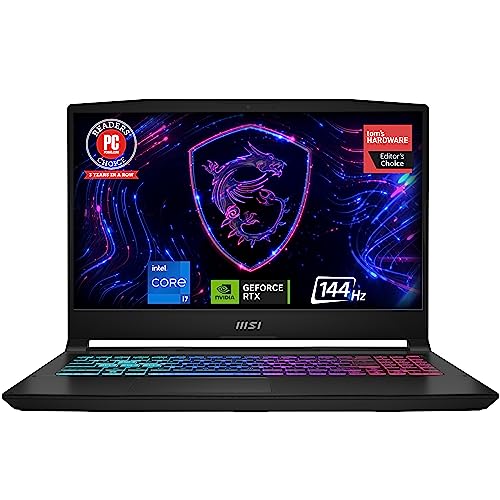
MSI Katana 15 B13VGK-484US
- Best for: Buyers willing to pay a step more for a stronger graphics tier.
- Processor: Intel Core i7-13620H
- Graphics: NVIDIA GeForce RTX 4070
- Display: 15.6-inch Full HD, 144Hz
- Memory: 16GB DDR5
Buyers willing to pay a step more for a stronger graphics tier.
It sits above the strict budget tier, so compare its listing against RTX 4050 prices.
The Katana 15 is the step-up option for buyers whose budget stretches a little further. Its Core i7-13620H and GeForce RTX 4070 sit a clear tier above the RTX 4050 machines, and the listed configuration adds 16GB of DDR5 memory and a 1TB NVMe SSD, so neither memory nor storage needs immediate attention. A 144Hz Full HD screen and MSI’s Cooler Boost 5 cooling round out a specification aimed at players who keep settings higher and play longer sessions at a desk.
HP Victus 15
- Best for: Light gaming and everyday work on the tightest budget in this guide.
- Processor: AMD Ryzen 5 7535HS
- Graphics: NVIDIA GeForce RTX 2050
- Display: 15.6-inch Full HD, 144Hz
- Memory: 16GB DDR5 RAM
Light gaming and everyday work on the tightest budget in this guide.
The RTX 2050 is an older graphics generation with limited headroom for new titles.
The Victus 15 is the restrained choice in this guide, built around a Ryzen 5 7535HS and an RTX 2050. That graphics chip belongs to an older generation, so this machine fits esports titles, older releases and everyday play at modest settings rather than the newest demanding games. In return the listed configuration still gives you 16GB of DDR5 memory, a 512GB SSD and a 144Hz Full HD screen, which keeps the overall package balanced for lighter gaming mixed with school or office work.
Which One Fits Your Situation
You play esports and older favourites
If your library is competitive shooters, MOBAs and games from a few years back, the HP Victus 15 covers that ground with its 144Hz screen and 16GB of memory, and its older graphics chip matters far less at the settings those titles use. It is the sensible pick when the laptop also handles homework, browsing and documents every day.
You want one machine for study and gaming
Students need a laptop that survives lectures and still plays well in the evening. The Lenovo LOQ 15 fits that double life: a recent Ryzen 7 processor for coursework and multitasking, RTX 4050 graphics for modern games at 1080p, and a plain design that looks at home in a classroom or library.
You hate deleting games to make room
A large rotating library points straight at the ASUS TUF Gaming A15 or the MSI Katana 15, the two picks here with a 1TB SSD as listed. Between them, the ASUS keeps the budget tighter, while the MSI adds a stronger graphics card. Either way, you avoid the constant uninstall-and-redownload routine that a 512GB drive brings.
You plan to keep the laptop for years
Longevity comes from graphics headroom and balanced supporting parts. The MSI Katana 15 has the strongest graphics card in this guide plus 16GB of memory and a 1TB drive, so nothing needs attention soon. If its listing stretches the budget too far, the ASUS offers the same memory and storage with a step down in graphics.
Common Mistakes
- Choosing by processor alone while ignoring the graphics card, which matters more for gaming.
- Buying 8GB of memory without checking whether the model allows a later upgrade.
- Assuming every version of a model name has the same specification as the one reviewed elsewhere.
- Forgetting that a 512GB SSD holds only a few large modern games at once.
- Skipping the refresh rate and ending up with a slower screen than the graphics card can feed.
Frequently Asked Questions
Is an RTX 4050 laptop enough for modern games?
At 1080p, yes for most current titles, provided you use sensible settings and let DLSS help in demanding games. The RTX 4050 is the entry tier of its generation, so it suits the native resolution of these screens rather than higher external displays. Players who want maximum settings should look at the RTX 4070 option instead.
How much RAM does an economic gaming laptop need?
Sixteen gigabytes is the comfortable target, because games run alongside launchers, browsers and chat applications. Eight gigabytes still plays many titles, but it limits multitasking and will age faster. If a listing ships with 8GB, check the model documentation for a free memory slot before assuming you can upgrade it later yourself.
Can these laptops be upgraded after purchase?
Many models in this class allow memory and storage upgrades, and some listings state slot counts and maximum supported memory directly. Upgrade paths are model specific, though, and third-party configurations may already differ from the factory specification. Confirm the exact model code’s documentation before buying extra parts, and keep the original components in case of a warranty claim.
Is a 144Hz screen worth it on a budget laptop?
For fast-paced games it is one of the most noticeable upgrades in this class, because these graphics cards can push high frame rates at 1080p in esports and older titles. The difference shows in motion clarity rather than image detail. If you mostly play slow strategy or adventure games, it matters less than memory or storage.
FAQ
Is an RTX 4050 laptop enough for modern games?
How much RAM does an economic gaming laptop need?
Can these laptops be upgraded after purchase?
Is a 144Hz screen worth it on a budget laptop?
More from Amazon
Programs that pair well with the guide above. Offers and eligibility are set by Amazon and may change.
Free shipping on eligible items, Prime Video and more. Eligible new members can start with a free trial.
Start a Prime free trialA Prime membership for ages 18-24 with a trial period. Eligibility is set by Amazon.
See Prime for Young AdultsAudiobooks and podcasts to listen to on the go. Eligible new members can start with a free trial.
Try Audible freeAd-free music streaming. Eligible new subscribers can start with a free trial.
Try Music Unlimited freeAs an Amazon Associate we earn from qualifying purchases.