Our Short List of 3

- Best for: First-time rig builders who want a fast 240Hz ultrawide without moving to a 49-inch panel.
- 34-inch curved ultrawide display
- UWQHD resolution, 3440×1440
- 240Hz refresh rate
- 1ms MPRT response time

- Best for: Drivers who want one monitor for sim racing, other games, and daily use.
- 34-inch ultrawide display
- Resolution 3440×1440
- 165Hz refresh rate
- 1ms response time

- Best for: Drivers replacing triple monitors with one wide screen for a full cockpit view.
- 49-inch QD-OLED ultrawide display
- Resolution 5120×1440
- 240Hz refresh rate
- 0.03ms GtG response time
All 5 Picks at a Glance
| Product | Specs | Action |
|---|---|---|
| SANSUI 34-Inch Curved Monitor |
| Check price on Amazon |
| ASUS TUF Gaming VG34VQL1B |
| Check price on Amazon |
| Samsung 49-Inch Odyssey G93SC |
| Check price on Amazon |
 Alienware AW3425DWM |
| Check price on Amazon |
 LG 34GS95QE UltraGear OLED |
| Check price on Amazon |
Key takeaways
- Compare five sim racing monitors, from 34-inch ultrawide panels to a 49-inch QD-OLED, with refresh rate, response time and curvature checks before you buy.
A sim racing monitor decides how much of the track you can actually see, and that changes how you brake, how you judge a gap, and how early you spot a car alongside you. A narrow flat screen hides the apex on a tight corner, while a wide curved panel pulls the edges of the circuit into your peripheral vision so the car feels planted on the road. Refresh rate matters too, because a stuttering image at the braking point turns a fast corner into guesswork.
This guide is written for three kinds of racers. Wheel-and-pedal drivers building a first rig need a single screen that covers the cockpit view. Competitive online racers want the fastest response they can get for close battles and late braking. Drivers who already own a wheel base and a sturdy cockpit want the widest possible view to replace a triple-screen setup. The five monitors below were chosen from Amazon product titles and listed specifications, covering 34-inch ultrawide panels and one 49-inch super ultrawide.
Quick Picks
As an Amazon Associate we earn from qualifying purchases.
| Product | Best for | Key spec from title |
|---|---|---|
| SANSUI 34-Inch Curved Monitor | High refresh rate on a budget rig | 240Hz UWQHD 3440×1440, 1500R curved |
| ASUS TUF Gaming VG34VQL1B | Balanced daily racing and general gaming | 34-inch 3440×1440, 165Hz, FreeSync Premium |
| Samsung 49-Inch Odyssey G93SC | A single screen that replaces triple monitors | 49-inch QD-OLED, 5120×1440, 240Hz |
| Alienware AW3425DWM | Fast 34-inch racing with vivid colour | 34-inch WQHD, 180Hz, FreeSync Premium |
| LG 34GS95QE UltraGear OLED | Deep contrast for night racing | 34-inch OLED, 3440×1440, 240Hz, 800R curved |
How to Choose
Screen width and aspect ratio
Sim racing rewards width more than almost any other kind of gaming, because the road ahead, the mirrors, and the car beside you all live outside the centre of the frame. A 34-inch ultrawide panel with a 21:9 aspect ratio shows noticeably more of the circuit than a standard 16:9 screen, which helps you place the car on the racing line and spot overtakes without turning your head. A 49-inch 32:9 panel goes further still, stretching the view so far that it can stand in for three separate screens. Before you commit to the widest option, measure your desk and cockpit, since a 49-inch panel needs a deep surface and a mount that can hold its weight.
Refresh rate and response time
Refresh rate controls how smooth the world looks as it rushes past the windscreen, and in sim racing that smoothness is directly tied to timing. A 165Hz panel already feels far more fluid than a 60Hz office screen when you are braking from high speed into a hairpin. Moving to 180Hz or 240Hz tightens that feeling further, making the track edge and the car ahead move in smaller, steadier steps. Response time matters alongside it, because a slow pixel leaves a faint trail behind fast-moving objects. Look for a listed response time of 1ms or lower, and remember that OLED panels list far lower figures than standard LCD panels for the same kind of motion.
Curvature and viewing distance
Curvature is measured in R values, and a smaller number means a tighter bend. A 1500R or 1800R curve wraps the image gently around a driver sitting close to the screen, which suits a cockpit where the monitor sits an arm’s length away. The 800R curve on the LG panel in this guide is far more aggressive, pulling the edges of the screen toward you so the whole panel stays at a similar distance from your eyes. That deep curve works best when you sit close and centred, and it can feel distracting if you sit far back or share the screen with a passenger. Check the curve against your seating position before you buy, not after the box arrives.
Sync technology and connectivity
Screen tearing shows up at the worst possible moment in a race, usually mid-corner when the frame rate dips below the refresh rate. Adaptive sync solves this by matching the monitor to the graphics card, and every panel in this guide lists either FreeSync or G-Sync compatibility. Match the sync type to your graphics card so the feature actually switches on. Connectivity deserves the same attention, because a high refresh rate at ultrawide resolution needs a capable port. HDMI 2.1 and DisplayPort both appear across these listings, but confirm that your graphics card has the matching output and that the cable in the box supports the resolution and refresh rate you plan to run.
The 5 Best Options
SANSUI 34-Inch Curved Monitor
- Best for: First-time rig builders who want a fast 240Hz ultrawide without moving to a 49-inch panel.
- 34-inch curved ultrawide display
- UWQHD resolution, 3440×1440
- 240Hz refresh rate
- 1ms MPRT response time
First-time rig builders who want a fast 240Hz ultrawide without moving to a 49-inch panel.
Confirm your graphics card can drive 3440×1440 at 240Hz, and check the stand depth on your desk before ordering.
The SANSUI panel is the value pick in this roundup, and it earns that place by pairing a 240Hz refresh rate with a 34-inch ultrawide screen at a size that fits a normal desk. For a driver building a first rig, that combination covers the two things that matter most: a wide view of the circuit and motion smooth enough for confident braking. The 1500R curve suits a close seating position, and the UWQHD resolution keeps the dashboard and the trackside details sharp without demanding the most powerful graphics card on the market.
Watch out for: Confirm your graphics card can drive 3440×1440 at 240Hz, and check the stand depth on your desk before ordering.
ASUS TUF Gaming VG34VQL1B
- Best for: Drivers who want one monitor for sim racing, other games, and daily use.
- 34-inch ultrawide display
- Resolution 3440×1440
- 165Hz refresh rate
- 1ms response time
Drivers who want one monitor for sim racing, other games, and daily use.
The refresh rate is lower than the 240Hz panels in this guide, so check whether that trade-off matters for your racing style.
The ASUS TUF VG34VQL1B is the steady all-rounder here, and it suits a driver who races several evenings a week but also uses the same screen for other games and everyday work. Its 165Hz refresh rate is fast enough for clean braking zones and close racing, while the 34-inch 3440×1440 panel gives a proper ultrawide view without the desk space a 49-inch screen demands. ELMB motion blur reduction and FreeSync Premium are listed for smoother fast corners, and DisplayHDR 400 adds brighter highlights on sunlit circuits.
Watch out for: The refresh rate is lower than the 240Hz panels in this guide, so check whether that trade-off matters for your racing style.
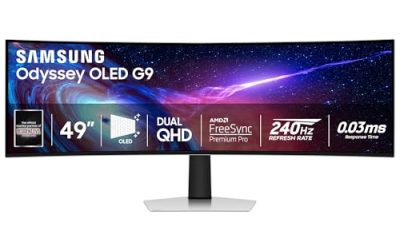
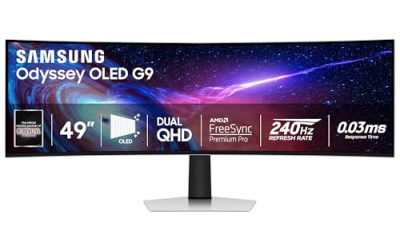
Samsung 49-Inch Odyssey G93SC
- Best for: Drivers replacing triple monitors with one wide screen for a full cockpit view.
- 49-inch QD-OLED ultrawide display
- Resolution 5120×1440
- 240Hz refresh rate
- 0.03ms GtG response time
Drivers replacing triple monitors with one wide screen for a full cockpit view.
Measure your desk depth and check mount compatibility first, since a 49-inch panel needs serious support.
The Samsung Odyssey G93SC is the pick for drivers who want to replace a triple-screen rig with a single panel. Its 49-inch QD-OLED screen spans 5120×1440, which puts the mirrors, the dashboard, and the cars on either side into one continuous view with no bezels breaking the image. The 240Hz refresh rate and 0.03ms response time keep fast straights and sudden direction changes looking clean, and the 1800R curve wraps the wide panel around a centred seating position. True Black 400 is listed for deep blacks on night stages and in tunnels.
Watch out for: Measure your desk depth and check mount compatibility first, since a 49-inch panel needs serious support.
Alienware AW3425DWM
- Best for: Racers who want a fast 34-inch panel with vivid colour for mixed racing and gaming.
- 34-inch WQHD display
- 180Hz refresh rate
- 1ms GtG response time
- DCI-P3 colour coverage
Racers who want a fast 34-inch panel with vivid colour for mixed racing and gaming.
The panel is a standard 34-inch ultrawide, so it will not match the peripheral view of the 49-inch Samsung.
The Alienware AW3425DWM sits between the budget 240Hz panel and the big 49-inch screen, offering a 34-inch WQHD display at 180Hz with vivid colour. That middle ground suits a driver who wants faster motion than the 165Hz ASUS without paying for a full super ultrawide setup. FreeSync Premium is listed for tear-free racing, and the wide DCI-P3 colour coverage makes sunsets, wet tarmac, and trackside signage look richer. The 1ms response time keeps the image clean when the car ahead brakes suddenly and you need to react in the same instant.
Watch out for: The panel is a standard 34-inch ultrawide, so it will not match the peripheral view of the 49-inch Samsung.
LG 34GS95QE UltraGear OLED
- Best for: Night racing and dark circuits where OLED contrast makes the track easier to read.
- 34-inch OLED ultrawide display
- Resolution 3440×1440
- 240Hz refresh rate
- 0.03ms GtG response time
Night racing and dark circuits where OLED contrast makes the track easier to read.
The deep 800R curve suits close, centred seating, so sit further back and the edges may feel too wrapped.
The LG 34GS95QE is the OLED alternative for drivers who race at night or in dark conditions and want the deepest possible contrast. Its 34-inch OLED panel lists a 240Hz refresh rate with a 0.03ms response time, so motion stays crisp through fast chicanes and the image holds together when the track lights flicker past. The 800R curve is the tightest in this guide, wrapping the screen closely around a driver who sits near the panel. G-Sync compatibility and FreeSync Premium Pro are both listed, which covers the two main graphics card families.
Watch out for: The deep 800R curve suits close, centred seating, so sit further back and the edges may feel too wrapped.
Which One Fits Your Situation
Building your first wheel-and-pedal rig
Start with the SANSUI 34-inch panel, because it gives a first rig the two essentials at the most accessible point in this guide: a wide ultrawide view and a 240Hz refresh rate. You can mount it on a standard desk, drive it with a mid-range graphics card at UWQHD, and still see the apex and the car beside you. If the budget stretches further, the ASUS TUF VG34VQL1B is the steadier choice for a screen that also handles everyday use.
Racing online every night
Pick the LG 34GS95QE if your evenings are spent in close online battles, since its OLED panel pairs a 240Hz refresh rate with a 0.03ms response time that keeps cars ahead looking sharp when they brake late. The deep curve suits a fixed cockpit seat, and the dual sync support means it works with either graphics card family. If you prefer an LCD panel with the same speed, the SANSUI is the alternative at the same refresh rate.
Replacing a triple-screen setup
Choose the Samsung 49-inch Odyssey G93SC, because its 5120×1440 panel is the only one here wide enough to stand in for three screens without bezels. The 240Hz refresh rate and the QD-OLED contrast keep the single-screen view smooth and readable, and the 1800R curve wraps the display around your seating position. Before ordering, confirm your desk and mount can carry a 49-inch panel safely.
One screen for racing and everything else
Take the ASUS TUF VG34VQL1B when the monitor has to earn its place beyond the rig. Its 165Hz refresh rate is quick enough for confident racing, the 34-inch ultrawide view works for other games, and the panel size fits a normal desk without special mounting. The Alienware AW3425DWM is the step up if you want 180Hz and richer colour while staying at the same practical 34-inch size.
Common Mistakes
- Buying a 49-inch panel before measuring desk depth and mount capacity, then finding the screen overhangs the desk or sags on a weak arm.
- Choosing a 240Hz monitor while running a graphics card that cannot sustain high frame rates at ultrawide resolution, so the extra speed never appears.
- Sitting too far from a tightly curved screen, which turns the wraparound effect into a distorted view at the edges.
- Ignoring sync compatibility and ending up with tearing in the braking zone because the monitor and graphics card do not match.
- Picking a standard 16:9 screen for sim racing and losing the peripheral view that makes overtakes and apexes easier to judge.
Frequently Asked Questions
Is a 34-inch ultrawide enough for sim racing?
Yes, a 34-inch ultrawide is enough for most drivers, and it is the size four of the five monitors in this guide use. The 21:9 view shows the apex, the mirrors, and the car alongside you far better than a standard screen, while still fitting a normal desk. A 49-inch panel adds more peripheral vision, but it is a luxury rather than a requirement for enjoyable racing.
Do I need 240Hz for sim racing?
No, you do not need 240Hz, although it does make fast motion look smoother and braking feel more precise. A 165Hz panel like the ASUS in this guide is already a large step up from a 60Hz screen and suits most drivers. Choose 240Hz if you race competitively online or already own a graphics card strong enough to reach those frame rates at ultrawide resolution.
Is an OLED monitor good for sim racing?
Yes, OLED works well for sim racing because its near-instant response time keeps fast motion clean and its deep blacks make night stages easier to read. The Samsung and LG panels in this guide both use OLED and list 0.03ms response times. Check the brightness and burn-in guidance on the listing if you plan to leave static dashboard elements on screen for long sessions.
Should I buy one 49-inch monitor or three smaller screens?
One 49-inch monitor is simpler to set up, uses one cable and one mount, and has no bezels breaking the view, which is why the Samsung G93SC suits drivers who want a clean single-screen rig. Three separate screens can give a wider total angle and more flexibility in placement, but they need three mounts, careful alignment, and a graphics card with enough outputs to drive them all.
FAQ
Is a 34-inch ultrawide enough for sim racing?
Do I need 240Hz for sim racing?
Is an OLED monitor good for sim racing?
Should I buy one 49-inch monitor or three smaller screens?
More from Amazon
Programs that pair well with the guide above. Offers and eligibility are set by Amazon and may change.
Free shipping on eligible items, Prime Video and more. Eligible new members can start with a free trial.
Start a Prime free trialA Prime membership for ages 18-24 with a trial period. Eligibility is set by Amazon.
See Prime for Young AdultsAudiobooks and podcasts to listen to on the go. Eligible new members can start with a free trial.
Try Audible freeAd-free music streaming. Eligible new subscribers can start with a free trial.
Try Music Unlimited freeAs an Amazon Associate we earn from qualifying purchases.