Our Short List of 3

- Best for: Buyers who want a full standalone VR library without a computer.
- Snapdragon XR2 Gen 2 chip
- 128GB of storage
- Touch Plus controllers included
- Up to 2.5 hours of battery life

- Best for: Gamers who want the sharpest standalone picture and the largest storage.
- 512GB of storage
- Snapdragon XR2 Gen 2 chip
- Pancake lenses for a sharper image
- Touch Plus controllers included

- Best for: Movie watchers who want a wide view from a phone they already own.
- 110-degree field of view
- Anti-blue-light HD lenses
- Fits phones from 4.7 to 6.8 inches
- Works with Android and iPhone phones
All 4 Picks at a Glance
| Product | Specs | Action |
|---|---|---|
| Meta Quest 3S 128GB |
| Check price on Amazon |
| Meta Quest 3 512GB |
| Check price on Amazon |
| DESTEK V5 VR Headset |
| Check price on Amazon |
 BNEXT VR Headset |
| Check price on Amazon |
Key takeaways
- Find the best vr headsets for android, from standalone Meta Quest headsets to phone viewers. Compare lenses, comfort, fit, and tracking before you buy.
Shopping for virtual reality on Android means choosing between two very different kinds of hardware. Standalone headsets run their own Android-based software and need no phone at all, while phone viewers turn an Android handset into a screen by holding it in front of two lenses. The first kind costs more and does far more, while the second kind is a cheap way to try 360-degree video and simple mobile games. Knowing which side of that split you belong on saves you from buying a viewer when you wanted a games machine, or a full headset when you only wanted to watch videos.
This guide is for Android users who want virtual reality without a computer or console. It covers gamers who want a standalone library, movie watchers who want a private screen, and curious buyers who want a low-cost viewer to test the idea. Each pick below comes from the name and specifications listed on its Amazon page.
Quick Picks
As an Amazon Associate we earn from qualifying purchases
| Product | Best for | Key spec from title |
|---|---|---|
| Meta Quest 3S 128GB | First standalone headset | Snapdragon XR2 Gen 2 chip |
| Meta Quest 3 512GB | Sharpest standalone display | 512GB of storage |
| DESTEK V5 VR Headset | Phone-based viewing | 110-degree field of view |
| BNEXT VR Headset | Cheapest way to try VR | Fits 4 to 6 inch phones |
How to Choose
Standalone Headset or Phone Viewer
A standalone headset has its own processor, storage, and controllers, so it runs games and apps by itself. A phone viewer is a hollow shell with lenses, and your Android phone does all the work. Standalone headsets suit gaming, fitness apps, and mixed reality, because they track your hands and your movement around a room. Phone viewers suit 360-degree video, virtual tours, and short casual games, because they depend on your phone’s gyroscope and screen. If you already own a recent Android phone with a sharp display, a viewer is a fair first step. If you want a real games library, choose a standalone headset.
Lenses and Visual Comfort
The lenses decide how clear the picture looks and how long you can wear the headset without strain. Fresnel lenses are common in entry headsets and can show glare rings around bright objects, while pancake lenses are thinner and give a sharper edge-to-edge image. Adjustable lens spacing matters when several people share one headset, since eyes sit at different distances apart. Anti-blue-light coatings and a soft facial interface help during longer sessions. Try to pick a headset with a stated field of view of at least 90 degrees, so the picture fills your vision instead of looking through a narrow window.
Tracking and Controllers
Tracking is what makes virtual reality feel real, and it works in two main ways. Inside-out tracking uses cameras on the headset itself to follow your hands and controllers, which keeps the setup simple and avoids extra sensors around the room. Phone viewers rely on your handset’s gyroscope, which can turn your head but cannot track your hands or your position. Controllers with haptic feedback add a sense of touch to games, and a thumbstick on a controller helps with movement in larger virtual worlds. If you plan to play action games, choose a headset with dedicated controllers rather than a viewer that only follows head movement.
Fit, Weight, and Battery Life
A headset that presses on your face or slides down your nose will end up in a drawer, no matter how good its screen is. Look for an adjustable strap, a balanced weight, and a facial interface that seals out light without pinching. Heavier headsets feel better when the weight sits evenly across the forehead and the back of the head. Battery life matters for standalone headsets, and most run for about two to three hours of active play before they need a charge. A wired connection lets you keep playing while charging, and a spare battery strap is a useful extra for long sessions.
The 4 Best Options
Meta Quest 3S 128GB
- Best for: Buyers who want a full standalone VR library without a computer.
- Snapdragon XR2 Gen 2 chip
- 128GB of storage
- Touch Plus controllers included
- Up to 2.5 hours of battery life
Buyers who want a full standalone VR library without a computer.
Fresnel lenses can show glare rings around bright objects in dark scenes.
The Quest 3S is the most sensible first standalone headset for Android users, because it runs the same software library as the more expensive Quest 3 while keeping the entry cost lower. Its Snapdragon XR2 Gen 2 chip handles the current catalogue of standalone games and mixed-reality apps without a computer or a phone, and the Touch Plus controllers track your hands with the same inside-out cameras found on the flagship model. The display uses Fresnel lenses rather than the sharper pancake lenses of the Quest 3, which is the main trade you make for the lower tier. For a first headset, that trade is usually worth it.
Watch out for: Fresnel lenses can show glare rings around bright objects in dark scenes.
Meta Quest 3 512GB
- Best for: Gamers who want the sharpest standalone picture and the largest storage.
- 512GB of storage
- Snapdragon XR2 Gen 2 chip
- Pancake lenses for a sharper image
- Touch Plus controllers included
Gamers who want the sharpest standalone picture and the largest storage.
The larger storage tier suits buyers who install many large games at once.
The Quest 3 is the strongest standalone headset in this guide, and the 512GB model gives you room for a large library without deleting games to make space. Its pancake lenses deliver a sharper image across the whole view, and the higher-resolution display makes text easier to read in virtual workspaces and menus. The same Snapdragon XR2 Gen 2 chip powers the experience, and the Touch Plus controllers give precise tracking with haptic feedback. Mixed-reality passthrough lets you see your room while virtual objects sit inside it, which opens up fitness apps and productivity tools that the 3S handles less gracefully.
Watch out for: The larger storage tier suits buyers who install many large games at once.
DESTEK V5 VR Headset
- Best for: Movie watchers who want a wide view from a phone they already own.
- 110-degree field of view
- Anti-blue-light HD lenses
- Fits phones from 4.7 to 6.8 inches
- Works with Android and iPhone phones
Movie watchers who want a wide view from a phone they already own.
Your phone needs a working gyroscope, or head tracking will not respond.
The DESTEK V5 is a phone viewer, which means it holds your Android phone in front of two lenses and turns it into a personal cinema. Its 110-degree field of view is wider than most viewers at this level, and the anti-blue-light HD lenses are designed to reduce eye fatigue during longer video sessions. The headset fits phones from 4.7 to 6.8 inches, which covers nearly every current Android handset, and it works with both Android and iPhone models. You will need a phone with a working gyroscope for head tracking, and the experience depends heavily on your phone’s screen quality.
Watch out for: Your phone needs a working gyroscope, or head tracking will not respond.
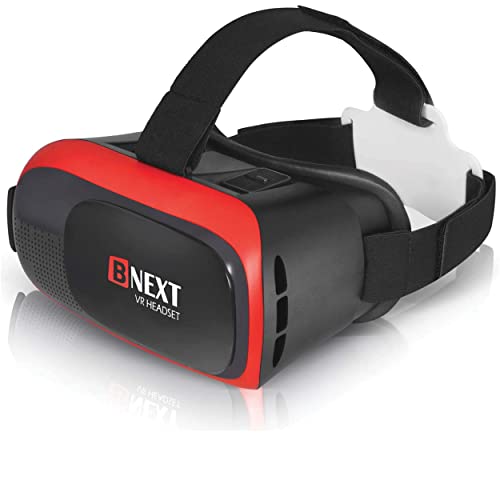
BNEXT VR Headset
- Best for: Curious buyers who want the cheapest way to try phone VR.
- Fits smartphones with 4 to 6 inch screens
- Adjustable focal distance and lens spacing
- Compatible with iPhone and Android phones
- 100-degree field of view
Curious buyers who want the cheapest way to try phone VR.
It cannot track hands or position, so it suits video more than action games.
The BNEXT headset is the simplest way to try virtual reality with an Android phone, and it is the most forgiving pick for a first viewer. It accepts phones with screens from 4 to 6 inches, and the focal distance and lens spacing adjust so different users can get a clear picture without tools. The headset is light enough to wear for a full movie, and its universal design means it also works with iPhone models if someone else in the house wants a turn. It will not track your hands or your position, so it suits video and simple games rather than full virtual-reality titles.
Watch out for: It cannot track hands or position, so it suits video more than action games.
Which One Fits Your Situation
You Want the Best Standalone Experience
Choose the Meta Quest 3S 128GB when you want a real games library without a computer or a phone. It runs standalone titles, fitness apps, and mixed-reality experiences on its own hardware, and the Touch Plus controllers give you full hand tracking. The 128GB of storage holds a solid starter library, and you can delete and reinstall games as your tastes change. It is the pick that turns curiosity into a hobby.
You Want the Sharpest Display
Choose the Meta Quest 3 512GB when image clarity and storage matter most to you. The pancake lenses keep text and distant objects sharp across the whole view, which helps in virtual workspaces and detailed games. The 512GB of storage means you rarely need to manage space, and the passthrough view makes mixed reality feel more natural. It is the headset for buyers who know they will use VR often.
You Want a Viewer for Your Phone
Choose the DESTEK V5 when you already own a good Android phone and mainly want to watch videos. Its wide 110-degree view and anti-blue-light lenses make movies and 360-degree tours feel bigger than a phone screen alone. The viewer costs less than a standalone headset, and turns the phone you already carry into a private cinema. It fits when the phone is the star and the headset is only a frame.
You Want the Simplest First Headset
Choose the BNEXT headset when you want to test virtual reality with the least fuss and the lowest commitment. It fits most phones, adjusts to different eyes, and weighs little enough for a full film. You will learn quickly whether you enjoy VR, and you will have spent very little to find out. If you love it, a standalone headset is the natural next step.
Common Mistakes
- Buying a phone viewer when you actually want a standalone games library.
- Ignoring lens spacing adjustment when several people will share one headset.
- Choosing a viewer for a phone that lacks a gyroscope, which breaks head tracking.
- Forgetting that standalone headsets need regular charging during long sessions.
- Picking a headset by storage alone instead of checking its lenses and controllers first.
Frequently Asked Questions
Do I need a phone to use a standalone VR headset?
No, a standalone headset runs its own software and needs no phone to play games or open apps. It has a built-in processor, storage, and tracking cameras, so it works on its own once it is set up. A phone app still helps with setup, purchases, and casting the view to a television, but the headset itself plays independently.
Will a phone viewer work with any Android phone?
Most viewers work with Android phones that have a gyroscope and a screen between 4 and 6.8 inches, but the fit depends on the model. Check the viewer’s stated phone size range and confirm your phone has a gyroscope before you buy. A phone with a low-resolution screen will also look softer inside the viewer.
What is the difference between Fresnel and pancake lenses?
Fresnel lenses use ridged rings to bend light, which keeps them cheap but can cause glare around bright objects. Pancake lenses fold the light path inside a thinner stack, which gives a sharper image across the view and a slimmer headset. Pancake lenses appear in higher-tier headsets, while Fresnel lenses are common in entry models.
Can I wear glasses inside a VR headset?
Many headsets include a glasses spacer or an adjustable facial interface that leaves room for frames. Slim frames usually fit, while wide frames may press against the lenses. Check the listing for a spacer or a glasses-friendly design, and measure your frames against the stated clearance before you order.
FAQ
Do I need a phone to use a standalone VR headset?
Will a phone viewer work with any Android phone?
What is the difference between Fresnel and pancake lenses?
Can I wear glasses inside a VR headset?
More from Amazon
Programs that pair well with the guide above. Offers and eligibility are set by Amazon and may change.
Free shipping on eligible items, Prime Video and more. Eligible new members can start with a free trial.
Start a Prime free trialA Prime membership for ages 18-24 with a trial period. Eligibility is set by Amazon.
See Prime for Young AdultsAudiobooks and podcasts to listen to on the go. Eligible new members can start with a free trial.
Try Audible freeAd-free music streaming. Eligible new subscribers can start with a free trial.
Try Music Unlimited freeAs an Amazon Associate we earn from qualifying purchases.