Our Short List of 3
- Best for: players who want a 16-inch OLED flagship with fast refresh.
- NVIDIA GeForce RTX 5090 graphics
- Intel Core Ultra 9 290HX Plus processor, 24 cores, 24 threads
- 32GB DDR5 memory, 2TB SSD storage
- 16-inch QHD+ 240Hz OLED display

- Best for: players who want 64GB of memory with a bright, fast OLED screen.
- NVIDIA GeForce RTX 5090 graphics, 24GB
- Intel Core Ultra 9 275HX processor, 24 cores
- 64GB RAM, 2TB NVMe SSD storage (1TB plus 1TB)
- 16.0-inch WQXGA OLED display, 500 nits, 240Hz

- Best for: players who want the largest Mini-LED screen for cinematic games.
- NVIDIA GeForce RTX 5090 graphics
- Intel Ultra 9-275HX processor
- 64GB DDR5 memory, 2TB NVMe SSD storage
- 18-inch 120Hz UHD+ Mini LED display
All 5 Picks at a Glance
| Product | Specs | Action |
|---|---|---|
| HP OMEN Max 16 |
| Check price on Amazon |
| Lenovo Legion Pro 7i Gen 10 |
| Check price on Amazon |
| MSI Stealth 18 HX AI |
| Check price on Amazon |
 MSI Titan 18 HX AI |
| Check price on Amazon |
 MAINGEAR Ultima 18 |
| Check price on Amazon |
Key takeaways
- Compare five premium gaming laptops with RTX 5090 graphics, generous memory, and OLED or Mini-LED displays to find the flagship that fits how you play.
A premium gaming laptop earns its place at the top of a lineup through flagship parts, not through a label. None of the listings below uses the words premium or flagship, so this guide judges premium fit only from stated flagship specifications: a top-tier graphics processor, 32GB or more of memory, and a high-refresh premium display. Every pick below meets all three tests, and every one carries a flagship mobile graphics processor.
The five laptops below come from four brands, with two sharing the MSI name as distinct models with different screens, memory, and storage. All five state laptop form, gaming wording, and brand in their own listing wording. Read the display and memory figures first, because those two choices shape everyday play more than any other specification on this page.
Quick Picks
As an Amazon Associate we earn from qualifying purchases.
| Product | Best for | Key spec |
|---|---|---|
| HP OMEN Max 16 | High-refresh OLED play on a 16-inch screen | RTX 5090, 32GB DDR5, QHD+ 240Hz OLED |
| Lenovo Legion Pro 7i Gen 10 | Large memory for demanding games and multitasking | RTX 5090, 64GB RAM, WQXGA OLED 240Hz |
| MSI Stealth 18 HX AI | Big-screen Mini-LED play with huge memory | RTX 5090, 64GB DDR5, 18-inch Mini LED |
| MSI Titan 18 HX AI | Maximum storage with a 240Hz Mini-LED screen | RTX 5090, 64GB DDR5, 4TB NVMe SSD |
| MAINGEAR Ultima 18 | Boutique 4K play with top-tier parts | RTX 5090, 64GB DDR5, 4K 240Hz G-SYNC |
How to Choose
Start With the Graphics Processor
The graphics processor decides which settings a laptop can hold in demanding games, so it is the first specification to settle. Every laptop in this guide lists the same flagship mobile graphics processor, which keeps the comparison focused on the parts around it: memory, display, storage, and ports. A flagship graphics processor still needs room to breathe, so check the display resolution it must drive. A sharper, larger panel asks more of the same chip than a smaller one, and that balance matters more than chasing a single headline number.
Weigh Memory Against Your Workload
Memory decides how much a laptop can hold open at once, and the picks below start at 32GB and rise to 64GB. For play alone with a browser and chat open, 32GB leaves comfortable headroom. For streaming while playing, editing clips between sessions, or running large creative tools beside a game, 64GB gives more breathing room. Memory figures in listings describe one fixed configuration, so treat the stated amount as the amount you will live with and choose the tier that matches the heaviest day you realistically expect.
Match the Display to How You Play
The display is the part you look at for every minute of play, so its size, resolution, and refresh rate deserve as much attention as the chip driving it. The picks below span 16-inch and 18-inch screens, OLED and Mini-LED panels, and refresh rates from 120Hz to 240Hz. A faster refresh rate suits fast competitive games, while a sharper, brighter panel suits cinematic single-player titles. Decide which kind of play fills most of your hours, then let that answer narrow the screen before you compare anything else.
Check Storage, Ports, and the Rest of the Machine
Storage, ports, and wireless connectivity decide how the laptop fits into a desk setup and a travel bag. The picks below offer 2TB or 4TB of solid-state storage, so large game libraries fit without constant uninstalling. Thunderbolt 5 appears on some models and suits fast external drives and docks, while Wi-Fi 7 keeps wireless play and downloads quick where the network supports it. Confirm the port mix matches your monitor, headset, and dock before committing, since adapters add clutter to an otherwise clean setup.
The 5 Best Options
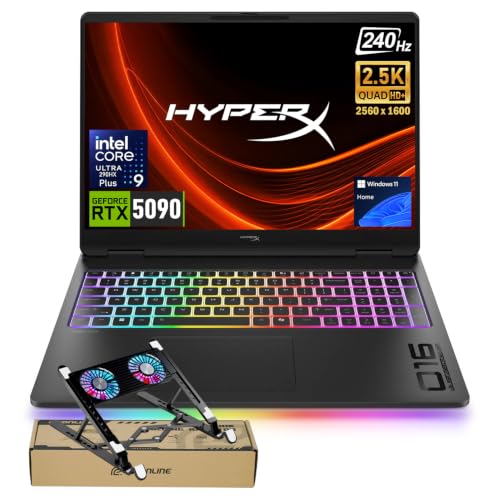
HP OMEN Max 16
- Best for: players who want a 16-inch OLED flagship with fast refresh.
- NVIDIA GeForce RTX 5090 graphics
- Intel Core Ultra 9 290HX Plus processor, 24 cores, 24 threads
- 32GB DDR5 memory, 2TB SSD storage
- 16-inch QHD+ 240Hz OLED display
players who want a 16-inch OLED flagship with fast refresh.
the 32GB memory tier suits play and multitasking but leaves less headroom than the 64GB picks below.
The HP OMEN Max 16 pairs flagship graphics with a bright, fast OLED panel in a 16-inch frame, making it a strong fit for players who want premium parts without moving up to an 18-inch machine. Its listing states 32GB of DDR5 memory and a 2TB solid-state drive, so large games install with room to spare. The per-key RGB backlit keyboard and Wi-Fi 7 round out a machine built for long sessions at a desk or away from one.
Lenovo Legion Pro 7i Gen 10
- Best for: players who want 64GB of memory with a bright, fast OLED screen.
- NVIDIA GeForce RTX 5090 graphics, 24GB
- Intel Core Ultra 9 275HX processor, 24 cores
- 64GB RAM, 2TB NVMe SSD storage (1TB plus 1TB)
- 16.0-inch WQXGA OLED display, 500 nits, 240Hz
players who want 64GB of memory with a bright, fast OLED screen.
the two-drive storage layout means checking drive letters when installing large games across both drives.
The Lenovo Legion Pro 7i Gen 10 combines a flagship graphics processor with 64GB of memory and a bright OLED display, a combination aimed at players who keep many tasks running beside their games. Its listing describes a 16-inch WQXGA OLED panel at 500 nits with a 240Hz refresh rate, so both fast and cinematic titles look their best. The 2TB solid-state drive splits across two 1TB drives, and Windows 11 Pro completes a machine that works as hard off the game as on it.
MSI Stealth 18 HX AI
- Best for: players who want the largest Mini-LED screen for cinematic games.
- NVIDIA GeForce RTX 5090 graphics
- Intel Ultra 9-275HX processor
- 64GB DDR5 memory, 2TB NVMe SSD storage
- 18-inch 120Hz UHD+ Mini LED display
players who want the largest Mini-LED screen for cinematic games.
the 120Hz refresh rate is lower than the 240Hz panels elsewhere in this guide.
The MSI Stealth 18 HX AI stretches the flagship formula across an 18-inch Mini-LED display, giving cinematic games a larger, brighter canvas than any 16-inch pick here. Its listing states 64GB of DDR5 memory, a 2TB solid-state drive, and Wi-Fi 7, so heavy multitasking and large libraries are both covered with room to spare. The 120Hz refresh rate trails the 240Hz screens in this guide, which suits story-driven play more than fast competitive titles.
MSI Titan 18 HX AI
- Best for: players who want 4TB of storage with a fast Mini-LED screen.
- NVIDIA GeForce RTX 5090 graphics
- Intel Ultra 9-290HX processor
- 64GB DDR5 memory, 4TB NVMe SSD storage
- 18-inch 240Hz MiniLED UHD+ display
players who want 4TB of storage with a fast Mini-LED screen.
the large 18-inch frame needs a bag and desk space to match its screen.
The MSI Titan 18 HX AI is the storage leader of this guide, pairing 4TB of solid-state storage with 64GB of memory and a 240Hz Mini-LED display. Its listing states Thunderbolt 5 and Wi-Fi 7, so fast external drives and docks connect without compromise. As the second MSI model here, it shares the brand with the Stealth 18 but differs in screen speed, storage size, processor, and port mix, making it the pick for players who refuse to uninstall games to make room.
MAINGEAR Ultima 18
- Best for: players who want a boutique 4K flagship with maximum storage.
- NVIDIA GeForce RTX 5090 graphics
- Intel Core Ultra 9 290HX Plus processor
- 64GB DDR5 memory, 4TB SSD storage
- 18-inch 4K 240Hz G-SYNC display
players who want a boutique 4K flagship with maximum storage.
the 4K resolution asks the most of the graphics processor, so settings may need tuning in the most demanding titles.
The MAINGEAR Ultima 18 is the boutique entry in this guide, pairing a 4K display with flagship parts and per-key RGB lighting. Its listing states 64GB of DDR5 memory, 4TB of solid-state storage, Thunderbolt 5, and Wi-Fi 7, so the machine is ready for large libraries and fast accessories alike. The 4K panel at 240Hz with G-SYNC support suits players who want the sharpest image in this lineup and are willing to carry an 18-inch machine to get it.
Which One Fits Your Situation
If You Want a 16-Inch Flagship That Travels Well
Choose the HP OMEN Max 16 or the Lenovo Legion Pro 7i, the two 16-inch picks in this guide. The HP pairs its OLED screen with 32GB of memory for focused play, while the Lenovo doubles the memory and adds a brighter panel for heavier multitasking. Both keep the flagship graphics processor, so the choice comes down to how much memory your heaviest day needs and how much brightness matters to you.
If You Want the Largest Screen for Cinematic Play
Choose one of the three 18-inch picks, which trade portability for a bigger canvas. The MSI Stealth 18 suits story-driven games with its Mini-LED panel, the MSI Titan 18 adds a faster screen and far more storage, and the MAINGEAR Ultima 18 goes furthest with a 4K display. Measure your desk and bag first, because an 18-inch machine changes both.
If You Refuse to Manage Storage
Choose the MSI Titan 18 HX AI or the MAINGEAR Ultima 18, the two picks with 4TB of solid-state storage. Both hold large modern libraries without constant uninstalling, and both pair that room with 64GB of memory. The Titan adds a 240Hz Mini-LED screen, while the MAINGEAR counters with a sharper 4K panel, so let display preference break the tie.
If You Stream or Create Beside Gaming
Choose a 64GB pick, since streaming, editing, and multitasking reward the extra memory headroom. The Lenovo Legion Pro 7i adds Windows 11 Pro and a bright OLED screen to the mix, while the MSI and MAINGEAR 18-inch models add larger screens and Thunderbolt 5 for docks and capture gear. Match the screen size to your desk, then let the port mix decide.
Common Mistakes
- Judging a laptop by its brand name alone instead of checking the stated graphics processor, memory, and display figures in its own listing.
- Choosing 32GB when your heaviest days involve streaming, editing, or many open tools beside a game, where 64GB leaves more headroom.
- Picking a 4K or 18-inch screen without measuring your bag and desk, then finding the machine awkward to carry or place.
- Ignoring the port mix and wireless standard, then adding adapters for a monitor, dock, or headset that should have connected directly.
- Assuming every configuration of a model line shares the same parts, when memory, storage, and display figures vary between listings of the same name.
Frequently Asked Questions
What makes a gaming laptop premium?
A premium gaming laptop pairs a flagship graphics processor with generous memory and a high-refresh premium display, rather than relying on a brand name or a single headline figure. In this guide, every pick lists the strongest mobile graphics processor in its listing, 32GB or more of memory, and an OLED, Mini-LED, or 4K high-refresh screen, so the premium claim rests on stated specifications.
Is 32GB of memory enough for premium gaming?
For play alone with a browser and chat open, 32GB leaves comfortable headroom and suits most players well. If you stream while playing, edit clips between sessions, or run large creative tools beside a game, 64GB gives more breathing room. Choose the tier that matches the heaviest day you realistically expect, since the stated amount is fixed for that listing.
Does a bigger screen always mean a better gaming laptop?
A bigger screen gives a larger, more immersive image, but it also makes the machine heavier and harder to carry, and it asks more of the graphics processor at higher resolutions. A 16-inch laptop suits players who travel or work in smaller spaces, while an 18-inch machine suits a fixed desk setup. Match the screen to your space and habits, not to size alone.
Should I worry that two picks share the MSI brand?
No, because the two MSI models differ in screen speed, storage size, processor, and ports, and each was judged on its own stated specifications. Sharing a brand does not make two listings the same machine, just as sharing a graphics processor does not make two laptops identical. Compare the stated figures for each model and choose the combination that fits your play.
FAQ
What makes a gaming laptop premium?
Is 32GB of memory enough for premium gaming?
Does a bigger screen always mean a better gaming laptop?
Should I worry that two picks share the MSI brand?
More from Amazon
Programs that pair well with the guide above. Offers and eligibility are set by Amazon and may change.
Free shipping on eligible items, Prime Video and more. Eligible new members can start with a free trial.
Start a Prime free trialA Prime membership for ages 18-24 with a trial period. Eligibility is set by Amazon.
See Prime for Young AdultsAudiobooks and podcasts to listen to on the go. Eligible new members can start with a free trial.
Try Audible freeAd-free music streaming. Eligible new subscribers can start with a free trial.
Try Music Unlimited freeAs an Amazon Associate we earn from qualifying purchases.