Our Short List of 3
All 3 Picks at a Glance
| Product | Specs | Action |
|---|---|---|
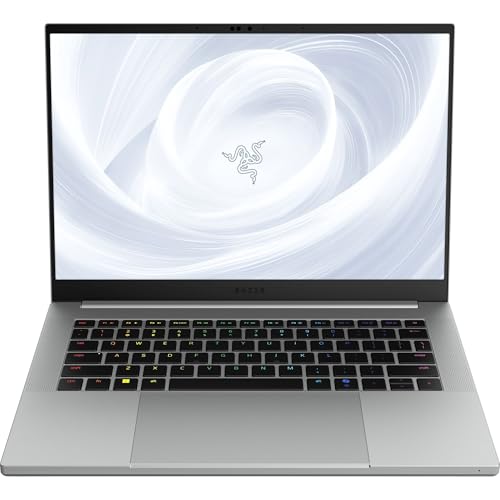 Razer Blade 14 (2025) | Check price on Amazon | |
 Lenovo Legion Slim 5 (16-Inch) | Check price on Amazon | |
 MSI Stealth 14 Studio A13VF | Check price on Amazon |
Key takeaways
- Find the best sleek gaming laptops with slim metal designs, quiet styling, OLED and fast displays, RTX graphics, and real power for work and play.
A sleek gaming laptop solves a problem that a traditional gaming laptop creates. It delivers discrete graphics, a fast processor, and a high-refresh display, yet it looks calm enough for an office, a classroom, a client meeting, or a shared living room. There are no oversized vents styled like race car parts, no huge glowing logos demanding attention, and no thick plastic shell that fills an entire backpack. Instead, the best designs use slim metal bodies, narrow bezels, muted colors, and keyboards that can pass as ordinary work tools once the backlighting is turned down or set to a single soft color.
That balance matters because many buyers use one laptop for everything. The same machine has to edit documents in the morning, join video calls in the afternoon, and run demanding games in the evening. The four models below were chosen for exactly that double life. Each one pairs a thin, understated chassis with a dedicated NVIDIA GeForce RTX graphics processor, and each one takes a slightly different route: a premium 14-inch flagship, an OLED all-rounder, a larger 16-inch slim model with generous memory and storage, and a compact Intel-based option with a wired Ethernet port that most thin laptops leave out.
As an Amazon Associate, we earn from qualifying purchases.
How to Choose a Sleek Gaming Laptop
Start with thickness and weight, because those two numbers decide whether a gaming laptop actually travels. A sleek model is generally under eight tenths of an inch thick, and the most portable 14-inch designs go well below that. Weight matters just as much once a power adapter joins the bag, so a lighter chassis paired with a compact adapter is easier to live with than the headline weight alone suggests. Metal construction is worth favoring here: aluminum bodies flex less, feel more professional, and tend to age better than textured plastic shells with aggressive styling lines.
Next, look honestly at graphics power. In a thin chassis, the same graphics chip can be configured at different power levels, and a slimmer laptop usually runs its graphics processor at a lower wattage than a thick desktop replacement. That trade is reasonable for most players. An RTX 4060 or RTX 5070 class chip in a slim body handles modern games well at the native resolution of a 14-inch or 16-inch display, especially with upscaling features enabled, while keeping heat and fan noise within limits that suit a quiet room. Buyers who want maximum frame rates at the highest settings for years should expect a thicker machine; buyers who value portability accept a sensible ceiling.
The display deserves close attention because it serves both halves of the laptop’s life. OLED panels, offered by two models below, deliver deep contrast and fast response that suit games, films, and photo work alike. A resolution of 2560 by 1600 or 2880 by 1800 keeps text sharp for documents and spreadsheets, and a refresh rate of 120 hertz or higher keeps motion smooth in games while also making everyday scrolling feel fluid. For competitive play at lower resolutions, a 165 hertz IPS panel remains a practical alternative.
Memory and storage choices are harder to change later in this category, because many slim designs solder the memory to the board. Sixteen gigabytes is a workable minimum for gaming and multitasking, while 32 gigabytes gives more headroom for large projects, virtual machines, and keeping many applications open beside a game. For storage, one terabyte is a sensible floor given the size of modern game installs, and two terabytes removes the need to shuffle titles on and off the drive. Before choosing, confirm whether memory can be upgraded at all; on the slimmest models, the configuration bought on day one is the configuration kept for the life of the machine.
Finally, check the practical details that styling photos hide. A thin laptop still needs useful ports: USB-C for modern accessories and charging flexibility, full-size USB for older gear, HDMI for an external display, and, rarely, Ethernet for a stable wired connection. Webcam quality matters for the work half of the day, keyboard backlighting should be adjustable down to a plain white or off, and fan behavior in a quiet or balanced mode decides whether the laptop stays welcome in a meeting room or library. Battery capacity, listed in watt hours, gives a rough guide to unplugged work time, though gaming away from the wall outlet drains any of these machines quickly.
Razer Blade 14 (2025)
The Razer Blade 14 is the clearest expression of the sleek idea in this guide. Its CNC-milled aluminum body in Mercury, a light silver finish, looks more like a premium ultrabook than a gaming machine, and at roughly six tenths of an inch thin it is the slimmest design here. Razer describes it as the thinnest Blade the company has made, and the closed laptop gives almost no visual hint that a GeForce RTX 5070 sits inside. The Chroma keyboard backlighting can be set to a plain color or switched off, at which point nothing about the machine announces gaming at all.
Performance is current-generation. The AMD Ryzen AI 9 365 processor brings an onboard neural processing unit rated by Razer at up to 50 TOPS for Copilot Plus features, and the RTX 5070 runs at up to 115 watts with Dynamic Boost, a strong figure for a chassis this thin, helped by a vapor chamber cooling design with a thermal hood. The 32 gigabytes of LPDDR5X memory is double the amount in most rivals here, and the 3K OLED display combines a 120 hertz refresh rate with a 0.2 millisecond response time and Calman Verified color profiles covering sRGB, DCI-P3, and Adobe RGB, which makes the same panel credible for color-sensitive creative work.
Who It Suits
The Blade 14 suits buyers who want the most power and the most memory in the smallest, quietest-looking package, and who split their time between games and creative or professional work. Its soldered memory is already generous, which softens the usual upgrade concern. Buyers who prefer a larger screen for long work sessions, or who need wired Ethernet without an adapter, should look at the Lenovo and MSI models below instead.
ASUS ROG Zephyrus G14 (2024)
The Zephyrus G14 has defined the small, tasteful gaming laptop for several generations, and the 2024 GA403UV version sharpened the formula with a cleaner aluminum body, a simple diagonal slash on the lid, and an OLED display. In its Platinum White or gray finishes it reads as a stylish everyday laptop first and a gaming laptop second. The Republic of Gamers branding is present but restrained, and the white keyboard backlighting keeps the deck looking tidy rather than theatrical.
Inside, the AMD Ryzen 9 8945HS processor provides eight cores reaching up to 5.2 GHz, paired with a GeForce RTX 4060 running at up to 90 watts with Dynamic Boost. That is a lower graphics ceiling than the Razer above, and it is the honest cost of the slim build, but it remains well matched to the 14-inch panel for modern games at high settings with upscaling. The 3K OLED screen runs at 120 hertz, so work text stays crisp and game motion stays smooth. Sixteen gigabytes of LPDDR5X memory is soldered, so buyers should choose this configuration knowing memory cannot grow later, though the single M.2 slot leaves storage open to expansion.
Specs
| Item | Detail |
|---|---|
| Display | 14-inch OLED, 2880 by 1800, 120 Hz |
| Processor | AMD Ryzen 9 8945HS, 8 cores, up to 5.2 GHz |
| Graphics | NVIDIA GeForce RTX 4060, 8 GB GDDR6, up to 90 W with Dynamic Boost |
| Memory | 16 GB LPDDR5X-6400, onboard |
| Storage | 1 TB PCIe 4.0 NVMe SSD |
| Operating system | Windows 11 Home |
| ASIN | B0CWCZVWDK |
Who It Suits
The Zephyrus G14 suits travelers and students who want a genuinely small laptop that still plays modern games well, and who value screen quality over raw graphics wattage. It is also a sensible pick for creators who like the OLED panel and the understated lid design. Players who keep very large game libraries installed at once, or who want 32 gigabytes of memory from the start, are better served by the Razer or the Lenovo.
Lenovo Legion Slim 5 (16-Inch)
The Legion Slim 5 takes the sleek formula and stretches it to a 16-inch screen while keeping the styling restrained. Lenovo’s own description of this line emphasizes an understated general design, and in Luna Grey it looks like a sober business laptop, with the Legion name kept small on the lid. At 0.78 inches thick it is the thickest model in this guide, yet it stays clearly on the slim side of gaming laptops, and the extra size buys the largest display and the most storage here.
This configuration is generous where it counts for longevity. The AMD Ryzen 7 8845HS processor reaches up to 5.1 GHz, the GeForce RTX 4060 carries 8 gigabytes of graphics memory, and the system arrives with 32 gigabytes of DDR5 memory and a 2 terabyte PCIe solid-state drive. That pairing removes the two most common regrets with slim laptops: running short of memory during heavy multitasking, and deleting games to make room for new ones. The 16-inch WQXGA panel at 2560 by 1600 offers more room for timelines, spreadsheets, and split-screen work than any 14-inch rival, while still giving games a sharp, detailed image.
Who It Suits
The Legion Slim 5 suits buyers who want one larger screen for both work and play and who dislike managing storage space. It fits a desk-centered routine with regular travel rather than daily carrying everywhere, since a 16-inch body and its adapter add noticeable bag weight. Anyone who prioritizes the smallest possible footprint should choose one of the 14-inch models instead.
MSI Stealth 14 Studio A13VF
MSI’s Stealth line was built for exactly this brief: gaming hardware that does not look like gaming hardware. The Stealth 14 Studio wears a plain, dark magnesium-aluminum style body with a small shield logo, measures 0.75 inches thick, and weighs 3.75 pounds according to its listing. Nothing about the closed laptop suggests a dedicated graphics chip, which makes it an easy carry into offices, lecture halls, and coffee shops. The Studio side of the name reflects its second job as a compact machine for photo, video, and design work.
The specification leans toward fast, responsive play. An Intel Core i7-13620H with six performance cores and eight efficient cores pairs with a GeForce RTX 4060 backed by 8 gigabytes of GDDR6 memory. The 14-inch display runs at 1920 by 1200 with a 165 hertz refresh rate and a 3 millisecond response time, the fastest refresh figure in this guide, which favors competitive players who prefer smooth motion over the higher pixel counts of the OLED models. The port set is unusually complete for a thin laptop, adding a wired RJ45 Ethernet connection alongside Thunderbolt 4, USB-C, USB-A, and HDMI 2.1, plus a 72 watt hour battery and Wi-Fi 6.
Who It Suits
The Stealth 14 Studio suits competitive players who want the highest refresh rate here and a wired network option without carrying a dongle, as well as Intel loyalists in a guide otherwise filled with AMD processors. Its per-key keyboard lighting can be toned down to a single color for professional settings. Buyers who want the sharpest possible display for text and creative work should favor one of the higher-resolution OLED models above.
FAQ
What makes a gaming laptop sleek rather than just thin?
Thin is only one part of it. A sleek gaming laptop combines a slim body with understated styling: muted colors, a metal shell, small or subtle logos, narrow bezels, and lighting that can be dimmed, set to one plain color, or turned off entirely. The goal is a machine with real gaming hardware inside that still looks appropriate in an office, a classroom, or a client meeting.
Do slim gaming laptops run games as well as thick ones?
They run the same games, but usually at somewhat lower graphics power limits, because a thin chassis has less room for cooling. An RTX 4060 or RTX 5070 in a slim body handles modern titles well at the native resolution of a 14-inch or 16-inch screen, especially with upscaling enabled. Buyers chasing the highest settings and frame rates for many years will get more headroom from a thicker desktop replacement, at the cost of size, weight, and noise.
Is 16 gigabytes of memory enough in a sleek gaming laptop?
For gaming combined with ordinary multitasking, 16 gigabytes remains workable, and several models in this guide ship with exactly that. The caution is upgradability: slim designs often solder memory to the board, so it cannot be added later. Buyers who keep many applications open, edit large projects, or plan to keep the laptop for a long time should prefer a 32 gigabyte configuration such as the Razer Blade 14 or the Legion Slim 5 listed above.
Can a sleek gaming laptop handle everyday work quietly?
Yes, provided the right power mode is used. Every model here can run office applications, browsing, and video calls on its integrated graphics and quiet or balanced fan profiles, reserving full fan speed and graphics power for games. Battery expectations should stay realistic: light work away from the outlet is reasonable, while gaming unplugged drains the battery quickly and usually reduces performance, so a charger belongs in the bag on game days.
Final Verdict
The best sleek gaming laptops prove that discrete graphics and a professional appearance no longer conflict. For the strongest all-round package in the smallest body, the Razer Blade 14 pairs an RTX 5070, 32 gigabytes of memory, and a 3K OLED display in the thinnest chassis here. The ASUS ROG Zephyrus G14 remains the polished portable alternative, with the same style of OLED screen and a proven slim design. Buyers who want a bigger canvas and room to grow into should choose the Lenovo Legion Slim 5, whose 32 gigabytes of memory and 2 terabyte drive are the most generous in this guide. Competitive players who value refresh rate and a wired connection most will be happiest with the MSI Stealth 14 Studio. Match the screen size to how the laptop will actually be carried, buy enough memory at the start, and any of these four will serve quietly at work and play hard after hours.
Product and ASIN Reference
| Product | ASIN |
|---|---|
| Razer Blade 14 (2025) | B0DYLFH8G2 |
| ASUS ROG Zephyrus G14 (2024) GA403UV | B0CWCZVWDK |
| Lenovo Legion Slim 5 (16-inch) | B0DF2FW7P3 |
| MSI Stealth 14 Studio A13VF | B0CCLPSMFW |
FAQ
What makes a gaming laptop sleek rather than just thin?
Do slim gaming laptops run games as well as thick ones?
Is 16 gigabytes of memory enough in a sleek gaming laptop?
Can a sleek gaming laptop handle everyday work quietly?
More from Amazon
Programs that pair well with the guide above. Offers and eligibility are set by Amazon and may change.
Free shipping on eligible items, Prime Video and more. Eligible new members can start with a free trial.
Start a Prime free trialA Prime membership for ages 18-24 with a trial period. Eligibility is set by Amazon.
See Prime for Young AdultsAudiobooks and podcasts to listen to on the go. Eligible new members can start with a free trial.
Try Audible freeAd-free music streaming. Eligible new subscribers can start with a free trial.
Try Music Unlimited freeAs an Amazon Associate we earn from qualifying purchases.