
Our Short List of 3

- Best all-round pick: ASUS TUF Gaming A15 (2024) FA506NC-ES51 — Ryzen 5 7535HS, RTX 3050, 8GB DDR5, 512GB SSD, 15.6-inch FHD 144Hz display.
- Best for multitasking: ASUS TUF Gaming A15 FA506NC, 16GB configuration — the same RTX 3050 graphics with twice the memory, for heavier multitasking and larger game libraries.
- Best entry pick: ASUS TUF Gaming A15 (2024) FA506NF-ES51 — Ryzen 5 7535HS, RTX 2050, 8GB DDR5, 512GB SSD, 15.6-inch FHD 144Hz display.
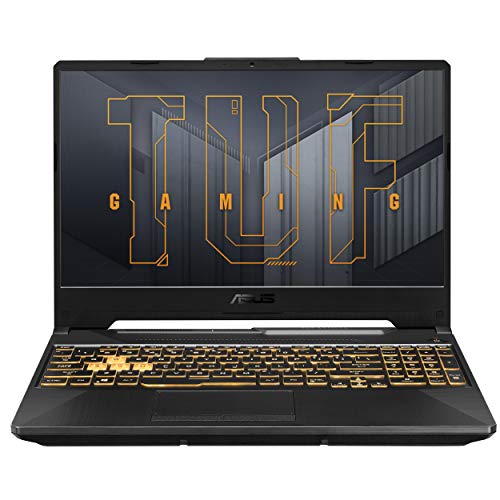
All 3 Picks at a Glance
| Product | Specs | Action |
|---|---|---|
| Our Top Picks |
| Check price on Amazon |
| 2. ASUS TUF Gaming A15 FA506NC, 16GB Configuration — Best for Multitasking | Check price on Amazon | |
 3. ASUS TUF Gaming A15 (2024) FA506NF-ES51 — Best Entry Pick | Check price on Amazon |
Key takeaways
- Searching for the best asus gaming laptops under 500? We compare three entry-level ASUS TUF Gaming A15 laptops on graphics, memory, display and cooling.
As an Amazon Associate I earn from qualifying purchases.
The Short Answer
If you want an ASUS gaming laptop at the affordable end of the range, the ASUS TUF Gaming A15 is the line to look at first. It is the entry point of the ASUS gaming laptop family: a 15.6-inch chassis, a dedicated NVIDIA graphics chip, a high-refresh display, and a durability-certified build, without the premium materials and flagship graphics of the ROG Strix range. Every pick in this guide is a TUF Gaming A15 configuration, because that is where ASUS concentrates its most affordable dedicated-graphics laptops.
Our lead pick is the ASUS TUF Gaming A15 FA506NC-ES51, with a Ryzen 5 7535HS processor, an RTX 3050 graphics chip, 8GB of DDR5 memory, and a 512GB PCIe Gen4 SSD. It pairs the strongest graphics chip in this guide with a 144Hz display, which makes it the best all-round choice for competitive games and modern titles at 1080p. If you multitask heavily, the 16GB FA506NC configuration is the better fit. If your budget is at its tightest and you mainly play esports titles and older games, the RTX 2050 FA506NF-ES51 covers the essentials.
One honest note before you buy: dedicated-graphics gaming laptops are scarce at the very bottom of the budget ladder, and the figure attached to any listing can move. Treat the “under 500” label as the budget you are shopping toward, confirm the current figure on the listing before you commit, and judge each laptop below on its hardware, not on a number in a headline. The three configurations below are the most affordable entry-level ASUS gaming laptops with dedicated graphics that we could verify on Amazon US.
Our Top Picks
- Best all-round pick: ASUS TUF Gaming A15 (2024) FA506NC-ES51 — Ryzen 5 7535HS, RTX 3050, 8GB DDR5, 512GB SSD, 15.6-inch FHD 144Hz display.
- Best for multitasking: ASUS TUF Gaming A15 FA506NC, 16GB configuration — the same RTX 3050 graphics with twice the memory, for heavier multitasking and larger game libraries.
- Best entry pick: ASUS TUF Gaming A15 (2024) FA506NF-ES51 — Ryzen 5 7535HS, RTX 2050, 8GB DDR5, 512GB SSD, 15.6-inch FHD 144Hz display.
Quick Comparison
| Laptop | Graphics | Processor | Memory | Storage | Display |
|---|---|---|---|---|---|
| TUF Gaming A15 FA506NC-ES51 | RTX 3050, 4GB GDDR6 | Ryzen 5 7535HS | 8GB DDR5 | 512GB PCIe Gen4 SSD | 15.6-inch FHD, 144Hz |
| TUF Gaming A15 FA506NC, 16GB | RTX 3050, 4GB GDDR6 | Ryzen 5 7535HS | 16GB DDR5 | 512GB PCIe Gen4 SSD | 15.6-inch FHD, 144Hz |
| TUF Gaming A15 FA506NF-ES51 | RTX 2050, 4GB GDDR6 | Ryzen 5 7535HS | 8GB DDR5 | 512GB PCIe Gen4 SSD | 15.6-inch FHD, 144Hz |
All three laptops run Windows 11 Home, connect over Wi-Fi 6, and share the same TUF chassis, cooling design, and port layout. The differences that matter are the graphics chip and the amount of memory.
How to Choose
Start with the graphics chip
The graphics chip decides which games run smoothly and at what settings. The RTX 3050 in the two FA506NC configurations is the stronger chip in this guide: it handles competitive titles at high frame rates and modern titles at 1080p with settings turned down a notch. The RTX 2050 in the FA506NF-ES51 is a step below, but it is still a dedicated graphics chip with its own video memory, which puts it well ahead of integrated graphics for esports titles such as Valorant, Fortnite, CS2, and League of Legends, and for older AAA games. If you play newer demanding titles, choose the RTX 3050. If you play competitive or older games, the RTX 2050 is enough.
Memory matters more than it looks
All three picks ship with DDR5 memory and a 512GB PCIe Gen4 SSD, but the amount of memory differs. 8GB is workable for gaming on its own, but it fills up fast once you add a browser with many tabs, voice chat, and a game running at the same time. 16GB gives you breathing room and is the single most useful upgrade in this guide if you multitask. The TUF A15 chassis is also easy to open for memory and storage upgrades, according to the listing, so an 8GB model is not a dead end. Confirm the upgrade layout on the listing for the exact configuration you buy, since layouts can vary by configuration.
Do not overlook the display
Every pick here has a 15.6-inch Full HD display running at 144Hz with Adaptive-Sync. That combination matters for gaming: a 144Hz panel shows motion more smoothly than a standard 60Hz panel, and Adaptive-Sync reduces tearing and stutter. The panel is an IPS-level display with modest color coverage, which is normal for entry-level gaming laptops. It is fine for gaming and everyday use, but if color-critical photo or video work is part of your day, confirm the panel specification on the listing and consider an external monitor for that work.
Cooling and build
The TUF line is built around durability: ASUS builds these laptops to the MIL-STD-810H standard, which covers drops, vibration, humidity, and temperature extremes. Cooling comes from a pair of 84-blade Arc Flow fans, per the listing. Expect fan noise under load — that is normal for this class of laptop — and use the laptop on a hard, flat surface so the intake vents stay clear.
Ports and connectivity
All three configurations include Wi-Fi 6, three USB Type-A ports, a USB Type-C port with DisplayPort support, HDMI 2.1, an RJ45 LAN port, and a combo audio jack, per the listing — enough for a wired network connection, an external monitor, and the usual keyboard, mouse, and headset.
The Picks in Detail
1. ASUS TUF Gaming A15 (2024) FA506NC-ES51 — Best All-Round Pick
ASUS TUF Gaming A15 (2024) FA506NC-ES51
The FA506NC-ES51 is the strongest all-round pick in this guide. It pairs an AMD Ryzen 5 7535HS processor — six cores, up to 4.55 GHz — with an NVIDIA GeForce RTX 3050 laptop graphics chip running at up to 75W with Dynamic Boost per the ASUS spec (the listing states 70W). That combination handles competitive games at high frame rates on the 144Hz display and copes with modern titles at 1080p when you are willing to adjust settings. The 8GB of DDR5-5600 memory (effective 4800MHz on this processor, per ASUS) and 512GB PCIe 4.0 SSD keep Windows 11 responsive and load times short, and the 15.6-inch Full HD display with Adaptive-Sync keeps motion smooth and tearing to a minimum.
The build is the standard TUF formula: a MIL-STD-810H-certified chassis, Arc Flow fans, and a keyboard laid out for long sessions. The listing also notes a 90-day pass for a game subscription service — confirm the current bundle on the listing, since bundled extras change over time.
This is the pick for the buyer who wants one laptop to do everything: competitive play, modern titles at sensible settings, school or office work, and media. Its only real weakness is the 8GB of memory, which is the first thing to upgrade if you multitask heavily.
Pros:
– Strongest graphics chip in this guide, with the RTX 3050 at up to 75W with Dynamic Boost
– 144Hz Full HD display with Adaptive-Sync for smooth competitive play
– Fast DDR5 memory and a PCIe Gen4 SSD for quick loading
– MIL-STD-810H-certified build with dual-fan Arc Flow cooling
– Straightforward memory and storage upgrade path
Cons:
– 8GB of memory can feel tight when multitasking with a game open
– Modest color coverage on the display for color-critical work
– Fan noise is noticeable under sustained load
2. ASUS TUF Gaming A15 FA506NC, 16GB Configuration — Best for Multitasking
ASUS TUF Gaming A15 FA506NC, 16GB configuration
The 16GB FA506NC configuration is the same laptop as the lead pick, with one meaningful change: twice the memory. It keeps the Ryzen 5 7535HS processor, the RTX 3050 graphics chip, the 512GB SSD, and the 15.6-inch Full HD 144Hz display, but the 16GB of DDR5 memory changes how the machine behaves under a real workload. With a game, voice chat, a browser full of tabs, and a music app open at once, the extra memory keeps everything responsive instead of forcing the system to lean on the SSD.
For a buyer who games while streaming, records gameplay, or simply never closes a tab, this is the configuration to choose. The decision comes down to how you use the machine: if you game with nothing else open, save the money; if your laptop is your whole desk — game, chat, browser, and work all at once — the 16GB model earns its place. Confirm the exact memory configuration and the number of memory slots on the listing, since configurations in this family can vary.
Pros:
– Same RTX 3050 graphics and 144Hz display as the lead pick
– 16GB of DDR5 memory for heavy multitasking and larger titles
– 512GB PCIe Gen4 SSD for fast loading
– Same durable TUF chassis and Arc Flow cooling
– Better suited to streaming or recording while playing
Cons:
– Shares the lead pick’s modest display color coverage
– Still a 512GB drive, which fills up fast with several large games installed
– Fan noise under sustained load, as with the rest of the line
3. ASUS TUF Gaming A15 (2024) FA506NF-ES51 — Best Entry Pick
ASUS TUF Gaming A15 (2024) FA506NF-ES51
The FA506NF-ES51 is the most affordable way into an ASUS gaming laptop with a dedicated graphics chip. It keeps the Ryzen 5 7535HS processor, 8GB of DDR5 memory, 512GB PCIe Gen4 SSD, and the 15.6-inch Full HD 144Hz display of its siblings, but swaps the RTX 3050 for an RTX 2050 with 4GB of GDDR6 memory, running at up to 70W with Dynamic Boost. That is a real step down in graphics power, and it shows in newer demanding titles, where you will need lower settings and modest expectations.
For esports titles and older games, though, the difference is small. Valorant, Fortnite, CS2, League of Legends, Rocket League, and Minecraft all run well on the RTX 2050 at 1080p, and the 144Hz display still pays off in fast-moving games. The chassis, cooling, ports, and keyboard are the same as the more expensive configurations, so nothing about the day-to-day experience feels cut down — only the graphics ceiling is lower.
Pros:
– Most affordable entry point to a dedicated-graphics ASUS gaming laptop
– RTX 2050 still handles esports and older titles well at 1080p
– Same 144Hz display, processor, SSD, and TUF build as the higher configurations
– Same port selection, including HDMI 2.1 and USB-C with DisplayPort
– Easy memory upgrade path when you want more headroom
Cons:
– Weakest graphics chip in this guide; newer demanding titles need low settings
– 8GB of memory can feel tight when multitasking
– 4GB of video memory limits texture settings in newer games
Who Should Choose What
- Choose the FA506NC-ES51 (RTX 3050, 8GB) if you want the best all-round balance in this guide: the strongest graphics chip here, a 144Hz display, and a machine that covers competitive play and modern titles at 1080p. This is the default recommendation for most buyers.
- Choose the 16GB FA506NC if you multitask heavily, stream or record while you play, or keep many applications open at once. The extra memory is the difference between a machine that copes and a machine that stays responsive.
- Choose the FA506NF-ES51 (RTX 2050, 8GB) if your budget is at its tightest and your library is mostly esports and older titles. It delivers the same display, processor, and build as the others, with a lower graphics ceiling you may never notice in the games you actually play.
If you are torn between the two 8GB models, the question is simple: do you play newer demanding titles? If yes, the RTX 3050 model is worth it. If your games are competitive or a few years old, the RTX 2050 model covers you. If you are torn between the two RTX 3050 models, heavy multitaskers should take the 16GB model, and everyone else should take the 8GB model and consider a memory upgrade later.
Common Mistakes
Chasing the lowest figure instead of the right hardware. The cheapest listing is not always the best buy. A laptop with integrated graphics and no dedicated chip may look similar on a spec sheet, but it will struggle in the games that a TUF A15 handles comfortably. Check that the configuration you are buying actually has a dedicated NVIDIA graphics chip, and that the model number matches the one in this guide.
Buying a configuration by the family name alone. “TUF Gaming A15” covers many configurations with different graphics chips, memory amounts, and displays. Always match the full model number — FA506NC-ES51, FA506NF-ES51, or the 16GB FA506NC configuration — against the listing before you buy.
Ignoring memory. 8GB is the minimum for comfortable gaming in this class, and it is easy to underestimate how quickly a browser, voice chat, and a game fill it up. If you multitask, either choose the 16GB configuration or plan a memory upgrade. Check the listing for the memory configuration and the number of upgrade slots.
Expecting desktop-class performance. A laptop RTX 3050 runs at a lower power limit than a desktop card with the same name, and a laptop chassis has less room for cooling. These laptops are strong for 1080p gaming, but they are not desktop replacements. Set your expectations — and your in-game settings — accordingly.
Gaming on battery power. Gaming laptops draw far more power under load than their batteries can sustain for long, and performance drops when unplugged. Game plugged in, and use the battery for light work and carrying the machine around.
Forgetting storage. 512GB sounds generous until you install three or four modern games. Large titles can take well over 100GB each, and Windows itself needs room. Plan for an external drive or a storage upgrade, and check whether the configuration you buy has a second SSD slot before you commit.
FAQ
Are ASUS TUF Gaming A15 laptops good for gaming?
Yes, for 1080p gaming. The TUF Gaming A15 pairs a Ryzen 5 processor with a dedicated NVIDIA graphics chip and a 144Hz display, which covers competitive titles at high frame rates and modern titles at adjusted settings. It is an entry-level gaming laptop, so it is best judged against other laptops in its class rather than against desktop machines or flagship gaming laptops.
What is the difference between the RTX 2050 and RTX 3050 in these laptops?
The RTX 3050 is the stronger chip. Both have 4GB of video memory; the RTX 3050 runs at up to 75W with Dynamic Boost and the RTX 2050 at up to 70W in these configurations, but the RTX 3050 delivers higher frame rates in modern titles and copes better with higher settings. The RTX 2050 is still a dedicated graphics chip and handles esports and older titles well, but it needs lower settings in newer demanding games.
Is 8GB of memory enough for a gaming laptop?
8GB is enough for gaming on its own, but it gets tight once you add a browser, voice chat, and other applications alongside a game. If you multitask, 16GB is noticeably better. The TUF A15 chassis allows memory upgrades, so an 8GB model can be upgraded later — confirm the slot layout on the listing for your exact configuration.
Can I upgrade the memory and storage on a TUF Gaming A15?
The TUF A15 is designed with accessible memory and storage slots, and the listing notes that upgrades are straightforward. Memory can be increased and the SSD can be swapped for a larger one. Confirm the number of slots and the maximum supported capacity on the listing for the configuration you buy, since layouts can vary.
What should I check on the listing before buying?
Match the full model number — FA506NC-ES51, FA506NF-ES51, or the 16GB FA506NC configuration — against the listing, and confirm the graphics chip, memory amount, storage size, display refresh rate, and included accessories. Listings for the same laptop family can describe different configurations, so the model number is the detail that keeps you from buying the wrong machine.
Conclusion
The ASUS TUF Gaming A15 is the right place to start if you want an ASUS gaming laptop at the affordable end of the range. All three configurations in this guide share the same strengths: a Ryzen 5 7535HS processor, a dedicated NVIDIA graphics chip, a 144Hz Full HD display, a durable MIL-STD-810H-certified chassis, and a straightforward upgrade path.
For most buyers, the FA506NC-ES51 with the RTX 3050 and 8GB of memory is the best balance of graphics power and value. Heavy multitaskers should step up to the 16GB FA506NC configuration, and buyers whose libraries are mostly esports and older titles can save money with the RTX 2050 FA506NF-ES51 without giving up the display, the processor, or the build. Whichever you choose, match the full model number on the listing and confirm the memory and storage configuration before you buy.
FAQ
Are ASUS TUF Gaming A15 laptops good for gaming?
What is the difference between the RTX 2050 and RTX 3050 in these laptops?
Is 8GB of memory enough for a gaming laptop?
Can I upgrade the memory and storage on a TUF Gaming A15?
What should I check on the listing before buying?
More from Amazon
Programs that pair well with the guide above. Offers and eligibility are set by Amazon and may change.
Free shipping on eligible items, Prime Video and more. Eligible new members can start with a free trial.
Start a Prime free trialA Prime membership for ages 18-24 with a trial period. Eligibility is set by Amazon.
See Prime for Young AdultsAudiobooks and podcasts to listen to on the go. Eligible new members can start with a free trial.
Try Audible freeAd-free music streaming. Eligible new subscribers can start with a free trial.
Try Music Unlimited freeAs an Amazon Associate we earn from qualifying purchases.









