
Our Short List of 3
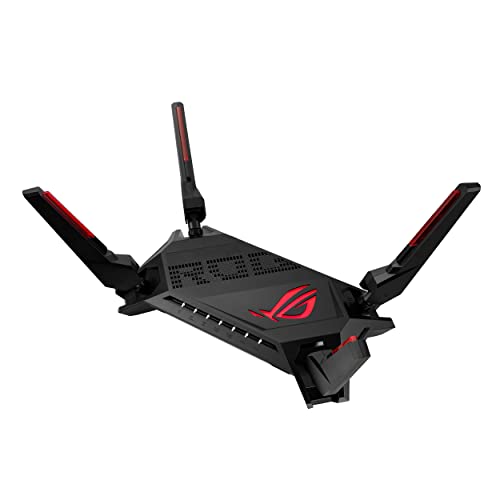
- Best for: A Spectrum household that wants the strongest all-around gaming router with multi-gigabit wired ports.

- Best for: A competitive player who wants to control which game servers the router connects to.

- Best for: A home where the 5 GHz band is crowded and the gaming device supports the 6 GHz band.
All 4 Picks at a Glance
| Product | Specs | Action |
|---|---|---|
| ASUS ROG Rapture GT-AX6000 — ASIN B09L8PCTPT |
| Check price on Amazon |
| NETGEAR Nighthawk Pro Gaming XR1000 — ASIN B08FWNNWTB |
| Check price on Amazon |
| TP-Link Archer AXE75 — ASIN B0B3SQK74L |
| Check price on Amazon |
 ASUS RT-AX86U Pro — ASIN B0BQ417K47 |
| Check price on Amazon |
Key takeaways
- The best gaming routers for Spectrum pair a fast Ethernet WAN port with game traffic controls. Compare four Spectrum-ready routers by band, speed, and ports.
The best gaming router for Spectrum is the ASUS ROG Rapture GT-AX6000, because it pairs dual 2.5G ports with triple-level game acceleration that puts gaming traffic first on a busy home network. The NETGEAR Nighthawk Pro Gaming XR1000 is the strongest runner-up for players who want DumaOS controls for picking game servers and steady ping. Every router in this guide connects to a Spectrum modem through an Ethernet WAN port, so each one works with Spectrum cable internet plans.
Spectrum delivers internet to the home through a cable modem, and a gaming router plugs into that modem with an Ethernet cable. That simple setup is why the router choice matters more than the modem choice for gaming: the router decides which traffic gets priority, how fast the wireless bands run, and how many wired devices can connect at full speed. Our top pick: ASUS ROG Rapture GT-AX6000. Runner-up: NETGEAR Nighthawk Pro Gaming XR1000. This guide compares published specifications only: every speed, port, and feature below comes from the manufacturer’s published specifications or the Amazon product listing.
At a Glance
| Product | Best for | Key specification |
|---|---|---|
| ASUS ROG Rapture GT-AX6000 — ASIN B09L8PCTPT | Overall gaming on Spectrum | WiFi 6 AX6000, dual 2.5G ports, triple-level game acceleration |
| NETGEAR Nighthawk Pro Gaming XR1000 — ASIN B08FWNNWTB | Server control and steady ping | WiFi 6 AX5400, DumaOS 3.0, Geo-Filter |
| TP-Link Archer AXE75 — ASIN B0B3SQK74L | A clean 6 GHz lane for gaming | WiFi 6E tri-band AXE5400, 6 GHz band, 160 MHz channels |
| ASUS RT-AX86U Pro — ASIN B0BQ417K47 | Wired console and PC gaming | WiFi 6 AX5700, 2.5G port, dedicated gaming port |
How to Choose
1. Confirm it connects to a Spectrum modem
Spectrum internet arrives through a cable modem, and a gaming router connects to that modem through an Ethernet WAN port. Every router in this guide has an Ethernet WAN port, so each one plugs into a Spectrum modem with a standard Ethernet cable. A router with a built-in DSL modem does not fit this setup, and a router that only works as a mesh satellite without a WAN port does not fit either. Check that the router lists a WAN port in its published specifications before anything else.
2. Match the router to the Spectrum plan speed
Spectrum plans run from a few hundred megabits per second up to gigabit and multi-gigabit tiers. A router with only gigabit ports caps a connection at gigabit speed on the wired side, while a router with a 2.5G WAN port passes a faster plan through to wired devices. The GT-AX6000 and the RT-AX86U Pro both carry 2.5G ports, so they suit gigabit and faster Spectrum plans. On a plan below gigabit speed, any of the four routers in this guide has enough throughput, and the choice turns on features rather than raw speed.
3. Pick the wireless generation: WiFi 6 or WiFi 6E
WiFi 6 routers run on the 2.4 GHz and 5 GHz bands. WiFi 6E adds a 6 GHz band, which gives gaming devices a lane with less traffic from older devices. The Archer AXE75 is the only WiFi 6E router in this guide, and its 6 GHz band suits a home where many devices share the 5 GHz band. WiFi 6 routers still serve current consoles and PCs well, because the PlayStation 5 and most gaming laptops connect over WiFi 6. A WiFi 6E router only helps when the gaming device itself supports the 6 GHz band.
4. Look for game traffic controls
A gaming router earns its name from traffic controls, not from styling. Adaptive QoS, game acceleration, and a dedicated gaming port all push game packets ahead of downloads and video streams. The GT-AX6000 uses triple-level game acceleration across the device, the router, and the game server path. The XR1000 uses DumaOS 3.0 with a Geo-Filter that limits matchmaking to nearby servers. The RT-AX86U Pro uses Adaptive QoS with a dedicated gaming port. These controls matter most in a home where someone else streams video or downloads large files while a match is running.
5. Count the wired ports
A wired connection gives a gaming PC or console the lowest and steadiest latency, so the number and speed of LAN ports matter. The GT-AX6000 has dual 2.5G ports plus gigabit LAN ports, which suits a desk with a PC and a console both wired in. The XR1000 has four gigabit LAN ports. The AXE75 has four gigabit LAN ports and a single gigabit WAN port. The RT-AX86U Pro has a 2.5G port and a dedicated gaming port that gets priority over the other wired ports. Count the wired devices in the gaming setup first, then match the port list to that count.
6. Check coverage for the size of the home
A single router covers a small apartment or a single floor with ease, while a large or multi-floor home needs stronger antennas or a mesh system. All four routers in this guide use external antennas and beamforming to aim the signal at connected devices. The GT-AX6000 supports AiMesh, the AXE75 supports OneMesh, and the RT-AX86U Pro supports AiMesh, so each one can join a mesh network with a second compatible router when one unit cannot cover the whole home. A mesh-ready router keeps the gaming controls working across the extended network.
7. Check security and parental controls
A router guards every device on the home network, so its security features deserve a look. The ASUS routers in this guide include AiProtection Pro with no subscription, and the AXE75 includes HomeShield. The XR1000 includes NETGEAR Armor support and security features in its published specifications. Parental controls, guest networks, and automatic security updates all help keep the network safe without extra software on each device. A guest network also keeps visitors off the same network as the gaming PC and consoles.
Our Picks
ASUS ROG Rapture GT-AX6000 — ASIN B09L8PCTPT
- Best for: A Spectrum household that wants the strongest all-around gaming router with multi-gigabit wired ports.
A Spectrum household that wants the strongest all-around gaming router with multi-gigabit wired ports.
The ASUS ROG Rapture GT-AX6000 is a dual-band WiFi 6 gaming router with combined wireless speeds up to 6000 Mbps, split across 1148 Mbps on the 2.4 GHz band and 4804 Mbps on the 5 GHz band. A 2.0 GHz quad-core CPU with 1 GB of RAM drives the routing, and dual 2.5G WAN and LAN ports pass multi-gigabit Spectrum plans through to wired devices. Triple-level game acceleration prioritises gaming traffic at the device, router, and server stages, and a dedicated gaming port gives the connected PC or console first claim on the wired connection. AiMesh support lets the router join a mesh network, AiProtection Pro covers network security with no subscription, and VPN Fusion runs a VPN on selected devices while the rest of the network stays on the normal connection.
Consideration: It has no 6 GHz band, so WiFi 6E devices cannot use a dedicated clean lane.
NETGEAR Nighthawk Pro Gaming XR1000 — ASIN B08FWNNWTB
- Best for: A competitive player who wants to control which game servers the router connects to.
A competitive player who wants to control which game servers the router connects to.
The NETGEAR Nighthawk Pro Gaming XR1000 is a 6-stream WiFi 6 router with AX5400 wireless speed up to 5.4 Gbps across the 2.4 GHz and 5 GHz bands. DumaOS 3.0 is the headline feature: its Geo-Filter limits matchmaking to servers inside a chosen distance, its ping heatmap shows latency to game servers, and its bandwidth allocation controls divide the connection between devices. Four gigabit Ethernet LAN ports and one USB 3.0 port cover wired consoles, a PC, and a storage drive. The router runs on a quad-core processor and supports up to 5.4 Gbps of combined wireless throughput, which suits gigabit Spectrum plans with several gaming devices online at once.
Consideration: Its LAN ports are gigabit only, so a Spectrum plan faster than gigabit speed cannot pass full speed to a wired device.
TP-Link Archer AXE75 — ASIN B0B3SQK74L
- Best for: A home where the 5 GHz band is crowded and the gaming device supports the 6 GHz band.
A home where the 5 GHz band is crowded and the gaming device supports the 6 GHz band.
The TP-Link Archer AXE75 is a tri-band WiFi 6E router with AXE5400 combined speed: 574 Mbps on 2.4 GHz, 2402 Mbps on 5 GHz, and 2402 Mbps on 6 GHz. The 6 GHz band gives gaming devices a lane with almost no traffic from older WiFi devices, and 160 MHz channels widen that lane further. A 1.7 GHz quad-core CPU runs the routing, with one gigabit WAN port, four gigabit LAN ports, and one USB 3.0 port. OneMesh support lets the router join a mesh network with other OneMesh devices, HomeShield adds network security and parental controls, and WPA3 protects the wireless network. The router is also listed as compatible with Alexa for voice control of the network.
Consideration: All of its Ethernet ports are gigabit, so it cannot pass a multi-gigabit Spectrum plan at full speed to wired devices.
ASUS RT-AX86U Pro — ASIN B0BQ417K47
- Best for: A wired gaming desk with a console or PC that needs a 2.5G port and a dedicated gaming port.
A wired gaming desk with a console or PC that needs a 2.5G port and a dedicated gaming port.
The ASUS RT-AX86U Pro is a dual-band WiFi 6 gaming router with AX5700 combined speed up to 5700 Mbps across the 2.4 GHz and 5 GHz bands. A 2.0 GHz quad-core CPU with 1 GB of RAM powers the routing, and a 2.5G port handles a gigabit or faster Spectrum plan on the wired side. A dedicated gaming port gives the connected console or PC priority over other wired devices, Mobile Game Mode lowers latency for phone gaming, and Adaptive QoS keeps game traffic ahead of downloads and streams. AiProtection Pro covers network security with no subscription, and AiMesh support lets the router extend coverage with a second compatible ASUS router. The published specifications list PlayStation 5 compatibility and port forwarding for console gaming.
Consideration: It has no 6 GHz band, so it cannot give WiFi 6E devices a separate lane.
Which One Is Right for You?
A Spectrum plan at gigabit speed or faster pairs best with the GT-AX6000, because its dual 2.5G ports pass the full plan speed to wired devices and its game acceleration works across the whole network. A player who cares most about which servers a match connects to should take the XR1000, because DumaOS 3.0 gives the most direct control over server distance and latency. A home with a crowded 5 GHz band and a WiFi 6E gaming device should take the AXE75, because its 6 GHz band is the cleanest wireless lane in this guide. A wired desk with one console or PC and a gigabit Spectrum plan should take the RT-AX86U Pro, because its dedicated gaming port and 2.5G port cover that setup at a lower tier than the GT-AX6000. Every router here connects to a Spectrum modem through an Ethernet WAN port, so the choice turns on ports, bands, and traffic controls rather than on compatibility.
Frequently Asked Questions
Do these routers work with Spectrum internet?
Yes. Spectrum internet arrives through a cable modem, and each router in this guide connects to that modem with an Ethernet cable through its WAN port. The router does not replace the modem; it plugs into the modem and manages the home network, including WiFi, wired devices, and game traffic controls.
Does a gaming router need a Spectrum-approved modem?
The modem itself must work with Spectrum service, and Spectrum publishes a list of approved modems for its plans. The router connects to any working modem through Ethernet, so the router choice is separate from the modem choice. Keep the modem that Spectrum supplied or an approved modem, then connect any router in this guide to it.
Is WiFi 6E worth it for Spectrum gaming?
WiFi 6E adds a 6 GHz band with less traffic than the 5 GHz band, which helps when many devices share the home network. It only helps when the gaming device supports the 6 GHz band; a PlayStation 5 or an older laptop without WiFi 6E cannot use it. The Archer AXE75 is the WiFi 6E pick in this guide, while the other three routers use WiFi 6.
Should a gaming PC connect by cable or by WiFi?
A cable gives the lowest and steadiest latency, so a gaming PC or console near the router should use an Ethernet cable. WiFi suits devices in other rooms or devices that move around the home. The GT-AX6000 and the RT-AX86U Pro both carry 2.5G ports, which keep a wired connection fast on gigabit and faster Spectrum plans.
What is DumaOS on the NETGEAR XR1000?
DumaOS is the gaming operating system on the NETGEAR Nighthawk Pro Gaming XR1000. Its Geo-Filter limits matchmaking to game servers inside a distance chosen by the player, its ping heatmap shows latency to servers, and its bandwidth allocation divides the connection between devices. These controls aim at steady ping rather than at raw wireless speed.
Bottom Line
The ASUS ROG Rapture GT-AX6000 is the best gaming router for Spectrum in this guide, because it combines dual 2.5G ports, triple-level game acceleration, and a dedicated gaming port in one unit that plugs straight into a Spectrum modem. The NETGEAR Nighthawk Pro Gaming XR1000 is the pick for players who want DumaOS server controls, the TP-Link Archer AXE75 is the pick for a clean 6 GHz lane, and the ASUS RT-AX86U Pro is the pick for a wired desk on a gigabit plan. Match the router to the Spectrum plan speed, count the wired devices, and check whether the gaming device supports the 6 GHz band before choosing.
Disclosure: As an Amazon Associate, this site earns from qualifying purchases.
FAQ
Which One Is Right for You?
Do these routers work with Spectrum internet?
Does a gaming router need a Spectrum-approved modem?
Is WiFi 6E worth it for Spectrum gaming?
Should a gaming PC connect by cable or by WiFi?
What is DumaOS on the NETGEAR XR1000?
More from Amazon
Programs that pair well with the guide above. Offers and eligibility are set by Amazon and may change.
Free shipping on eligible items, Prime Video and more. Eligible new members can start with a free trial.
Start a Prime free trialA Prime membership for ages 18-24 with a trial period. Eligibility is set by Amazon.
See Prime for Young AdultsAudiobooks and podcasts to listen to on the go. Eligible new members can start with a free trial.
Try Audible freeAd-free music streaming. Eligible new subscribers can start with a free trial.
Try Music Unlimited freeAs an Amazon Associate we earn from qualifying purchases.









