
Our Short List of 3

- Layout: true 65 percent form factor with dedicated arrow keys, Page Up/Down, Home, and Delete
- Body: aircraft-grade aluminum
- Keycaps: double-shot PBT, secondary functions printed on keycap sides
- Switches: HyperX mechanical, rated to 80 million keypresses (switch feel varies by listing variant)
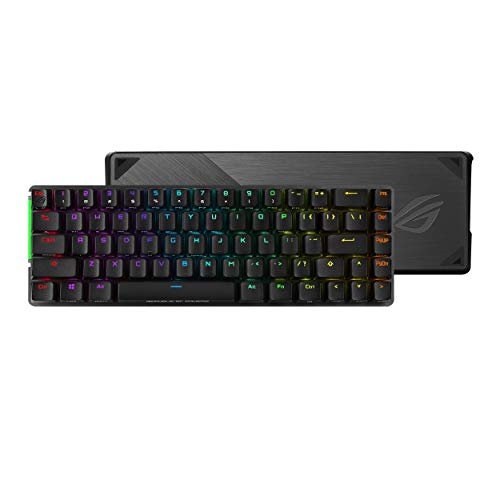
- Layout: 65 percent form factor, 306 mm length per manufacturer description
- Switches: ROG NX mechanical (this listing: NX Blue clicky)
- Keycaps: ROG PBT doubleshot
- Connectivity: 2.4 GHz RF (1 ms report rate) and wired USB mode

- Layout: 65 percent mechanical keyboard
- Switches: hot-swappable Kailh Box V2 tactile Brown; extra Cherry MX Green switches included for modifiers
- Keycaps: PBT doubleshot
- Backlighting: RGB, 16.7 million colors
All 3 Picks at a Glance
| Product | Specs | Action |
|---|---|---|
| HyperX Alloy Origins 65 |
| Check price on Amazon |
| ASUS ROG Falchion NX |
| Check price on Amazon |
| Cooler Master CK720 |
| Check price on Amazon |
Key takeaways
- The best 65 percent keyboards keep dedicated arrow keys in a near-60% footprint. Three verified picks compared on layout, switches, and connectivity.
A 65 percent keyboard is the layout for people who want a small board without giving up the keys they actually reach for. Unlike a 60 percent board, which buries the arrow keys and navigation cluster behind a function layer, a 65 percent keyboard keeps dedicated arrow keys and usually a slim column of navigation keys — Delete, Page Up, Page Down, and sometimes Home — while staying close to the footprint of a 60 percent board. That single design decision makes the 65 percent class the most practical compact layout for mixed work and play: you get the desk space and mouse room of a small keyboard, but spreadsheets, code editors, and platformers do not suddenly require two-handed key combinations for basic cursor movement.
The trade-offs are real, though. There is no number pad and no dedicated function row, so F-keys and media controls live on a function layer. Keycap sets can be trickier to match because the right-hand modifier keys are often non-standard widths, and the navigation column varies from model to model. This guide looks at three verified 65 percent keyboards that take different approaches to the class: a wired aluminum board built for durability, a wireless board with a touch panel and a protective cover case, and a hot-swappable board with a control dial for people who like to tune how their keys feel. Every product below is a true 65 percent layout — not a 60 percent board, not a tenkeyless — so the comparison stays inside one layout class.
As an Amazon Associate, we earn from qualifying purchases.
Quick answer
If you want one board and do not want to think about it again, the HyperX Alloy Origins 65 is the safest pick: an aircraft-grade aluminum body, double-shot PBT keycaps, and a detachable USB-C cable in a true 65 percent layout with dedicated arrow and navigation keys. If you need wireless and portability, the ASUS ROG Falchion NX pairs a 2.4 GHz connection with a near-60-percent footprint, an interactive touch panel, and a two-way cover case. If you want to change how your keyboard feels without buying a new one, the Cooler Master CK720 has hot-swappable switches, a three-way control dial, and pre-lubed stabilizers — though its availability was unconfirmed at the time of checking, so confirm it is in stock before planning a build around it.
Key takeaways
- A 65 percent keyboard keeps dedicated arrow keys and a small navigation column that 60 percent boards drop, while staying nearly as small.
- There is no number pad and no separate function row; F-keys are accessed through a function layer on every board in this class.
- The HyperX Alloy Origins 65 is wired only, with an aluminum body and switches rated to 80 million keypresses.
- The ASUS ROG Falchion NX is the wireless option here, with 2.4 GHz RF, a wired USB mode, a touch panel, and a cover case included.
- The Cooler Master CK720 is the tinkerer’s pick: hot-swappable switches, extra switches in the box, and a customizable dial — but its availability was unconfirmed when checked.
- Right-side modifier widths and navigation columns differ between 65 percent models, so check keycap compatibility before buying a custom keycap set.
The picks
HyperX Alloy Origins 65
- Layout: true 65 percent form factor with dedicated arrow keys, Page Up/Down, Home, and Delete
- Body: aircraft-grade aluminum
- Keycaps: double-shot PBT, secondary functions printed on keycap sides
- Switches: HyperX mechanical, rated to 80 million keypresses (switch feel varies by listing variant)
The Alloy Origins 65 is built around a simple idea: take the 65 percent layout and put it in a body that feels like it will outlast the computer it is plugged into. The frame is aircraft-grade aluminum rather than plastic, and the keycaps are double-shot PBT with the secondary functions printed on the sides of the caps, so the function-layer legends stay readable instead of wearing off. The layout keeps dedicated arrow keys plus Page Up, Page Down, Home, and Delete — the full navigation set many 65 percent boards trim down — which makes it the closest thing in this guide to a full-size keyboard’s behavior in a compact frame.
Under the caps, the board uses HyperX mechanical switches rated to 80 million keypresses, with an exposed-LED design that lets the RGB backlighting show through brightly; lighting is customizable per key through the HyperX NGENUITY software, which also handles macros and lighting profiles. The cable is a detachable braided USB-C lead, the feet offer three tilt angles across two steps, and the box includes a keycap puller, an extra Esc key, and an alternate spacebar. One note for buyers: this listing is sold in more than one switch variant, so check the variant selector on the product page and choose the switch feel you want at checkout rather than assuming a single default.
See the HyperX Alloy Origins 65 on Amazon
ASUS ROG Falchion NX
- Layout: 65 percent form factor, 306 mm length per manufacturer description
- Switches: ROG NX mechanical (this listing: NX Blue clicky)
- Keycaps: ROG PBT doubleshot
- Connectivity: 2.4 GHz RF (1 ms report rate) and wired USB mode
The Falchion NX approaches the 65 percent class from the portability side. ASUS describes it as a 65 percent keyboard with a 306 mm length — nearly the footprint of a 60 percent board — and it is the only wireless pick in this guide, connecting over 2.4 GHz RF with a 1 ms report rate or over a wired USB connection when you want zero wireless variables. A two-way polycarbonate cover case is included: it protects the board in a bag and doubles as a tray underneath it, which makes this the natural choice for anyone who carries a keyboard between desks or to events.
Its signature feature is the interactive touch panel on the left flank, a touch strip you can use for volume, shortcuts, and macros without reaching for a separate control. This listing uses ROG NX Blue clicky mechanical switches with ROG PBT doubleshot keycaps, and the board carries wireless Aura Sync RGB — per-key lighting plus lighting on the touch panel itself. Battery life is rated at up to 450 hours with lighting off and 53 hours with default lighting, and configuration runs through Armoury Crate. At 1.1 lb it is noticeably lighter than the other two picks, which suits the travel role it is designed for.
See the ASUS ROG Falchion NX on Amazon
Cooler Master CK720
- Layout: 65 percent mechanical keyboard
- Switches: hot-swappable Kailh Box V2 tactile Brown; extra Cherry MX Green switches included for modifiers
- Keycaps: PBT doubleshot
- Backlighting: RGB, 16.7 million colors
The CK720 is the pick for people who treat a keyboard as a starting point rather than a finished product. It ships with hot-swappable Kailh Box V2 tactile Brown switches, so any switch can be pulled and replaced without soldering, and Cooler Master includes extra Cherry MX Green switches in the box for the modifier keys — a small touch that lets you make the keys you hold down for shortcuts noticeably firmer than the keys you type on. The stabilizers come pre-lubed from the factory, silicone padding is built into the case to soften the sound and feel of bottoming out, and the construction mixes aluminum and plastic.
A three-way customizable dial on the board gives you a physical control for whatever you assign to it, the keycaps are PBT doubleshot, and the backlighting covers 16.7 million colors over a wired USB Type-C connection. There is 512 KB of on-board memory for carrying settings with the board. One honest caution: when this listing was checked, its availability could not be confirmed from the product page copy — the board appeared in the manufacturer’s comparison listings, but no clear buy-box confirmation was visible. Treat it as a board to verify at purchase time: if it is in stock when you look, it is a strong pick; if not, the other two boards in this guide cover the wired and wireless roles without the uncertainty.
See the Cooler Master CK720 on Amazon
How to choose
Start with the connection. Only one board here is wireless: if your desk setup, couch setup, or travel bag demands a cable-free board, the Falchion NX is the pick by default, and its cover case reinforces that role. If the keyboard will live on one desk, a wired board like the Alloy Origins 65 or the CK720 removes battery management and pairing from your life entirely.
Next, think about how much you will use the navigation column. The Alloy Origins 65 keeps the fullest set — arrows plus Page Up, Page Down, Home, and Delete — which matters if you edit long documents or code. Compact boards trim this column differently, so compare the right edge of the layout photos against the keys you actually press every day before deciding that any 65 percent board will do.
Then decide how you feel about switches. If you want a fixed, durable typing feel and no maintenance, the aluminum-bodied Alloy Origins 65 is the straightforward choice — just pick your preferred switch variant on the listing. If you like the idea of changing switch feel later, or making modifier keys firmer than letter keys, the CK720’s hot-swappable sockets and included extra switches are built for exactly that, subject to the availability caution above. Finally, consider the extras: the Falchion NX’s touch panel replaces a separate volume control, the CK720’s dial does similar duty in a different form, and per-key RGB plus software macros on the HyperX board suit players who maintain lighting and macro profiles per game.
Who should skip
Skip the whole 65 percent class if you enter data into spreadsheets all day — no board here has a number pad, and a full-size or tenkeyless-plus-numpad setup will serve you better. Skip it, too, if you rely on a dedicated function row for work shortcuts and do not want those keys behind a function layer. If you want the smallest possible board and are happy to give up dedicated arrow keys entirely, a 60 percent keyboard is smaller still; this guide deliberately stays inside the 65 percent class. Gamers who need a wireless board with a protective case for travel should skip the two wired picks. And if you need a keyboard in hand this week with zero uncertainty, skip the CK720 until its availability is confirmed on the product page — the Alloy Origins 65 and Falchion NX were both confirmed as orderable when checked.
FAQ
What is the difference between a 65 percent and a 60 percent keyboard?
A 65 percent keyboard adds a dedicated arrow cluster and a slim navigation column — typically Delete and Page Up/Down, and on some models Home — to the 60 percent layout. A 60 percent board puts those keys on a function layer. The 65 percent board is slightly wider, but cursor movement and text navigation work without key combinations.
Do 65 percent keyboards have a function row?
No. F1 through F12 are accessed through a function layer, usually by holding an Fn key and pressing the number row. All three boards in this guide work this way. If your workflow depends on bare F-keys all day, consider a 75 percent or tenkeyless board instead.
Can I use custom keycaps on a 65 percent keyboard?
Usually, yes, but check the right side of the board first. Many 65 percent layouts use shorter right Shift and modifier keys than a full-size board, so a keycap set needs the correct sizes for those positions. The Alloy Origins 65 prints its secondary legends on the keycap sides, and both it and the CK720 use double-shot PBT caps, which are a solid stock starting point before you consider swapping.
Which of these keyboards is best for carrying in a bag?
The ASUS ROG Falchion NX. It is the lightest board here at 1.1 lb, it connects wirelessly over 2.4 GHz, and its included two-way polycarbonate cover protects the keys in transit and works as a tray at your destination. The wired boards are better treated as desk fixtures.
Final verdict
The 65 percent layout earns its popularity honestly: it is the smallest class that still behaves like a full keyboard for navigation. For most buyers, the HyperX Alloy Origins 65 is the one to get — aluminum construction, durable PBT keycaps, the fullest navigation column here, and a detachable cable, with the only homework being to select your preferred switch variant on the listing. Choose the ASUS ROG Falchion NX if wireless freedom, a touch panel, and a travel-ready cover case matter more than a metal body. Choose the Cooler Master CK720 if hot-swappable switches and a control dial are the features you will actually use — just confirm it is in stock first, since its availability was unconfirmed at checking time. Any of the three keeps your arrow keys where your fingers expect them, which is the entire point of the class.
Product and ASIN Reference
| Product | ASIN | Connection | Distinguishing feature |
|---|---|---|---|
| HyperX Alloy Origins 65 | B09RBB2VJJ | Wired USB-C (detachable) | Aircraft-grade aluminum body, fullest navigation column |
| ASUS ROG Falchion NX | B09GL76BFD | 2.4 GHz RF and wired USB | Touch panel, cover case, up to 450-hour battery without lighting |
| Cooler Master CK720 | B0BHL7SK6S | Wired USB Type-C | Hot-swappable switches, 3-way dial, availability unconfirmed at check time |
More from Amazon
Programs that pair well with the guide above. Offers and eligibility are set by Amazon and may change.
Free shipping on eligible items, Prime Video and more. Eligible new members can start with a free trial.
Start a Prime free trialA Prime membership for ages 18-24 with a trial period. Eligibility is set by Amazon.
See Prime for Young AdultsAudiobooks and podcasts to listen to on the go. Eligible new members can start with a free trial.
Try Audible freeAd-free music streaming. Eligible new subscribers can start with a free trial.
Try Music Unlimited freeAs an Amazon Associate we earn from qualifying purchases.









