Our Short List of 3
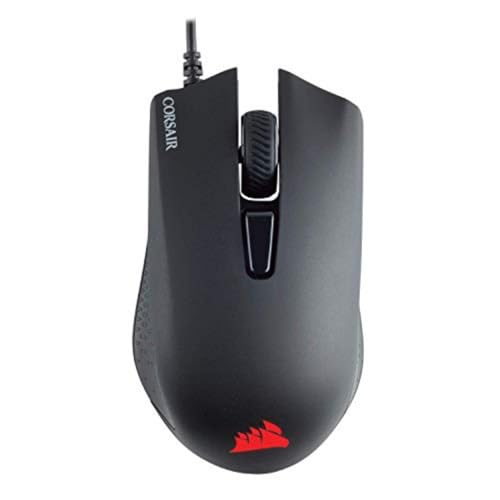
- Best for: claw grip players who want a light, simple wired mouse for shooters and MOBAs.
- Sensor: optical sensor, up to 12,000 DPI
- Buttons: 6 programmable buttons
- Switches: Omron switches rated for 20 million clicks
- Weight: 85 g

- Best for: palm and claw grip players who put comfort first.
- Sensor: Razer Focus+ optical sensor, up to 20,000 DPI
- Switches: Razer optical mouse switches
- Buttons: 8 programmable buttons
- Weight: 82 g

- Best for: budget buyers who want proven wireless without a charging cable.
- Sensor: HERO optical sensor, 200 to 12,000 DPI
- Connection: LIGHTSPEED wireless via USB receiver, 1 ms report rate
- Battery: up to 250 hours on one AA battery, included
- Buttons: 6 programmable buttons
All 4 Picks at a Glance
| Product | Specs | Action |
|---|---|---|
| Corsair Harpoon RGB Pro |
| Check price on Amazon |
| Razer DeathAdder V2 |
| Check price on Amazon |
| Logitech G305 LIGHTSPEED |
| Check price on Amazon |
 Logitech G203 LIGHTSYNC |
| Check price on Amazon |
Key takeaways
- Compare the best selling gaming mice on Amazon, including Harpoon RGB Pro, DeathAdder V2 and G305, with the sensor, weight and button specs that matter.
A best selling gaming mouse earns its position the slow way: it stays in production for years, shows up in setup after setup, and keeps getting recommended because its shape and sensor simply work for a lot of people. The real decision is not which mouse sells the most copies, but which of these proven designs matches your hand size, grip style and desk. A light wired mouse built for shooters, a curved ergonomic shell and a battery-sipping wireless model can all be best sellers while suiting completely different players.
This guide is for the main groups of buyers behind those sales figures: all-round players who want one mouse for every genre, comfort-first players with larger hands, budget buyers who still want reliable wireless, and laptop gamers who move between desks. The picks below come from the long-running Logitech G, Razer, SteelSeries and Corsair lines that Amazon still lists today, chosen from the names and specifications on their product pages rather than from short-lived trends.
Quick Picks
As an Amazon Associate we earn from qualifying purchases.
| Product | Best for | Key spec from title |
|---|---|---|
| Corsair Harpoon RGB Pro | Lightweight wired FPS play | 12,000 DPI optical sensor, 85 g |
| Razer DeathAdder V2 | Ergonomic comfort | Focus+ optical sensor, up to 20,000 DPI |
| Logitech G305 LIGHTSPEED | Affordable wireless | 250-hour battery on one AA cell |
| SteelSeries Rival 3 Wireless | Dual-device wireless | 2.4 GHz and Bluetooth 5.0, 400+ hour battery |
| Logitech G203 LIGHTSYNC | Budget wired classic | 8,000 DPI sensor, LIGHTSYNC RGB |
How to Choose
Shape, size and grip style
Shape decides more of your experience than any sensor specification. Palm grip players rest their whole hand on the shell and usually prefer taller, curved designs like the DeathAdder V2. Claw grip players arch their fingers and tend to like medium shells with a defined rear hump, while fingertip players steer with their fingers and do better with compact, lighter mice such as the G305 or the G203 LIGHTSYNC. Check the listed length against your hand: a mouse that is too long forces your fingers past the main buttons, and one that is too short leaves your palm dragging on the desk.
Sensor and DPI range
Every mouse in this guide uses an optical sensor from a proven family: Logitech’s HERO and gaming-grade lines, Razer’s Focus+ line, SteelSeries’ TrueMove line or the PixArt sensor inside Corsair’s Harpoon RGB Pro. The headline DPI numbers run from 8,000 to 20,000, yet most players actually game between 400 and 3,200 DPI, so treat the maximum as headroom rather than a target. What matters more is that the sensor tracks without smoothing or acceleration at your chosen setting, which all five of these sensors are listed as doing. If you play at low sensitivity with long swipes, also confirm the sensor’s tracking speed rating on the product page.
Wired, 2.4 GHz or Bluetooth connection
Wired mice like the Harpoon RGB Pro, DeathAdder V2 and G203 LIGHTSYNC never need charging and usually cost less for the same sensor, at the price of cable drag across the desk. A 2.4 GHz USB receiver, used by the G305 and the Rival 3 Wireless, gives a connection fast enough for competitive play while freeing the desk, but it ties you to battery life. Bluetooth, offered as the Rival 3 Wireless’s second mode, is the convenient option for laptops and tablets and the slowest of the three. Match the connection to where you actually play rather than paying for modes you will never switch on.
Buttons, weight and extras
Button count should follow your games. Six buttons, the layout on the Harpoon RGB Pro, G203 LIGHTSYNC and G305, cover shooters and MOBAs comfortably, while the DeathAdder V2’s eight buttons give MMO and ARPG players extra room for abilities, items and push-to-talk on the mouse itself. Weight shapes aim feel: the DeathAdder V2 sits at 82 g, the Harpoon RGB Pro at 85 g, and the G305 lands at 99 g with its battery fitted. Extras such as RGB zones and on-board memory are worth having only when they map to something you genuinely do every session.
The 5 Best Options
Corsair Harpoon RGB Pro
- Best for: claw grip players who want a light, simple wired mouse for shooters and MOBAs.
- Sensor: optical sensor, up to 12,000 DPI
- Buttons: 6 programmable buttons
- Switches: Omron switches rated for 20 million clicks
- Weight: 85 g
claw grip players who want a light, simple wired mouse for shooters and MOBAs.
the compact shell runs small for large hands, and it is wired only.
The Harpoon RGB Pro is Corsair’s long-running answer to the lightweight wired mouse: a contoured, right-handed shell with rubber side grips that has stayed in the line for years because it fits smaller hands and claw grips so easily. Its optical sensor reaches 12,000 DPI, the main clicks use Omron switches, and six programmable buttons cover the essentials for shooters and MOBAs without crowding the shell. At 85 g it moves quickly across the pad, and the RGB backlighting runs through Corsair’s iCUE software alongside the rest of a Corsair setup.
Razer DeathAdder V2
- Best for: palm and claw grip players who put comfort first.
- Sensor: Razer Focus+ optical sensor, up to 20,000 DPI
- Switches: Razer optical mouse switches
- Buttons: 8 programmable buttons
- Weight: 82 g
palm and claw grip players who put comfort first.
the right-handed shell offers nothing for left-handed players, and there is no tilt wheel.
The DeathAdder name has been a default recommendation for so long because the shape is easy to get along with: a curved, right-handed shell that supports palm and relaxed claw grips without forcing your fingers into place. The V2 pairs that shape with Razer’s Focus+ optical sensor, optical switches that register clicks with light instead of metal contacts, and a flexible Speedflex cable that drags less across the desk. At 82 g it feels noticeably lighter than button-heavy rivals, which suits players who aim with longer, lower-sensitivity swipes.
Logitech G305 LIGHTSPEED
- Best for: budget buyers who want proven wireless without a charging cable.
- Sensor: HERO optical sensor, 200 to 12,000 DPI
- Connection: LIGHTSPEED wireless via USB receiver, 1 ms report rate
- Battery: up to 250 hours on one AA battery, included
- Buttons: 6 programmable buttons
budget buyers who want proven wireless without a charging cable.
the compact shell runs small for large hands, and the AA battery is not rechargeable.
The G305 LIGHTSPEED is the budget wireless mouse that keeps showing up in setup photos, and the reason is straightforward: a HERO sensor, a 1 ms wireless connection and up to 250 hours of play from a single AA battery, in a compact shell that weighs 99 g. There is no charging routine to manage and no lighting draining the cell. Six programmable buttons cover the basics for shooters and MOBAs, and the USB receiver stores inside the body, which makes the G305 an easy pick for laptop bags and small desks.
SteelSeries Rival 3 Wireless
SteelSeries built the Rival 3 Wireless around one promise: go months between battery changes. The listing rates it at more than 400 hours of use, and it offers two ways to connect, a 2.4 GHz dongle for low-latency desktop play and Bluetooth 5.0 for laptops and tablets. The TrueMove Air sensor tracks up to 18,000 CPI, and the main switches are rated for 60 million clicks. It skips the extra buttons and lighting zones of pricier models, which is exactly why it appeals to players who want a dependable wireless mouse without flagship pricing.
Specs
- Sensor: TrueMove Air optical sensor, up to 18,000 CPI
- Connection: 2.4 GHz Quantum 2.0 wireless and Bluetooth 5.0
- Battery life: 400+ hours
- Switches: mechanical switches rated for 60 million clicks
- Model: 62521
Best for: players who switch between a gaming PC and a laptop or tablet.
Watch out for: the feature set is deliberately plain, with fewer buttons than the eleven-button models here.
ASIN: B08GB2PF71
Logitech G203 LIGHTSYNC
- Best for: budget buyers and first-time gaming mouse owners who want a proven wired design.
- Sensor: gaming-grade optical sensor, 200 to 8,000 DPI
- Buttons: 6 programmable buttons
- Lighting: LIGHTSYNC RGB
- Connection: wired USB
budget buyers and first-time gaming mouse owners who want a proven wired design.
the compact shell suits small to medium hands best, and the sensor tops out at 8,000 DPI.
The G203 LIGHTSYNC is the budget mouse that never really left the best seller lists: a compact wired shell, a gaming-grade sensor adjustable from 200 to 8,000 DPI and six programmable buttons, wrapped in LIGHTSYNC RGB that ripples across the rear strip. It keeps the formula deliberately simple, with on-board memory so your settings travel with the mouse and compatibility across PC and Mac. For a first gaming mouse, a spare for a second desk or a laptop bag backup, it covers the fundamentals that made the bigger names popular.
Which One Fits Your Situation
You play a bit of everything on one desk
Start with the Corsair Harpoon RGB Pro or the Logitech G203 LIGHTSYNC. Both are wired, both keep six programmable buttons and proven optical sensors, and both shapes have been in production long enough to be safe buys without a test run. Pick the Harpoon RGB Pro if you play mostly shooters and MOBAs and like a contoured shell with rubber grips; pick the G203 LIGHTSYNC if you want the simpler, lower-cost route into the same basics.
You want wireless freedom without charging cables
The Logitech G305 LIGHTSPEED is the answer: it runs for up to 250 hours on a single AA battery, so a spare cell in a drawer replaces any charging routine. Its LIGHTSPEED connection holds a 1 ms report rate, which keeps it suitable for ranked play, and the compact 99 g shell travels well. Players who also pair with a laptop over Bluetooth should look at the Rival 3 Wireless instead, since the G305 connects through its USB receiver only.
You split time between a PC and a laptop
The SteelSeries Rival 3 Wireless was built for this pattern. Leave the 2.4 GHz dongle in your desktop for full-speed play, then switch to Bluetooth 5.0 when you move to a laptop or tablet, with no cable to pack. The rated battery life of more than 400 hours means the mouse rarely becomes the thing that stops a session. Its plainer button layout matters less when the second machine is for lighter games, study or work between matches.
You play long sessions and grip comfort comes first
Choose the Razer DeathAdder V2. Its curved shell supports a relaxed palm or claw grip without sharp edges under your fingers, and at 82 g it asks less of your wrist and forearm over a long evening than the heavier button-focused models. The Speedflex cable keeps drag low enough that the wired connection rarely registers. If your hands are on the larger side, this is the safest shape in the guide to buy without trying one first.
Common Mistakes
- Buying by maximum DPI alone, when most players game between 400 and 3,200 DPI and shape fit matters far more.
- Choosing a large, heavy mouse for a fingertip grip, then blaming aim when the shell was simply the wrong size.
- Paying for Bluetooth and multi-device switching that a single desktop setup will never use.
- Ignoring button layout: extra buttons only help if your thumb can reach them comfortably without shifting your grip.
- Forgetting that wireless models trade charging or battery swaps for their freedom, so battery type and rated life belong in the decision.
Frequently Asked Questions
What makes a gaming mouse a best seller?
Longevity and fit, mostly. The mice in this guide have stayed in production for years because their shapes suit a wide range of hand sizes and grip styles, their sensors come from proven optical families, and replacement stock stays easy to find. Sales follow that reliability: players rebuy the same model when one wears out, and recommend it because the shape is a known quantity rather than a gamble.
Is a wired or wireless gaming mouse better?
Neither is automatically better. Wired models such as the Harpoon RGB Pro and G203 LIGHTSYNC cost less and never need power, but the cable can drag. Modern 2.4 GHz wireless, like the G305’s LIGHTSPEED connection with its 1 ms report rate, is fast enough for competitive play and frees the desk. The trade is price and battery management against a cleaner setup, so decide by your desk and budget.
How much DPI do I actually need for gaming?
Far less than the box numbers suggest. Most players settle between 400 and 3,200 DPI depending on sensitivity preference and screen resolution, and every sensor here covers that range many times over. A higher maximum, such as 20,000 DPI on the DeathAdder V2, simply means more headroom. What matters is stable tracking at your chosen setting, which the sensor families used across this guide are all listed as providing.
Will these mice work with a Mac or a laptop?
Yes, with caveats. The G203 LIGHTSYNC and G305 LIGHTSPEED list PC and Mac compatibility on their product pages, and the Rival 3 Wireless pairs over Bluetooth with laptops and tablets as well as its dongle connection. Software features can differ by operating system, so check the product page for your platform if you rely on saved profiles, and a USB receiver needs a free port or adapter on slimmer laptops.
FAQ
What makes a gaming mouse a best seller?
Is a wired or wireless gaming mouse better?
How much DPI do I actually need for gaming?
Will these mice work with a Mac or a laptop?
More from Amazon
Programs that pair well with the guide above. Offers and eligibility are set by Amazon and may change.
Free shipping on eligible items, Prime Video and more. Eligible new members can start with a free trial.
Start a Prime free trialA Prime membership for ages 18-24 with a trial period. Eligibility is set by Amazon.
See Prime for Young AdultsAudiobooks and podcasts to listen to on the go. Eligible new members can start with a free trial.
Try Audible freeAd-free music streaming. Eligible new subscribers can start with a free trial.
Try Music Unlimited freeAs an Amazon Associate we earn from qualifying purchases.