Our Short List of 3
All 3 Picks at a Glance
| Product | Specs | Action |
|---|---|---|
 1. Lenovo LOQ-E 15.6-inch, Ryzen 7 7735HS | Check price on Amazon | |
 2. Lenovo LOQ Essential, Core i5-12450HX | Check price on Amazon | |
 3. Acer Nitro V 15 ANV15-41-R5N6 | Check price on Amazon |
Key takeaways
- Compare three gaming laptops on processor, graphics, display, memory and storage, with the specification details that matter most for smooth 1080p play.
As an Amazon Associate we earn from qualifying purchases.
A gaming laptop purchase is decided by specifications long before it is decided by styling. The processor and graphics chip set the frame rates a machine can sustain, the display decides how much of that performance you actually see, and the memory and storage figures decide how comfortably the machine handles a modern game library alongside everyday work. Read those five areas carefully, in that order, and most buying mistakes disappear.
This guide compares three 15.6-inch gaming laptops built around the NVIDIA GeForce RTX 4050 Laptop GPU. Two are Lenovo LOQ configurations with different processors and memory amounts, and one is an Acer Nitro V configuration that trades memory capacity for a strong upgrade path. Each machine is identified by its exact ASIN, because gaming laptops are sold under one model name with many hardware combinations, and the ASIN is the identifier that ties a listing to the specific configuration described here. This selection is also kept separate from the gaming laptop configurations already covered elsewhere on this site, so the three ASINs below do not repeat those earlier sets.
Disclosure: This article contains affiliate links. If you buy through these links, we may earn a commission at no additional cost to you.
How to Choose a Gaming Laptop on Specifications
Start with the graphics chip, because it does most of the work in games. All three machines here use the GeForce RTX 4050 Laptop GPU, which is the entry point of the current RTX laptop range and a sensible match for 1080p play. When graphics are equal, the processor becomes the differentiator: core count and boost speed decide how well the machine handles strategy titles, simulation games, streaming, and background tasks while you play.
Memory is the next check. A 16GB configuration is the comfortable baseline for gaming with a voice app, a launcher, and a browser open at the same time. An 8GB configuration can run games, but it leaves less headroom, so upgradeability matters: a machine with two memory slots and a stated maximum lets you add capacity later instead of replacing the laptop. Storage follows the same logic. A 512GB solid-state drive holds a working library, and a second M.2 slot, where fitted, makes expansion simple.
Then read the display line. All three machines here pair a 15.6-inch Full HD panel with a 144Hz refresh rate, which is the combination that suits fast-paced titles: the resolution matches the graphics chip, and the refresh rate lets the screen show the frame rates the hardware produces. Panel type matters too, with IPS panels giving wider viewing angles for shared screens and desk use.
Finally, confirm the exact configuration on the listing before ordering. Check the model number, processor, graphics chip, memory amount, and drive capacity against the section for that pick in this guide. Manufacturers reuse model families across many combinations, and sellers sometimes bundle accessories or services with a listing, so the ASIN check is the step that protects you from ordering a similarly named machine with different hardware inside.
Two secondary areas round out the specification sheet. Cooling decides how long a machine can hold its performance: a dual-fan design, as listed for the Nitro V below, is the arrangement to look for in this class, because thin gaming laptops that cannot move heat will slow themselves down during long sessions. Connectivity decides how the machine fits your desk. WiFi 6, as listed for the Nitro V, covers wireless play and downloads, while the port set — HDMI for an external monitor, USB-C for docks and accessories, and wired networking where fitted — decides whether the laptop can grow into a fuller setup. Neither area outranks the processor, graphics, memory, storage, and display checks above, but both separate two otherwise similar configurations, and both are stated on the listing for the exact ASIN you are considering.
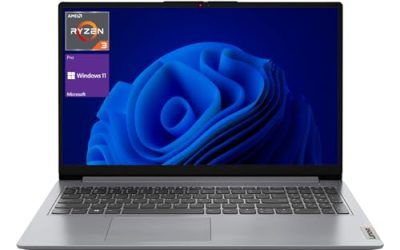
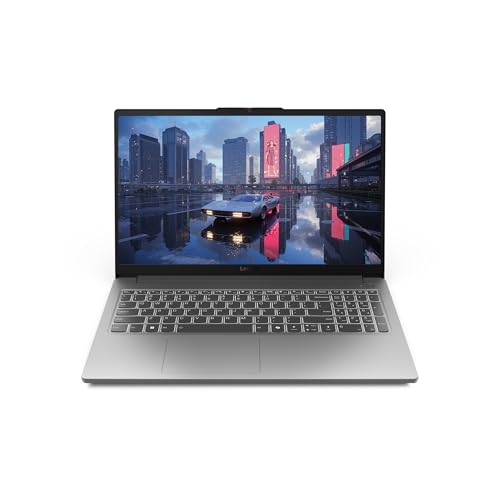
1. Lenovo LOQ-E 15.6-inch, Ryzen 7 7735HS
The Lenovo LOQ-E configuration listed under this ASIN, model number 83S00000US, is the balanced machine of this group. Its AMD Ryzen 7 7735HS processor is paired with the GeForce RTX 4050 graphics chip, 16GB of DDR5 memory, and a 512GB solid-state drive. The display is a 15.6-inch Full HD panel with a 144Hz refresh rate, and the finish is Luna Gray.
The reason to put this configuration first is the combination rather than any single figure. The Ryzen 7 processor gives it more multitasking headroom than the other two picks, the 16GB memory amount is the comfortable baseline described above, and the graphics and display are matched for 1080p play. It is the configuration that needs the fewest compromises or later upgrades for a player who also studies, works, or creates on the same machine.
Confirm the model number 83S00000US and the memory and storage figures on the listing before ordering, because the LOQ name covers many configurations across several processor generations. If the listing you open shows a different processor or a smaller memory amount, it is a different configuration from the one described here, whatever the headline says.
2. Lenovo LOQ Essential, Core i5-12450HX
The LOQ Essential is the Intel-based configuration in this guide. It pairs an Intel Core i5-12450HX processor with the GeForce RTX 4050 graphics chip, a 15.6-inch Full HD IPS display with a 144Hz refresh rate, 8GB of memory, and a 512GB solid-state drive, in a Luna Grey chassis running Windows 11 Home.
The HX-series processor is the interesting part of this specification. HX chips are built for sustained workloads in larger laptop chassis, so this configuration suits a player whose sessions sit alongside demanding everyday tasks. The 8GB memory figure is the one compromise to plan around: it is workable for focused gaming sessions, and a buyer who multitasks heavily should treat a memory upgrade as part of the plan and confirm the slot arrangement on the listing.
Choose this configuration if you prefer an Intel platform, or if your use mixes gaming with processor-heavy study or work software. As with every pick here, match the ASIN and the full specification line — processor, graphics, memory, storage, and display — on the listing before you order, because Essential branding is used across several LOQ variants.
3. Acer Nitro V 15 ANV15-41-R5N6
The Acer Nitro V 15, model ANV15-41-R5N6, completes the group with an AMD Ryzen 5 7535HS hexa-core processor, the GeForce RTX 4050 Laptop GPU, a 15.6-inch Full HD IPS display at 144Hz, 8GB of DDR5 memory, and a 512GB PCIe Gen 4 solid-state drive. It runs Windows 11 Home, connects over WiFi 6, and has a backlit keyboard and a dual-fan cooling design.
What sets this configuration apart is expandability. The listing states two DDR5 memory slots with a maximum of 32GB, and two PCIe M.2 slots for storage. That means the two figures a buyer might outgrow — memory and drive capacity — are both upgradeable later, which changes how the 8GB starting memory should be judged: it is a starting point with a documented path upward, not a fixed limit.
This is the pick for a tinkerer, or for a buyer who expects to keep the machine for years and improve it in stages. Before ordering, confirm the model number ANV15-41-R5N6 on the listing and note that other listings bundle this same laptop with accessories under different ASINs; the ASIN above is for the laptop configuration described in this section.
Comparison Table
| Laptop | ASIN | Processor | Graphics | Display | Memory | Storage |
|---|---|---|---|---|---|---|
| Lenovo LOQ-E 15.6 | B0FMFQ8QJ5 | AMD Ryzen 7 7735HS | GeForce RTX 4050 | 15.6-inch FHD, 144Hz | 16GB DDR5 | 512GB SSD |
| Lenovo LOQ Essential | B0FMLCQZM8 | Intel Core i5-12450HX | GeForce RTX 4050 | 15.6-inch FHD IPS, 144Hz | 8GB | 512GB SSD |
| Acer Nitro V 15 ANV15-41-R5N6 | B0CX2PS48B | AMD Ryzen 5 7535HS | GeForce RTX 4050 | 15.6-inch FHD IPS, 144Hz | 8GB DDR5, expandable to 32GB | 512GB PCIe Gen 4 SSD |
Frequently Asked Questions
Is the RTX 4050 enough for 1080p gaming?
For the display class fitted to all three machines — 15.6-inch Full HD at 144Hz — the RTX 4050 Laptop GPU is the matched entry point of the current RTX laptop range. It is designed for play at the panel native resolution, and the processor, memory, and storage figures in the table decide how much headroom surrounds it.
How much memory does a gaming laptop need?
A 16GB configuration, like the LOQ-E here, is the comfortable baseline for gaming alongside everyday apps. An 8GB configuration runs games but leaves less room for multitasking, which is why the Nitro V upgrade path — two slots, stated 32GB maximum — matters when comparing the 8GB picks.
Why do two picks share the LOQ name but differ so much?
Lenovo sells the LOQ family in many configurations. The LOQ-E pick uses an AMD Ryzen 7 processor with 16GB of memory, while the LOQ Essential pick uses an Intel Core i5 HX processor with 8GB. The model name alone never describes a machine; the ASIN and the specification line do.
What should I check on the listing before ordering?
Match five things to the section for your pick: the ASIN, the model number, the processor, the memory amount, and the storage capacity. Also check what else the listing bundles, since seller bundles use different ASINs and can change what arrives in the box.
Are these configurations repeated from other guides on this site?
No. This selection was assembled to sit apart from the gaming laptop sets already published on this site, including the general, Alienware, high-end, low-end, and segmented guides found during the duplicate check. None of the three ASINs above appears in those earlier sets that could be inspected.
Conclusion
These three RTX 4050 machines divide by headroom and upgrade plans. The Lenovo LOQ-E (B0FMFQ8QJ5) is the ready-to-go configuration, with the strongest processor and memory pairing here. The Lenovo LOQ Essential (B0FMLCQZM8) is the Intel option, built around an HX processor for mixed gaming and work. The Acer Nitro V (B0CX2PS48B) is the upgrade-first option, with documented memory and storage expansion. Compare the specifications in the table, confirm the ASIN and configuration on the listing, and the machine that fits your desk and your library will be clear. That final listing check takes a minute and protects the whole purchase.
FAQ
Is the RTX 4050 enough for 1080p gaming?
How much memory does a gaming laptop need?
Why do two picks share the LOQ name but differ so much?
What should I check on the listing before ordering?
Are these configurations repeated from other guides on this site?
More from Amazon
Programs that pair well with the guide above. Offers and eligibility are set by Amazon and may change.
Free shipping on eligible items, Prime Video and more. Eligible new members can start with a free trial.
Start a Prime free trialA Prime membership for ages 18-24 with a trial period. Eligibility is set by Amazon.
See Prime for Young AdultsAudiobooks and podcasts to listen to on the go. Eligible new members can start with a free trial.
Try Audible freeAd-free music streaming. Eligible new subscribers can start with a free trial.
Try Music Unlimited freeAs an Amazon Associate we earn from qualifying purchases.