
Our Short List of 3
All 5 Picks at a Glance
| Product | Specs | Action |
|---|---|---|
 1. Samsung Odyssey G5 G50F 27-Inch QHD Monitor | Check price on Amazon | |
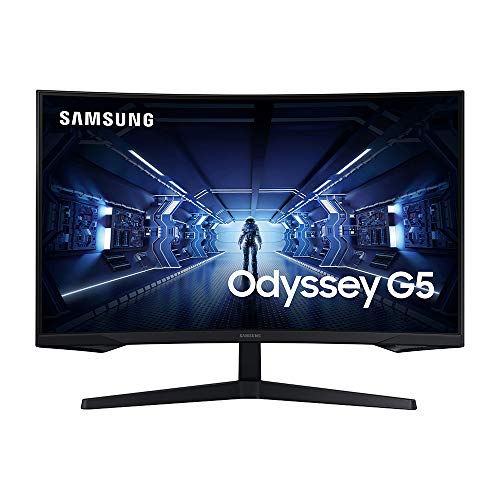 2. Samsung Odyssey G5 32-Inch Curved QHD Monitor | Check price on Amazon | |
 3. Sceptre C275B-FWT240 27-Inch Curved Monitor | Check price on Amazon | |
 4. BenQ ZOWIE XL2411K 24-Inch Monitor | Check price on Amazon | |
 5. AOC Gaming 24G2S 24-Inch Monitor | Check price on Amazon |
Key takeaways
- Compare the best monitors for PS4, with 1080p and QHD screens, HDMI input, low response times, and sizes that fit a console desk or a living room.
A PlayStation 4 still plays a huge library of games, and the screen it is connected to decides how those games look and feel. A television works, but a monitor sits closer, shows a sharper image at desk distance, and responds faster to controller input. The right monitor for a PS4 is not the same as the right monitor for a gaming PC, because the console sends a different signal and has different limits. A monitor that matches those limits gives a clean, responsive picture with one cable.
All five monitors in this guide connect to a PS4 over HDMI, and all five are desktop display monitors only. Three are Full HD screens that match the base PS4 pixel for pixel. Two are QHD screens for a PS4 Pro and for later use with a newer console or a PC. Every pick has a fast response time and a panel suited to fast-moving games.
Disclosure: As an Amazon Associate, we earn from qualifying purchases.
How a PS4 Connects to a Monitor
A PS4 connects to a monitor through a single HDMI cable, and every monitor in this guide has at least one HDMI input. Plug the HDMI cable from the PS4 into the monitor, select the HDMI input on the monitor, and the console picture appears. The PS4 has no DisplayPort output, so the DisplayPort inputs on these monitors are for a PC or a second device, not for the console.
Resolution is set by the console, not by the monitor. A base PS4 outputs up to 1920 by 1080 at 60 frames per second. A PS4 Pro outputs up to 3840 by 2160 at 60 frames per second, with HDR support on games and screens that support it. A Full HD monitor shows a base PS4 signal at its native resolution, with no scaling, which keeps the image at its sharpest. A QHD monitor accepts the same 1080p signal from a base PS4 and scales it to fill the screen, and it accepts a higher-resolution signal from a PS4 Pro.
Refresh rate is also set by the console. A PS4 outputs at up to 60 Hz, so a monitor rated at 144 Hz or higher still runs at 60 Hz when a PS4 is connected. It does not make PS4 games run above 60 frames per second. Every monitor in this guide lists a 1-millisecond response time, which keeps fast movement clean.
Sound needs a plan, because a monitor is not a television. The PS4 sends audio over HDMI, and a monitor with built-in speakers plays it through those speakers. Only one monitor in this guide has built-in speakers. For the other four, the simplest sound setup is a headset plugged into the DualShock 4 controller, which carries game audio and chat audio. A separate set of speakers connected to the monitor headphone output is another option where the monitor has one.
What to Look For in a Monitor for PS4
Resolution comes first, and it depends on which PS4 is in use. A base PS4 renders games at 1080p, so a Full HD monitor is the exact match, with no scaling and no wasted pixels. A PS4 Pro renders many games at higher resolutions and supports 4K output with HDR, so a QHD monitor gives a sharper picture from a Pro and a better screen for other devices later. Do not buy a 4K monitor for a base PS4 expecting a sharper image, because the console still sends a 1080p signal and the monitor scales it.
Size decides viewing distance. A 24-inch monitor is the standard choice for a desk, where the screen sits about an arm’s length away. At that distance, a 24-inch Full HD panel looks sharp, and the whole screen stays inside the field of view without turning the head. A 27-inch monitor suits a slightly deeper desk, and it is the smallest size where a QHD panel makes sense. A 32-inch monitor suits a living room or a deep desk, where the viewer sits further from the screen.
Panel type decides how the picture looks from the side and how dark scenes hold up. An IPS panel keeps colors accurate and viewing angles wide, so the image looks the same from the side of the desk as from the front. A VA panel gives deeper blacks and higher contrast, so dark scenes in horror and stealth games hold more depth, but the image can shift more when viewed from an angle. A TN panel gives the fastest response and the lowest cost, but colors and viewing angles are narrower.
Response time and refresh rate need to be read the way a console player should read them. Response time, listed in milliseconds, is how fast a pixel changes color, and a 1-millisecond rating keeps fast camera movement from smearing. Refresh rate, listed in hertz, is how many times per second the screen redraws, and the PS4 caps at 60 Hz, so a 144 Hz, 165 Hz, 180 Hz, or 240 Hz rating is headroom for other devices rather than a PS4 feature. Choose a monitor on panel, size, and ports, and treat the high refresh rate as a bonus for later use.
Ports and the stand decide whether the monitor fits the desk. Every monitor in this guide has HDMI, and most have two HDMI inputs, so a PS4 and a second device can stay plugged in at once. A height-adjustable stand keeps the screen at eye level, which matters over long sessions, and a tilt adjustment helps when the screen sits above or below eye level. A VESA mount pattern on the back allows an arm or wall mount for desks where the included stand takes too much room. Built-in speakers matter only if no headset is planned.
Best Monitors for PS4
1. Samsung Odyssey G5 G50F 27-Inch QHD Monitor
The Samsung Odyssey G5 G50F is the sharpest screen in this guide, and the pick for a PS4 Pro owner. Its 27-inch Fast IPS panel runs at 2560 by 1440, which is more than one and a half times the pixel count of Full HD, so text and fine detail in games look cleaner than on a 1080p screen. The panel runs at up to 180 Hz with a 1-millisecond response time, and it carries HDR10 support for games that use it.
Color coverage reaches 99 percent of sRGB. The stand adjusts in height, tilts, swivels, and pivots to portrait orientation, so the screen sits at eye level on a normal desk. Inputs are one HDMI port and one DisplayPort, so the PS4 takes the HDMI port and a PC can use DisplayPort. There are no built-in speakers, so plan on a headset plugged into the controller. This is the pick for a PS4 Pro owner who wants the sharpest picture here.
2. Samsung Odyssey G5 32-Inch Curved QHD Monitor
The Samsung Odyssey G5 32-inch is the big-screen pick in this guide, and the one for a living room or a deep desk. Its 32-inch VA panel runs at 2560 by 1440 with a 1000R curve, which wraps the edges of the screen slightly toward the viewer. The panel runs at up to 144 Hz with a 1-millisecond response time, and it carries HDR10 support and AMD FreeSync Premium.
The VA panel is the reason to choose this screen over the flat IPS pick above. VA contrast is roughly three times higher than IPS contrast, so dark scenes hold deeper blacks and shadows keep more detail. Two HDMI ports and one DisplayPort cover a PS4 and a second device at once, and the stand adjusts in height, tilts, and swivels. There are no built-in speakers, so a headset through the controller is the sound plan. This is the pick for a PS4 Pro owner who plays in a darker room and wants the largest screen here.
3. Sceptre C275B-FWT240 27-Inch Curved Monitor
The Sceptre C275B-FWT240 is the only monitor in this guide with built-in speakers, and that makes it the simplest PS4 setup here. Its 27-inch curved panel runs at 1920 by 1080 with a 1500R curve, which matches the base PS4 pixel for pixel, so the console signal needs no scaling. The panel runs at up to 240 Hz with a 1-millisecond response time, and it carries FreeSync support and 99 percent sRGB coverage. A base PS4 still runs at 60 Hz on this screen, and the extra refresh rate is headroom for a PC later.
The built-in speakers are the deciding feature. Connect the PS4 over HDMI and the game audio plays through the monitor, with no headset and no extra speakers needed. This is the pick for a base PS4 owner who wants the simplest setup here: one cable in, picture and sound out.
4. BenQ ZOWIE XL2411K 24-Inch Monitor
The BenQ ZOWIE XL2411K is the competitive pick in this guide, built for fast shooters and reaction-based games. Its 24-inch TN panel runs at 1920 by 1080 with a 144 Hz refresh rate and a 1-millisecond response time, and it uses DyAc motion-clarity technology to keep fast movement sharp. The panel is a TN type, which gives the fastest pixel response of the three panel types here, and the screen is the size competitive players standardize on, because the whole picture stays in view without head movement.
The features around the panel are aimed at competitive play. Black eQualizer brightens dark corners without washing out the rest of the picture, so an opponent hiding in shadow is easier to spot. The stand adjusts in height, tilts, swivels, and pivots. For a PS4, it runs at 60 Hz, and the fast panel keeps the picture clean at that speed. There are no built-in speakers, so a headset through the controller is the sound plan. This is the pick for a PS4 player who mainly plays shooters.
5. AOC Gaming 24G2S 24-Inch Monitor
The AOC Gaming 24G2S is the straightforward desk pick in this guide, and the one for a base PS4 on a normal desk. Its 24-inch IPS panel runs at 1920 by 1080 with a 165 Hz refresh rate and a 1-millisecond response time, and it carries Adaptive-Sync support. At 24 inches and desk distance, Full HD looks sharp, and the IPS panel keeps colors accurate from wide angles, so the picture holds up when someone watches from beside the desk.
The stand is the practical advantage here. It adjusts in height, tilts, swivels, and pivots to portrait orientation, which is the fullest adjustment range of any 24-inch pick in this guide, and the frameless design keeps the bezels thin for a clean desk. HDMI and DisplayPort inputs cover a PS4 and a PC. There are no built-in speakers, so a headset through the controller is the sound plan, as with most monitors here. This is the pick for a base PS4 owner who wants a sharp, well-adjusted 24-inch screen.
Which Monitor Fits Which Need
The five monitors split first on resolution and console. The three Full HD screens, the Sceptre, the BenQ, and the AOC, match a base PS4 pixel for pixel, with no scaling and no wasted resolution. The two QHD screens, the Samsung G50F and the Samsung 32-inch, suit a PS4 Pro, which can send a higher-resolution signal, and they suit a PC later, where the extra pixels and the higher refresh rates come into play.
Size is the second divider. The two 24-inch screens, the BenQ and the AOC, suit a desk where the screen sits about an arm’s length away,. The two 27-inch screens, the Samsung G50F and the Sceptre, suit a deeper desk or a slightly longer viewing distance, and the Sceptre is the one with built-in speakers while the Samsung is the sharper QHD screen. The 32-inch Samsung suits a living room or a deep desk, where the viewer sits further back and the curved VA panel can show off its contrast.
Sound is the third divider, and it is the simplest one. Only the Sceptre has built-in speakers, so it is the only pick that plays game audio with no extra gear. The other four need a headset plugged into the DualShock 4 controller, which is the standard PS4 sound setup and works well, but it is a step the buyer should plan for. Panel type is the last divider: IPS on the Samsung G50F and the AOC for wide viewing angles, VA on the Samsung 32-inch for deeper blacks, and TN on the BenQ for the fastest response in competitive play.
Setting Up a PS4 With a Monitor
Setup takes a few minutes. Connect the HDMI cable from the PS4 to an HDMI input on the monitor, then select that HDMI input with the monitor buttons or on-screen menu.
Check the PS4 video settings after the first connection. Open Settings, choose Sound and Screen, then Video Output Settings, and confirm the resolution matches the monitor: 1080p on a Full HD screen, or the higher setting on a QHD screen with a PS4 Pro. On a PS4 Pro, the HDR setting appears when the monitor supports it, and the 32-inch Samsung and the G50F both support HDR10.
Sound setup depends on the monitor. On the Sceptre, the game audio plays through the built-in speakers once the HDMI connection is made, and the volume is adjusted with the monitor controls. On the other four monitors, plug a headset into the DualShock 4 controller, then hold the PlayStation button, open Sound and Devices, and set the output to the headset. For chat, the same menu controls whether voice goes to the headset or the speakers.
Place the monitor at eye level and about an arm’s length away for a 24-inch screen, or a little further back for a 27-inch or 32-inch screen. The top of the screen should sit near eye level, so the neck stays neutral over a long session. A height-adjustable stand makes this easy on the Samsung G50F, the BenQ, and the AOC, and the 32-inch Samsung and the Sceptre adjust in height and tilt as well.
Common Questions
Does a PS4 work with any monitor?
Yes, as long as the monitor has an HDMI input, which every monitor in this guide does. The PS4 sends video and audio over HDMI, so one cable carries both.
Is a 1080p or a QHD monitor better for a PS4?
It depends on the console. A base PS4 outputs at up to 1080p, so a Full HD monitor matches it exactly. A PS4 Pro outputs at higher resolutions with HDR, so a QHD monitor shows a sharper picture from a Pro. A base PS4 does not get sharper from a QHD screen, because the console still sends a 1080p signal.
Does a 144 Hz monitor make PS4 games run faster?
No. A PS4 outputs at up to 60 Hz, so a monitor rated above 60 Hz still runs at 60 Hz with a PS4 connected. The higher rating matters for a PC connected to the same monitor later.
Do I need built-in speakers on a PS4 monitor?
Only if no headset is planned. The PS4 sends audio over HDMI, and a monitor with built-in speakers plays it, which is the simplest setup. Without built-in speakers, a headset plugged into the DualShock 4 controller carries game audio and chat, which is how most console players already listen.
Can I use the same monitor with a PS4 and a PC?
Yes. Every monitor in this guide has more than one input, so a PS4 can stay on HDMI while a PC uses DisplayPort or a second HDMI port. Switch inputs with the monitor buttons or on-screen menu.
What size monitor is best for a PS4?
A 24-inch screen suits a desk at arm’s length, and it is the standard size for competitive play. A 27-inch screen suits a deeper desk or a slightly longer viewing distance. A 32-inch screen suits a living room or a deep desk, where the viewer sits further back.
Final Thoughts
The best monitor for a PS4 is the one that matches the console, the room, and the way the games are played. A base PS4 needs a Full HD screen with HDMI and a fast response time, and the Sceptre, the BenQ, and the AOC all meet that bar in different ways. A PS4 Pro can use the extra pixels of a QHD screen, and the Samsung G50F and the Samsung 32-inch give that choice at 27 inches and 32 inches.
Start with the console, then the size, then the sound plan. A base PS4 on a desk points to a 24-inch Full HD screen, a PS4 Pro in a darker room points to a QHD screen with strong contrast, and a setup with no headset points to the Sceptre, the only pick here with built-in speakers.
More from Amazon
Programs that pair well with the guide above. Offers and eligibility are set by Amazon and may change.
Free shipping on eligible items, Prime Video and more. Eligible new members can start with a free trial.
Start a Prime free trialA Prime membership for ages 18-24 with a trial period. Eligibility is set by Amazon.
See Prime for Young AdultsAudiobooks and podcasts to listen to on the go. Eligible new members can start with a free trial.
Try Audible freeAd-free music streaming. Eligible new subscribers can start with a free trial.
Try Music Unlimited freeAs an Amazon Associate we earn from qualifying purchases.









