Our Short List of 3
All 4 Picks at a Glance
| Product | Specs | Action |
|---|---|---|
 Jabra Evolve2 65 MS Stereo: Long Battery for Hybrid Days | Check price on Amazon | |
 Poly Voyager 4320 UC: Dongle Stability With Acoustic Fence | Check price on Amazon | |
 Shokz OpenComm2 UC 2025 Upgrade: Open-Ear and Zoom Certified | Check price on Amazon | |
 Logitech H390: Simple Wired USB for a Fixed Desk | Check price on Amazon |
Key takeaways
- Five headsets for Zoom meetings compared on microphone clarity, certification, comfort and battery life, covering wired, wireless and open-ear options.
A laptop microphone picks up everything in the room, from keyboard clicks and a running fan to voices in the next room, and that background sound is what other people on a Zoom call hear most clearly. A dedicated headset solves the problem at the source by placing a boom microphone close to the mouth, filtering out much of the room, and giving the wearer a private, consistent way to listen.
This guide compares five headsets built for Zoom meetings, covering the main connection styles and wearing formats. The Jabra Evolve2 65 and the Poly Voyager 4320 UC are wireless desk headsets with USB adapters and meeting platform support, the Logitech Zone Vibe 100 is a lighter over-ear wireless option that the listing names as working with Zoom, the Shokz OpenComm2 UC takes an open-ear bone conduction approach for people who need to hear the room around them, and the Logitech H390 covers the simple wired end with a plug-and-play USB connection.
As an Amazon Associate, we earn from qualifying purchases.
How to Choose a Headset for Zoom Meetings
Microphone design matters more than speaker size for meetings. A boom microphone positioned near the corner of the mouth captures the voice at a consistent level and lets noise cancelling processing separate speech from steady background sound such as a fan or traffic outside a window. Headsets that rely on microphones built into an ear cup have to work harder to isolate the voice, so a boom design is usually the safer choice for anyone whose voice is the main reason for buying the headset.
Certification and platform support are worth checking next. A headset described as Zoom certified, or as a UC model built for leading platforms, is designed so that call controls such as answer, mute, and volume work in step with the meeting software. That synchronization matters because a mute button that only mutes the headset, while Zoom still shows the microphone as live, creates confusion in both directions.
Connection style should match the working pattern. Wired USB headsets need no charging, pair with nothing, and work the moment they are plugged in, which suits a fixed desk and shared or managed computers.
Comfort decides whether a headset survives a full meeting day. On-ear designs are lighter and let in more awareness of the room, over-ear designs seal more sound out and can feel more immersive for focused listening, and open-ear bone conduction designs leave the ear canal completely open for people who dislike pressure on the ears or who must hear a doorbell, a child, or office conversation. Weight, cushion material, and headband padding all feed into comfort, and a lighter headset with modest features often serves a long day better than a heavier model with more technology.
Battery life and charging round out the choice for wireless models. Stated talk time is the figure that matters for meetings, and it is usually shorter than stated listening time, so buyers should compare talk time figures between models rather than headline playback numbers.
Jabra Evolve2 65 MS Stereo: Long Battery for Hybrid Days
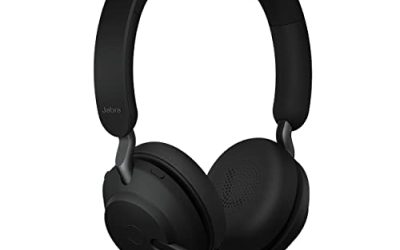
The Jabra Evolve2 65 in this listing is the stereo Microsoft Teams variant supplied with the Link380c USB-C adapter, and it is built around long wireless working days. Jabra states up to 37 hours of battery life, which is the longest talk time figure in this guide, and the headset uses passive noise cancellation through memory foam ear cushions and an angled ear cup design to reduce the sound reaching the wearer. A three-microphone system handles calls, and an integrated busy light shows people nearby that the wearer is on a call or concentrating, which is a small feature that prevents a steady stream of interruptions at home and in an office.
For Zoom use, the important point is that the Evolve2 65 line is a UC workplace headset family, and this specific listing is the MS variant optimized for Microsoft Teams, so buyers whose employer standardizes on Zoom should confirm that the call control behavior in this variant matches what they expect, or look at the UC variant of the same headset instead. The Bluetooth connection through the Link 380 adapter gives a stable computer link, the headset can also connect to a phone, and the on-ear stereo fit keeps it lighter than a large over-ear design while still covering both ears for focused listening between calls.
Who It Suits
This headset suits hybrid workers who move between home and office and who want to charge as rarely as possible. The long stated battery life, the compact on-ear fit, and the busy light fit a day that mixes Zoom and Teams calls with focused work.
Poly Voyager 4320 UC: Dongle Stability With Acoustic Fence
The Poly Voyager 4320 UC is a stereo wireless headset supplied with the BT700 USB-A Bluetooth adapter for a computer, with a direct Bluetooth connection available for a phone. Poly states up to 24 hours of talk time, and the headset can also be used in a corded mode with audio over USB, which covers the moment when the battery runs low in the middle of a meeting day. An online indicator light lets others know when the wearer is on a call, and the listing names compatibility with Teams, Zoom, and other platforms, which is exactly the mixed platform pattern many workplaces now follow.
The microphone system is the headline feature. The Voyager 4320 UC uses dual noise cancelling microphones with Poly Acoustic Fence technology, which is designed to keep the voice clear while reducing the conversation and noise happening around the speaker.
Who It Suits
This headset suits people whose Zoom calls happen in a noisy shared space and who want the reliability of a dedicated USB adapter. The combination of Acoustic Fence microphone processing, a full stated day of talk time, and a wired fallback mode fits support, sales, and teaching roles with back-to-back calls.
Logitech Zone Vibe 100: Lightweight Over-Ear Wireless
The Logitech Zone Vibe 100 takes a different route from the traditional office headset. It is a lightweight over-ear wireless headset in graphite, with a noise cancelling microphone on a boom that can be flipped up to mute, and the listing names compatibility with Microsoft Teams, Google Meet, and Zoom on Mac and PC. Logitech states up to 20 hours of listening time and up to 18 hours of talk time on a full charge, a wireless range of up to 30 meters, and multipoint Bluetooth so the headset can stay connected to two devices and switch between a computer call and a phone without re-pairing.
The over-ear fit and the styling are aimed at people who wear a headset for meetings and then keep it on for music or focused work, so it looks more like everyday headphones than like call center equipment. The microphone uses beamforming and digital signal processing to focus on the voice, according to the product description, and the controls are handled through the headset itself, with the Logi Tune app available for settings on supported setups. There is no USB receiver in this version, since the Zone Vibe 100 connects by Bluetooth alone, so the computer needs working Bluetooth and the buyer gives up the pre-paired dongle stability of the Jabra and Poly models in exchange for simplicity and a cleaner desk.
Specs
| Spec | Detail |
|---|---|
| ASIN | B09NBVS84T |
| Model | Zone Vibe 100 Graphite, model number 981-001256 |
| Connection | Multipoint Bluetooth, no USB receiver included |
| Battery life | Up to 20 hours listening and 18 hours talk time as stated in the listing |
| Wireless range | Up to 30 meters, listed as 98.4 feet |
| Microphone | Noise cancelling boom microphone, flip up to mute |
| Platform support | Works with Teams, Google Meet, and Zoom as stated in the listing |
| Fit | Over-ear, lightweight design |
Who It Suits
This headset suits home workers who want one comfortable over-ear headset for Zoom meetings, calls, and listening, and who prefer not to manage a USB dongle. The multipoint connection and the flip-to-mute boom fit a day that alternates between a laptop and a phone.
Shokz OpenComm2 UC 2025 Upgrade: Open-Ear and Zoom Certified
The Shokz OpenComm2 UC 2025 Upgrade is the open-ear entry in this guide. Instead of speakers covering the ears, it uses seventh generation bone conduction technology to deliver sound while leaving the ears completely open, so the wearer can hear a colleague, a doorbell, or traffic during an outdoor walk while staying on a Zoom call.
Shokz states up to 16 hours of talk time, a weight of only 35 grams, and an IP55 water resistant finish, which together make this the lightest and most awareness-friendly option here by a wide margin. The boom microphone uses digital signal processing noise cancelling to keep the voice clear, there is a dedicated mute button for meeting controls, and quick charge support is listed for short top-ups between calls. The trade-off is inherent to the format: bone conduction audio is less full and less private than sealed ear cups, and in a loud room the open design lets that noise reach the wearer even though the microphone works to keep it out of the call.
Who It Suits
This headset suits people who dislike ear pressure, who wear a headset for most of the day, or who must stay aware of their surroundings during Zoom meetings, including parents at home and staff who move around a workplace. It also suits glasses wearers who find over-ear cushions uncomfortable over long periods.
Logitech H390: Simple Wired USB for a Fixed Desk
The Logitech H390 is the straightforward wired option in this guide, and it has been a common workplace headset for many years for a simple reason: it plugs into a USB-A port and works without software, charging, or pairing. The listing describes clear audio for video meetings, a noise cancelling microphone on a rotating boom, and in-line controls for volume and mute on the cable. The cable is listed at 6.23 feet, or 1.9 meters, which gives enough slack to stand up and stretch during a long conversation while staying connected to the computer.
Because it is wired, there is no battery figure to manage and no wireless interference to troubleshoot, and the headset presents itself as a standard USB audio device on Windows, macOS, and ChromeOS computers. The padded headband and ear cushions are aimed at everyday call comfort rather than premium isolation, and there is no active noise cancellation for the wearer, so a loud room will still be audible between calls. For Zoom meetings, the value is predictability: the same connection, the same microphone position, and a physical mute control on the cable in every meeting, at a desk that does not change.
Who It Suits
This headset suits a fixed desk, a shared or managed computer, and buyers who want a dependable Zoom headset without charging or Bluetooth setup. It also works well as a spare headset that is always ready when a wireless model is flat or forgotten.
Frequently Asked Questions
Does a headset need to be Zoom certified to work on Zoom?
No. Any standard USB or Bluetooth headset that a computer recognizes as an audio device will carry sound and a microphone into Zoom. Certification, and UC designations, add tighter integration, such as call controls and mute state working in step with the meeting software, and they signal that the maker built the headset for meeting platforms.
Is a wired or wireless headset better for Zoom meetings?
Neither is better for every desk. A wired USB headset such as the Logitech H390 is predictable, needs no charging, and suits a fixed desk or a managed computer. A wireless headset with a USB adapter, such as the Poly Voyager 4320 UC or the Jabra Evolve2 65, gives freedom to move and usually holds a stable computer connection through its pre-paired dongle.
What matters most for sounding clear on Zoom?
Microphone position and noise processing matter most. A boom microphone near the mouth, backed by noise cancelling processing such as the dual microphone Acoustic Fence system on the Poly Voyager 4320 UC or the digital signal processing on the Shokz and Logitech models, keeps the voice consistent and reduces the room sounds sent to the call.
Can one headset connect to a computer and a phone at the same time?
Yes, models with multipoint Bluetooth can stay connected to two devices at once. The Logitech Zone Vibe 100 lists multipoint Bluetooth, and the Jabra Evolve2 65 and Poly Voyager 4320 UC connect to a computer through an adapter while also pairing with a phone over Bluetooth. That setup lets a mobile call and a Zoom meeting share one headset without re-pairing, although only one source plays at a time and the exact switching behavior varies by model.
Final Verdict
For most people who live on Zoom, the Poly Voyager 4320 UC is the most balanced pick in this guide, because its dual noise cancelling microphones with Acoustic Fence address the problem callers complain about most, its BT700 adapter keeps the computer connection stable, and its stated talk time covers a full meeting day with a corded fallback in reserve. The Jabra Evolve2 65 MS is the choice for the longest stated battery life and a busy light, with the caveat that this specific listing is the Teams variant, so Zoom-focused buyers should confirm the variant before ordering.
The Logitech Zone Vibe 100 is the comfortable over-ear option for home workers who want multipoint Bluetooth and a headset that doubles for listening, the Shokz OpenComm2 UC is the clear choice for open-ear awareness and all-day lightness with Zoom certification, and the Logitech H390 remains the dependable wired answer for a fixed desk with no charging at all.
Product and ASIN Reference
| Product | ASIN |
|---|---|
| Jabra Evolve2 65 MS Stereo | B08B8XX6XP |
| Poly Voyager 4320 UC | B09BBTCTMM |
| Logitech Zone Vibe 100 Graphite | B09NBVS84T |
| Shokz OpenComm2 UC 2025 Upgrade USB-A | B0DFWJS7Q9 |
| Logitech H390 | B000UXZQ42 |
FAQ
Does a headset need to be Zoom certified to work on Zoom?
Is a wired or wireless headset better for Zoom meetings?
What matters most for sounding clear on Zoom?
Can one headset connect to a computer and a phone at the same time?
More from Amazon
Programs that pair well with the guide above. Offers and eligibility are set by Amazon and may change.
Free shipping on eligible items, Prime Video and more. Eligible new members can start with a free trial.
Start a Prime free trialA Prime membership for ages 18-24 with a trial period. Eligibility is set by Amazon.
See Prime for Young AdultsAudiobooks and podcasts to listen to on the go. Eligible new members can start with a free trial.
Try Audible freeAd-free music streaming. Eligible new subscribers can start with a free trial.
Try Music Unlimited freeAs an Amazon Associate we earn from qualifying purchases.