
Our Short List of 3

- Best for: Beginners who want one camera for photos and video.
- 24.2MP APS-C CMOS sensor
- 4K30 video oversampled from 6K
- Dual Pixel CMOS AF II with subject detection
- Vari-angle touchscreen
- Best for: Travel vlogs and stills where video flexibility matters most.
- 26.1MP X-Trans CMOS 4 sensor
- 6.2K open-gate recording and 4K60 video
- In-body image stabilization rated up to 7 stops
- Dedicated Vlog mode

- Best for: Budget 4K video and light travel kits.
- 16MP Micro Four Thirds sensor
- 4K30 video recording
- 4K Photo mode
- 3-inch free-angle touchscreen
All 4 Picks at a Glance
| Product | Specs | Action |
|---|---|---|
| Canon EOS R50 with RF-S 18-45mm |
| Check price on Amazon |
| Fujifilm X-S20 with XC 15-45mm |
| Check price on Amazon |
| Panasonic Lumix G7 with 14-42mm |
| Check price on Amazon |
 Nikon Z30 with 16-50mm |
| Check price on Amazon |
Key takeaways
- The best cameras for photography and video balance stills and footage in one body. Compare four hybrid cameras on sensor, autofocus, video specs and handling.
A hybrid camera has to do two jobs well, and the best ones refuse to compromise on either. Stills need a sharp sensor, quick autofocus and a viewfinder you can trust in bright light, while video needs clean 4K, steady stabilization and a screen that flips around for self-recording. The right choice depends on which side you lean toward, since a camera tuned for vlogging handles differently from one tuned for portraits, even when both shoot the same resolution.
This guide is written for creators who shoot photos and video with one body, from family trips and travel vlogs to product shots and short films. Each camera below was picked from the specifications shown on its own Amazon listing, with sensor size, video modes and kit lens details checked against the page.
Quick Picks
As an Amazon Associate we earn from qualifying purchases
| Product | Best for | Key spec from title |
|---|---|---|
| Canon EOS R50 with RF-S 18-45mm | Beginners shooting both | 24.2MP APS-C, 4K30 video |
| Fujifilm X-S20 with XC 15-45mm | Travel vlogs and stills | 26.1MP, 6.2K open gate |
| Panasonic Lumix G7 with 14-42mm | Budget 4K video | 16MP Micro Four Thirds, 4K30 |
| Nikon Z30 with 16-50mm | Vlogging and social video | 20.9MP DX, 4K30 uncropped |
How to Choose
Sensor Size and Image Quality
Sensor size shapes image quality more than megapixels, so start here. APS-C sensors, found in the Canon, Fujifilm and Nikon models below, gather more light than the smaller Micro Four Thirds sensor in the Panasonic, which helps in dim rooms and at dusk. A larger sensor also blurs backgrounds more easily, which suits portraits and product shots. The Micro Four Thirds format trades some low-light performance for smaller lenses and lighter bodies, so it suits travelers who carry a camera all day. Match the sensor to the light you shoot in most. A bigger sensor also gives cleaner files when you crop after shooting.
Autofocus and Subject Detection
Autofocus decides how many shots stay sharp, and modern systems differ widely in what they track. Look for eye detection that locks onto people and animals, since it keeps portraits sharp even when your subject moves. Canon’s Dual Pixel autofocus and Nikon’s eye detection both handle faces well, while Fujifilm’s system tracks subjects across the frame during video. Test how the camera behaves when a subject turns away or walks toward you, since a system that hunts in those moments costs you shots. A camera that holds focus quietly is worth more than one with a longer spec list. Quiet autofocus motors also keep video soundtracks free of focus noise.
Video Specs and Recording Limits
Video specs decide what you can actually record, so read them carefully. A camera that shoots 4K at 30 frames per second covers most creators, while 4K at 60 frames per second suits slow motion and fast action. Check whether the 4K footage is cropped, since a heavy crop narrows your lens and changes your framing. Open-gate recording, offered by the Fujifilm, captures more of the sensor for flexible vertical and horizontal crops later. Also check recording time limits, since some cameras stop after 30 minutes and others record until the card fills. A headphone jack also helps you check audio while recording.
Handling, Screen and Stabilization
Handling decides whether you enjoy using the camera, so weigh it as heavily as the sensor. A vari-angle screen that flips to the front is essential for vlogging, while a touchscreen makes focus and menu control faster. In-body stabilization steadies handheld video and lets you shoot slower shutter speeds for stills, which matters when you travel without a tripod. Check the grip size against your hands, the weight with the kit lens attached, and whether the battery lasts a full afternoon of shooting before you need a spare. A spare battery costs little and saves a shoot when the first runs out.
The 4 Best Options
Canon EOS R50 with RF-S 18-45mm
- Best for: Beginners who want one camera for photos and video.
- 24.2MP APS-C CMOS sensor
- 4K30 video oversampled from 6K
- Dual Pixel CMOS AF II with subject detection
- Vari-angle touchscreen
Beginners who want one camera for photos and video.
The 4K30 mode crops slightly, so wide shots need a shorter lens.
The Canon EOS R50 is the easiest hybrid camera to recommend to a beginner who wants strong stills and video in one small body. Its 24.2MP APS-C sensor pairs with Dual Pixel autofocus that tracks eyes and faces reliably, and its 4K video is oversampled from 6K for sharp, detailed footage. The vari-angle touchscreen flips forward for vlogging, and the 15 frames per second electronic shutter catches fast action. The included 18-45mm kit lens covers everyday wide shots through short portraits without extra bulk.
Watch out for: The 4K30 mode crops slightly, so wide shots need a shorter lens.
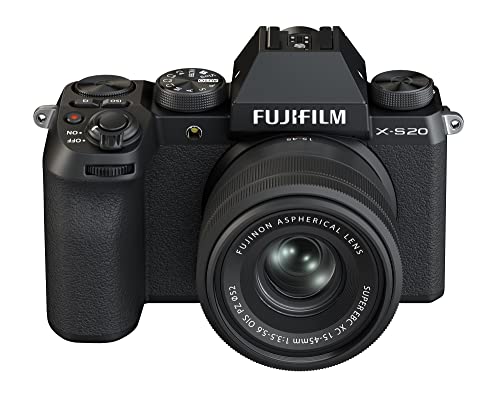
Fujifilm X-S20 with XC 15-45mm
- Best for: Travel vlogs and stills where video flexibility matters most.
- 26.1MP X-Trans CMOS 4 sensor
- 6.2K open-gate recording and 4K60 video
- In-body image stabilization rated up to 7 stops
- Dedicated Vlog mode
Travel vlogs and stills where video flexibility matters most.
The menu system takes time to learn, so budget an afternoon to set it up.
The Fujifilm X-S20 is the strongest travel hybrid in this group, packing serious video tools into a body that still feels like a stills camera. Its 26.1MP sensor records 6.2K open-gate footage and 4K at 60 frames per second, giving you room to crop vertical video from the same clip. In-body stabilization rated up to 7 stops steadies handheld shots, and a dedicated Vlog mode puts the most-used video settings one tap away. The included 15-45mm kit lens is compact, and Fujifilm’s film simulations give stills a distinctive look straight out of the camera.
Watch out for: The menu system takes time to learn, so budget an afternoon to set it up.
Panasonic Lumix G7 with 14-42mm
- Best for: Budget 4K video and light travel kits.
- 16MP Micro Four Thirds sensor
- 4K30 video recording
- 4K Photo mode
- 3-inch free-angle touchscreen
Budget 4K video and light travel kits.
The smaller sensor gathers less light, so dim rooms need a faster lens.
The Panasonic Lumix G7 is the budget route into 4K video, offering the core hybrid features at a friendlier size and weight. Its 16MP Micro Four Thirds sensor records 4K at 30 frames per second, and a 4K Photo mode pulls sharp stills from video footage. The 3-inch free-angle touchscreen flips for self-recording, and built-in Wi-Fi moves files to a phone for quick sharing. The included 14-42mm kit lens covers wide landscapes through everyday portraits, and the smaller sensor keeps the whole kit light in a bag.
Watch out for: The smaller sensor gathers less light, so dim rooms need a faster lens.
Nikon Z30 with 16-50mm
- Best for: Vlogging and social video where the camera faces you.
- 20.9MP DX-format CMOS sensor
- 4K30 uncropped video
- 1080p at 120 fps slow motion
- Vari-angle touchscreen
Vlogging and social video where the camera faces you.
There is no electronic viewfinder, so bright sunlight makes framing harder.
The Nikon Z30 is built for creators who film themselves, with a vari-angle screen, strong autofocus and no viewfinder to get in the way. Its 20.9MP DX sensor records uncropped 4K at 30 frames per second, and a 1080p mode at 120 frames per second covers smooth slow motion. Eye-detection autofocus holds faces sharp while you move, and the compact body pairs well with the included 16-50mm kit lens for everyday shooting. It is the lightest way into Nikon’s lens system for a creator who films more than they print.
Watch out for: There is no electronic viewfinder, so bright sunlight makes framing harder.
Which One Fits Your Situation
First hybrid camera
First-time hybrid buyers should start with the Canon EOS R50, since its autofocus, touchscreen and kit lens make good results easy from the first outing. The menu is friendly, the body is light, and the 4K video is sharp enough for social clips and family films. Spend the first week shooting in auto modes, then move into manual controls. A simple camera you enjoy using beats a complex one that stays in a drawer.
Travel and vlogging
Travelers and vloggers should favor the Fujifilm X-S20 or the Nikon Z30, both of which flip their screens forward and hold focus on faces while you walk and talk. The Fujifilm adds open-gate recording for flexible crops, while the Nikon stays lighter and simpler. Pack one spare battery and a fast memory card, since 4K video fills cards quickly, and keep the kit lens on for most days so the camera stays ready.
Budget-conscious creators
Creators watching their spending should look at the Panasonic Lumix G7, which delivers 4K video and a flip screen at a lower outlay than the APS-C models here. Its smaller sensor and lighter lenses keep the whole kit affordable to expand, and the 4K Photo mode helps you grab stills from video. Put the savings toward a fast prime lens, which improves low-light results more than a pricier body would.
Stills-first shooters
Photographers who shoot stills first and video second should lean toward the Canon EOS R50 or the Fujifilm X-S20, since both pair strong sensors with film-like color and quick autofocus. The Canon’s Dual Pixel system tracks eyes well for portraits, while Fujifilm’s film simulations give JPEGs a finished look without editing. Choose the body whose grip and controls feel natural, since a camera that fits your hand gets used more often.
Common Mistakes
- Buying for megapixels alone while ignoring sensor size and autofocus.
- Choosing a camera without a flip screen, then struggling to film yourself.
- Forgetting that 4K video fills memory cards fast and needs a spare battery.
- Picking a heavy kit for travel, then leaving it behind on the best days.
- Skipping the kit lens and buying a body-only camera with nothing to shoot through.
Frequently Asked Questions
Do I need a full-frame camera for good photos and video?
No, an APS-C or Micro Four Thirds camera delivers excellent photos and video for most creators. Full-frame bodies gather more light and blur backgrounds further, yet they cost more and need larger, heavier lenses. Start with a crop-sensor hybrid, learn your style, and move to full-frame only when a specific job demands it.
Is 4K video necessary for a hybrid camera?
4K video is worth having, since it gives sharper footage and room to crop in editing, yet it is not required for every creator. If your audience watches on phones, 1080p still looks fine, and it saves card space and battery. Choose a camera that shoots 4K so you have the option, then record in 1080p for long sessions.
Which camera is best for vlogging?
The Nikon Z30 and the Fujifilm X-S20 lead for vlogging, since both flip their screens forward and hold eye focus while you move. The Nikon is lighter and simpler, while the Fujifilm adds open-gate recording and stronger stabilization for walking shots. Pick the Nikon for straightforward talking-head video and the Fujifilm when you want more creative control over each clip.
Can one lens cover both photos and video?
Yes, the kit lens included with each camera here covers wide shots through short portraits, which handles most everyday photos and video. A single zoom lens keeps the kit light and ready, while a fast prime lens helps in dim light and blurs backgrounds for portraits. Add a second lens only after you know which focal length you reach for most.
FAQ
Do I need a full-frame camera for good photos and video?
Is 4K video necessary for a hybrid camera?
Which camera is best for vlogging?
Can one lens cover both photos and video?
More from Amazon
Programs that pair well with the guide above. Offers and eligibility are set by Amazon and may change.
Free shipping on eligible items, Prime Video and more. Eligible new members can start with a free trial.
Start a Prime free trialA Prime membership for ages 18-24 with a trial period. Eligibility is set by Amazon.
See Prime for Young AdultsAudiobooks and podcasts to listen to on the go. Eligible new members can start with a free trial.
Try Audible freeAd-free music streaming. Eligible new subscribers can start with a free trial.
Try Music Unlimited freeAs an Amazon Associate we earn from qualifying purchases.









