
Our Short List of 3

- 75 percent wired mechanical keyboard, 82 keys
- Hot-swappable Keychron K Pro Brown switches, 3-pin and 5-pin MX support
- QMK/VIA programmable with 1000 Hz polling rate
- Double-shot PBT keycaps in OSA profile

- 75 percent layout in a full aluminium case
- Hot-swappable Keychron K Pro Brown switches
- QMK/VIA programmable
- Bluetooth 5.1 wireless for up to three devices plus wired mode
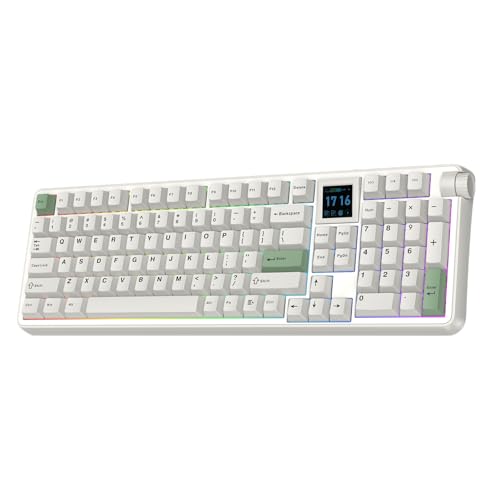
- Full-size layout with gasket mount structure
- Hot-swappable PCB for switch changes without soldering
- 1.54-inch TFT screen module, swappable for four extra keys
- Tri-mode connectivity: 2.4 GHz, Bluetooth and wired
All 3 Picks at a Glance
| Product | Specs | Action |
|---|---|---|
| Keychron V1 (K Pro Brown Switches) |
| Check price on Amazon |
| Keychron Q1 Pro (K Pro Brown Switches) |
| Check price on Amazon |
| EPOMAKER RT100 Pro |
| Check price on Amazon |
Key takeaways
- Compare custom hot-swap keyboards by socket type, QMK and VIA support, layout and case material, with four Amazon listings for builders and tinkerers.
A custom keyboard purchase is really two decisions disguised as one. First, are you buying a finished board you can modify, or a barebone kit you will build with your own switches and keycaps? Second, how deep do you want the customisation to go: swapping switches on a weekend, remapping layers in software, or rebuilding the board’s sound and feel with different plates and foams over time?
This guide is for first-time builders who want a safe entry point, typists who want a board that feels different from an office keyboard, and hobbyists comparing aluminium cases and firmware support. Each keyboard below was chosen from the features stated on its Amazon product page, with hot-swappable sockets and programmability treated as the defining requirements of the category.
Quick Picks
As an Amazon Associate we earn from qualifying purchases.
| Product | Best for | Key spec from title |
|---|---|---|
| Keychron V1 (K Pro Brown Switches) | A first custom board that arrives ready to type on | 75 percent layout, hot-swappable, QMK/VIA programmable, wired USB-C |
| Keychron Q1 Pro (K Pro Brown Switches) | A heavy aluminium board with wireless freedom | 75 percent layout, full aluminium case, Bluetooth and wired, QMK/VIA |
| EPOMAKER RT100 Pro | A full-size board with a swappable screen module | Tri-mode wireless, hot-swappable, 1.54-inch TFT screen, gasket mount |
| RK Royal Kludge RK100 | A near-full-size board with a hub built in | 96 percent 100-key layout, hot-swappable, Bluetooth 5.1, 2.4G and wired, 3 USB ports |
How to Choose
Custom means different things at different budgets, so decide which parts you actually intend to change before comparing boards.
Hot-Swap Sockets Are the Entry Requirement
A genuinely custom board lets you change switches without soldering, which means checking that the listing states hot-swappable support and which pin types the sockets accept. Boards that accept both 3-pin and 5-pin MX-style switches give you the widest choice of replacements, from quiet linears for shared spaces to tactile switches for feedback. If a listing does not state hot-swap support clearly, treat the board as fixed, because desoldering is a different hobby entirely.
Firmware Decides How Far Remapping Goes
QMK and VIA support means you can remap any key, build layers for symbols and shortcuts, and store those changes on the board itself so they travel between computers. Proprietary drivers can still remap keys, but they tie your layout to one app and one operating system. If you code, write with symbols, or use a non-standard layout, firmware support is not a luxury feature; it is the difference between a board that adapts to you and one you adapt to.
Layout Size Changes Your Desk and Your Habits
A 75 percent board keeps the function row and arrows while dropping the number pad, which suits most typists and leaves room for a mouse. A 96 percent layout squeezes nearly every key into a compact frame for people who enter numbers daily, while a full-size board keeps the traditional spacing. Match the layout to your real work: spreadsheet users feel a missing number pad immediately, while writers rarely miss it and gain a more centred, comfortable mouse position.
Case, Mount and Keycaps Shape Sound and Feel
Two boards with identical switches can feel completely different because of everything around them. Aluminium cases add weight and a firmer, quieter character, gasket mounting softens each keystroke, and double-shot PBT keycaps resist shine and keep legends readable for years. Read the listing for these construction details rather than judging by the switch name alone, and remember that keycaps and switches are the easiest parts to change later if the base board is sound.
The 4 Best Options
Keychron V1 (K Pro Brown Switches)
- 75 percent wired mechanical keyboard, 82 keys
- Hot-swappable Keychron K Pro Brown switches, 3-pin and 5-pin MX support
- QMK/VIA programmable with 1000 Hz polling rate
- Double-shot PBT keycaps in OSA profile
The V1 is the board most first-time builders should start with: it arrives assembled and ready to type on, yet every switch can be pulled and replaced without tools beyond the included puller, and full QMK/VIA support means the layout is yours to rebuild in software. Its 75 percent layout keeps the keys most people use while freeing desk space. Choose it if you want to learn what you like in switches and layouts on one affordable, forgiving platform before spending on a premium case.
Keychron Q1 Pro (K Pro Brown Switches)
- 75 percent layout in a full aluminium case
- Hot-swappable Keychron K Pro Brown switches
- QMK/VIA programmable
- Bluetooth 5.1 wireless for up to three devices plus wired mode
The Q1 Pro is the step up for builders who already know they enjoy the hobby and want the case itself to be part of the experience. Its full aluminium body gives the board a planted, substantial feel, and wireless Bluetooth pairing for up to three devices suits a desk shared between a work laptop and a personal machine. With hot-swap sockets and QMK/VIA onboard, it remains as customisable as the V1 while feeling like a different class of object. Pick it for a long-term desk centrepiece.
EPOMAKER RT100 Pro
- Full-size layout with gasket mount structure
- Hot-swappable PCB for switch changes without soldering
- 1.54-inch TFT screen module, swappable for four extra keys
- Tri-mode connectivity: 2.4 GHz, Bluetooth and wired
The RT100 Pro takes customisation in a different direction: its headline feature is a small screen module that can be swapped for a cluster of extra keys, so the board’s top corner changes function to suit your desk. Underneath, it is a gasket-mounted, hot-swappable full-size board with tri-mode connectivity for people who want one keyboard across several machines. It suits builders who like visible, playful hardware and who need a number pad for daily work rather than treating it as optional.
RK Royal Kludge RK100
The RK100 answers a practical version of the custom question: what if the board also replaced your desk hub? Its 96 percent layout keeps a number pad in a frame barely wider than a tenkeyless board, its sockets accept replacement switches freely, and three built-in USB ports handle the dongles and drives that otherwise clutter a desk. It fits number-heavy work and shared family computers, where wireless options for several devices and easy switch swaps matter more than firmware depth.
Specs
- 96 percent layout with 100 keys
- Hot-swappable switches supporting 3-pin and 5-pin MX-style switches
- Bluetooth 5.1, 2.4 GHz wireless and wired modes
- Three built-in USB ports
- Blue switches on this listing
- Mac and Windows compatibility
- Best for: Number-pad users who want hot-swap freedom plus a built-in USB hub.
- Watch out for: This ASIN was verified through the model’s Amazon listing data; confirm the switch type and colour on the US page, as RK100 variants differ.
Which One Fits Your Situation
Your first custom board should match the kind of tinkering you will actually do in the first month.
You Want to Experiment Without Building From Scratch
Start with the Keychron V1. It works the day it arrives, and each later experiment, a different switch set, a new keycap set, a remapped layer, is a small reversible step. That sequence teaches you your own preferences far better than ordering a barebone kit and guessing at every part at once.
Your Desk Is a Long-Term Setup You Care About
Choose the Keychron Q1 Pro if the keyboard is furniture as much as tool. The aluminium case and wireless pairing suit a permanent desk with two computers, and its customisation depth means it can evolve with your taste instead of being replaced when your taste changes.
You Enter Numbers All Day but Hate Big Keyboards
The RK100 keeps the number pad while trimming the frame, and its hub ports reduce desk clutter at the same time. If your work is budgets, data entry or bookkeeping, that combination solves the layout problem and the cable problem in one purchase.
You Like Hardware That Feels Playful
The EPOMAKER RT100 Pro is the expressive pick: a screen that shows information or images, a knob to program, and a full-size gasket-mounted base to type on. Choose it when the keyboard is part of how your desk looks and feels, not just an input device.
Common Mistakes
- Buying a barebone kit without budgeting for the switches and keycaps it does not include.
- Assuming every mechanical keyboard is hot-swappable, then discovering a switch change needs soldering.
- Choosing a layout for its looks, then missing the number pad or function row your work uses daily.
- Ignoring firmware support, then finding your remapped layout only works inside one app on one computer.
- Judging feel by switch colour names alone while ignoring case material, mounting style and keycap profile.
Frequently Asked Questions
What does hot-swappable actually mean?
It means the switches sit in sockets rather than being soldered to the board, so you can pull one out and press another in with a simple tool and no technical risk. That single feature is what makes a keyboard genuinely customisable over time, because trying a new switch type becomes a ten-minute experiment instead of a workshop project.
Do I need QMK or VIA support?
You need it if you plan to remap keys, build layers for symbols or shortcuts, or carry one layout between different computers. Casual typists who never change a key can live happily with a maker driver. Most builders grow into remapping quickly, though, so firmware support is worth prioritising even on a first board.
Should a beginner buy a barebone kit or an assembled board?
An assembled board is the safer start. It works immediately, and you learn your switch and keycap preferences by changing one thing at a time. A barebone kit rewards experience: you choose every part, but a wrong first choice in switches means buying twice before you have typed a paragraph.
Which layout size suits most people?
A 75 percent layout suits most writers, students and programmers, keeping arrows and a function row while dropping the number pad for desk space. If your work involves frequent number entry, a 96 percent or full-size board avoids the daily friction of a missing pad, even though it takes more room.
FAQ
What does hot-swappable actually mean?
Do I need QMK or VIA support?
Should a beginner buy a barebone kit or an assembled board?
Which layout size suits most people?
More from Amazon
Programs that pair well with the guide above. Offers and eligibility are set by Amazon and may change.
Free shipping on eligible items, Prime Video and more. Eligible new members can start with a free trial.
Start a Prime free trialA Prime membership for ages 18-24 with a trial period. Eligibility is set by Amazon.
See Prime for Young AdultsAudiobooks and podcasts to listen to on the go. Eligible new members can start with a free trial.
Try Audible freeAd-free music streaming. Eligible new subscribers can start with a free trial.
Try Music Unlimited freeAs an Amazon Associate we earn from qualifying purchases.









