
Our Short List of 3

- Best for: writers who draft in cafés, libraries and trains and want silence plus all-day battery.
- Apple 2025 MacBook Air 13-inch laptop with M4 chip, built for Apple Intelligence
- 13.6-inch Liquid Retina display (2560×1664)
- 16GB unified memory, 256GB SSD storage
- 12MP Center Stage camera, Touch ID

- Best for: professional writers and editors who revise long manuscripts and keep large reference collections open alongside the draft.
- Intel Core Ultra 7 165U vPro processor
- 14-inch WUXGA (1920×1200) 100% sRGB touchscreen, 16:10
- 32GB 6400MHz RAM, 1TB Gen4 Performance SSD
- FHD+ IR + RGB camera
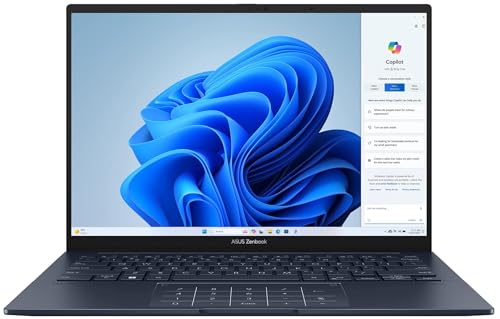
- Best for: Windows writers who want up-to-date performance and a touchscreen for reading through drafts.
- ASUS Zenbook 14 UX3405CA, 14-inch FHD touchscreen laptop
- Intel Core Ultra 7 255H processor
- 16GB RAM, 512GB SSD
- Intel Arc Graphics
All 4 Picks at a Glance
| Product | Specs | Action |
|---|---|---|
| Apple MacBook Air 13-inch with M4 Chip |
| Check price on Amazon |
| Lenovo ThinkPad X1 Carbon Gen 12 |
| Check price on Amazon |
| ASUS Zenbook 14 UX3405CA |
| Check price on Amazon |
 Acer Swift Go 14 SFG14-73 |
| Check price on Amazon |
Key takeaways
- Four writing-first laptops compared on keyboard feel, battery life and screen height: MacBook Air M4, ThinkPad X1 Carbon, Zenbook 14 and Swift Go 14.
A writer’s laptop decision has almost nothing to do with raw speed. A word processor and a dozen browser tabs run fine on modest hardware, so the real choice is about the keyboard under your fingers for six hours, a battery that survives a café session without a charger hunt, and a screen that shows enough of the draft to keep your place. Buy for those three things first and everything else is secondary.
The four machines below split by working style. Silent, all-day writers get the fanless MacBook Air with the M4 chip. Keyboard purists who revise long manuscripts get the ThinkPad X1 Carbon Gen 12. Windows writers wanting a current-generation processor and a touchscreen get the ASUS Zenbook 14. Anyone watching their spending without giving up an OLED display gets the Acer Swift Go 14.
Quick Picks
As an Amazon Associate we earn from qualifying purchases.
| Product | Best for | Key spec |
|---|---|---|
| Apple MacBook Air 13-inch with M4 chip | Writers who draft away from a desk all day | 16GB unified memory, fanless design |
| Lenovo ThinkPad X1 Carbon Gen 12 | Keyboard-first writers revising long manuscripts | 32GB RAM, 1TB SSD |
| ASUS Zenbook 14 UX3405CA | Windows writers wanting a bright touchscreen | Intel Core Ultra 7 255H, 512GB SSD |
| Acer Swift Go 14 SFG14-73 | Budget-conscious writers who still want OLED | 2880×1800 OLED display, 512GB SSD |
How to Choose
Judge the Keyboard Before Anything Else
You will touch the keyboard more than every other part of the machine combined, so key travel, spacing and layout decide whether a laptop suits writing work. Look for full-size keys with a sculpted feel rather than flat, closely packed decks, and check that the arrow keys and punctuation keys have not been shrunk to half height. The ThinkPad line built its reputation on exactly this, and its deeper-travel keys remain the benchmark other laptop keyboards are measured against for long typing sessions.
Treat Battery Figures as a Best Case
Every headline battery number in a listing comes from a light test loop, usually video playback at modest brightness, and manufacturers state the figure plainly as a maximum. A real writing day of documents, reference tabs and Wi-Fi research lands lower than that ceiling, so treat the claim as a ranking tool between models rather than a promise. What matters practically is whether the machine clears your longest typical session away from an outlet with charge to spare, and whether it charges quickly enough that a short stop at home between outings meaningfully refills it.
Pick a Taller Screen for More Lines of Text
Screen shape changes how much of a draft you can see at once. A 16:10 panel shows noticeably more lines than an older widescreen shape at the same size, which means less scrolling mid-paragraph and more context while editing. Resolution matters at reading distance too: crisp text rendering reduces the squinting that builds into fatigue over a long session. Touchscreens are optional for writers, but a bright panel you can read near a window is not, and a finish that cuts reflections helps during daytime sessions in bright rooms.
Weigh the Whole Carry, Not Just the Laptop
A writing laptop usually travels, so the honest figure is the machine plus its charger in your bag. Anything under three pounds disappears on a commute, and USB-C charging means one small adapter can serve the laptop and your phone. Also count the ports you actually use: writers plugging in a backup drive, an external monitor at a desk, or a memory card from a recorder should confirm the connections exist before ordering, because a missing port means carrying a hub everywhere, which quietly cancels out the weight you saved choosing a slim machine.
The 4 Best Options
Apple MacBook Air 13-inch with M4 Chip
- Best for: writers who draft in cafés, libraries and trains and want silence plus all-day battery.
- Apple 2025 MacBook Air 13-inch laptop with M4 chip, built for Apple Intelligence
- 13.6-inch Liquid Retina display (2560×1664)
- 16GB unified memory, 256GB SSD storage
- 12MP Center Stage camera, Touch ID
writers who draft in cafés, libraries and trains and want silence plus all-day battery.
this listing is the 16GB/256GB Sky Blue configuration; other colours and the larger storage version are separate listings, so confirm the colour and capacity on the page before ordering.
The Air suits writers who work wherever the day takes them. Its fanless design means total silence in libraries and shared rooms, and at 2.7 pounds it is the easiest machine here to carry daily. The M4 chip is far more power than drafting software needs, which translates into instant wake, smooth handling of large documents and many open tabs, and a 13.6-inch Liquid Retina display that renders text sharply. Apple rates the battery at up to 18 hours, a best-case figure, but even discounted it covers long writing days comfortably.
Lenovo ThinkPad X1 Carbon Gen 12
- Best for: professional writers and editors who revise long manuscripts and keep large reference collections open alongside the draft.
- Intel Core Ultra 7 165U vPro processor
- 14-inch WUXGA (1920×1200) 100% sRGB touchscreen, 16:10
- 32GB 6400MHz RAM, 1TB Gen4 Performance SSD
- FHD+ IR + RGB camera
professional writers and editors who revise long manuscripts and keep large reference collections open alongside the draft.
the X1 Carbon sells in many configurations under the same model name, so verify the listing shows the Ultra 7 165U vPro with 32GB of memory and the 1TB SSD before ordering.
This is the pick built around the keyboard. The X1 Carbon’s keys are the model’s known typing strength, with the deeper travel and firm landing that writers who produce thousands of words a day tend to prefer over shallow ultrabook decks. Around that keyboard sits a business-grade specification: an Ultra 7 165U vPro processor, a generous 32GB of memory and a 1TB SSD that swallows research archives, reference libraries and years of drafts. The 14-inch 16:10 touchscreen shows extra lines of text, and the whole machine stays light enough for daily carrying.
ASUS Zenbook 14 UX3405CA
- Best for: Windows writers who want up-to-date performance and a touchscreen for reading through drafts.
- ASUS Zenbook 14 UX3405CA, 14-inch FHD touchscreen laptop
- Intel Core Ultra 7 255H processor
- 16GB RAM, 512GB SSD
- Intel Arc Graphics
Windows writers who want up-to-date performance and a touchscreen for reading through drafts.
the Zenbook 14 name covers higher-resolution, larger-storage variants sold under separate listings; check that the page in front of you states the FHD touchscreen and 512GB SSD configuration before ordering.
The Zenbook gives Windows writers a current-generation machine in a slim 14-inch body. Its Intel Core Ultra 7 255H processor and 16GB of memory handle drafting software, reference tabs and light photo work for accompanying articles without strain, while the 512GB SSD offers sensible room for documents and research files. The FHD touchscreen is handy for scrolling through long drafts and marking up pages, and Intel Arc graphics cover everyday visual tasks. It is the balanced middle option here: modern internals, a touch display, and a chassis that travels well between desk and café.
Acer Swift Go 14 SFG14-73
- Best for: students, freelancers and first-book writers who want a superb screen for long drafting sessions without flagship spending.
- Acer Swift Go 14 Intel Evo Edition laptop, model SFG14-73-58EP
- 14-inch OLED WQXGA+ 2880×1800 display
- Intel Core Ultra 5 processor 125H, Intel Arc graphics
- 8GB LPDDR5 memory, 512GB SSD
students, freelancers and first-book writers who want a superb screen for long drafting sessions without flagship spending.
the 8GB of memory is the compromise in this configuration; it is fine for writing apps and browser research but tight for heavy multitasking, and the model name also covers other variants, so confirm the listing shows the OLED, 8GB configuration.
The Swift Go 14 leads with its screen: a 14-inch OLED panel at 2880×1800, the sharpest display in this group, which makes long reading and editing sessions easy on the eyes. An Ultra 5 125H processor and a 512GB SSD give it honest working pace for documents, browser research and email, and the Intel Evo badge signals a thin, responsive design with modern connectivity including WiFi 6E. The trade-off sits in the memory figure, which is why this machine suits focused writing work rather than heavy multitasking across many demanding programs at once.
Which One Fits Your Situation
You Write in Cafés and Libraries All Day
Take the MacBook Air. The fanless design never breaks the quiet of a reading room, the 2.7-pound body vanishes into a tote or backpack, and the battery rating, even treated as a best case, comfortably spans a full day of drafting between outlets. Touch ID also speeds up the constant lock-and-unlock rhythm of working in public places.
You Revise Long Manuscripts and Live on the Keyboard
Choose the ThinkPad X1 Carbon Gen 12. Its keyboard is the strongest here for sustained typing, and the 32GB of memory plus 1TB SSD let you keep the draft, research archive and reference material open together without slowdowns. The taller 16:10 screen shows more of each chapter while you edit, which suits structural revision work.
You Want a Modern Windows Machine With a Touchscreen
The ASUS Zenbook 14 fits. The Ultra 7 255H and 16GB of memory give it headroom for years of writing software updates, and the touchscreen makes scrolling, selecting and annotating long drafts feel direct. It is the natural choice if your documents, cloud storage and habits already live in the Windows world and you want current hardware.
You Are Watching Your Spending but Refuse a Dull Screen
Pick the Acer Swift Go 14. Its 2880×1800 OLED panel is the best display in this roundup for reading your own words for hours, and the processor and storage are entirely adequate for writing workloads. Accept the 8GB memory limit, keep your open programs lean, and you get the screen quality of machines costing far more.
Common Mistakes
- Paying for gaming-class processors and graphics that a word processor will never use, instead of spending on keyboard and screen quality.
- Believing the headline battery figure is a guarantee, when it is a best-case rating from a light test loop.
- Overlooking keyboard layout details like half-height arrow keys and cramped punctuation keys that slow typing every single day.
- Choosing a short, wide screen that shows fewer lines of the draft and forces constant scrolling while editing.
- Ordering by model name alone, when the same name covers several configurations with different memory, storage, colour and display.
Frequently Asked Questions
Is 8GB of Memory Enough for Writing?
For drafting software, email and browser-based research, yes. Word processors and writing apps are light, and 8GB handles them alongside a reasonable number of tabs. It becomes tight when you add large photo libraries, video calls and many heavy programs at once, which is why the Acer Swift Go 14 suits focused writing rather than everything-at-once multitasking.
Should a Writer Choose Mac or Windows?
Both run the major writing tools, cloud storage and browsers without issue, so the deciding factors are your existing software licences, the phone and services you already use, and keyboard preference. The MacBook Air wins on silence and battery; the Windows machines here win on configuration choice and, in the ThinkPad’s case, the keyboard itself.
How Much Storage Does a Writer Actually Need?
Text is tiny: a lifetime of manuscripts, notes and articles fits in a few gigabytes. The 256GB in the MacBook Air is plenty for pure writing, but research PDFs, audio interviews, photos and backups add up quickly. If your process involves recorded interviews or image-heavy research, the 512GB and 1TB configurations remove the need to manage space.
Does a High-Resolution Screen Matter for Text?
At laptop reading distances, higher resolution renders letterforms with smoother edges, which many writers find less tiring across long sessions. The Acer’s 2880×1800 OLED is the extreme example here. Shape matters as much as sharpness, though: a taller 16:10 display shows more lines per screen, reducing scrolling regardless of resolution.
FAQ
Is 8GB of Memory Enough for Writing?
Should a Writer Choose Mac or Windows?
How Much Storage Does a Writer Actually Need?
Does a High-Resolution Screen Matter for Text?
More from Amazon
Programs that pair well with the guide above. Offers and eligibility are set by Amazon and may change.
Free shipping on eligible items, Prime Video and more. Eligible new members can start with a free trial.
Start a Prime free trialA Prime membership for ages 18-24 with a trial period. Eligibility is set by Amazon.
See Prime for Young AdultsAudiobooks and podcasts to listen to on the go. Eligible new members can start with a free trial.
Try Audible freeAd-free music streaming. Eligible new subscribers can start with a free trial.
Try Music Unlimited freeAs an Amazon Associate we earn from qualifying purchases.









