Key takeaways
- Find the best budget keyboard for game streaming: five affordable picks with quiet switches, compact layouts, and RGB lighting for clean, reliable broadcasts.
For game streaming on a budget, pick a wired TKL keyboard with quiet linear switches and RGB lighting, such as the Redragon K660 or the Keychron C3 Pro, because it keeps your desk clear for a microphone and camera while staying quiet enough for your stream audio. A wired connection removes battery and latency worries during long sessions, and a compact layout leaves room for a mouse and a stream deck. If you want wireless freedom without spending more, the KEMOVE K87 adds tri-mode connectivity and a large battery in the same compact footprint.
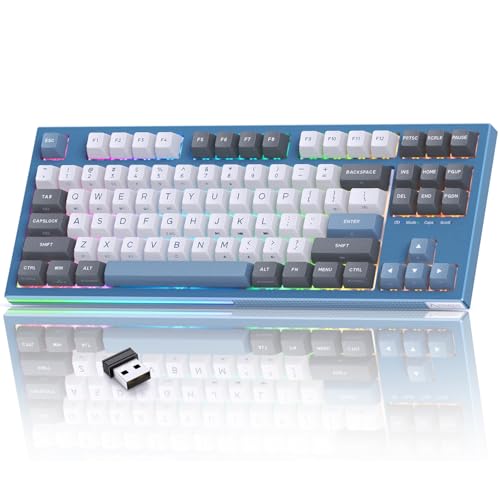

This guide is written for new and part-time streamers who play games on a PC and want a keyboard that sounds clean on mic, fits a crowded desk, and handles scene switching without extra software fuss. Every keyboard below is a budget gaming model with its key specs taken from its Amazon listing, so you can compare layouts, switches, and connectivity and choose the one that matches how you stream.
Quick Picks
As an Amazon Associate we earn from qualifying purchases
| Product | Best for | Key spec from title |
|---|---|---|
| KEMOVE K87 | Wireless streaming setups | Tri-mode Bluetooth, 2.4GHz, USB-C |
| Redragon K660 | Quiet TKL streaming | Hot-swap, quiet linear red switches |
| Redragon K516 Shiva | Macro-heavy streaming | On-board macro, membrane mechanical-feel |
| Keychron C3 Pro | Customizable streaming | QMK/VIA programmable, gasket mount |
| Logitech G213 Prodigy | Full-size streaming desk | Mech-Dome keys, LIGHTSYNC RGB |
How to Choose
Switch Type and Noise
The switches decide how your keyboard sounds on stream, and microphone pickup makes this the first thing to get right. Quiet linear switches, like the red switches on the K660 and the C3 Pro, travel smoothly without a click, so key presses stay low in the mix and your voice stays in front. Loud clicky switches cut through commentary and distract viewers, especially during quiet game moments or late-night sessions. Membrane boards sit between the two: the K516 feels mechanical but stays softer than most true mechanical boards. If you use a condenser microphone close to your desk, favor quiet linear or membrane options and skip anything marketed as clicky.
Layout and Desk Space
A streaming desk fills up fast with a microphone arm, a camera, and a second monitor, so layout matters more than most buyers expect. Tenkeyless boards drop the number pad and give your mouse hand more room, which helps when you play fast games and reach for push-to-talk at the same time. Full-size boards suit streamers who keep a numpad for hotkeys or run production software that maps numbers to scenes. The K87, K660, K516, and C3 Pro are all 87-key TKL models, while the G213 is the only full-size pick here. Measure the space between your monitor stand and your microphone base before choosing.
Wired or Wireless
Wired keyboards remove two worries at once: the battery never dies mid-stream, and the connection never drops during a ranked match. Most budget streamers are better served by a wired board, and four of the five picks here connect over USB. Wireless only makes sense when your desk sits far from the PC or you move the keyboard between a gaming setup and a work laptop. The K87 covers that case with Bluetooth, 2.4GHz, and USB-C in one board, plus a 4000mAh battery the listing claims lasts up to 90 hours with RGB lighting turned off. If you go wireless, keep the USB-C cable plugged in during streams.
Lighting and Macros
RGB lighting does real work on a stream: it makes your keyboard readable on camera in a dim room and lets you color-code keys for scenes, mute, and push-to-talk. Zone lighting, like the five zones on the G213, is enough for most setups, while full RGB across the board gives you finer control over which keys stand out. Macros matter just as much when you switch scenes, start recordings, or mute yourself dozens of times per session. The K516 offers on-board macro support with dedicated multimedia keys, and the C3 Pro adds QMK/VIA programming for custom layers. Decide which shortcuts you will actually press before paying for extra features.
The 5 Best Options
KEMOVE K87 80% Wireless TKL Mechanical Gaming Keyboard
The KEMOVE K87 is the pick for streamers who want wireless freedom without giving up a compact layout or a quiet typing feel. Its tri-mode connection lets you switch between Bluetooth, 2.4GHz, and USB-C, so the same board can serve a gaming PC and a laptop, and the 4000mAh battery keeps long sessions going with the lights off. Hot-swappable linear red switches and pre-lubricated stems keep key presses smooth and soft on the microphone, while double-shot PBT keycaps resist shine from daily use. This is the most flexible board in the group, and the right choice when your desk moves or your PC sits out of cable reach.
Specs
- 80% TKL layout, 87 keys
- Hot-swappable linear red switches
- RGB LED backlit
- Bluetooth / 2.4GHz / USB-C tri-mode
- 4000mAh battery, up to 90 hours with RGB lighting turned off (listing claim)
- Double-shot PBT keycaps
- Pre-lubricated switches
- 2.4G / Bluetooth 5.0 / wired
Best for: Streamers who want one wireless board for a gaming PC and a laptop.
Watch out for: Wireless range and battery life depend on your setup, so keep the USB-C cable handy for long streams.
Redragon K660 (K556 TKL) RGB Wired Gaming Keyboard
The Redragon K660 suits streamers who want a quiet, sturdy TKL board and a wired connection they never have to think about. Its aluminum base and noise-absorbing foams keep the board stable and soften each keystroke, while the quiet linear red switches stay gentle on the microphone during commentary. Hot-swap sockets let you change switches later without soldering, and the two-angle height stand helps you find a comfortable typing position for long broadcasts. This is a straightforward board with no wireless features to manage, and it fits desks where a full-size keyboard would crowd the mouse.
Specs
- 80% TKL layout, 87 keys
- Aluminum base
- Hot-swap socket
- Noise-absorbing foams
- Quiet linear red switch
- RGB backlit
- Wired USB
- 2-angle height stand
- Model K660, series number 556
Best for: Streamers who want a quiet wired TKL board with a solid aluminum base.
Watch out for: This is the TKL K660, not the full-size K556, so check the model number before ordering.
Redragon K516 Shiva TKL Wired RGB Membrane Gaming Keyboard
The Redragon K516 Shiva is the pick for streamers who run lots of shortcuts and want dedicated keys for them. Its macro support and dedicated multimedia keys put scene switching, muting, and volume control within reach, while the membrane design with a mechanical feel stays softer than a true mechanical board. The 16.8M RGB backlight keeps keys readable in a dim streaming room, and software support lets you tune the lighting and macros to your setup. This board makes sense when your stream depends on quick key presses rather than switch feel, and when you want macro keys without a separate control pad.
Specs
- 87 keys
- Membrane, mechanical-feel
- Smooth linear switch
- On-board macro
- Dedicated multimedia keys
- 16.8M RGB backlit
- Software supported
- Wired
- Model K516, model name Shiva 87
Best for: Streamers who want macro keys and media controls built into the keyboard.
Watch out for: This is a membrane keyboard with a mechanical feel, not a true mechanical keyboard.
Keychron C3 Pro QMK/VIA
The Keychron C3 Pro is the pick for streamers who like to tune their keyboard to their workflow. Its QMK/VIA support lets you remap keys and build layers for scenes, push-to-talk, and mute, so your most-used shortcuts sit where your fingers expect them. The gasket mount and red switches give the board a soft, quiet typing feel that stays out of the microphone, and the 1000Hz polling rate keeps key presses responsive during fast games. With NKRO, every key press registers even when you hold several keys at once. This board rewards setup time with a layout that fits your stream rather than the other way around.
Specs
- 87 keys, compact TKL layout
- Gasket mount
- QMK/VIA programmable
- Red LED backlight
- Red switches
- Wired
- 1000Hz polling rate
- NKRO
- ARM architecture MCU with 256KB flash
- Compatible with Mac, Windows, and Linux
- 14.35 x 5.43 x 1.25 inches
- Date first available July 15, 2023
Best for: Streamers who want to remap keys and build custom layers for their broadcast.
Watch out for: Programming the board takes some setup time, so expect a learning curve before your first stream.
Logitech G213 Prodigy Gaming Keyboard

The Logitech G213 Prodigy is the pick for streamers who want a full-size board with a built-in palm rest and simple controls. Its Mech-Dome keys combine a mechanical feel with a quieter membrane base, using 4mm travel and 50g actuation force, so long sessions stay comfortable without loud clicks on the microphone. LIGHTSYNC RGB spreads across five lighting zones with 16.8 million colours, and dedicated media controls adjust volume or mute without leaving the game. The spill-resistant design and integrated palm rest add durability for a desk that sees food, drinks, and long sessions. This is the only full-size board here, and the right one when a numpad matters.
Specs
- Full-size
- Mech-Dome keys, 4mm travel, 50g actuation force
- LIGHTSYNC RGB, 5 lighting zones, 16.8 million colours
- Spill-resistant
- Integrated palm rest
- Adjustable feet, two-level angle
- Dedicated media controls
- Anti-ghosting gaming matrix
- Wired USB
- 1x USB 2.0 port
- 2.2 pounds
- 17.8 x 8.58 x 1.3 inches
- Model 920-009284
- Date first available March 2, 2020
Best for: Streamers who want a full-size board with a palm rest and dedicated media controls.
Watch out for: The standalone keyboard is the pick here, not the bundles that add a mouse or headset.
Which One Fits Your Situation
Streaming From a Small Desk
Pick the Redragon K660 or the Keychron C3 Pro. Both are 87-key TKL boards that leave room for your mouse and microphone arm, and both use quiet red switches that stay low in the mix. The K660 adds an aluminum base and foam for a softer sound, while the C3 Pro adds QMK/VIA remapping if you want custom shortcut layers.
Streaming Late at Night
Pick the Redragon K660 or the Redragon K516 Shiva. Quiet linear switches and a soft membrane feel keep key presses from carrying through the house, and RGB backlighting keeps keys readable without a bright room light. Keep push-to-talk on a thumb key so you can mute quickly and easily between sentences.
Streaming With Lots of Scene Switching
Pick the Redragon K516 Shiva or the Keychron C3 Pro. The K516 gives you on-board macros and dedicated multimedia keys out of the box, while the C3 Pro lets you build custom QMK/VIA layers for scenes, mute, and recording. Either board puts your most-used shortcuts just one key press away.
Setting Up Your First Stream
Pick the Logitech G213 Prodigy. Its full-size layout, integrated palm rest, and dedicated media controls need no setup, and the spill-resistant design forgives accidents while you learn. The Mech-Dome keys feel familiar if you are coming from a standard office keyboard. You can add a macro board later once you know which shortcuts you use most.
Common Mistakes
- Buying a clicky keyboard and discovering the clicks dominate your stream audio.
- Choosing a full-size board for a small desk, then running out of room for the mouse.
- Picking a wireless keyboard and forgetting to charge it before a long broadcast.
- Ignoring macro keys and switching scenes with the mouse while playing.
- Judging a keyboard by its lighting alone instead of checking switch type and layout first.
Frequently Asked Questions
Do I need a mechanical keyboard to stream games?
No. A mechanical keyboard is not required for game streaming, and many streamers do better with quieter options. The membrane K516 Shiva and the Mech-Dome G213 both feel responsive while staying softer on the microphone than loud mechanical boards. Choose based on noise, layout, and shortcut needs rather than switch type alone.
Is wireless fast enough for game streaming?
Yes, for most streamers. The KEMOVE K87 offers 2.4GHz and Bluetooth alongside a wired USB-C mode, and its 1000Hz-class responsiveness suits everyday play. Wired mode is still the safest choice for long broadcasts because it removes battery and connection worries entirely, so keep the cable plugged in during important streams.
What keyboard layout is best for streaming?
Tenkeyless is the best layout for most streaming desks because it drops the number pad and frees space for the mouse and microphone arm. Four of the five picks here are 87-key TKL boards. A full-size board like the G213 makes sense only when you use the numpad for hotkeys or production software that maps numbers to scenes.
Does RGB lighting matter for a stream?
Yes, when it helps you find keys in a dim room and color-code shortcuts for scenes and mute. Zone lighting on the G213 is enough for most setups, while full RGB on the K660, K516, and K87 lets you highlight specific keys. Lighting alone never makes a keyboard good, so check switches and layout first.
FAQ
Do I need a mechanical keyboard to stream games?
Is wireless fast enough for game streaming?
What keyboard layout is best for streaming?
Does RGB lighting matter for a stream?
More from Amazon
Programs that pair well with the guide above. Offers and eligibility are set by Amazon and may change.
Free shipping on eligible items, Prime Video and more. Eligible new members can start with a free trial.
Start a Prime free trialA Prime membership for ages 18-24 with a trial period. Eligibility is set by Amazon.
See Prime for Young AdultsAudiobooks and podcasts to listen to on the go. Eligible new members can start with a free trial.
Try Audible freeAd-free music streaming. Eligible new subscribers can start with a free trial.
Try Music Unlimited freeAs an Amazon Associate we earn from qualifying purchases.