Our Short List of 3
All 3 Picks at a Glance
| Product | Specs | Action |
|---|---|---|
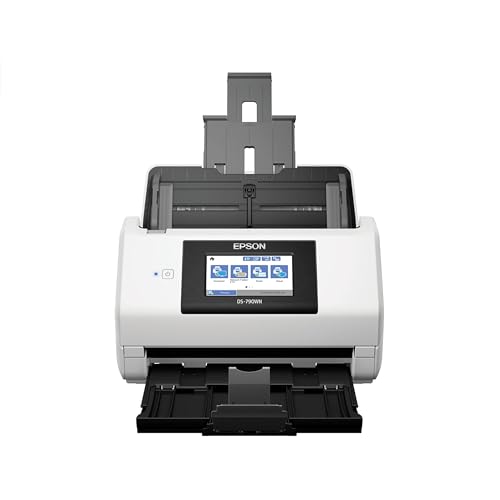 Epson WorkForce DS-790WN (ASIN: B09TVBYMYV) | Check price on Amazon | |
 Brother ADS-4300N (ASIN: B09TRWDQM4) | Check price on Amazon | |
 Brother ADS-4900W (ASIN: B09TRX9JQ3) | Check price on Amazon |
Key takeaways
- Compare the best network adf scanners for back-office workflows by scan speed, feeder capacity, daily volume and connectivity, with verified models and key spec
As an Amazon Associate, we earn from qualifying purchases made through links on this page.
Back-office workflows — invoice intake, claims processing, HR files, order paperwork — share a pattern: many people generate paper, a few processes handle it, and the scanned result has to land in the right system folder every time. A network ADF scanner fits that pattern because it sits where the paper is, serves everyone who walks up and sends files directly to network destinations without depending on one employee’s PC. This guide compares network-connected models with the feeder capacity, touchscreen or shortcut controls and scan-to-folder reliability that back-office teams need, including wired-only options for offices that restrict wireless devices.
What to Look For
- Connection that matches office policy: Gigabit Ethernet for stability and compliance, Wi-Fi where cabling is impractical — and both on flagship models.
- Walk-up usability: a touchscreen or programmable shortcuts so back-office staff scan to the correct folder without training on driver software.
- Feeder capacity of 80-100 sheets for end-of-day batch piles, plus duplex speed of 40 ppm or more.
- Destination flexibility: network folders (SMB), FTP/SFTP, email and SharePoint cover most back-office routing without middleware.
- Central management: web-based configuration and user profiles so IT can deploy identical settings to every unit.
The Picks
Epson WorkForce DS-790WN (ASIN: B09TVBYMYV)
The DS-790WN is built for shared network scanning without a host computer: staff walk up, choose a destination on the large touchscreen and scan straight to a network folder, email or cloud service over Wi-Fi or Ethernet. The 100-sheet feeder and 45 ppm engine are sized for departmental daily work rather than occasional desktop batches, and PC-free operation keeps the workflow running even when the nearest computer is busy or off.
Key specifications:
– 45 ppm / 90 ipm single-pass duplex scanning
– 100-sheet automatic document feeder
– Built-in Wi-Fi, Ethernet and USB 3.0 connectivity
– PC-free scanning from a 4.3-inch color touchscreen
– Scan to network folders, email, cloud services and USB drives
– Ultrasonic double-feed detection and slow mode for delicate pages
– Epson Scan 2, TWAIN and Document Capture Pro support
Limitations to know: At 45 ppm it is half the speed of the fastest models here, so a single centralized high-volume station is better served by the DS-970 class.
Fujitsu fi-8170 (Ricoh fi Series) (ASIN: B0BZZ9W6V1)
The fi-8170 is the departmental anchor of the Ricoh (formerly Fujitsu) fi Series: a 70 ppm sheet-fed scanner with both USB and wired LAN connections, so one unit can serve a whole workgroup through PaperStream networking or sit on a single high-volume desk. Its ultrasonic iMFF sensor watches every page for overlaps, and the straight, reliable paper path handles mixed batches of office paper, cards and long documents.
Key specifications:
– 70 ppm / 140 ipm single-pass duplex scanning
– 100-sheet automatic document feeder
– Manufacturer daily volume up to 10,000 sheets
– USB 3.2 and Gigabit Ethernet LAN connectivity
– Ultrasonic intelligent multi-feed function (iMFF) double-feed detection
– PaperStream IP TWAIN/ISIS drivers and PaperStream Capture software
– Clear Image Capture optics and automatic skew, crop and color detection
Limitations to know: Network deployment works best through the PaperStream software stack, so mixed-platform offices should confirm driver coverage for every operating system in use before standardizing on it.
Brother ADS-4300N (ASIN: B09TRWDQM4)
The ADS-4300N is the wired-network specialist: it skips Wi-Fi entirely in favor of a stable Ethernet connection, which suits offices with wireless restrictions or interference problems. Brother rates it for up to 6,000 pages a day, the feeder takes 80 sheets, and the ultrasonic sensor plus a separation switch for tricky media make it a dependable shared back-office unit.
Key specifications:
– 40 ppm / 80 ipm single-pass duplex scanning
– 80-sheet automatic document feeder
– Gigabit Ethernet wired networking plus USB 3.0
– Manufacturer daily duty cycle up to 6,000 pages
– Ultrasonic multifeed detection sensor and separation switch
– Scan to PC, network, FTP/SFTP, email and USB without wireless radios
– Three configurable shortcut buttons for shared walk-up use
Limitations to know: There is no Wi-Fi and no touchscreen, so placement depends on a nearby network port and most setup happens through the connected PC or web interface.
Brother ADS-4900W (ASIN: B09TRX9JQ3)
The ADS-4900W is Brother’s professional desktop flagship: a 60 ppm engine, every connection type in the class and a large touchscreen that stores per-user workflows for shared departments. It is positioned for busy workgroups that scan all day, with image processing compatibility (Kofax VRS) that larger organizations often standardize on, and an ultrasonic sensor guarding batch integrity.
Key specifications:
– 60 ppm / 120 ipm single-pass duplex scanning
– 100-sheet automatic document feeder
– Wi-Fi, Gigabit Ethernet and USB 3.0 connectivity
– 4.3-inch color touchscreen with customizable workflow shortcuts
– Ultrasonic multifeed detection sensor
– Kofax VRS Elite image processing compatibility and TWAIN/ISIS support
– Scan to network, SharePoint, FTP/SFTP, email server and cloud services
Limitations to know: Its feature set is aimed at administered workgroups; a single user with light volume pays for networking and workflow capacity they will not use.
Quick Comparison
| Model | ASIN | Speed | Feeder | Connection |
|---|---|---|---|---|
| Epson DS-790WN | B09TVBYMYV | 45 ppm / 90 ipm | 100 sheets | Wi-Fi, Ethernet, USB |
| Fujitsu fi-8170 | B0BZZ9W6V1 | 70 ppm / 140 ipm | 100 sheets | USB, Ethernet |
| Brother ADS-4300N | B09TRWDQM4 | 40 ppm / 80 ipm | 80 sheets | Ethernet, USB |
| Brother ADS-4900W | B09TRX9JQ3 | 60 ppm / 120 ipm | 100 sheets | Wi-Fi, Ethernet, USB |
Frequently Asked Questions
Why choose a network scanner over a USB scanner on a shared PC?
A network scanner removes the host PC as a bottleneck and a failure point. Anyone can walk up and scan to their destination even when the usual computer is off, updated or occupied.
Is wired Ethernet better than Wi-Fi for a back-office scanner?
For fixed locations, generally yes: wired connections are stable, fast and simpler to secure. Wi-Fi earns its place where running a cable is impractical or the scanner moves between stations.
Can staff scan without logging into a computer?
The touchscreen models here can. The DS-790WN and ADS-4900W scan directly to network folders, email and cloud services from the panel; the ADS-4300N covers PC and USB-host destinations with its shortcut buttons.
How are scan destinations kept consistent across a team?
Administrators create shared profiles — folder paths, file naming, resolution, OCR — and push them to the device, so every user’s ‘Invoices’ button produces the same output in the same place.
Verdict
The DS-790WN is the most complete PC-free back-office scanner here. Choose the fi-8170 for PaperStream-based environments, the ADS-4300N when policy demands wired-only hardware, and the ADS-4900W when the back office wants the largest touchscreen workflow library.
FAQ
Why choose a network scanner over a USB scanner on a shared PC?
Is wired Ethernet better than Wi-Fi for a back-office scanner?
Can staff scan without logging into a computer?
How are scan destinations kept consistent across a team?
More from Amazon
Programs that pair well with the guide above. Offers and eligibility are set by Amazon and may change.
Free shipping on eligible items, Prime Video and more. Eligible new members can start with a free trial.
Start a Prime free trialA Prime membership for ages 18-24 with a trial period. Eligibility is set by Amazon.
See Prime for Young AdultsAudiobooks and podcasts to listen to on the go. Eligible new members can start with a free trial.
Try Audible freeAd-free music streaming. Eligible new subscribers can start with a free trial.
Try Music Unlimited freeAs an Amazon Associate we earn from qualifying purchases.