Key takeaways
- Compare PCVR headsets for first-time buyers, from Quest Link all-in-one models to native PC systems, with tracking, GPU and total setup checks.
Short answer: For most first-time PC VR buyers, the Meta Quest 3 512GB is the safest pick, since it connects to a gaming PC through Quest Link or Air Link and needs no base stations. Buyers watching total setup cost should start with the Meta Quest 3S 128GB instead.
The real decision for a first PC VR headset is not which display sounds sharpest on paper, but which system your room, your graphics card and your remaining budget can actually support. A native PC headset with base stations asks for mounting space and a strong GPU, while an all-in-one headset linked to the PC asks for a good router or a link cable and more modest hardware. Choosing the wrong type means paying for resolution your PC cannot drive or for tracking gear your room cannot fit.
This guide is written for first-time PC VR buyers who already own, or are about to build, a gaming PC. It compares two all-in-one headsets with a stated PC link mode against two native PC systems, so both setup styles are covered. Every product below was chosen from the names and specifications printed on its Amazon product page, and each page confirms the headset works with a PC before it earns a place here.
Quick Picks
As an Amazon Associate we earn from qualifying purchases.
| Product | Best for | Key spec from title |
|---|---|---|
| Meta Quest 3 512GB | First-time buyers who want one headset for PC and standalone play | 512 GB storage with thirty percent sharper resolution |
| Meta Quest 3S 128GB | The lowest total setup cost for a first PC VR rig | 128 GB storage with Batman: Arkham Shadow included |
| HTC VIVE Pro 2 Virtual Reality System | Buyers who want base station tracking included in the box | 5K resolution with a 120Hz refresh rate |
| Pimax Crystal Light VR Headset for PC | Sim players chasing maximum per-eye clarity | 2880×2880 per eye on an 8K QLED display |
How to Choose
Tracking: Inside-Out Cameras or Base Stations
Inside-out headsets use cameras on the headset itself to watch the room and the controllers, so setup means clearing floor space and charging the controllers. Base station systems instead mount two sensor boxes high in opposite corners, and those boxes track the headset and controllers from outside. The base station route usually tracks controllers behind your back more reliably and suits a dedicated VR room. Inside-out tracking suits shared rooms, renters who cannot mount hardware, and anyone who wants to move the setup between rooms without repeating the whole installation each time.
Your Graphics Card Sets the Ceiling
A PC VR headset never renders its own PC games, so the graphics card decides how much of the display you actually get to use. A panel rated for very high per-eye resolution needs a card that can fill those pixels at a steady frame rate, or the software lowers the render resolution and the expensive display is partly wasted. Before choosing, match the headset against the games you plan to run, since a racing simulator and a simple rhythm title place very different loads on the same card. Leaving GPU headroom also protects comfort, because dropped frames in VR feel far worse than on a monitor.
The Full Setup Cost Beyond the Headset
The headset price is only the first line of a first PC VR setup. Depending on the model, the full cost can grow with a link cable, a dedicated router for wireless PC play, base station stands or wall mounts, a powered USB hub, replacement facial interfaces and the games themselves. Native PC systems bundle some of this hardware, while all-in-one headsets often leave the PC connection accessories as separate purchases. Listing everything your chosen headset needs before you order prevents the common surprise of an unusable headset waiting on a cable that was never in the box.
Connection Type: DisplayPort, Link Cable or Wireless
Native PC headsets connect with a cable that carries a direct display signal, which keeps image compression out of the picture and suits fast, detailed games. All-in-one headsets reach the PC either through a USB-C link cable or wirelessly through Air Link over your home network. The wireless route frees your movement but depends heavily on router placement and network load from the rest of the household. The wired link route is more predictable and charges the headset while you play. Decide which trade-off fits your room before deciding which headset fits your desk.
The 4 Best Options
Meta Quest 3 512GB

For a first PC VR purchase, the Quest 3 512GB is the most forgiving place to start. It plays on its own when the PC is busy, then connects to a gaming PC through Quest Link or Air Link when you want the larger PC library and the extra graphical power. Its pancake lenses keep text and menus readable across more of the view than older lens designs, and the large storage tier means standalone titles never compete for space. Inside-out tracking keeps the whole setup inside one box, with no mounts, no sensor wiring and no dedicated room required.
Specs
- Storage: 512 GB
- Display resolution: 2064 x 2208 pixels per eye
- Processor: Snapdragon XR2 Gen 2
- Graphical processing: 2X the power of the previous generation, per the product title
- Included offer: access to 40+ games with a 3-month trial of Meta Horizon+
Best for: First-time buyers who want PC VR now and standalone play from the same headset.
Watch out for: A link cable for wired PC play is a separate purchase, so confirm what is in the box before ordering.
ASIN: B0CD1JTBSC
Meta Quest 3S 128GB

The Quest 3S 128GB is the entry point of this group, and for PC VR use its job is simple: reach the PC library through Quest Link or Air Link while keeping the rest of the setup spend as low as possible. It runs the same processor family as the Quest 3, so standalone titles remain an option between PC sessions, and the bundled game softens the cost of stocking a new library. The trade-off sits in the optics, where the lower per-eye resolution and Fresnel lenses give a smaller zone of best clarity than the Quest 3 delivers.
Specs
- Storage: 128 GB
- Display resolution: 1832 x 1920 pixels per eye
- Processor: Snapdragon XR2 Gen 2
- Memory: thirty-three percent more memory, per the product title
- Included game: Batman: Arkham Shadow, with a 3-month trial of Meta Horizon+
Best for: Buyers whose budget has to cover the headset, the PC connection and the first games all at once.
Watch out for: The 128 GB tier fills quickly if you keep many standalone games installed alongside your PC library.
ASIN: B0DDK1WM9K
HTC VIVE Pro 2 Virtual Reality System

The VIVE Pro 2 system is the traditional native PC route in this guide: a wired headset, two controllers and two Base Station 2.0 units in one box, all tracked through SteamVR. Its combined 5K resolution and wide field of view are aimed at players who sit close to detailed content, such as cockpit instruments and dashboard readouts. Because the tracking hardware is included, the purchase covers parts that headset-only packages leave as later expenses. The cost of that completeness is setup work, since the base stations need power, height and a clear view of the play area.
Specs
- Display maximum resolution: 4896 x 2448 pixels combined
- Refresh rate: 120Hz
- Field of view: 120 degrees
- Tracking: SteamVR, with two Base Station 2.0 units included
- Audio: 3D spatial sound with Hi-Res certified headphones
- Additional features from the listing: 5K resolution, SteamVR compatibility, wireless controllers
Best for: Buyers setting up a fixed VR space who want base station tracking included from day one.
Watch out for: Your PC needs a DisplayPort connection and enough graphics power to feed a 5K panel, so check both before ordering.
ASIN: B09FPCT3H8
Pimax Crystal Light VR Headset for PC
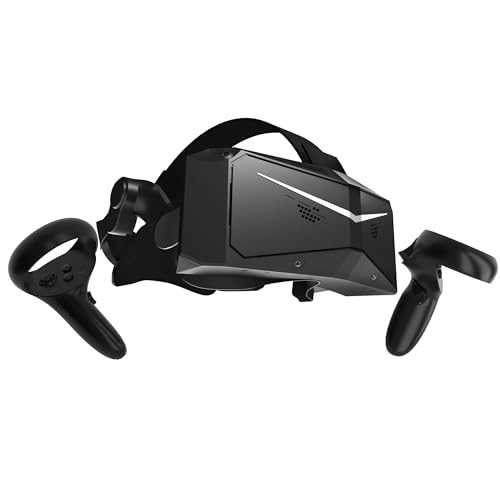
The Crystal Light is a native PC headset built around one headline figure: 2880×2880 pixels per eye on a QLED display with local dimming. That density is aimed squarely at flight and racing simulator players, who read small gauges and distant markers for hours and notice softness faster than anyone. It uses inside-out tracking, so it skips base station mounting while staying wired to the PC for its signal. This is a specialist pick rather than a starter pick, and it makes the most sense when the graphics card is already strong and the games are already chosen.
Specs
- Display resolution: 2880 x 2880 pixels per eye
- Display type: 8K QLED with local dimming
- Tracking: inside-out
- Refresh rate: up to 120Hz
- Version: Full Payment Version, per the product title
- Intended use from the title: flight sims, iRacing and gaming
Best for: Simulator players with a powerful graphics card who value per-eye clarity above everything else.
Watch out for: Confirm exactly what the listing includes, especially the controller situation, and check the seller details before ordering.
ASIN: B0G6YYW3PB
Which One Fits Your Situation
You Want the Simplest First Step Into PC VR
Choose the Meta Quest 3 512GB. There is nothing to mount, the controllers are in the box, and the same headset keeps working as a standalone device when the PC is off or occupied. You can start with wireless Air Link, then add a link cable later if your network struggles, which spreads the setup decisions over time instead of forcing all of them on the first day.
Your Budget Has to Cover Everything at Once
Choose the Meta Quest 3S 128GB and plan the whole purchase as one list: headset, link cable if you want wired play, and the first games. The included Batman: Arkham Shadow gives you something substantial to play immediately, and because the headset also works alone, a PC upgrade later still builds on the same hardware instead of replacing it.
You Play in a Fixed Room and Hate Setup Drift
Choose the HTC VIVE Pro 2 Virtual Reality System. Mounted base stations give the play space a permanent reference, so the boundaries and controller tracking stay consistent from session to session. It is the most installation work in this guide, but it is installation you do once, and the box already contains the tracking hardware that other systems sell separately.
You Fly or Drive in Simulators for Hours
Choose the Pimax Crystal Light if your graphics card is genuinely strong, because its per-eye resolution exists for reading instruments and spotting distant detail. Seated simulator play also plays to its strengths, since the wired connection and inside-out tracking matter less when you stay in one chair. If your card is mid-range, the Quest 3 will look better in practice than a starved high-resolution panel.
Common Mistakes
- Buying a high-resolution headset before checking whether the graphics card can drive it at a steady frame rate.
- Forgetting the accessories outside the box, such as a link cable, base station mounts or a better router, when setting the budget.
- Choosing a standalone-only headset whose product page never states a PC link mode, then discovering the PC library is closed to it.
- Mounting base stations at desk height or in corners blocked by furniture, which breaks tracking that should be reliable.
- Judging headsets only by resolution while ignoring lens type, field of view and how the headset connects to the PC.
Frequently Asked Questions
Can a standalone headset really work as a PCVR headset?
Yes, provided the product page states a PC link mode. The Quest models in this guide connect through Quest Link with a cable or Air Link over Wi-Fi, and the PC then renders the games while the headset acts as the display and tracking system. A standalone headset with no stated PC mode on its page should be treated as standalone only. Always confirm the link feature on the exact listing you are buying, not on a different model in the same family.
What graphics card do I need for PC VR?
The honest answer depends on the headset and the games. Native PC systems publish minimum PC specifications on their pages, and those minimums describe a floor for basic play rather than the full resolution and refresh rate the panel advertises. Higher per-eye resolution raises the requirement steeply, especially in simulators. A sensible approach is to pick the headset your current card can feed comfortably, or budget the card upgrade into the same purchase decision.
Are base stations better than inside-out tracking?
Base stations usually track controllers more consistently, including when a controller passes behind your body, and they give a fixed room a stable reference. Inside-out tracking removes the mounting, wiring and extra hardware, and it travels between rooms easily. Neither system is better for everyone. First-time buyers in shared spaces generally prefer inside-out convenience, while dedicated VR rooms benefit most from base stations. Your room and routine should make this decision, not the spec sheet.
What else do I need to buy besides the headset?
That depends on which headset you choose. An all-in-one model may need a link cable for wired PC play and possibly a better-placed router for wireless play. A native PC system needs a suitable play area, power points for its base stations if it uses them, and a PC with the right ports. Games are a separate cost for every system. Reading the included-components list on the product page before ordering is the simplest way to avoid a half-finished setup.
FAQ
Can a standalone headset really work as a PCVR headset?
What graphics card do I need for PC VR?
Are base stations better than inside-out tracking?
What else do I need to buy besides the headset?
More from Amazon
Programs that pair well with the guide above. Offers and eligibility are set by Amazon and may change.
Free shipping on eligible items, Prime Video and more. Eligible new members can start with a free trial.
Start a Prime free trialA Prime membership for ages 18-24 with a trial period. Eligibility is set by Amazon.
See Prime for Young AdultsAudiobooks and podcasts to listen to on the go. Eligible new members can start with a free trial.
Try Audible freeAd-free music streaming. Eligible new subscribers can start with a free trial.
Try Music Unlimited freeAs an Amazon Associate we earn from qualifying purchases.