Key takeaways
- Find the best gaming mouse for Dota 2, from button-heavy MOBA picks to light, precise options for fast camera control, quick item use, and long matches.
Dota 2 asks more from a mouse than most games do. You are moving the camera, last-hitting, aiming skill shots, and firing off items, all in the same few seconds, and a misclick during a team fight can cost the game. The real decision is not which mouse has the highest DPI number on the box. It is how many commands you want under your thumb, how the shape holds up through a long match, and whether the sensor tracks cleanly at the sensitivity you actually play with.
This guide is for Dota 2 players who want a mouse built around that workload, from support players who need quick wards and item actives to mid laners who live on precise skill shots. Each pick below is listed on Amazon with its name and specifications taken from its product page, so you can compare button layouts, sensors, and weights before choosing.
Quick Picks
As an Amazon Associate we earn from qualifying purchases at no extra cost to you.
| Product | Best for | Key spec from title |
|---|---|---|
| Logitech G502 HERO | All-round Dota 2 play with many buttons | HERO 25K sensor, 25,600 DPI |
| Razer Naga V2 Pro | Carrying a full item build on the mouse | 19+1 programmable buttons, Focus Pro 30K |
| Logitech G600 | A dedicated MOBA layout on a modest setup | 20 MMO-tuned buttons, 8,200 DPI |
| Corsair Scimitar RGB Elite | Adjusting the side buttons to your thumb | 17 programmable buttons, 18,000 DPI |
| SteelSeries Rival 5 | Fast, light play with a few side buttons | TrueMove Air sensor, 18,000 CPI |
How to Choose
Count the buttons you will actually use
Dota 2 gives you four abilities, up to six item slots, and often a neutral item on top, so the number of reachable buttons matters more here than in a shooter. Count how many actives you normally carry, then look for a mouse that puts that many inputs under your thumb without forcing your fingers to stretch. A 12-button side panel suits players who want every item on the mouse, while five side buttons are enough if you keep most actives on the keyboard and only want two or three on the mouse. Buying more buttons than you can reach reliably just adds misclicks, so match the layout to your hand and your usual item build.
Pick a sensor that tracks cleanly at your sensitivity
Most Dota 2 players use a low or medium sensitivity, which means the sensor spends its time on small, careful movements rather than fast flicks. A modern optical sensor with a high maximum DPI and no smoothing keeps the cursor steady when you edge the camera or click a moving hero, while an older laser sensor can feel less consistent on the same surface. Check the sensor name and the maximum DPI on the listing, then set the in-game sensitivity so one comfortable wrist movement covers the distance you need. If the cursor drifts or skips at your usual setting, the problem is usually the sensor or the surface, not the DPI ceiling.
Match the shape and weight to long matches
A Dota 2 match can run for an hour, and a mouse that feels fine for ten minutes can turn into hand fatigue by the late game. Heavier mice around 120 grams feel planted and steady for deliberate clicking, while lighter mice under 90 grams make constant camera movement easier on the wrist. Right-handed ergonomic shapes support the palm during long sessions, and a thumb rest helps when you hold the mouse for extended periods. If you play several matches in a row, weight and shape matter at least as much as the sensor, so treat comfort as a specification rather than an afterthought.
Check the software and onboard memory
Dota 2 players often rebind keys, set DPI steps for different moments, and save lighting or button profiles, so the mouse software matters. Look for a mouse whose software lets you assign abilities and items to the side buttons, create more than one profile, and store at least one profile on the mouse itself. Onboard memory means your bindings travel with the mouse to another computer or a LAN setup without reinstalling anything. Before buying, confirm on the listing whether profiles save to the mouse, because some models only store settings in the software on one machine.
The 5 Best Options
Logitech G502 HERO

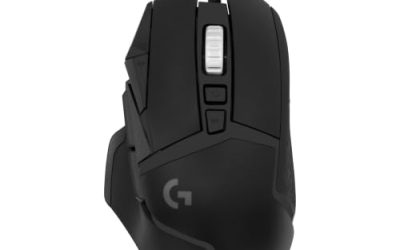
The G502 HERO is the most flexible pick in this guide because it covers the whole Dota 2 workload without committing to a single button layout. Eleven programmable buttons give you room for abilities, a couple of item actives, and a push-to-talk key, while the dual-mode scroll wheel helps with camera zoom and quick item cycling. The right-handed ergonomic shape suits palm and claw grips through long matches, and the five removable tuning weights let you shift the balance toward the front or back of the mouse until it feels planted without feeling slow.
Specs
- Sensor: HERO 25K optical sensor, 100 to 25,600 DPI
- Buttons: 11 programmable buttons
- Weight: 121 grams, plus five removable 3.6-gram weights
- Scroll wheel: Dual-mode hyper-fast with tilt
- Lighting: LIGHTSYNC RGB
- Onboard memory: Up to 5 profiles
- Connectivity: Wired, braided USB cable
- Model: 910-005469
Best for: Players who want one mouse that handles abilities, items, and camera control without a dedicated MOBA layout.
Watch out for: The shape is right-handed and fairly wide, so check the fit if you have small hands or prefer a fingertip grip.
Razer Naga V2 Pro

The Naga V2 Pro is built for players who want their whole item build on the mouse. Three magnetic side plates swap between 2, 6, and 12-button layouts, so the 12-button plate can hold a full set of item actives while the 2-button plate keeps things simple. The Focus Pro 30K sensor tracks up to 30,000 DPI with 750 IPS tracking and 70 G acceleration, which is far more than Dota 2 needs, and the HyperScroll Pro wheel switches between a tactile step mode and a free-spin mode for fast camera movement. Battery life runs up to 150 hours over HyperSpeed wireless and up to 300 hours over Bluetooth.
Specs
- Sensor: Focus Pro 30K optical sensor, up to 30,000 DPI
- Buttons: Up to 20 programmable, with 2, 6, and 12-button swappable side plates
- Switches: Optical Mouse Switches Gen-3
- Connectivity: HyperSpeed wireless, Bluetooth, wired USB-C
- Battery: Up to 150 hours over HyperSpeed, up to 300 hours over Bluetooth
- Tracking: Up to 750 IPS, up to 70 G acceleration
- Weight: 134 grams
- Model: RZ01-04400100-R3U1
Best for: Players who carry many active items and want to move their whole hotbar onto the mouse.
Watch out for: At 134 grams it is a large, heavy mouse, so smaller hands should check the shape first, and wireless charging needs a separately sold accessory.
Logitech G600

The G600 is the most dedicated MOBA mouse in this guide, and it shows in the layout. Twenty MMO-tuned buttons include a 12-button thumb panel arranged in a grid, plus a G-Shift button under the ring finger that gives every button a second function, so the mouse can carry abilities, items, and control groups without touching the keyboard. The laser sensor reaches 8,200 DPI, which is modest next to modern optical sensors but ample for Dota 2 at low and medium sensitivity. Onboard memory stores three profiles, and the RGB backlight can mark the thumb panel so you can find the right button by touch and color.
Specs
- Sensor: Gaming-grade laser, 50 to 8,200 DPI
- Buttons: 20 MMO-tuned programmable buttons, including 12 thumb buttons
- G-Shift: Ring-finger button doubles the function of every other button
- Weight: 133 grams without cable
- Lighting: RGB backlit thumb panel and body
- Onboard memory: 3 profiles
- Connectivity: Wired, braided USB cable, 2 meters
- Model: 910-002864
Best for: Players who want a true MOBA layout with a thumb grid and a second function layer for every button.
Watch out for: The laser sensor and the wide body are older design choices, so it suits palm-grip players with average to large hands better than fingertip players or small hands.
Corsair Scimitar RGB Elite

The Scimitar RGB Elite fixes the most common complaint about button-heavy mice: the side buttons never quite sit under your thumb. A patented Key Slider control system lets you slide the 12-button side panel forward or back until the buttons fall where your thumb naturally rests, and 17 programmable buttons in total cover abilities, items, and macros. The custom PixArt PMW3391 optical sensor reaches 18,000 DPI in 1 DPI steps, and the 50 million click-rated Omron switches are built for the constant clicking that Dota 2 demands. The iCUE software handles macro programming, lighting, and surface calibration.
Specs
- Sensor: Custom PixArt PMW3391 optical sensor, native 18,000 DPI, adjustable in 1 DPI steps
- Buttons: 17 programmable buttons, 12 on the side panel
- Key Slider: Side panel slides to fit your thumb reach
- Switches: 50 million click-rated Omron switches
- Weight: 122 grams
- Lighting: Four-zone RGB, iCUE compatible
- Connectivity: Wired, braided cable
- Onboard memory: Profile storage
- Model: CH-9304211-NA
Best for: Players whose thumbs never quite reach the side buttons on a fixed-grid mouse and want to move the panel to fit.
Watch out for: The mouse is right-handed and wired, so left-handed players and players who want wireless should look at the other picks in this guide.
SteelSeries Rival 5

The Rival 5 is the lightest and simplest pick here, and that is exactly the point. Nine buttons include five quick-action side buttons, enough for your most-used actives without turning the mouse into a keypad, and the 85-gram weight makes constant camera movement easy over a long match. The TrueMove Air optical sensor reaches 18,000 CPI with 400 IPS tracking and 40 G acceleration, and the Golden Micro IP54 switches are rated for 80 million clicks. The ergonomic right-handed shape suits claw and fingertip grips, and the 10-zone RGB lighting syncs with the rest of a SteelSeries setup through PrismSync.
Specs
- Sensor: TrueMove Air optical sensor, 18,000 CPI, 400 IPS, 40 G acceleration
- Buttons: 9 programmable buttons, including 5 quick-action side buttons
- Switches: Golden Micro IP54 mechanical switches, 80 million click rating
- Weight: 85 grams
- Lighting: 10-zone RGB, PrismSync enabled
- Grip style: Claw and fingertip
- Connectivity: Wired USB
- Model: 62551
Best for: Players who want a light, fast mouse for camera control and skill shots, with just a few side buttons for key actives.
Watch out for: Nine buttons will not hold a full item build, so you will still need the keyboard for most actives, and the shape is right-handed only.
Which One Fits Your Situation
You play heroes with many active items
If your hero pool includes item-heavy carries and supports who juggle actives like Blink Dagger, Force Staff, and Glimmer Cape, the Razer Naga V2 Pro fits best. The 12-button side plate holds a full item row, and the swappable plates let you drop to fewer buttons on heroes with simpler builds. The Corsair Scimitar RGB Elite is the backup choice if you want a wired mouse and the sliding side panel matters more to you than wireless freedom.
You want one mouse for every game you play
If Dota 2 is your main game but you also play shooters and strategy games, the Logitech G502 HERO fits best. Its 11 buttons cover Dota 2 comfortably without locking you into a MOBA-only layout, and the adjustable weights and onboard profiles adapt to other genres. The SteelSeries Rival 5 is the alternative if you prefer a lighter mouse and play more aim-heavy games alongside Dota 2.
You have a modest setup and want a dedicated MOBA layout
If you play on a single computer and want the most buttons for the least fuss, the Logitech G600 fits best. Its thumb grid and G-Shift layer carry a whole hotbar, and the three onboard profiles mean you can set it up once and leave it alone. The Corsair Scimitar RGB Elite is the alternative if you want a newer optical sensor and a side panel you can slide to fit your thumb.
You play long sessions and your wrist gets tired
If you regularly play several matches in a row and comfort is your main concern, the SteelSeries Rival 5 fits best. At 85 grams it is the lightest pick in this guide, and the ergonomic shape supports claw and fingertip grips without forcing your hand flat. The Logitech G502 HERO is the alternative if you prefer a heavier, more planted mouse and want the tuning weights to adjust the balance.
Common Mistakes
- Choosing a mouse by its maximum DPI number instead of checking how the sensor tracks at the sensitivity you actually use in Dota 2.
- Mapping every item to the mouse on day one, then misclicking in team fights because you have not learned where each button sits by touch.
- Buying a 12-button thumb panel when your hand is small, then finding the back rows unreachable in the middle of a match.
- Ignoring onboard memory and discovering your bindings are gone when you plug the mouse into another computer.
- Picking a wireless mouse without checking the battery life and the charging setup, then running out of charge during a ranked match.
Frequently Asked Questions
How many buttons do I need on a mouse for Dota 2?
Most players do well with five to twelve side buttons, depending on how many item actives they carry. Five side buttons cover the two or three actives you use most, while a 12-button panel holds a full item row. Count your usual actives before buying, and remember that buttons you cannot reach by touch are worse than no buttons at all.
What DPI should I use for Dota 2?
There is no single right DPI for Dota 2, because the right setting depends on your screen size, your grip, and how far you move the mouse. Many players use a low or medium sensitivity so small wrist movements give precise cursor control for last-hitting and skill shots. Start near the middle of your mouse range, play a few matches, and adjust in small steps until camera movement feels natural.
Is a wireless mouse fine for Dota 2?
Yes, a modern wireless mouse with a fast 2.4 GHz connection works well for Dota 2, where the game rarely punishes a tiny input delay. The practical concern is battery life, so check the listed hours on the product page and keep the charging cable within reach. A wired mouse removes that concern entirely if you do not mind the cable.
Do I need a dedicated MOBA mouse, or will any gaming mouse work?
Any good gaming mouse works for Dota 2 if the sensor tracks cleanly and the shape fits your hand, so a dedicated MOBA mouse is not required. A button-heavy mouse helps when you carry many active items, but a simpler mouse with five side buttons is enough if you keep most actives on the keyboard. Choose by your item habits, not by the label on the box.
FAQ
How many buttons do I need on a mouse for Dota 2?
What DPI should I use for Dota 2?
Is a wireless mouse fine for Dota 2?
Do I need a dedicated MOBA mouse, or will any gaming mouse work?
More from Amazon
Programs that pair well with the guide above. Offers and eligibility are set by Amazon and may change.
Free shipping on eligible items, Prime Video and more. Eligible new members can start with a free trial.
Start a Prime free trialA Prime membership for ages 18-24 with a trial period. Eligibility is set by Amazon.
See Prime for Young AdultsAudiobooks and podcasts to listen to on the go. Eligible new members can start with a free trial.
Try Audible freeAd-free music streaming. Eligible new subscribers can start with a free trial.
Try Music Unlimited freeAs an Amazon Associate we earn from qualifying purchases.