Key takeaways
- Compare the best Logitech gaming keyboards by layout, switch feel, wireless range and lighting. Four picks from full-size wired to compact wireless.
Logitech sells more gaming keyboards than most shoppers can sort through in one sitting, and the real decision is rarely about the logo on the spacebar. It comes down to how much desk space you can give up, whether you want a cable or a wireless connection, and how the keys should feel under your fingers during a long session. A full-size board with a number pad suits a desk that never moves, while a tenkeyless or 60-size board frees up room for wide mouse movement.
This guide is for PC gamers who want a Logitech keyboard and a clear way to choose between them, whether you play ranked shooters, story-driven games, or a mix of both. Every keyboard below comes from a live Amazon listing, with its switches, layout, connectivity and lighting taken from that listing, so you can compare the four on the same terms before you buy.
Quick Picks
As an Amazon Associate we earn from qualifying purchases at no extra cost to you.
| Product | Best for | Key spec from title |
|---|---|---|
| Logitech G915 TKL | A slim wireless board with media controls | GL Linear switches, LIGHTSPEED wireless, 40-hour battery |
| Logitech G PRO X TKL | Tournament-style play and travel | GX Brown tactile switches, LIGHTSPEED, Bluetooth and USB |
| Logitech G213 Prodigy | A full-size wired board with a palm rest | Mech-Dome keys, LIGHTSYNC RGB, spill-resistant design |
| Logitech G PRO X 60 | Maximum mouse room on a small desk | GX Optical Tactile switches, 60-size layout, LIGHTSPEED wireless |
How to Choose
Start with the layout size
Layout size shapes everything else about a keyboard. A full-size board keeps the number pad and suits a desk where the keyboard also handles spreadsheets or data entry between games. A tenkeyless board drops the number pad and pulls the mouse hand closer to the center, which helps shooter players who flick across a wide pad. A 60-size board goes further and drops the function row and navigation cluster, leaving a small footprint that fits easily in a bag. Measure the free space on your desk and think about whether you use the number pad every day, because a layout that looks neat in a photo can feel cramped once your mouse and monitor are in place.
Pick the switch feel first
Switch feel decides how every keystroke lands, and Logitech offers three broad characters across these keyboards. Linear switches travel smoothly from top to bottom with no bump, which suits players who want fast, quiet double taps in shooters. Tactile switches add a small bump partway down so you can feel each press register, a useful middle ground for typing and gaming in the same session. Clicky switches add an audible click to that bump, which some players love and some households do not. The G213 Prodigy uses Mech-Dome keys rather than full mechanical switches, so its press feels softer. If you have never tried a switch type before, buy the feel that matches your main use.
Decide between wired and wireless
A wired keyboard never needs charging and never drops a connection, which is why many players keep one as their main board. Wireless boards have closed the gap with 2.4 GHz connections such as LIGHTSPEED, and the freedom from a cable makes the desk look cleaner and the board easier to move. The trade-off is battery: the G915 TKL runs for up to 40 hours on a full charge, while the PRO X TKL and PRO X 60 recharge over USB and work while plugged in. Bluetooth is a bonus for pairing with a laptop, but it is not the connection to use for ranked play. Check whether the board works while charging before you commit.
Weigh lighting, media controls and software
Lighting and extra controls are easy to dismiss until you use them every day. Per-key LIGHTSYNC RGB lets you light the keys you use in a game and dim the rest, while a dedicated volume wheel and media keys let you adjust sound without leaving the match. The G915 TKL and PRO X TKL both carry a volume roller and media controls, while the G213 Prodigy has dedicated media keys above the number pad. Logitech G HUB handles lighting, macros and per-game profiles, and onboard profiles let the board remember settings when you move it to another machine. On a shared computer where you cannot install software, onboard profiles matter more than a long feature list.
The 4 Best Options
Logitech G915 TKL
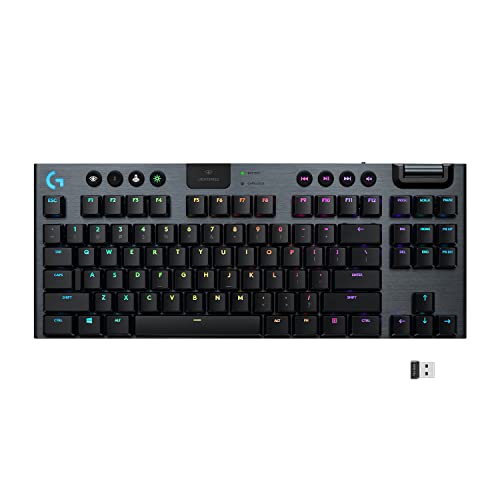
The G915 TKL is the board to look at when you want a premium wireless keyboard that still feels like a serious gaming tool. Its low-profile GL Linear switches sit at half the height of standard switches, so keystrokes feel short and quick, and the slim aluminum body keeps the whole board thin without feeling flimsy. LIGHTSPEED wireless keeps the connection fast, Bluetooth covers a second device, and the dedicated volume wheel and media keys sit within easy reach. This is the pick for a player who wants a clean, cable-free desk and is willing to pay for the thinnest board Logitech makes.
Specs
- Low-profile GL Linear mechanical switches
- LIGHTSPEED wireless with 1 ms report rate, plus Bluetooth
- Up to 40 hours of battery life on a full charge
- LIGHTSYNC RGB per-key lighting, approx. 16.8 million colors
- Dedicated volume wheel and media keys
- Onboard profiles, up to 3, plus game mode
- Model 920-009512; 15.2 x 5.9 x 0.9 inches; 1.8 pounds
- Rechargeable lithium-polymer battery, charges via micro USB
Best for: A player who wants a slim wireless board with media controls and a premium build.
Watch out for: Low-profile keys feel different from standard-height switches, so the shorter travel takes a few days to get used to.
ASIN: B085RMD5TP
Logitech G PRO X TKL

The PRO X TKL is built around tournament play. It was designed with input from esports players, and the tenkeyless layout leaves plenty of room for low-sensitivity mouse movement. GX Brown tactile switches give each press a small bump you can feel without a loud click, which works well for both ranked matches and everyday typing. LIGHTSPEED wireless, Bluetooth and USB cover every connection you need, and the dual-shot PBT keycaps resist the shine smooth keycaps develop over time. The volume roller and media controls sit on the top edge where they are easy to reach without looking down.
Specs
- GX Brown tactile mechanical switches
- LIGHTSPEED wireless, Bluetooth and USB connectivity
- Dual-shot PBT keycaps
- Media controls and volume roller
- Game mode control
- Standard keyboard layouts for third-party keycap compatibility
- Model 920-012127; 13.86 x 5.91 x 1.34 inches
- Designed in collaboration with esports players
Best for: Competitive players who want a portable tenkeyless board with a tactile switch.
Watch out for: The tenkeyless layout drops the number pad, so check whether you use it daily before you buy.
ASIN: B0BQBSH6NQ
Logitech G213 Prodigy

The G213 Prodigy is the full-size option in this group, for a player who wants a complete keyboard without a mechanical switch. Its Mech-Dome keys feel softer than the mechanical switches on the other boards here, with a quieter press for a shared room. The built-in palm rest supports long sessions, the spill-resistant design guards against drink spills, and dedicated media controls sit above the number pad. LIGHTSYNC RGB lights the whole board, and the wired USB connection means the keyboard never needs charging. This is the straightforward pick for a fixed desk where the keyboard stays put.
Specs
- Mech-Dome keys
- LIGHTSYNC RGB backlit keys
- Spill-resistant design
- Built-in palm rest
- Dedicated media controls
- Adjustable feet
- Wired USB connection
- Model 920-008096; compatible with Windows
Best for: A player who wants a full-size wired board with a palm rest and quiet keys.
Watch out for: Mech-Dome keys feel different from mechanical switches, so try the feel in a store first if you can.
ASIN: B07QGHK6Q8
Logitech G PRO X 60

The PRO X 60 is Logitech G’s first 60-size keyboard, and the most space-saving board in this guide. Dropping the function row and navigation cluster frees up a large area of desk for mouse movement, which matters for low-sensitivity players. GX Optical Tactile switches use a light beam instead of a metal contact to register each press, and the board connects over LIGHTSPEED wireless, Bluetooth or USB. Dual-shot PBT keycaps and LIGHTSYNC RGB carry over from the larger PRO X boards, so the size is not stripped down. It fits easily in a bag, a natural second board for travel or LAN events.
Specs
- GX Optical Tactile switches
- 60-size layout, Logitech G’s first 60-size keyboard
- LIGHTSPEED wireless, Bluetooth and USB connectivity
- LIGHTSYNC RGB lighting
- Dual-shot PBT keycaps
- Model 920-011902; designed for Windows PC
Best for: A player who wants the smallest footprint possible and maximum mouse room.
Watch out for: The missing function row and navigation keys mean shortcuts move to layered key combinations, which takes practice.
ASIN: B0BRSSGBCN
Which One Fits Your Situation
You want a premium wireless board for a clean desk
Pick the G915 TKL. Its slim profile, low-profile switches and 40-hour battery make it the most polished wireless board here, and the dedicated volume wheel and media keys keep everyday controls close at hand. The tenkeyless layout still leaves room for the mouse, and Bluetooth lets you pair it with a laptop when the gaming PC is off. This is the board for a desk you want to keep tidy without giving up gaming performance.
You play ranked games and travel to events
Pick the PRO X TKL. It was designed with esports players, its tenkeyless size fits in a bag, and the GX Brown switches give a clear tactile bump for both games and typing. LIGHTSPEED wireless covers match play, while Bluetooth and USB cover everything else. The dual-shot PBT keycaps hold up well to heavy use, which matters when the board travels with you every week.
You want a full-size board that stays put
Pick the G213 Prodigy. It keeps the number pad, adds a palm rest and dedicated media controls, and its wired connection never needs charging. The Mech-Dome keys are quieter than the mechanical switches here, which suits a shared room. This is the right choice for a fixed desk where the keyboard never moves and the number pad gets daily use.
You play at low sensitivity and need mouse room
Pick the PRO X 60. Its 60-size layout frees up the most desk space of any board in this guide, which suits wide flick shots and low-sensitivity aiming. The GX Optical Tactile switches register quickly, and LIGHTSPEED wireless keeps the connection fast. Be ready to relearn a few shortcuts, since the function row lives on a second layer.
Common Mistakes
- Buying a tenkeyless or 60-size board and then discovering you use the number pad every day for work or school.
- Choosing a clicky switch for a shared room without thinking about the sound it makes late at night.
- Picking a wireless board and forgetting to check how it charges and whether it works while plugged in.
- Ignoring the layout of media controls and the volume wheel, then missing them during every match.
- Ordering a keyboard without checking whether the listing matches the switch type and color you actually want.
Frequently Asked Questions
Are Logitech gaming keyboards good for typing as well as gaming?
Yes, most of them work well for both, but the switch matters more than the brand. Tactile switches such as GX Brown give feedback that suits long typing sessions, while linear switches feel smoother for fast game inputs. The G213 Prodigy uses softer Mech-Dome keys that suit everyday writing. If you type all day and play at night, a tactile or Mech-Dome board is the safer choice.
Do I need a wireless gaming keyboard?
Not necessarily. A wired board never needs charging and never drops a connection, which is enough for many players. Wireless makes sense when you want a clean desk, move the keyboard often, or switch between a PC and a laptop. The wireless boards here use LIGHTSPEED connections built for gaming, and they keep working while plugged in, so the battery is rarely a problem in practice.
What is the difference between GL and GX switches?
GL switches are Logitech’s low-profile design, built at half the height of a standard switch for a shorter keystroke. They appear on slim boards such as the G915 TKL. GX switches are full-height mechanical switches, offered in linear, tactile and clicky versions, and they appear on boards such as the PRO X TKL. GX Optical switches use a light beam to register presses instead of a metal contact.
Can I use a Logitech gaming keyboard with a Mac?
The listings for these keyboards list Windows as the main platform, and the G915 TKL also lists macOS compatibility. The boards connect over USB or Bluetooth, so basic typing works on a Mac, but some features in Logitech G HUB may behave differently outside Windows. Check the listing for the model you want and confirm which keys and software features carry over before you buy.
FAQ
Are Logitech gaming keyboards good for typing as well as gaming?
Do I need a wireless gaming keyboard?
What is the difference between GL and GX switches?
Can I use a Logitech gaming keyboard with a Mac?
More from Amazon
Programs that pair well with the guide above. Offers and eligibility are set by Amazon and may change.
Free shipping on eligible items, Prime Video and more. Eligible new members can start with a free trial.
Start a Prime free trialA Prime membership for ages 18-24 with a trial period. Eligibility is set by Amazon.
See Prime for Young AdultsAudiobooks and podcasts to listen to on the go. Eligible new members can start with a free trial.
Try Audible freeAd-free music streaming. Eligible new subscribers can start with a free trial.
Try Music Unlimited freeAs an Amazon Associate we earn from qualifying purchases.