Key takeaways
- Find a large wireless gaming mouse that fills a big palm. We compare five full-size models on sensor, grip, battery life, and comfort before you buy.
A mouse that is too small forces your palm to hover and your fingers to curl, and after a long session that strain shows up as cramps, misclicks, and a grip that never quite settles. The real decision is not which sensor tops a spec sheet, but which full-size shell lets your whole hand rest flat while the buttons fall under your fingers without reaching.
This guide is for palm-grip players with large hands, MMO and strategy players who want more buttons within thumb reach, and anyone whose current mouse feels like a pebble after an hour. Each mouse below was picked from its Amazon listing by name, size, and wireless connection, and the specs in each section come from that listing, so you can match the shell to your hand before you buy.
Quick Picks
As an Amazon Associate we earn from qualifying purchases.
| Product | Best for | Key spec from title |
|---|---|---|
| Logitech G502 LIGHTSPEED | Palm-grip players who want lots of buttons | HERO 25K sensor, 11 programmable buttons |
| Razer Basilisk V3 Pro | MMO and strategy players who want a tilt wheel | Focus Pro 30K sensor, HyperScroll Tilt Wheel |
| Logitech G903 LIGHTSPEED | Left- or right-handed players who want a long battery | 140+ hour battery, ambidextrous shell |
| Razer DeathAdder V3 Pro | Palm-grip players who want a light full-size shell | 63-gram body, Focus Pro 30K sensor |
| Corsair Dark Core RGB Pro SE | Players who want Qi charging and side-grip options | Qi wireless charging, 18,000 DPI sensor |
How to Choose
Match the shell to your hand size
A large gaming mouse usually measures about 125 to 135 millimetres long and 65 to 80 millimetres wide, with a tall hump that fills the middle of your palm. Measure your hand from wrist crease to middle fingertip: if it is 18 centimetres or longer, a palm grip on a full-size shell will feel far more relaxed than a compact mouse. Width matters as much as length, since a narrow body forces your ring finger to drag on the pad. Check the grip width in the listing before you buy, and remember that a tall hump supports the palm while a low, flat shell suits a claw grip better.
Decide how many buttons you actually use
Extra buttons help only if your thumb can reach them without shifting your grip. MMO and strategy players often use a thumb grid or a row of side buttons for abilities, while shooter players usually need just two side buttons for reload and melee. Count the commands you press in a typical match, then match that number to the mouse. A mouse with eleven or more programmable buttons sounds impressive, but unused buttons add weight and invite accidental presses at the worst moment. If you play one genre most of the time, pick the button layout built for it rather than the highest count on the shelf.
Weigh battery life against weight
Big mice carry bigger batteries, so the longest-lasting wireless models tend to weigh more than 100 grams. That trade is worth it if you play for hours without a cable nearby, since a dead mouse mid-match is worse than a few extra grams. Check the battery hours in the listing and note whether the figure is for the fast 2.4 GHz link or for Bluetooth, which usually lasts longer. Some models recharge on a wireless pad or a dock, while others need a cable plugged in. If you hate charging, a mouse that works with a wireless charging mat or a dock keeps the desk clear and the battery topped up.
Check the wireless connection and polling rate
A gaming mouse connects over a 2.4 GHz dongle, Bluetooth, or a cable, and the dongle link is the one built for fast play. Bluetooth is handy for laptops and travel, but it polls more slowly and can feel sluggish in a shooter. Look for a 1,000 Hz polling rate as the baseline, which reports the mouse position a thousand times a second. A few models include an 8,000 Hz mode with a separate receiver, yet that mode drains the battery faster and needs a strong PC to show any gain. Also check where the dongle lives when you travel: a slot inside the mouse body keeps it safe, while a loose dongle is easy to lose.
The 5 Best Options
Logitech G502 LIGHTSPEED

The G502 LIGHTSPEED is the full-size classic of this group, with a 132-millimetre body that gives large hands a place to rest and eleven programmable buttons spread across the thumb and top. Its HERO 25K sensor tracks cleanly at high speeds, and the tunable weight system lets you add or remove small weights until the balance feels right. The free-spinning scroll wheel flips between notched steps and smooth scrolling, which suits long documents as well as weapon switching. It also works with the PowerPlay charging mat, so the battery can top up while you play.
Specs
- HERO 25K sensor
- 11 programmable buttons
- LIGHTSPEED wireless with 1 ms report rate
- Tunable weight system
- LIGHTSYNC RGB lighting
- PowerPlay wireless charging compatible
- Size: 132 x 75 x 40 mm, 114 g
Best for: Palm-grip players who want many buttons and a tunable weight.
Watch out for: It is one of the heavier mice here, so check the 114-gram weight if you lift the mouse often.
Razer Basilisk V3 Pro

The Basilisk V3 Pro is a wide, right-handed ergonomic mouse built around a 130-millimetre shell that suits palm grips and larger hands. Its HyperScroll Tilt Wheel tilts left and right as well as spinning freely, which gives MMO and strategy players extra inputs without moving the thumb far. The Focus Pro 30K sensor handles fast flicks, and thirteen programmable controls cover abilities, macros, and media keys. Three connection modes cover a 2.4 GHz dongle, Bluetooth, and a cable, so the same mouse works at a desk and on a laptop.
Specs
- Focus Pro 30K optical sensor
- HyperScroll Tilt Wheel with free-spin and tilt
- 13 programmable controls
- Gen-3 optical switches
- HyperSpeed wireless, Bluetooth, and wired modes
- 13-zone Chroma RGB lighting
- Size: 130 x 75.4 x 42.5 mm, 112 g
Best for: MMO and strategy players who want a tilt wheel and many programmable controls.
Watch out for: The wide shell suits large hands best, and the wireless charging dock is sold separately.
Logitech G903 LIGHTSPEED

The G903 LIGHTSPEED is a full-size ambidextrous mouse, which makes it the pick for left-handed players and for households where more than one person shares the same mouse. Its HERO 25K sensor and 140-plus-hour battery cover long sessions without a cable, and the shell accepts an optional 10-gram weight for a heavier feel. Removable side buttons let you set up the left side, the right side, or both, and the LIGHTSYNC lighting can be set to match the rest of your setup. PowerPlay support means it can charge on a compatible mat while you use it.
Specs
- HERO 25K sensor, up to 25,600 DPI
- 140+ hour battery life
- Ambidextrous design with removable side buttons
- 107 g plus optional 10 g weight
- LIGHTSYNC RGB lighting
- PowerPlay wireless charging compatible
Best for: Left-handed players and anyone who shares a mouse between hands.
Watch out for: The ambidextrous shape has no thumb rest, so palm-grip players should check the fit first.
Razer DeathAdder V3 Pro

The DeathAdder V3 Pro proves that a large mouse does not have to be heavy: its 128-millimetre ergonomic shell fills a big palm while the body weighs only 63 grams. That light weight makes fast flicks and long aiming sessions less tiring, and the tall hump supports the palm through a full evening of play. The Focus Pro 30K sensor tracks at up to 30,000 DPI, and the HyperSpeed wireless link keeps the connection steady. Five programmable buttons keep the layout simple, which suits shooter players who want a clean grip without a thumb grid.
Specs
- Focus Pro 30K optical sensor, up to 30,000 DPI
- 63 g ultra-lightweight body
- Up to 90 hours of battery life
- HyperSpeed wireless and Bluetooth
- Gen-3 optical switches
- 5 programmable buttons
- Size: 128 x 68 x 44 mm
Best for: Shooter players who want a light, full-size ergonomic shell.
Watch out for: Only five programmable buttons, so MMO players who need a thumb grid should look elsewhere.
Corsair Dark Core RGB Pro SE
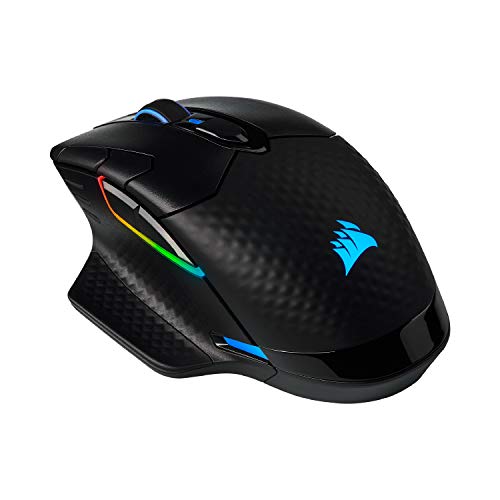
The Dark Core RGB Pro SE is the heaviest mouse in this group at 142 grams, and its wide contoured shell with two interchangeable side grips fits large hands that want a solid, planted feel. Qi wireless charging sets it apart: set it on a compatible charging pad and it tops up without a cable. The 18,000 DPI optical sensor and sub-1ms SLIPSTREAM wireless link handle fast play, while eight programmable buttons cover the commands most players need. It also works over Bluetooth and a cable, so one mouse can move between a gaming PC and a laptop.
Specs
- 18,000 DPI optical sensor
- 8 programmable buttons
- Qi wireless charging
- SLIPSTREAM sub-1ms wireless, Bluetooth, and wired modes
- Two interchangeable side grips
- iCUE software compatible
- Weight: 142 g
Best for: Players who want Qi charging and a wide, planted shell.
Watch out for: At 142 grams it is the heaviest mouse here, and the 18,000 DPI sensor trails the newer sensors in this guide.
Which One Fits Your Situation
You have very large hands and palm-grip everything
Start with the Logitech G502 LIGHTSPEED or the Razer Basilisk V3 Pro. Both measure about 130 millimetres long with a tall hump that fills a large palm, and both carry enough buttons for everyday play without a thumb grid. The G502 adds tunable weights if you like a heavier feel, while the Basilisk adds a tilt wheel for extra inputs. Either one lets your whole hand rest instead of hovering.
You play MMOs and need a wall of thumb buttons
Pick the Razer Basilisk V3 Pro first, with the Corsair Dark Core RGB Pro SE as the alternative. The Basilisk gives you thirteen programmable controls plus a tilt wheel, so abilities, macros, and camera controls sit under your thumb. The Dark Core gives eight programmable buttons and a wider shell if the Basilisk feels narrow. Both connect over a fast wireless link, so your inputs stay responsive during raids and long sessions.
You want the lightest large mouse for fast shooters
Choose the Razer DeathAdder V3 Pro. At 63 grams it is by far the lightest full-size mouse here, yet its 128-millimetre shell still fills a large palm. The simple five-button layout keeps your grip clean, and the Focus Pro 30K sensor tracks fast flicks without smoothing. If you lift the mouse often to reposition, the low weight will feel like the biggest upgrade of all.
You are left-handed or share the mouse with someone else
Take the Logitech G903 LIGHTSPEED. It is the only ambidextrous mouse in this group, with side buttons you can fit on the left, the right, or both sides. That makes it the natural choice for left-handed players and for households where two people with different hands share one desk. The long battery and PowerPlay charging mean it rarely needs a cable, no matter who is using it.
Common Mistakes
- Buying by DPI alone: a 30,000 DPI sensor means nothing if the shell is too small for your hand, so check length and grip width first.
- Ignoring the grip style: a mouse shaped for palm grip feels awkward in a claw grip, and the reverse is just as true.
- Forgetting the dongle: a wireless mouse without a storage slot inside the body leaves a small dongle that is easy to lose on the move.
- Assuming every wireless link is equal: Bluetooth is fine for browsing but the 2.4 GHz dongle is the link built for fast play.
- Skipping the battery check: a mouse with a short battery life will need a cable at the worst moment, so match the listed battery hours to your longest sessions.
Frequently Asked Questions
What size counts as a large gaming mouse?
A large gaming mouse is usually 125 to 135 millimetres long, 65 to 80 millimetres wide, and tall enough to fill the palm. If your hand measures 18 centimetres or more from wrist to middle fingertip, a mouse in this range will usually fit a palm grip. Shorter mice force large hands to curl, which causes strain during long sessions.
Are wireless gaming mice fast enough for competitive play?
Yes, when you use the 2.4 GHz dongle link. Modern wireless gaming mice report at 1,000 Hz, which matches a wired mouse, and the best sensors track just as cleanly. Bluetooth is the slower option and suits browsing and travel better than ranked matches. Keep the dongle close to the mouse and charge before long sessions.
How long should a wireless gaming mouse battery last?
Look for at least 60 hours on the fast wireless link if you play most evenings, and more if you hate charging. Some models in this guide run far longer, and a few recharge on a wireless pad or dock so you rarely plug in a cable. Battery figures vary by lighting and polling rate, so treat the listed figure as a guide rather than a promise.
Can I use a large gaming mouse with small hands?
You can, but it is rarely comfortable for a palm grip. Small hands suit a shorter shell and a claw or fingertip grip, since a large mouse forces the fingers to stretch for the buttons. If you still want a big mouse for its buttons, try a claw grip first and check the grip width in the listing. Comfort matters more than the extra buttons.
FAQ
What size counts as a large gaming mouse?
Are wireless gaming mice fast enough for competitive play?
How long should a wireless gaming mouse battery last?
Can I use a large gaming mouse with small hands?
More from Amazon
Programs that pair well with the guide above. Offers and eligibility are set by Amazon and may change.
Free shipping on eligible items, Prime Video and more. Eligible new members can start with a free trial.
Start a Prime free trialA Prime membership for ages 18-24 with a trial period. Eligibility is set by Amazon.
See Prime for Young AdultsAudiobooks and podcasts to listen to on the go. Eligible new members can start with a free trial.
Try Audible freeAd-free music streaming. Eligible new subscribers can start with a free trial.
Try Music Unlimited freeAs an Amazon Associate we earn from qualifying purchases.