Key takeaways
- Find the best keyboard and mouse for Nintendo Switch, from adapter bundles that work in any game to simple dock plug-in sets for typing and chat.
The real decision when buying a keyboard and mouse for Nintendo Switch is not which brand looks best. It is whether the set can actually control games, because the Switch does not treat a mouse the way a computer does. Most Switch games have no native mouse support, so a USB set in the dock only types text in menus, shops, and chat boxes. A set with a built-in console adapter translates keyboard and mouse input into controller signals, and that is what makes the mouse move a character in a shooter.
This guide covers both kinds of sets and says plainly which kind each one is. Adapter bundles suit players who want mouse aim in shooters on the TV, while direct USB sets suit players who want faster typing, a comfortable layout for supported games, and a tidy setup beside the dock. Every product below names Nintendo Switch compatibility on its Amazon listing, and every specification comes from that listing.
Quick Picks
As an Amazon Associate we earn from qualifying purchases.
| Product | Best for | Key spec from title |
|---|---|---|
| GameSir VX2 AimSwitch | Couch play with mouse aim in shooters | 36 TTC Red switches, 12000 DPI mouse |
| IFYOO KMAX2 Plus | Console shooters with macro keys and a headset jack | One-hand keyboard, mouse, and mouse pad included |
| ZJFKSDYX C91 | A complete keyboard, mouse, and headset set for the dock | C91MAX chip, mouse up to 6000 DPI |
| 7KEYS One Handed Combo | A compact, low-cost one-handed set for typing and supported games | 35-key RGB keypad, 6-button mouse |
| Orzly Hornet RX-250 Pink 4-in-1 | A matching pink desk set with headset and mouse pad | 4 DPI levels, 19-key rollover keyboard |
How to Choose
Adapter bundles or direct USB sets
First, decide how the set will talk to the console. Adapter bundles such as the GameSir VX2, the IFYOO KMAX2 Plus, and the ZJFKSDYX C91 include hardware converting keyboard and mouse input into controller signals, so they work in games that never added keyboard support. Direct USB sets such as the 7KEYS combo and the Orzly RX-250 plug straight into the dock, and the keyboard then works for text entry and in the few games with native keyboard support, while the mouse does not steer gameplay. If mouse aim in shooters is the goal, only an adapter bundle does the job. If typing speed and a nicer layout matter most, a direct USB set is simpler and cheaper.
One-handed keypad or full keyboard
One-handed keypads keep only the keys a game needs, plus a wrist rest, and they leave room on a small desk or a lap. The GameSir VX2, IFYOO, ZJFKSDYX, and 7KEYS sets all use this shape, and it suits players who sit close to the TV and want movement keys under one hand and the mouse under the other. A full keyboard such as the one in the Orzly bundle suits players who also type long messages, search the shop, or share the set with a computer. Think about where the set will live: a keypad fits a couch tray, while a full board needs a real desk and a second USB port on the dock for the mouse.
Wired connection and dock ports
Every set in this guide connects by wire, and that is a strength on Switch because wireless receivers can add pairing steps the console does not handle well. Count the dock ports before buying: the Switch dock has three USB ports, and a keyboard plus a mouse takes two of them. Adapter bundles route both devices through one adapter, which frees a port and keeps the cable run tidy. A direct USB set needs two free ports, so check what else is plugged in, such as a wired controller adapter or a charging cable. Switch Lite owners need a USB OTG adapter with a USB-C connector, since the handheld has no full-size USB port at all.
Extra gear in the box
Some sets are only a keyboard and a mouse, while others add a headset, a mouse pad, or a controller crossover adapter. The Orzly bundle includes a headset and a large mouse pad, and the ZJFKSDYX C91 includes a headset as well, which matters for voice chat in team games. The IFYOO KMAX2 Plus includes a mouse pad and a 3.5mm headphone jack on the keyboard, plus macro keys for repeated commands. Decide which extras you would buy separately anyway. A bundle that includes them saves a second order, but a bundle that includes gear you will never use is just a larger box on the shelf.
The 5 Best Options
GameSir VX2 AimSwitch
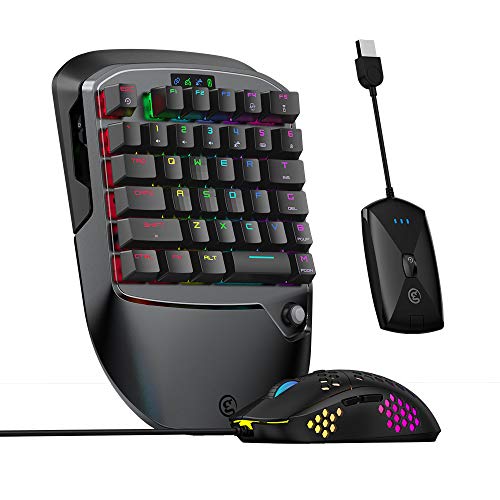
The VX2 is the most complete adapter bundle here, and it suits players who want mouse aim on the TV without a desk full of cables. A 36-key keypad with TTC Red mechanical switches handles movement and actions, a wired mouse with a 12000 DPI sensor handles aiming, and a 2.4GHz receiver links the two to the console through the dock. The keypad is small enough to rest on a lap, the switches are quiet and linear, and the G-Crux app allows key remapping for different games. It is the pick for shooter players who want the closest thing to a computer setup on Switch.
Specs
- 36 TTC Red mechanical switches on the keypad
- Wired gaming mouse with PMW3360 sensor and 12000 DPI tracking
- Agility X 2.4GHz wireless link with 1000 Hz polling
- 3600mAh rechargeable battery in the keypad
- 7-key rollover anti-ghosting
- RGB backlight with adjustable brightness
- Compatible with Nintendo Switch, PS4, Xbox One, and PC
Best for: Shooter players who want mouse aim from the couch.
Watch out for: The keypad has no headphone jack, so voice chat still needs a headset connected to a controller.
IFYOO KMAX2 Plus
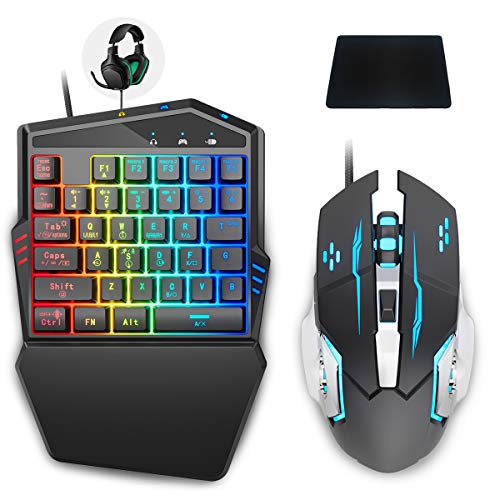
The KMAX2 Plus is a wired one-hand keyboard and mouse set built around console play, and it suits players who want macro keys and headset support in one box. The keyboard carries four macro keys that can each record a sequence of steps, plus a turbo function for repeated actions and a 3.5mm headphone jack. A mouse pad and a USB sync cable come in the package, and the key mapping software runs on Windows for custom layouts. Setup follows a fixed order: connect the official controller to the keyboard first, then the mouse and headset, then the keyboard to the console.
Specs
- One-hand keyboard with RGB backlight effects
- Gaming mouse included in the set
- 4 macro keys with turbo function
- 3.5mm headphone jack on the keyboard
- Mouse pad measuring 220 x 180 x 2 mm included
- Key mapping software for Windows
- Compatible with Switch, Switch Lite, PS4, and Xbox One
Best for: Console shooter players who want macros and a headset jack.
Watch out for: The official controller must stay connected to the keyboard during play, and third-party controllers do not work with it.
ZJFKSDYX C91
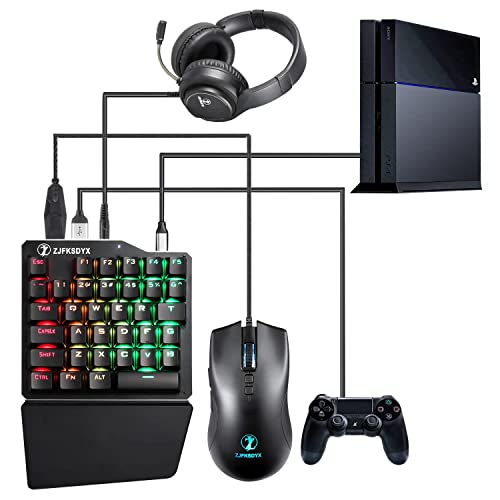
The C91 is a full kit rather than a bare set: a one-handed keyboard, a gaming mouse, and a headset arrive together, and it suits players who want everything in one order. The keyboard uses mechanical blue switches and a C91MAX chip that maps keyboard and mouse input to the console, and the mouse tracks at up to 6000 DPI with an RGB backlight. Buttons can be remapped without extra software, and the included headset plugs into the keyboard jack for voice chat. Switch setup needs Pro Controller Wired Communication turned on in System Settings, with the console docked.
Specs
- One-handed keyboard with mechanical blue switches
- Gaming mouse with RGB backlight and up to 6000 DPI
- C91MAX chip for console input mapping
- 3.5mm gaming headset with 48K HD audio included
- Custom button mapping without extra software
- 3.5mm headset jack on the keyboard
- Compatible with Nintendo Switch, PS5, PS4, and Xbox
Best for: Players who want a keyboard, mouse, and headset in one box.
Watch out for: Some Switch games do not accept mouse input even through the adapter, so check the specific game before buying.
7KEYS One Handed Keyboard and Mouse Combo
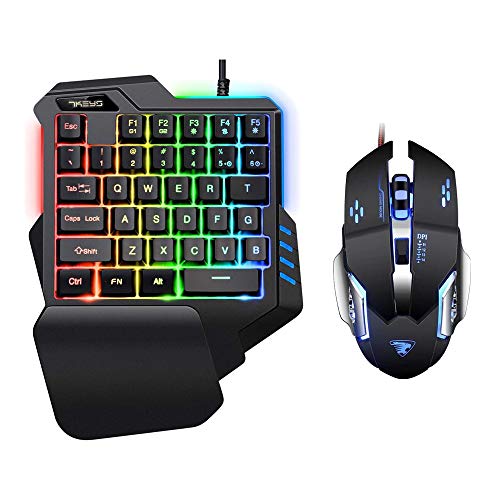
The 7KEYS combo is the simplest set in this guide, and it suits players who want a compact one-handed layout for typing and for the games that support a keyboard. The 35-key keypad uses a membrane design that stays quiet, with an RGB backlight and a wide wrist rest for long sessions. The wired mouse has six buttons and four DPI levels, and the whole set connects over USB with no drivers to install. It plugs into the dock and works for text entry across the system, which is the main thing most Switch owners actually use a keyboard for.
Specs
- 35-key one-handed membrane keyboard with RGB backlight
- Wide integrated wrist rest
- USB wired gaming mouse with 6 buttons
- 4-level DPI adjustment: 800, 1600, 1800, and 2400
- Durable USB braided cable, 1.6 m long
- Color LED breathing lamp that can be turned off
- Compatible with PC, laptop, Switch, PS4, and Xbox One
Best for: Typing, menus, and supported games on a small budget.
Watch out for: This is a direct USB set with no console adapter, so the mouse does not steer gameplay in games without native mouse support.
Orzly Hornet RX-250 Pink 4-in-1
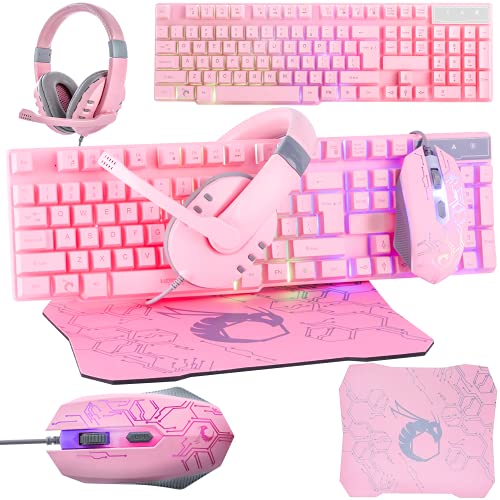
The RX-250 is the only full-size keyboard in this guide, and it suits players who want a matching pink setup with a headset and a mouse pad included. The membrane keyboard has a multi-colour LED backlight, 19-key rollover with anti-ghosting, media control keys, a gaming mode for function keys, and adjustable legs for wrist comfort. The mouse switches between four DPI levels and carries a circular breathing LED, while the stereo headset has a foldable microphone and volume controls on the cord. It is a desk set first and a console set second, and it works best beside the dock.
Specs
- Full-size membrane gaming keyboard with multi-colour LED backlight
- 19-key rollover with anti-ghosting
- Media control keys and gaming mode function keys
- Gaming mouse with 4 DPI levels: 1200, 1600, 2400, and 3200
- Stereo headset with foldable microphone and volume cord controls
- Large mouse pad with anti-skid rubber base
- Compatible with PC, Xbox, PS4, PS5, and Nintendo Switch
Best for: A matching pink desk setup with headset and mouse pad included.
Watch out for: This is a direct USB set with no console adapter, so the mouse does not control gameplay in games without native mouse support.
Which One Fits Your Situation
You play shooters on the TV and want mouse aim
Pick the GameSir VX2 AimSwitch. Its adapter translates mouse movement into controller input, so aiming works in games that never added mouse support, and the compact keypad sits comfortably on a lap. The IFYOO KMAX2 Plus is the backup choice if macro keys and a headset jack matter more than wireless freedom.
You want one box with everything, headset included
Pick the ZJFKSDYX C91. Keyboard, mouse, and headset arrive together, the buttons remap without software, and the headset jack sits on the keyboard itself. Turn on Pro Controller Wired Communication in System Settings first, then connect the set through the dock. That single order covers voice chat as well as aiming, and the included headset means no separate purchase before the first match.
You mainly type, search the shop, and chat
Pick the 7KEYS combo for a compact one-handed layout, or the Orzly RX-250 if you want a full keyboard with a headset and mouse pad. Both plug straight into the dock with no adapter to configure, and both cover text entry across the system. Setup takes a minute, and either set also works beside a computer when the console is off.
You play handheld or on Switch Lite
Pick an adapter bundle such as the IFYOO KMAX2 Plus, and add a USB OTG adapter with a USB-C connector, since the handheld has no full-size USB port. Keep the cable run short and the set on a table, because a keypad and mouse need a flat surface the handheld mode does not provide.
Common Mistakes
- Buying a plain USB keyboard and mouse and expecting the mouse to aim in shooters: most Switch games have no native mouse support, so only an adapter bundle translates mouse input into gameplay.
- Forgetting that the dock has only three USB ports: a direct USB set takes two, so check what else is plugged in before the set arrives.
- Skipping the Switch setting for adapter sets: Pro Controller Wired Communication must be on in System Settings, or the adapter will not connect.
- Using a third-party controller with the IFYOO KMAX2 Plus: the setup needs the official controller connected to the keyboard, and other controllers do not work with it.
- Assuming every game works the same way: a few Switch games reject mouse input even through an adapter, so confirm the specific game first.
Frequently Asked Questions
Can I use any USB keyboard and mouse with Nintendo Switch?
A USB keyboard plugs into the dock and works for text entry in menus, the shop, and chat boxes, and in the few games with native keyboard support. A USB mouse on its own does not steer gameplay in most Switch games. For mouse aim in shooters, you need a set with a console adapter, such as the GameSir VX2, IFYOO KMAX2 Plus, or ZJFKSDYX C91 in this guide.
Do keyboard and mouse sets work with Switch Lite?
Switch Lite has no full-size USB port, so a set needs a USB OTG adapter with a USB-C connector to plug in at all. Adapter bundles such as the IFYOO KMAX2 Plus are the practical choice, since they translate input for games without native support. Even then, a keypad and mouse need a table, so handheld play with this kind of set is awkward.
Why does an adapter set need my official controller connected?
Adapter sets translate keyboard and mouse input into controller signals, and the console checks for a genuine controller during that handshake. The official controller stays connected to the keyboard while you play, and it must be powered off before you plug it in. Third-party controllers do not complete this step on the IFYOO set, so keep the official controller nearby.
Will a keyboard and mouse set work on every Switch game?
No. Direct USB sets only help in games with native keyboard support, and even adapter sets cannot force mouse input into every title. A few games reject mouse input entirely, and some online games treat adapter input as a policy matter. Check the specific game before buying, and keep the controller handy for games that do not accept the set.
FAQ
Can I use any USB keyboard and mouse with Nintendo Switch?
Do keyboard and mouse sets work with Switch Lite?
Why does an adapter set need my official controller connected?
Will a keyboard and mouse set work on every Switch game?
More from Amazon
Programs that pair well with the guide above. Offers and eligibility are set by Amazon and may change.
Free shipping on eligible items, Prime Video and more. Eligible new members can start with a free trial.
Start a Prime free trialA Prime membership for ages 18-24 with a trial period. Eligibility is set by Amazon.
See Prime for Young AdultsAudiobooks and podcasts to listen to on the go. Eligible new members can start with a free trial.
Try Audible freeAd-free music streaming. Eligible new subscribers can start with a free trial.
Try Music Unlimited freeAs an Amazon Associate we earn from qualifying purchases.