Key takeaways
- Compare 3D scanners that ship with a turntable, from desktop auto-scan units to handheld kits, and pick the setup that fits your objects and workspace.
A scanner bundled with a turntable changes the job completely. Instead of walking around an object with the scanner in hand, or nudging a figurine a few degrees at a time and hoping the frames still line up, you set the object down, press start, and let the platform rotate it through a full circle while the scanner stays fixed. The real decision is not which scanner has the sharpest spec sheet, it is which scanner-plus-turntable setup matches the size, weight, and surface of the things you actually scan, and whether the rotation stays in step with the capture.
This guide is for makers digitizing prints and prototypes, sellers building catalog models of small products, and hobbyists archiving figurines and collectibles. Each pick below is a scanner that ships with a turntable in the box, chosen from names and specifications listed on Amazon product pages, with the bundled platform doing the rotating so your hands stay free.
Quick Picks
As an Amazon Associate we earn from qualifying purchases
| Product | Best for | Key spec |
|---|---|---|
| Revopoint POP 3 Advanced Edition | Tilt-and-rotate capture of detailed objects | 0.05mm precision, dual-axis turntable |
| Shining 3D EinScan SE V2 | Repeatable desktop scans of small objects | 0.1mm accuracy, built-in turntable |
| Revopoint POP 3 Plus Standard | Sharper small-object scans on a first kit | 0.04mm precision, mini turntable |
| Creality CR-Scan Lizard Premium Kit | Marker-free scans of dark or plain parts | 0.05mm accuracy, USB turntable |
| Revopoint POP 4 Standard Edition | Laser-accurate scans of small and medium objects | 0.03mm laser accuracy, mini turntable |
How to Choose
Turntable size and weight capacity
Start with the platform, not the scanner. A mini turntable around 125mm across suits rings, figurines, and small printed parts, while a 200mm dual-axis platform handles vases, shoes, and chunky prototypes. Check the load rating before you buy: a light platform rated for a couple of kilograms will stall or wobble under a dense metal part, and a wobbling object ruins alignment in every frame. Measure your largest regular object, then leave headroom for a mounting putty or a riser. A scanner that captures beautifully means little when the object it must rotate cannot sit safely on the plate.
Rotation control and sync with the scanner
A turntable that spins at one fixed speed is fine for simple shapes, but adjustable rotation gives you control when detail matters. Slower turns let the scanner collect denser frames on textured surfaces, while faster turns suit smooth, plain objects that track easily. Bluetooth or app control matters more than it sounds: pausing, reversing, or changing speed without touching the object keeps markers and putty exactly where they were. Dual-axis models add a tilt, so the scanner sees the top of an object without a second setup. Before buying, confirm the turntable talks to the scanner software instead of running blind, because a platform that drifts out of step forces the software to stitch frames it cannot place.
Accuracy at turntable speed
Accuracy numbers are measured on a still object, so treat them as a ceiling rather than a promise. Once the platform turns, the scanner must capture, track, and stitch frames while the surface moves, and a fast spin on a detailed object smears edges that a slow pass would keep crisp. Look at frame rate beside precision: a scanner capturing 18 frames per second tolerates a quicker rotation than one capturing 8, because each frame covers less movement. Point distance matters too, since a finer gap between points holds small features through the spin. Match the turntable speed to the scanner, not to your patience, and run a slow pass first on anything with fine ridges or lettering.
Software auto-alignment and export
The software decides whether a turntable scan becomes a clean model or a pile of loose frames. Auto-alignment should stitch each rotation into one mesh without manual dragging, using the markers on the platform or the object shape itself when markers are absent. Check the export list before buying: STL and OBJ cover most printers and slicers, while PLY keeps color data for catalog work. A good package also offers hole filling, smoothing, and mesh repair, since turntable scans often miss the base where the object meets the plate. Free software is standard here, but scan-to-CAD tools usually cost extra, so confirm what your workflow actually needs.
The 5 Best Options
Revopoint POP 3 Advanced Edition

The Advanced Edition is the most complete turntable setup, pairing the POP 3 scanner with two platforms: a mini turntable for everyday pieces and a dual-axis turntable that tilts as it rotates, so the scanner reaches the top of an object without a second pass. With single-frame precision up to 0.05mm and capture at 12 to 18 frames per second, it handles detailed figurines, prototypes, and product shots. Wi-Fi 6 and a phone connection keep the desk clear of cables, and the included power bank frees the kit from an outlet. It suits a maker who wants the turntable to do the positioning work.
Specs
- Single-frame precision up to 0.05mm
- Scanning speed 12 to 18 fps
- Single capture range 125 x 225mm
- Working distance 150 to 400mm
- Minimum scan volume 20 x 20 x 20mm
- Point distance 0.05mm
- Wi-Fi 6 and Type-C connection
- Exports PLY, OBJ, STL, ASC, 3MF, GLTF, FBX
- Box includes mini turntable and dual-axis turntable, plus power bank
Best for: makers who want tilt-and-rotate capture without repositioning the object.
Watch out for: the dual-axis turntable adds bulk, so check your desk space before ordering the Advanced Edition.
Shining 3D EinScan SE V2
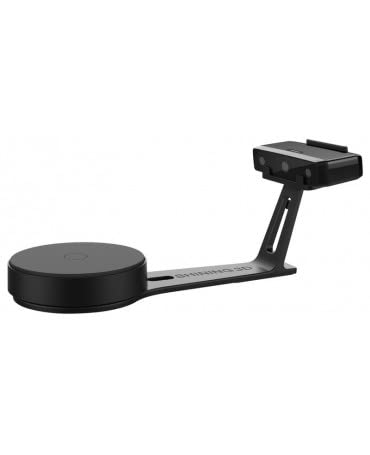
A fixed desktop scanner changes the rhythm of small-object work. The EinScan SE V2 sits on a stand, the object sits on its built-in turntable, and a full 360-degree pass finishes in about two minutes, hands-free. Single-shot accuracy reaches 0.1mm, and the fixed-scan mode stretches the capture volume to 700mm on each side for larger pieces that do not fit the platform. White structured light keeps the process eye-safe for classrooms, and the software walks through calibration with a single click. It fits a teacher, a jeweler, or a hobbyist who scans the same kinds of small objects again and again.
Specs
- Single-shot accuracy up to 0.1mm
- Point distance 0.17 to 0.2mm
- Single scan under 8 seconds; 360-degree auto scan in about 2 minutes
- Auto scan volume 200 x 200 x 200mm
- Fixed scan volume 700 x 700 x 700mm
- Minimum scan volume 30 x 30 x 30mm
- White light source with 1.3MP camera
- Turntable included in the box
- Exports OBJ, STL, ASC, PLY
Best for: repeatable desktop scanning of small objects in a classroom or workshop.
Watch out for: the auto-scan volume caps at 200mm, so larger objects need the fixed-scan setup.
Revopoint POP 3 Plus Standard
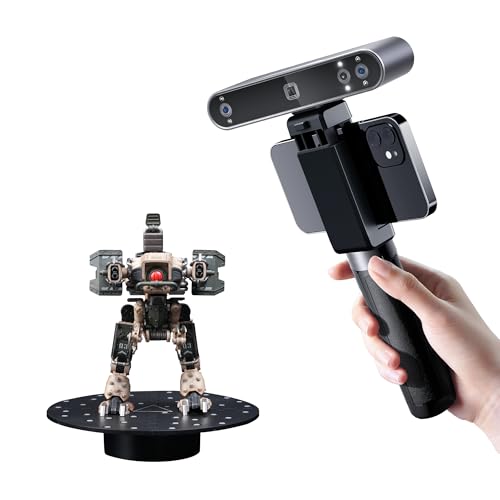
The POP 3 Plus is the sensible middle of the POP line, sharper than the original POP 3. Its 0.04mm single-frame precision and optical zoom pick up fine edges on coins, small gears, and detailed miniatures, while the 9-axis IMU steadies tracking when the turntable is mid-rotation. The standard box already includes the mini turntable, a tripod, and a calibration board, so a first scan needs nothing extra. Full-color capture and the free Revo Scan software cover the usual path from object to printable mesh. It suits a hobbyist who wants a sharper scan without a bigger desk setup.
Specs
- Single-frame precision up to 0.04mm
- Scanning speed up to 18 fps
- 1.5x and 2x optical zoom
- 9-axis IMU for stable tracking
- HD RGB camera with Flash LED lighting
- Class 1 infrared light
- Global Marker tracking mode
- Mini turntable included in the standard box
- Exports PLY, OBJ, STL, ASC, 3MF, GLTF, FBX
Best for: hobbyists who want finer detail on small objects without a dual-axis rig.
Watch out for: the mini turntable suits small pieces only, so check its size against your largest object.
Creality CR-Scan Lizard Premium Kit

The Lizard earns its place through no-marker scanning: visual tracking follows the object as the turntable rotates, so you skip the sticker step that slows down plain or curved pieces. Accuracy reaches 0.05mm at 10 frames per second, and the LED plus near-infrared light handles dark surfaces that trip up many scanners, even in bright rooms. The Premium kit adds the USB-powered turntable, a tripod, and a carrying case, turning the scanner into a bench setup that packs away. CR Studio handles alignment and one-click optimization. It suits a maker scanning black or featureless parts for printing.
Specs
- Accuracy up to 0.05mm
- Resolution 0.1 to 0.2mm
- Scanning speed 10 fps
- Single capture range 200 x 100mm
- Working distance 150 to 400mm
- Minimum scanning volume 15 x 15 x 15mm
- LED plus near-infrared light source
- Scanner weight 370g; size 155 x 84 x 46mm
- USB-powered turntable included in the Premium kit
- Exports STL, OBJ, PLY
Best for: scanning dark or plain-surfaced parts without placing markers.
Watch out for: confirm the listing is the Premium kit, since the base Lizard ships without the turntable.
Revopoint POP 4 Standard Edition

The POP 4 Standard Edition is the newest hybrid in this guide, combining 30 blue laser cross-lines, a single-line deep-hole mode, and near-infrared structured light into five scanning modes. Laser accuracy reaches 0.03mm, and the blue laser lines read dark and glossy surfaces that structured light alone struggles with, without a coating step. The Standard box includes the mini turntable, a tripod, 200 markers, and a calibration board, so bench scanning starts at once. Wi-Fi 6 and a USB-C connection keep the desk tidy. It suits a maker who wants laser-grade detail on small and medium objects with one kit.
Specs
- Line laser accuracy up to 0.03mm; full-field structured light accuracy up to 0.08mm
- Multi-line laser scanning up to 105 fps with NVIDIA GPU, 60 fps on CPU
- Five scanning modes: 30 blue cross-lines, single-line deep hole, Full-Field HD, VCSEL Rapid, Hybrid HD
- Working distance 200 to 800mm across modes
- Minimum scan volume 10 x 10 x 10mm; maximum scan volume 2 x 2 x 2m
- Fused point distance up to 0.05mm
- Outdoor scanning up to 100,000 lux in VCSEL mode
- Mini turntable, tripod, 200 markers, and calibration board included in the Standard box
- Exports PLY, OBJ, STL, ASC, 3MF, GLTF, FBX, Splat
- Scanner weight 286g; dimensions 160 x 30 x 72mm
Best for: makers who want laser accuracy on dark or glossy small and medium objects with a turntable bench setup.
Watch out for: the Standard Edition ships without the battery grip, so long wireless sessions away from an outlet need the Premium box.
Which One Fits Your Situation
You scan small products for an online catalog
Put the Shining 3D EinScan SE V2 on the bench and let its fixed stand and built-in turntable run the same pass for every item. The repeatable setup keeps lighting, angle, and framing steady from one product to the next, so catalog photos and models stay consistent. Fixed-scan mode covers pieces too large for the platform, and the single-click calibration keeps the routine fast between items.
You chase fine detail on tiny parts
Choose the Revopoint POP 3 Advanced Edition, whose dual-axis turntable tilts as it turns, exposing the top faces and undercuts that a flat spin hides. The 0.05mm precision and 18-frame capture hold crisp edges on coins, gears, and miniature sculpts, while the mini turntable handles the smallest pieces. Keep the rotation slow on the first pass, then add a second pass only where detail still looks soft.
You scan dark or featureless parts for printing
Pick the Creality CR-Scan Lizard Premium Kit, since its no-marker visual tracking follows plain and black surfaces that lose other scanners mid-rotation. The LED plus near-infrared light reads dark plastic and matte metal without a coating step, and the USB-powered turntable keeps the part moving at a steady pace. Confirm the Premium kit in the listing, then run a slow first pass to lock tracking before speeding up.
You want laser accuracy on dark or shiny parts
Pick the Revopoint POP 4 Standard Edition, whose 30 blue laser cross-lines read dark and glossy surfaces that structured light alone often loses. The single-line mode reaches into deep holes and narrow grooves, while the mini turntable keeps the part rotating at a steady pace. Set the object on the platform, start with a laser pass, then switch modes only where the surface still looks thin.
Common Mistakes
- Buying the base kit and discovering the turntable was an upgrade: check the box list for the turntable before ordering, since several scanners sell a bare version beside the kit.
- Putting an object heavier than the platform rating on the plate: an overloaded turntable stalls, tilts, or wobbles, and the scan drifts with it.
- Spinning the platform at full speed on a detailed object: fast rotation smears fine edges, so start slow and speed up only on smooth shapes.
- Scanning shiny, black, or glassy surfaces without preparation: bare reflections confuse tracking, so use markers or a dulling spray made for scanning.
- Skipping calibration after moving the setup: a bumped scanner or a new surface changes alignment, so recalibrate before the first scan of the day.
Frequently Asked Questions
Do I still need a separate turntable if the scanner already includes one?
No. Every scanner in this guide ships with a turntable in the box, so a separate platform is only worth buying when you outgrow the bundled one. A larger or dual-axis turntable makes sense for heavier objects, bigger pieces, or tilt capture. Before spending more, check the bundled platform size and load rating against the objects you scan most.
Can a bundled turntable handle heavy objects?
It depends on the platform. Mini turntables suit light figurines and small printed parts, while a dual-axis platform handles larger and heavier pieces, and a desktop unit like the EinScan SE V2 carries up to 5kg on its plate. Check the load rating in the listing before placing a dense metal part on a light platform, and keep the object centered so the motor turns evenly.
Will a turntable help with shiny or dark objects?
Only up to a point. A turntable fixes the movement problem, but it cannot fix reflections or light absorption, so shiny metal and black plastic still need markers or a scanning spray. The Lizard handles dark surfaces better than most thanks to its near-infrared light. Whatever the scanner, run a slow first pass and watch tracking before committing to a full rotation.
What file formats do these scanners export?
Most of these scanners export STL, OBJ, and PLY, which cover nearly every slicer and modeling tool, and the Revopoint models add ASC, 3MF, GLTF, and FBX for wider compatibility. PLY keeps color data when you need textured models for a catalog. Check the export list against your slicer before buying, since a missing format means extra conversion work on every scan.
FAQ
Do I still need a separate turntable if the scanner already includes one?
Can a bundled turntable handle heavy objects?
Will a turntable help with shiny or dark objects?
What file formats do these scanners export?
More from Amazon
Programs that pair well with the guide above. Offers and eligibility are set by Amazon and may change.
Free shipping on eligible items, Prime Video and more. Eligible new members can start with a free trial.
Start a Prime free trialA Prime membership for ages 18-24 with a trial period. Eligibility is set by Amazon.
See Prime for Young AdultsAudiobooks and podcasts to listen to on the go. Eligible new members can start with a free trial.
Try Audible freeAd-free music streaming. Eligible new subscribers can start with a free trial.
Try Music Unlimited freeAs an Amazon Associate we earn from qualifying purchases.