Key takeaways
- Compare four 3D scanners built for small objects, from coins and miniatures to small mechanical parts, and find the accuracy and scan volume you need.
Buying a scanner for small objects is a different decision from buying a general-purpose scanner. The question is not how large a subject it can cover, but how small a subject it can still capture cleanly. A scanner built for car panels, furniture, and full bodies will blur a coin, a ring, or a tabletop miniature into a smooth lump, because its capture window is too wide and its point spacing too coarse for fine detail.
This guide is for makers who print miniatures, jewelry designers digitizing rings and pendants, hobbyists copying small mechanical parts, and collectors archiving coins, figurines, and keepsakes. Every scanner below was chosen from the names and specifications published on its Amazon listing, with attention to minimum object size, accuracy, light source, and the accessories that make small-object work practical.
Quick Picks
As an Amazon Associate we earn from qualifying purchases
| Product | Best for | Key spec from title |
|---|---|---|
| 3DMakerpro Seal Standard | Finest detail on rings, coins, and miniatures | 0.01mm accuracy, 24-bit full-color |
| Creality Sermoon P1 | Standalone scanning without a computer | 0.02mm accuracy, 6-inch touchscreen |
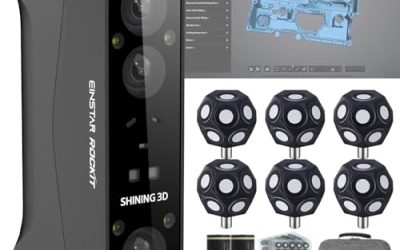
| Creality Sermoon S1 | Machined parts and reverse engineering | 0.02mm accuracy, single-line deep-hole mode |
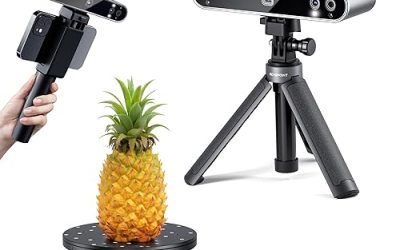
| 3DMakerpro Moose Lite Premium Kit | Desk turntable scanning for 3D printing | 0.05mm accuracy, NIR light |
How to Choose
Minimum scan volume and accuracy
Start with the smallest object the scanner can hold, not the largest. Listings state a minimum object size, and for small-object work that figure should sit near 10 mm. Check the single capture range too: a window around 50 by 60 mm at close distance suits coins and rings, while a 200 by 100 mm window suits figurines and small mechanical parts. Accuracy is the other half of the decision. A scanner rated up to 0.02 mm or 0.03 mm holds edges and engraved lines far better than one rated at 0.1 mm. Treat both numbers as a pair, because fine accuracy means little if the scanner cannot frame a tiny object at all.
Detail capture on tiny features
Fine detail depends on point distance, which is the spacing between the points the scanner records. A point distance near 0.02 mm or 0.05 mm picks up prongs, threads, lettering, and the ridges on a coin, while a wider spacing smooths those features away. Blue light scanners tend to resolve sharper detail than infrared ones, which is why several picks below use blue laser or blue structured light. Look at the frame rate as well: a faster scanner gathers denser data in each pass, so thin edges and small holes come out cleaner. If your objects have engraved text or delicate surface patterns, put point distance ahead of top speed.
Handling small shiny or dark objects
Small objects are often the hardest surfaces to scan: polished rings, black plastic housings, chrome fittings, and dark resin. Infrared structured light bounces off these surfaces or gets absorbed, leaving holes in the mesh. Blue laser scanners read dark and reflective surfaces far more reliably, and several of the scanners below are listed as working without a coating on such parts. When a scanner cannot read a surface, the usual fix is a light coat of matte scanning spray, which adds a step and can hide the finest detail. Check the listing for guidance on shiny and dark surfaces before you buy.
Turntable and marker use
A turntable changes small-object scanning from a juggling act into a repeatable process. You set the object down, let it rotate, and keep the scanner still, which produces steadier tracking and cleaner meshes. Turntables are most useful for objects that fit in one hand and have detail on all sides. Markers serve a different purpose: they give the scanner fixed reference points on smooth or symmetrical objects that have no features to track. Some kits include small markers for tiny parts, while others rely on feature tracking alone. Fixed scanning on a tripod with a turntable suits beginners.
The 4 Best Options
3DMakerpro Seal Standard

The Seal Standard is the finest-detail scanner in this guide, and the one to choose when the object itself is the challenge. Its blue light system is rated at 0.01mm accuracy with 0.05mm resolution, which holds the prongs on a ring, the lettering on a coin, and the ridges on a miniature that coarser scanners smooth away. The 24-bit color camera keeps painted surfaces attached to the geometry, and anti-shake lenses steady the capture while you move around a small piece. It is a wired desktop scanner rather than a wireless one, so plan on a desk, a computer, and a steady hand.
Specs
- Accuracy up to 0.01mm, resolution up to 0.05mm
- 24-bit color camera
- Blue light encoded structured light
- Scanning speed up to 10 FPS
- Anti-shake optical stabilization lenses
- JMStudio software, exports OBJ, STL, and ASC
- USB 3.0, for Windows 10/11 and macOS 12/13
- Dimensions 60 by 35 by 110mm
Best for: Rings, coins, miniatures, and jewelry where the finest detail matters most.
Watch out for: The standard kit includes no carry case, tripod, or turntable, so budget for those accessories if you need them.
Creality Sermoon P1

The Sermoon P1 is the only scanner here that works without a computer, because it carries its own processing, storage, and a 6-inch touchscreen. Five scanning modes cover single blue laser lines for deep holes, 7 and 22 crossed blue laser lines for detail, and infrared structured light for larger subjects, with accuracy up to 0.02mm in blue laser mode and a minimum scan volume of 5 by 5 by 5mm. Two swappable batteries keep it going away from a desk, and the on-device software cleans and meshes the scan before export. It is the heaviest scanner in this guide, so it suits shorter sessions best.
Specs
- Five scanning modes: single, 7 parallel, and 22 crossed blue laser lines plus close-range and long-range infrared
- Accuracy up to 0.02mm with blue laser, up to 0.075mm with infrared
- Minimum scan volume 5 by 5 by 5mm
- Scanning speed up to 100 FPS in wired PC mode
- Up to 6.88 million points per second
- 6-inch HD touchscreen with onboard processing, 24GB RAM and 256GB storage
- Two 3,300 mAh swappable batteries
- Wi-Fi 7 with standalone, wireless PC, and wired PC modes
- Weight 830g, dimensions 209 by 129 by 53mm
- Color mapping supported, for Windows and macOS
Best for: Scanning small parts on location with no computer, where the built-in screen and batteries matter.
Watch out for: At 830g it is the heaviest scanner here, so long handheld sessions will tire your arm.
Creality Sermoon S1
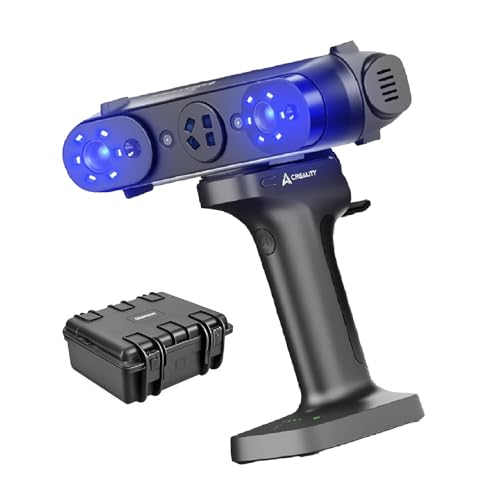
The Sermoon S1 is the measurement instrument of this guide, built for parts that must fit rather than just look right. Its blue laser system combines single-line, 7-line, and 34-line modes with infrared structured light, reaching 0.02mm accuracy and a volumetric accuracy figure that holds over longer parts. A dedicated single-line mode reaches into deep, narrow holes, and the stated object range starts at 5mm, so a small bracket or fitting sits comfortably inside it. Color texture mapping keeps surface finishes attached to the geometry for documentation and CAD work.
Specs
- Blue laser modes: single-line, 7-line, and 34-line, plus infrared structured light
- Accuracy up to 0.02mm, volumetric accuracy 0.02mm plus 0.08mm per meter
- Scanning speed up to 90 FPS, up to 4.6 million points per second
- Object range from 5mm to 4000mm
- Single-line deep-hole scanning, up to 1 to 6 depth-to-diameter ratio
- Color texture mapping
- Weight 508g, dimensions 225 by 53 by 76mm
- CrealityScan 4.0 software, for Windows and macOS, with Android and iOS through wireless accessories
- AI temperature compensation and One-Shot 3D imaging
Best for: Machined parts, small brackets, and reverse engineering where dimensions and hole features matter most.
Watch out for: The recommended computer setup is demanding, with a recent multi-core processor, a dedicated graphics card, and ample memory, so check your workstation first.
3DMakerpro Moose Lite Premium Kit

The Moose Lite Premium Kit is the straightforward desk option. It pairs near-infrared structured light with AI visual tracking, so it follows the object without markers on most everyday shapes. The Premium Kit is the reason it earns its place: a tripod and a motorized turntable turn small-object scanning into a hands-off routine, with the object rotating while the scanner stays fixed. Accuracy up to 0.05mm with 0.10mm resolution is enough for figurines, replacement parts, and prototypes headed for the printer, and the mono texture output keeps files simple when color is not needed.
Specs
- NIR structured light
- Accuracy up to 0.05mm, resolution 0.10mm
- Scanning speed up to 10 FPS
- Object range 15 to 1500mm
- Single capture range 200 by 100mm
- Working distance 150 to 400mm
- AI visual tracking, marker-free
- Mono texture scanning
- Premium Kit includes tripod and motorized turntable
Best for: Desk-bound turntable scanning of figurines and small parts for 3D printing.
Watch out for: It records shape only, with mono texture, so it will not capture the colors of a painted miniature.
Which One Fits Your Situation
You scan miniatures and tabletop game pieces
Pick the 3DMakerpro Seal Standard. Its 0.01mm accuracy and 0.05mm resolution hold the fine ridges, faces, and weapon details on a miniature that coarser scanners blur away. The 24-bit color camera keeps painted schemes attached to the model, which matters when the scan is a record of finished work. Blue light capture handles the small scale well, and the wired desktop setup suits a bench where the figure sits still.
You digitize rings, coins, and small metal parts
Pick the Creality Sermoon P1. Its blue laser mode is rated to 0.02mm accuracy, and the 5 by 5 by 5mm minimum scan volume fits a single ring or coin comfortably. The single-line laser mode reaches into engraved grooves and narrow settings, while color mapping records the surface tone alongside the shape. The built-in touchscreen lets you check coverage on the spot, so a missed edge gets caught before the piece goes back in its box.
You rebuild small machined parts in a workshop
Pick the Creality Sermoon S1. Its 0.02mm accuracy and published volumetric accuracy hold dimensions across a bracket, housing, or fitting, and the single-line laser mode reaches into deep holes that wider modes cannot enter. The 5mm minimum object size covers small fasteners and connectors, while infrared structured light takes over for larger castings. It is a wired, workstation scanner, so it suits a bench with a capable computer nearby.
You want a turntable setup on your desk
Pick the 3DMakerpro Moose Lite Premium Kit. The motorized turntable rotates the object while the scanner stays fixed on its tripod, which produces steadier tracking than handheld passes for most beginners. Marker-free AI tracking means there is nothing to stick on the object first. It is a calm, repeatable routine for figurines and small parts headed for the printer.
Common Mistakes
- Buying a scanner rated for furniture and full bodies, then expecting it to resolve a coin or a ring.
- Ignoring the minimum object size and single capture range, which decide whether a tiny object fits in frame at all.
- Scanning polished or black objects with an infrared-only scanner and getting holes in the mesh.
- Skipping markers on smooth, symmetrical objects, then losing tracking halfway through a pass.
- Forgetting to check computer requirements, supported operating systems, and export formats before ordering.
Frequently Asked Questions
What accuracy do I need for small objects?
Aim for a scanner rated up to 0.05mm or finer, where prongs, threads, and engraved lines survive instead of melting into smooth surfaces. For machined parts or jewelry that will be measured, a 0.02mm or 0.03mm rating is safer. Accuracy alone is not enough: the scanner also needs a small minimum object size and a fine point distance to use it on tiny subjects.
Can a 3D scanner capture a ring or a coin?
Yes, if the scanner is built for small subjects. Look for a minimum object size near 10 mm or below, a single capture range that fits the piece, and a point distance near 0.05mm or finer. Blue laser scanners handle the polished metal of rings and coins better than infrared ones. A turntable helps, since the piece rotates while the scanner stays put and tracking stays steady.
Do I need scanning spray for shiny objects?
It depends on the light source. Blue laser scanners often read polished metal and dark plastic without any coating, a key advantage for small parts. Infrared scanners usually need a light matte spray on shiny or black surfaces, and that coating can hide the finest detail. If most of your objects are glossy, choose a blue laser model and read the listing for guidance on reflective surfaces.
What file format should I export for 3D printing?
STL is the standard choice for 3D printing, and every scanner in this guide exports it. OBJ is useful when you want to keep color textures with the model, and PLY suits editing and archiving work. Check that the scanner’s software exports the format your slicer expects before you buy, and keep the original scan files so you can re-export later without rescanning the object.
FAQ
What accuracy do I need for small objects?
Can a 3D scanner capture a ring or a coin?
Do I need scanning spray for shiny objects?
What file format should I export for 3D printing?
More from Amazon
Programs that pair well with the guide above. Offers and eligibility are set by Amazon and may change.
Free shipping on eligible items, Prime Video and more. Eligible new members can start with a free trial.
Start a Prime free trialA Prime membership for ages 18-24 with a trial period. Eligibility is set by Amazon.
See Prime for Young AdultsAudiobooks and podcasts to listen to on the go. Eligible new members can start with a free trial.
Try Audible freeAd-free music streaming. Eligible new subscribers can start with a free trial.
Try Music Unlimited freeAs an Amazon Associate we earn from qualifying purchases.