Key takeaways
- Find the best 3D scanner for clay models with our 2026 guide comparing accuracy, scan volume, and how each handheld handles matte sculpted surfaces.
A clay model is unforgiving to scan. Soft edges, shallow tool marks, fingerprints in the surface, and matte finishes that swallow light all conspire against a scanner, and a device built for car parts or room scans can smooth away exactly the detail a sculptor spent hours shaping. The real decision is not which scanner has the longest spec sheet, but which one holds fine detail on a soft, non-reflective surface while tracking reliably as you move around the piece.
This guide is for sculptors digitizing maquettes for casting or 3D printing, character artists building a digital library of clay sculpts, and mold makers who need accurate reference meshes before cutting a mold. Each of the five scanners below was chosen from the names and specifications shown on its Amazon product page, with attention to accuracy, scan volume, and how the hardware handles matte clay.
Quick Picks
As an Amazon Associate we earn from qualifying purchases
| Product | Best for | Key spec from title |
|---|---|---|
| Creality CR-Scan Otter | Large and small clay pieces in one workflow | 0.02mm accuracy, 20 fps |
| Revopoint POP 3 Plus | Everyday medium-size sculpts with color | 0.04mm precision, 18 fps |
| Shining 3D Einstar | Full figures and busts in natural light | Up to 14 fps, infrared VCSEL projectors |
| Creality CR-Scan Ferret Pro | Phone-based scanning at the workbench | 0.1mm accuracy, wireless scanning |
| Revopoint MINI 2 | Tiny maquettes and fine surface detail | 0.02mm precision, 16 fps |
How to Choose
Accuracy and Resolution
Accuracy decides whether a fingerprint ridge, a wrinkle, or a carved line survives the scan or gets averaged into a smooth blob. For clay work, look at both the stated accuracy and the point distance, since a scanner can be accurate on flat planes yet still miss shallow relief. A figure around 0.02mm suits small maquettes and jewelry-scale sculpts, while 0.1mm is workable for larger busts where broad form matters more than surface texture. Remember that published figures describe ideal conditions, so a scanner with a slightly lower number and strong tracking often beats a flashier one in practice.
Scan Volume Versus Model Size
Every scanner has a sweet spot, and clay pieces range from thumbnails to life-size busts. A close-range scanner with a small capture window excels on a six-inch figure but forces dozens of passes on a torso, with each pass adding alignment risk. Conversely, a wide-volume scanner covers a bust quickly yet may skip the fine work on a small face. Match the single-capture range and working distance to the pieces you sculpt most often, and check the minimum scan volume too, because some scanners simply cannot lock onto very small objects.
Handling Matte and Dark Clay
Matte clay is actually friendlier than glossy resin, since it scatters light evenly and gives structured-light sensors a stable pattern to read. Trouble starts with very dark clay, deep undercuts, and wet, shiny patches where the surface turns reflective. Infrared-based scanners generally cope better with dark material than white-light ones, and models that advertise scanning black surfaces without spray are worth a closer look. For the darkest clays, a light dusting of scanning spray or a thin coat of matte primer can rescue a scan that keeps dropping tracking.
Software and Export Formats
The scanner is only half the purchase; the software decides how much cleanup stands between a raw scan and a printable file. Look for software that runs on your operating system, offers marker and feature tracking modes, and exports STL, OBJ, and PLY at minimum, since those formats feed nearly every slicer and sculpting app. Mesh repair, hole filling, and texture export matter when a clay scan goes straight into a digital sculpting workflow. Also confirm whether the software needs a powerful graphics card, because a demanding app can turn a capable scanner into a slow one.
The 5 Best Options
Creality CR-Scan Otter

The Otter earns its place as the most flexible option here, pairing dual long-focal lenses for small detail with dual short-focal lenses for larger forms, so one device covers a tabletop maquette and a full bust without swapping hardware. Its anti-shake tracking helps when circling a clay piece by hand, and the full-color capture records the subtle tonal shifts of tinted clay. Sculptors who work across sizes and want a single scanner for the whole studio will find this the easiest to live with.
Specs
- Accuracy up to 0.02mm
- Scanning speed up to 20 fps
- 24-bit full-color scanning with RGB camera
- Four-lens stereo vision for small and large objects
- Scan range from 10 x 10 x 10 mm to 2000 x 2000 x 2000 mm
- Scans black and metal surfaces without spraying
- Compatible with Windows and macOS
Best for: Sculptors who scan clay pieces of many sizes and want one handheld device for all of them.
Watch out for: Confirm your computer meets the listed system requirements before ordering, since the software asks for a fairly capable machine.
ASIN: B0CZDP2CWT
Revopoint POP 3 Plus
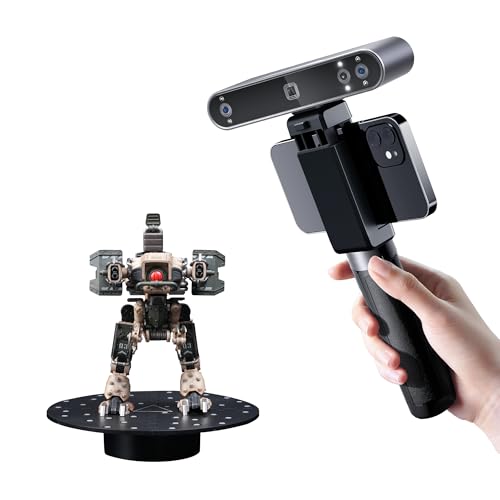
The POP 3 Plus is the steady all-rounder for medium-size clay work, combining 0.04mm precision with 18 fps capture and a lightweight 190 g body that stays comfortable during long handheld sessions. Optical zoom helps pull extra detail from a face or a carved panel without moving closer, and the 9-axis IMU keeps tracking stable when your hand wobbles mid-pass. It connects over Wi-Fi 6 or USB Type-C to Windows, macOS, Android, and iOS, which makes it a natural fit for studios that move between a desktop and a phone.
Specs
- Single-frame precision up to 0.04mm
- Scanning speed up to 18 fps
- Weight 190 g
- Dual-camera infrared structured light
- Optical zoom at 1.5x and 2x magnification
- 9-axis IMU stabilization
- Full-color scan with RGB camera and white LED lights
- Connectivity via Wi-Fi 6 and USB Type-C
- Compatible with Windows, macOS, Android, and iOS
Best for: Character artists and hobbyists scanning medium clay sculpts with color on a phone or computer.
Watch out for: Very small maquettes can sit near the edge of its comfortable capture range, so check the minimum scan volume against your smallest pieces.
ASIN: B0D9GRW643
Shining 3D Einstar
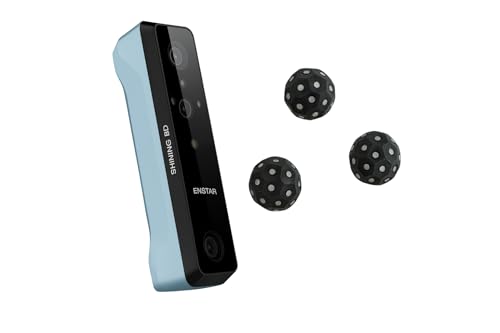
Einstar takes a different approach, using three infrared VCSEL projectors and two stereo depth cameras to capture broad surfaces quickly, which suits life-size busts and full figures far better than a close-range detail scanner. Its detail-oriented enhancement technology is aimed at tricky subjects such as hair and organic forms, and it works outdoors as well as in the studio. Artists digitizing large clay figures for archiving or scaling will appreciate how fast it covers a big surface without constant repositioning.
Specs
- Three infrared VCSEL projectors
- Two stereo depth cameras and one RGB camera
- Scanning speed up to 14 fps
- Detail-oriented enhancement technology for hair and body scanning
- Infrared structured light for stable capture in varied lighting
- Full-color texture capture
- Designed for art, body, and large-object scanning
Best for: Artists scanning large clay busts and full figures where coverage speed matters more than microscopic detail.
Watch out for: Fine detail on very small maquettes is not its strength, so pair it with a close-range scanner if you also sculpt miniatures.
ASIN: B0CXB1N39W
Creality CR-Scan Ferret Pro

Ferret Pro is the most convenient way to start scanning clay at the workbench, because its wireless bridge lets a phone drive the whole process without a tethered computer. Anti-shake tracking steadies handheld passes around a maquette, and full-color capture preserves the look of tinted or painted clay for reference. With 0.1mm accuracy it suits medium pieces and study models rather than jewelry-scale detail, and its phone-first design makes it easy to scan a fresh sculpt the moment it comes off the armature.
Specs
- Accuracy up to 0.1mm
- Wireless scanning with Wi-Fi 6 bridge
- Anti-shake tracking
- Fast full-color scan
- Compatible with iOS and Android phones and Windows 10 and 11 PCs
- Handheld design with phone mount and grip
Best for: Beginners and bench sculptors who want phone-based wireless scanning of medium clay models.
Watch out for: The finest tool marks on small pieces may soften at 0.1mm accuracy, so confirm the detail level you need before choosing it.
ASIN: B0CSF9B1WG
Revopoint MINI 2

MINI 2 is the detail specialist of this group, built around industrial blue light and 0.02mm single-frame precision for objects where every ridge counts. Its working distance of 120 to 250 mm and single capture area of up to 168 x 132 mm frame small maquettes perfectly, and the 2-megapixel depth and RGB cameras keep color even across the surface. Weighing 175 g with Wi-Fi 6 and USB Type-C, it suits a turntable workflow where a tiny clay figure rotates slowly while the scanner holds still.
Specs
- Single-frame precision up to 0.02mm
- Single-frame accuracy up to 0.05mm
- Scanning speed up to 16 fps
- Industrial blue light structured light technology
- Working distance 120 to 250 mm
- Single capture area up to 168 x 132 mm at 250 mm
- Minimum scan volume 10 x 10 x 10 mm
- Weight 175 g
- Depth and RGB camera resolution 2 megapixels
- Output formats PLY, OBJ, STL, ASC, 3MF, GLTF, and FBX
Best for: Miniature sculptors and jewelry-scale clay work where fine surface detail is the whole point.
Watch out for: It is not designed for outdoor scanning, and large busts will need many passes, so keep it to small and medium pieces.
ASIN: B0CNYRRMRL
Which One Fits Your Situation
You sculpt small maquettes and miniatures
Fine detail is everything at this scale, and a close-range blue-light scanner holds ridges and tool marks that wider scanners smooth away. The Revopoint MINI 2 fits here, with 0.02mm precision, a 10 mm minimum scan volume, and a turntable-friendly workflow that keeps tiny figures steady. Pair it with marker dots on featureless clay to help tracking lock on.
You work on busts and life-size figures
Large clay work needs coverage speed and a wide capture window more than microscopic precision. The Shining 3D Einstar covers broad surfaces quickly with its infrared projectors, and the Creality CR-Scan Otter is the alternative when you also sculpt smaller pieces. Either one keeps a full bust session to a manageable number of passes.
You want to scan straight from your phone
A phone-first workflow removes the computer from the bench and lets you capture a sculpt the moment it is finished. The Creality CR-Scan Ferret Pro runs wirelessly from a phone, while the Revopoint POP 3 Plus also connects to Android and iOS over Wi-Fi. Both keep the setup light enough to carry around the studio.
You need one scanner for a mixed studio
Studios that jump between thumbnails, maquettes, and busts need range more than specialization. The Creality CR-Scan Otter covers 10 mm pieces up to two-meter objects with its dual lens sets, and the Revopoint POP 3 Plus handles the middle ground well. Choose the Otter when size variety is the daily reality.
Common Mistakes
- Scanning a wet, glossy clay surface and wondering why tracking keeps dropping, when a short drying time or a matte coating would have fixed it.
- Choosing a scanner by accuracy alone and ignoring scan volume, then discovering a bust needs dozens of passes to complete.
- Skipping calibration and marker placement on smooth, featureless clay, which leaves the software with nothing to track.
- Scanning in harsh direct light or near a window, which interferes with structured-light sensors and adds noise to the mesh.
- Exporting the raw scan straight to a slicer without cleaning holes and stray geometry, then blaming the scanner for a failed print.
Frequently Asked Questions
Can a 3D scanner capture soft clay without damaging the model?
Yes, structured-light and infrared scanners never touch the surface, so the clay stays exactly as sculpted. Keep the piece on a stable turntable, avoid handling it between passes, and let wet clay firm up first so fingerprints and sagging do not change the shape mid-scan.
Do I need scanning spray for matte clay?
Usually not, since matte clay scatters light evenly and most scanners read it well. Spray helps with very dark clay, wet patches, or glossy sealers that turn reflective. If you use it, apply a thin, even coat and check that it does not fill in the fine detail you want to keep.
What accuracy do I need for clay models?
For small maquettes and detailed faces, aim for 0.02mm to 0.05mm so tool marks and wrinkles survive. For busts and larger figures, 0.1mm is generally enough, since broad form matters more than surface texture. Match the figure to your smallest feature, not to the size of the model.
Which file format should I export for 3D printing?
STL is the standard choice for most slicers and works well for a cleaned mesh. OBJ preserves color and texture when you need the surface appearance, while PLY suits archival scans and further editing. Export in the format your next tool expects, and keep a high-resolution master copy before simplifying the mesh.
FAQ
Can a 3D scanner capture soft clay without damaging the model?
Do I need scanning spray for matte clay?
What accuracy do I need for clay models?
Which file format should I export for 3D printing?
More from Amazon
Programs that pair well with the guide above. Offers and eligibility are set by Amazon and may change.
Free shipping on eligible items, Prime Video and more. Eligible new members can start with a free trial.
Start a Prime free trialA Prime membership for ages 18-24 with a trial period. Eligibility is set by Amazon.
See Prime for Young AdultsAudiobooks and podcasts to listen to on the go. Eligible new members can start with a free trial.
Try Audible freeAd-free music streaming. Eligible new subscribers can start with a free trial.
Try Music Unlimited freeAs an Amazon Associate we earn from qualifying purchases.