Key takeaways
- Compare five 3D scanners for sculpture artists, from entry-level turntable scanning to metrology-grade laser detail, and pick the right one for your work.
A sculpture scanner has one job that matters more than any other: capturing the form and surface of a finished piece faithfully enough that the digital model is genuinely useful. Chisel marks, undercuts, subtle curves, and the texture of clay, plaster, stone, or bronze all need to survive the scan. The right choice depends on the size you actually work at, from small maquettes on a bench to life-size figures that fill a room, and on whether you need color, fine detail, or simply a clean mesh for printing and archiving.
This guide is for studio sculptors digitizing finished work, artists preparing pieces for reproduction, and makers who want a reliable record of fragile originals. Every scanner below was chosen from its name and specifications as listed on its Amazon product page, with attention to accuracy, capture range, and how it handles the materials sculptors actually use.
Quick Picks
As an Amazon Associate we earn from qualifying purchases
| Product | Best for | Key spec |
|---|---|---|
| 3DMakerpro Mole | Medium sculptures with fine surface detail | 0.05mm accuracy |
| Revopoint POP 3D Scanner | First scanner for small to medium pieces | Turntable included |
| Creality CR-Scan Raptor | Detailed scans with full color | 0.02mm accuracy |
| Revopoint MetroX Pro | Metrology-grade detail on complex forms | 0.01mm precision |
| Creality Raptor Pro | Large sculptures and long working sessions | 22 plus 7 blue laser lines |
How to Choose
Match accuracy to the size of your sculpture
Accuracy matters most when the detail is small relative to the whole piece. A scanner accurate to 0.02mm will hold the edge of a carved eyelid or the ridge of a fingerprint in clay, while a 0.3mm scanner will soften those marks into gentle bumps. For a life-size torso, that softening may be invisible at normal viewing distance, but for a hand-sized maquette it changes the character of the work. Check the single-frame accuracy in the listing, then think about the smallest feature you care about. If that feature is thinner than the stated accuracy, the scanner will struggle to record it cleanly.
Think about scan volume and stitching
Every scanner captures only a limited patch of surface in each frame, so large sculptures are built up from many overlapping passes that software stitches together. A wide single-capture range means fewer passes and fewer chances for drift on a big figure, while a narrow range suits a bust or a relief panel. Turntable scanning helps with small pieces because the object rotates steadily while the scanner stays still. For a floor-standing figure, you will walk around the piece instead, so look for strong tracking and anti-shake support that keeps the model aligned when your hand moves.
Plan for varied materials and finishes
Sculptors work in clay, plaster, wax, stone, wood, resin, and cast metal, and each surface behaves differently under a scanner. Matte plaster and unglazed clay scan easily because they scatter light evenly. Polished bronze, dark stone, and glossy resin reflect or absorb the projected light, which can leave holes in the mesh. Blue laser scanners handle dark and shiny surfaces better than infrared ones, and some scanners need a light dusting of scanning spray on reflective areas. Before buying, check whether the scanner is rated for dark or shiny objects and whether your usual materials fall inside its comfort zone.
Check software and mesh export
A scan is only as useful as the file it becomes. Most scanners ship with companion software that aligns frames, cleans noise, fills small holes, and exports a mesh for printing or editing. Confirm that the software runs on your computer and that it exports the formats your workflow needs, such as STL for printing or OBJ and PLY when you want color and texture preserved. Also consider how much cleanup the software does automatically. A tool that merges and textures well saves hours of manual repair, which matters when you are digitizing a whole series rather than a single piece.
The 5 Best Options
3DMakerpro Mole

The Mole suits sculptors who work at a medium scale and want crisp surface detail without stepping up to industrial hardware. Its accuracy is fine enough to hold tool marks and carved texture on a bust or a figure, and the anti-shake lenses help when you are scanning freehand around a piece that cannot be moved. It is a practical middle ground: more capable than an entry-level scanner, yet still straightforward to set up in a studio. If your work ranges from tabletop maquettes to medium figures, this is a dependable daily tool.
Specs
- 0.05mm accuracy
- 0.1mm resolution
- 10FPS scanning speed
- Anti-shake lenses
- Compatible with Win10 and MacOS
- Handheld 3D model scanner, Premium Kit
Best for: Sculptors digitizing medium figures and busts with visible surface texture.
Watch out for: Confirm your computer meets the software requirements before ordering, since the scanner relies on a desktop or laptop for processing.
ASIN: B0FX474YHZ
Revopoint POP 3D Scanner

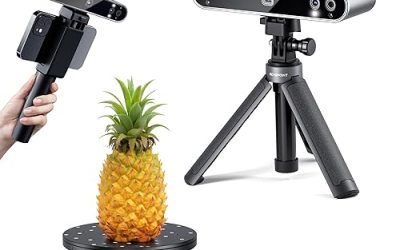
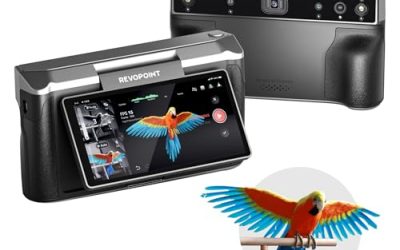
The POP is the friendliest starting point in this list for artists who are new to scanning. It arrives with a turntable, so small and medium pieces can rotate slowly while the scanner records them from a fixed position, which removes much of the wobble that ruins a first scan. Desktop and handheld modes give you two ways to work, and the face and body modes show that it can handle organic curves well. Its accuracy is modest next to the laser scanners here, so it fits documentation and reproduction at ordinary sizes rather than forensic detail.
Specs
- 0.3mm accuracy
- 8FPS scan speed
- Turntable included
- Desktop and handheld modes
- Fixed and auto scan modes
- Face and body scanning modes
- Color 3D printing support
Best for: Beginners scanning small to medium sculptures on a turntable.
Watch out for: The 0.3mm accuracy will soften very fine carved detail, so check your smallest features against that figure first.
ASIN: B092C58RH8
Creality CR-Scan Raptor

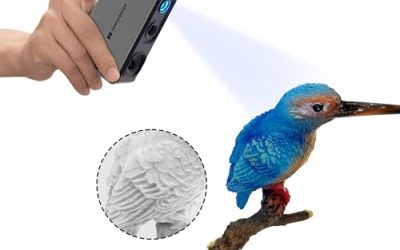
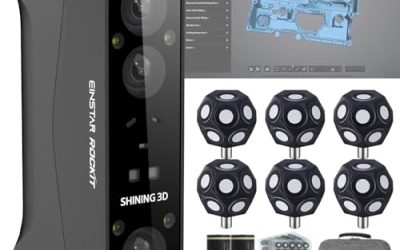
The Raptor brings blue-light laser scanning into reach for sculptors who need both fine detail and color. At 0.02mm accuracy it records the ridges, grooves, and tool marks that give a hand-made surface its character, and the 24-bit color capture keeps painted or patinated finishes looking right in the digital model. It handles objects from 5mm to 2000mm, so a single scanner can cover a small study and a large figure. Anti-shake tracking keeps handheld passes steady, which helps when you are circling a piece on a plinth.
Specs
- 0.02mm accuracy
- Industrial blue light
- Anti-shake tracking
- Up to 60FPS scanning speed
- Objects from 5 to 2000mm
- 24-bit full-color scanning
- For Windows and Mac
Best for: Sculptors who need fine detail and true color on medium to large pieces.
Watch out for: Blue laser scanning still struggles with very dark or mirror-polished bronze, so plan a test pass on your most reflective material.
ASIN: B0D2MRP2W3
Revopoint MetroX Pro
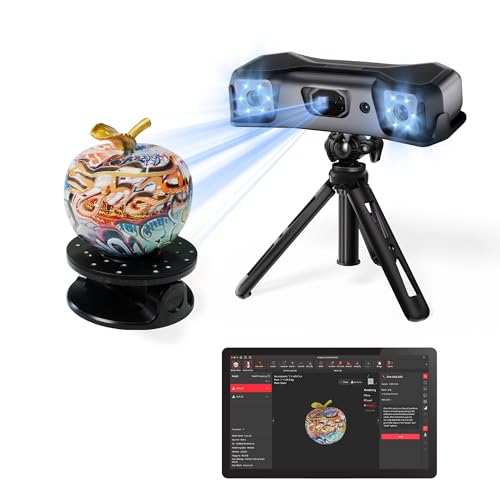
The MetroX Pro is the precision instrument of this group, built for artists and workshops where the digital model must match the original almost exactly. Its 0.01mm precision and blue laser system resolve the smallest carved lines, fingerprints, and texture that other scanners blur away, which makes it a strong choice for archival records, mold making, and scaled reproduction. Full-color scanning preserves surface tone alongside geometry. It demands more from the operator and the computer, but the payoff is a mesh that needs far less manual repair.
Specs
- 0.01mm precision
- 30 plus 15 blue laser scan
- Full-color scanning
- Industrial-grade precision
- USB connection
- Supports Windows and MacOS
- For 3D printing and reverse engineering
Best for: Archival digitizing and reproduction work where the finest detail must survive.
Watch out for: This is a demanding scanner, so verify that your computer and workspace can support its workflow before committing.
ASIN: B0G4VB289R
Creality Raptor Pro

The Raptor Pro covers the widest range in this list, from small studies at 5mm to monumental work up to 4 meters. Its 22 plus 7 blue laser lines and 0.02mm accuracy hold detail across that range, while the fast frame rate keeps long scanning sessions moving. For a sculptor with a varied practice, that flexibility is the main attraction: one scanner can digitize a maquette in the morning and a life-size figure in the afternoon. Full-color capture records patina and paint, and the handheld form keeps you mobile around large pieces.
Specs
- 0.02mm accuracy
- 22 plus 7 blue laser lines
- Up to 60FPS scanning speed
- Objects from 5mm to 4 meters
- 24-bit full-color scanning
- For Windows and MacOS
- Handheld scanner for 3D printing
Best for: Studios scanning everything from small studies to monumental figures.
Watch out for: Large scans produce large files, so confirm you have storage and processing headroom for full-size figures.
ASIN: B0DXTDDDSB
Which One Fits Your Situation
You sculpt small maquettes and tabletop pieces
The 3DMakerpro Mole fits this work well because its accuracy and resolution are tuned for objects you can hold in your hands. Place the maquette on a steady surface, scan slowly, and the Mole will hold carved lines and clay texture that a lower-accuracy scanner would blur. Its handheld form also lets you angle the scanner into undercuts that a fixed setup would miss.
You are buying your first scanner and learning the workflow
The Revopoint POP 3D Scanner is the gentlest introduction here. The included turntable does much of the movement for you, and the fixed and auto modes let you learn alignment before you try freehand scanning. Start with a matte clay piece, keep the lighting steady, and you will have a usable mesh within your first few sessions.
You need archival records of finished work
The Revopoint MetroX Pro is the right tool when the digital copy must stand in for the original. Its 0.01mm precision captures the finest tool marks, and full-color scanning preserves the surface tone of paint or patina. That level of fidelity matters for mold making, insurance records, and any reproduction where a softened detail would be noticed.
You work at many sizes, from studies to life-size figures
The Creality Raptor Pro handles that range in one device, scanning objects from 5mm to 4 meters with the same 0.02mm accuracy. You can digitize a small study and a full figure without changing hardware, and the fast frame rate keeps big sessions practical. The Creality CR-Scan Raptor is the closer alternative if your largest pieces stay under two meters.
Common Mistakes
- Choosing a scanner by accuracy alone and ignoring whether its capture range fits the size of your sculptures.
- Scanning polished bronze or glossy resin without testing how the scanner handles reflective surfaces first.
- Rushing a handheld pass and losing tracking, which leaves gaps that are hard to repair later.
- Forgetting to check that the companion software runs on your computer and exports the formats you need.
- Scanning in harsh or changing light, which confuses tracking and washes out color capture.
Frequently Asked Questions
Can a 3D scanner capture soft clay without damaging the model?
Yes, scanning is contact-free, so the scanner never touches the clay. Keep the piece still, avoid direct heat or strong light that could dry the surface during a long session, and use a turntable or a fixed mount so nothing presses against the model while it rotates.
Do I need scanning spray for sculpture?
Not usually for matte clay, plaster, or stone, which scatter light well. Spray helps on polished bronze, dark stone, and glossy resin, where reflections can leave holes in the mesh. Test a small hidden area first, and only use spray that is safe for your material and easy to remove afterward.
What accuracy do I need for sculpture?
It depends on the smallest detail you want to keep. For general documentation, 0.1mm to 0.3mm is often enough. For carved texture, fingerprints, and fine lines, look for 0.05mm or better. Archival work and mold making benefit from 0.02mm or finer, where the digital model preserves the hand of the artist.
Which file format should I export for sculpture work?
Export STL when the goal is 3D printing a reproduction, since most slicers accept it directly. Choose OBJ or PLY when you want to keep color and texture, or when the model will go into editing software. Keep a high-resolution master copy in the scanner software before exporting smaller versions for printing.
FAQ
Can a 3D scanner capture soft clay without damaging the model?
Do I need scanning spray for sculpture?
What accuracy do I need for sculpture?
Which file format should I export for sculpture work?
More from Amazon
Programs that pair well with the guide above. Offers and eligibility are set by Amazon and may change.
Free shipping on eligible items, Prime Video and more. Eligible new members can start with a free trial.
Start a Prime free trialA Prime membership for ages 18-24 with a trial period. Eligibility is set by Amazon.
See Prime for Young AdultsAudiobooks and podcasts to listen to on the go. Eligible new members can start with a free trial.
Try Audible freeAd-free music streaming. Eligible new subscribers can start with a free trial.
Try Music Unlimited freeAs an Amazon Associate we earn from qualifying purchases.