Key takeaways
- Find the best cheapest wireless gaming mouse for tight budgets. Five affordable wireless gaming mice compared on sensor, battery life, weight, and comfort.
A wireless gaming mouse used to mean a serious jump in cost over a wired model. That gap has closed. Budget wireless mice now ship with capable optical sensors, low-latency 2.4GHz connections, long battery life, and programmable buttons, all at prices that sit comfortably in the entry-level range. The challenge is no longer finding a cheap wireless mouse. The challenge is finding one that still tracks cleanly in fast games, holds a charge through long sessions, and feels good after several hours at the desk.

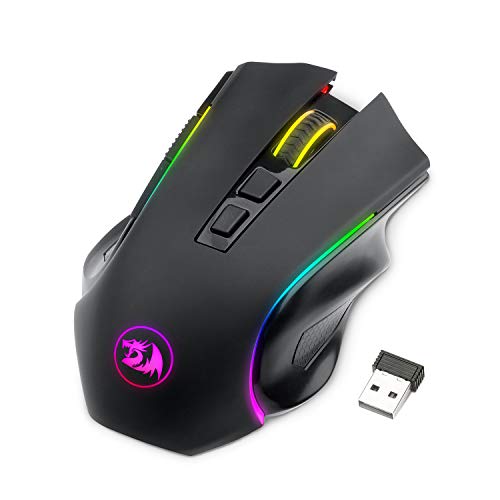
Every mouse below is a wireless gaming mouse, not a general office mouse with a gaming label. Each one connects over 2.4GHz wireless, and several add Bluetooth as a second option for laptops and travel. The picks cover different hand sizes, grip styles, and game types. Check current price on Amazon for each pick before ordering, because sale pricing on these models changes often.
As an Amazon Associate, we earn from qualifying purchases.
Quick Picks
Our Short List of 3
- Sensor: HERO optical, 200 to 12,000 DPI, 400 IPS precision
- Connection: LIGHTSPEED 2.4GHz wireless, 1 ms report rate, 1,000 Hz polling
- Battery: 1 AA battery, up to 250 hours in performance mode, up to 9 months in Endurance mode
- Weight: 99 grams with battery installed
- Sensor: Optical, 250 to 8,000 DPI
- Connection: Tri-mode 2.4GHz, Bluetooth, USB-C wired
- Polling rates: 125 Hz, 250 Hz, 500 Hz, 1,000 Hz
- Battery: 35 hours with RGB on, 70 hours with RGB off

- Sensor: Pixart PAW3325 optical, up to 10,000 DPI
- DPI levels: 500, 1,000, 2,000, 3,000, 10,000
- Connection: 2.4GHz wireless with nano receiver, USB-C wired
- Polling rate: 1,000 Hz
All 4 Picks at a Glance
| Product | Specs | Action |
|---|---|---|
| 1. Logitech G305 LIGHTSPEED — Best Overall Cheap Wireless Gaming Mouse |
| Check price on Amazon |
| 2. Redragon M602 Griffin — Cheapest Tri-Mode Wireless Mouse |
| Check price on Amazon |
| 3. Redragon M810 Pro — Best Budget Wireless Mouse With Macro Buttons |
| Check price on Amazon |
 5. Razer Orochi V2 — Best Lightweight Cheap Wireless Mouse |
| Check price on Amazon |
1. Logitech G305 LIGHTSPEED — Best Overall Cheap Wireless Gaming Mouse
- Sensor: HERO optical, 200 to 12,000 DPI, 400 IPS precision
- Connection: LIGHTSPEED 2.4GHz wireless, 1 ms report rate, 1,000 Hz polling
- Battery: 1 AA battery, up to 250 hours in performance mode, up to 9 months in Endurance mode
- Weight: 99 grams with battery installed
The Logitech G305 LIGHTSPEED remains the default recommendation for anyone shopping for the best cheapest wireless gaming mouse. It pairs a proven sensor with remarkable battery life in a compact, no-fuss shell. The HERO sensor tracks from 200 to 12,000 DPI with 400 IPS precision and no smoothing, acceleration, or filtering, according to the listing. That sensor lineage comes from higher-end Logitech mice, and in everyday play the G305 feels responsive and consistent in shooters, battle royale games, and fast-paced action titles.
Battery life is the other headline. A single AA battery powers the G305 for up to 250 hours of continuous gameplay in performance mode. Switching to Endurance mode through Logitech G HUB software extends that figure to up to 9 months. There is no charging routine to manage. When the battery runs low, a fresh AA cell restores full use in seconds.
At 99 grams with the battery installed, the rounded, symmetrical egg shape suits palm and claw grips, and the compact body works well for medium and smaller hands. Six programmable buttons cover the essentials, and on-board memory stores settings on the mouse itself. LIGHTSPEED wireless delivers a 1 millisecond report rate at 1,000 Hz.
Key specs
Pros
Cons
2. Redragon M602 Griffin — Cheapest Tri-Mode Wireless Mouse
- Sensor: Optical, 250 to 8,000 DPI
- Connection: Tri-mode 2.4GHz, Bluetooth, USB-C wired
- Polling rates: 125 Hz, 250 Hz, 500 Hz, 1,000 Hz
- Battery: 35 hours with RGB on, 70 hours with RGB off
The Redragon M602 Griffin earns its place as the cheapest tri-mode option in this guide. Tri-mode means three ways to connect: 2.4GHz wireless for gaming, Bluetooth for a laptop or tablet, and USB-C wired for charging while playing. That flexibility is rare at this end of the market, and it makes the M602 a strong pick for a player who switches between a desktop and a laptop, or who wants one mouse for gaming and everyday work.
DPI adjusts from 250 to 8,000, with four polling rates from 125 Hz to 1,000 Hz. The 1,000 Hz setting is the one to use for gaming, because it keeps cursor updates fast and consistent. Seven programmable buttons are listed, and the driver software supports macro editing and remapping, along with seven programmable backlight modes.
Battery life is stated as 35 hours with RGB lighting on and 70 hours with RGB lighting off. The mouse can be used while charging over USB-C, so a flat battery does not end a game. At 0.44 lb, the M602 is on the heavier side, and the ergonomic right-handed shell suits palm and claw grips.
Key specs
Pros
Cons
3. Redragon M810 Pro — Best Budget Wireless Mouse With Macro Buttons
- Sensor: Pixart PAW3325 optical, up to 10,000 DPI
- DPI levels: 500, 1,000, 2,000, 3,000, 10,000
- Connection: 2.4GHz wireless with nano receiver, USB-C wired
- Polling rate: 1,000 Hz
The Redragon M810 Pro is the pick for players who want macro buttons and RGB lighting without paying for a premium brand. It is built around the Pixart PAW3325 optical sensor, with DPI adjustable up to 10,000 across five on-board levels: 500, 1,000, 2,000, 3,000, and 10,000. That stepped range is easy to switch mid-game with the dedicated DPI button, and the 1,000 Hz polling rate keeps movement smooth at the highest settings.
Eight programmable buttons are listed, plus a rapid-fire key and two side macro buttons. The driver software supports remapping and macro keybinds, which makes the M810 Pro useful for games that reward extra inputs, such as MMOs, survival games, and strategy titles. The ergonomic right-handed shell has a comfort grip body, and RGB backlighting adds a visual accent that can be adjusted through the software.
Battery life is rated at up to 45 hours at maximum in eco mode, with a rechargeable battery and USB-C charging. The mouse works in both 2.4GHz wireless mode and wired mode, so it can be plugged in to charge and keep playing.
The trade-off is software polish: the Redragon driver is functional rather than refined, and the build is basic compared with the Logitech and Razer models in this guide.
Key specs
Pros
Cons
4. Razer DeathAdder V2 X HyperSpeed — Best Cheap Ergonomic Wireless Mouse for Large Hands
The Razer DeathAdder V2 X HyperSpeed brings the classic DeathAdder shape to a budget wireless price. This version keeps the tall, right-handed ergonomic curve that fills a large hand, making it a strong shortlist pick for players with bigger hands who find compact mice uncomfortable.
Under the shell, the Razer 5G Advanced optical sensor tracks up to 14,000 DPI with pixel-precise aim and no spinouts, according to the listing. Seven programmable buttons include two unique quick-access edge buttons and two side buttons, and the switches are Razer Mechanical Mouse Switches Gen-2 with gold-plated contact points, rated for up to 60 million clicks. The mouse supports Razer Synapse software for DPI adjustment and button remapping.
Battery life is a major strength. The listing rates it at up to 235 hours on Razer HyperSpeed Wireless at 2.4GHz and up to 615 hours on Bluetooth. The mouse runs on a single AA or AAA battery, with the batteries seated at an angle for balanced weight distribution. There is no RGB lighting on this model, which helps stretch battery life.
Key specs
- Sensor: Razer 5G Advanced optical, up to 14,000 DPI
- Connection: Razer HyperSpeed Wireless 2.4GHz and Bluetooth
- Battery: Up to 235 hours on HyperSpeed, up to 615 hours on Bluetooth
- Power: Single AA or AAA battery
- Buttons: 7 programmable buttons
- Switches: Razer Mechanical Mouse Switches Gen-2, rated for up to 60 million clicks
Pros
- Comfortable ergonomic shape for large hands and palm grips
- Long battery life on both HyperSpeed and Bluetooth
- 14,000 DPI sensor with clean tracking
- Seven programmable buttons with Synapse support
Cons
- Right-handed only, not suitable for left-handed players
- No RGB lighting
- No textured side grips like higher-priced DeathAdder models
- Larger shell may feel bulky for small hands
5. Razer Orochi V2 — Best Lightweight Cheap Wireless Mouse
- Sensor: Razer 5G Advanced optical, up to 18,000 DPI, 450 IPS, 40G acceleration
- Connection: Razer HyperSpeed Wireless 2.4GHz and Bluetooth
- Battery: Up to 950 hours on Bluetooth, up to 425 hours on HyperSpeed Wireless
- Power: Single AA or AAA battery
The Razer Orochi V2 is the lightweight pick in this guide. It weighs under 60 grams without a battery, putting it in ultralight territory at a budget tier where most mice are noticeably heavier. The compact shape slips easily into a laptop bag, and the hybrid battery slot accepts a single AA or AAA battery.
Battery life is rated at up to 950 hours on Bluetooth and up to 425 hours on Razer HyperSpeed Wireless. Those figures are among the longest in this guide, and they make the Orochi V2 a practical choice for travel, school, and long stretches away from a desk. Dual wireless modes cover both use cases: HyperSpeed Wireless for low-latency gaming and Bluetooth for everyday productivity on a laptop.
The Razer 5G Advanced optical sensor tracks up to 18,000 DPI with 450 IPS tracking speed and 40G acceleration, according to the listing, and the 2nd-generation Razer Mechanical Mouse Switches are rated for up to 60 million clicks across six programmable buttons. There is no RGB lighting, and the compact shape suits claw and fingertip grips better than a full palm grip for large hands.
Key specs
Pros
Cons
Buying Guide: How to Choose the Cheapest Wireless Gaming Mouse
Start with the sensor, not the headline DPI
High DPI numbers look impressive, but the sensor matters more than the maximum figure. A clean sensor with no smoothing, acceleration, or filtering tracks more predictably than a high-DPI sensor with poor motion control. The Logitech HERO sensor in the G305, the Pixart PAW3325 in the Redragon M810 Pro, and the Razer 5G sensors in the DeathAdder V2 X HyperSpeed and Orochi V2 are all proven designs for their tier.
Check the wireless connection
All five mice in this guide connect over 2.4GHz wireless, which is the right choice for gaming because it offers lower latency than Bluetooth. Look for a stated report rate of 1,000 Hz, which means the mouse reports its position 1,000 times per second. Bluetooth is a useful second connection for laptops and travel, and the Redragon M602 Griffin and both Razer picks include it. The Logitech G305 and Redragon M810 Pro are 2.4GHz only.
Battery life changes how the mouse is used
Battery life is where cheap wireless mice differ most. A mouse rated for 250 hours or more on a single AA battery, like the Logitech G305, can run for weeks or months without attention. The Razer models go further, with the Orochi V2 rated at up to 950 hours on Bluetooth. Rechargeable models like the Redragon M602 Griffin and M810 Pro need charging every few days with heavy use, but they can be used while charging over USB-C, so a flat battery does not stop a session.
Weight and shape decide comfort
Weight affects aim more than most buyers expect. A lighter mouse is easier to flick across a pad and causes less fatigue in long sessions, which is why the under-60-gram Orochi V2 stands out. The DeathAdder V2 X HyperSpeed suits large hands and palm grips, the G305 suits medium and smaller hands with palm or claw grips, and the Orochi V2 suits claw and fingertip grips.
FAQ
What is the cheapest wireless gaming mouse that is still good for gaming?
The Redragon M602 Griffin is the lowest-cost tri-mode pick in this guide, with 2.4GHz, Bluetooth, and USB-C wired connections and DPI up to 8,000. For the best balance of sensor quality and battery life at a low cost, the Logitech G305 LIGHTSPEED is the stronger all-round choice, with a HERO sensor up to 12,000 DPI and up to 250 hours on one AA battery.
Is a cheap wireless gaming mouse good enough for competitive shooters?
Yes, if the mouse uses a proven sensor and a 1,000 Hz 2.4GHz connection. The Logitech G305, Razer DeathAdder V2 X HyperSpeed, and Razer Orochi V2 all meet that standard, with sensors rated from 12,000 to 18,000 DPI and low-latency wireless. The main compromises at this tier are weight, switch feel, and software polish, not tracking accuracy in normal play.
How long does the battery last on a cheap wireless gaming mouse?
It depends on the model and the connection. The Razer Orochi V2 is rated at up to 950 hours on Bluetooth and up to 425 hours on HyperSpeed Wireless. The Logitech G305 is rated at up to 250 hours on one AA battery. Rechargeable models are shorter: the Redragon M810 Pro is rated at up to 45 hours in eco mode, and the Redragon M602 Griffin is rated at 35 hours with RGB on and 70 hours with RGB off.
Should I choose a mouse with AA batteries or a rechargeable battery?
AA and AAA batteries suit players who want no charging routine and no downtime, because a fresh cell restores use immediately. Rechargeable batteries suit players who prefer not to buy replacement cells and who are comfortable plugging in over USB-C every few days. Both approaches work well; the choice comes down to habit. The Logitech G305 and both Razer picks in this guide use disposable batteries, while the two Redragon picks use rechargeable batteries.
Conclusion
The Logitech G305 LIGHTSPEED is the safest all-round pick, with a proven HERO sensor and up to 250 hours on a single AA battery. The Redragon M602 Griffin is the lowest-cost tri-mode option. The Redragon M810 Pro adds macro buttons and a 10,000 DPI sensor. The Razer DeathAdder V2 X HyperSpeed suits large hands and palm grips, and the Razer Orochi V2 is the lightweight, travel-friendly choice with the longest battery figures in this guide.
Start with grip and hand size, then match the sensor and battery life to the games played most. Any of the five mice above covers the basics of wireless gaming well, and the differences come down to comfort and connection flexibility rather than raw tracking. Check current price on Amazon for the shortlisted models, confirm the listing matches the exact model name, and choose the one that fits the hand and the setup best.
FAQ
What is the cheapest wireless gaming mouse that is still good for gaming?
Is a cheap wireless gaming mouse good enough for competitive shooters?
How long does the battery last on a cheap wireless gaming mouse?
Should I choose a mouse with AA batteries or a rechargeable battery?
More from Amazon
Programs that pair well with the guide above. Offers and eligibility are set by Amazon and may change.
Free shipping on eligible items, Prime Video and more. Eligible new members can start with a free trial.
Start a Prime free trialA Prime membership for ages 18-24 with a trial period. Eligibility is set by Amazon.
See Prime for Young AdultsAudiobooks and podcasts to listen to on the go. Eligible new members can start with a free trial.
Try Audible freeAd-free music streaming. Eligible new subscribers can start with a free trial.
Try Music Unlimited freeAs an Amazon Associate we earn from qualifying purchases.