Key takeaways
- Discover the best IPS monitors for work, gaming, and creative projects. Compare 4K and QHD IPS displays for color accuracy, speed, and value.
An IPS monitor is the safe, sensible choice for almost any desk. In-plane switching panels hold their color and contrast steady when viewed from an angle, which makes them easy to share, easy to glance at from the side, and far more forgiving than older TN panels when more than one person looks at the screen. Modern IPS displays also cover wide color gamuts, keep text sharp at high resolutions, and now reach refresh rates once reserved for competitive gaming panels.

The five monitors below all use genuine IPS panels, and each one serves a different kind of buyer. Two are 4K creator and office displays with factory-calibrated color and USB-C docking. One is a 4K all-rounder that balances color accuracy with a single-cable laptop connection. The last two are fast QHD gaming monitors that prove IPS no longer means slow. Every pick is a 27-inch display, the size where IPS looks its best, and each listing is available on Amazon.
As an Amazon Associate, we earn from qualifying purchases.
Quick Picks
Our Short List of 3
- 27-inch IPS Black panel, 3840 x 2160 (4K UHD) resolution
- 2000:1 contrast ratio, 400 nits brightness, 178-degree viewing angle
- 60 Hz refresh rate, 5 ms GtG response time
- 98 percent DCI-P3, 100 percent sRGB and 100 percent Rec. 709 color coverage
- 27-inch IPS panel, 3840 x 2160 (4K UHD) resolution
- 100 percent sRGB and 100 percent Rec. 709 color gamut
- Calman Verified, factory calibrated to Delta E under 2
- 60 Hz refresh rate, 5 ms response time

- 27-inch IPS panel, 3840 x 2160 (4K UHD) resolution
- 95 percent DCI-P3 color gamut, VESA DisplayHDR 400
- 60 Hz refresh rate, 5 ms response time
- 400 nits brightness, 1200:1 contrast ratio, 178-degree viewing angle
All 5 Picks at a Glance
| Product | Specs | Action |
|---|---|---|
| 1. Dell UltraSharp U2723QE — Best Overall IPS Monitor |
| Check price on Amazon |
| 2. ASUS ProArt Display PA279CV — Best IPS Monitor for Creators |
| Check price on Amazon |
| 3. LG 27UP850-W — Best Value 4K IPS Monitor |
| Check price on Amazon |
 4. LG 27GP850-B — Best IPS Gaming Monitor |
| Check price on Amazon |
 5. Acer Nitro XV272U F3 — Best High-Refresh IPS Monitor |
| Check price on Amazon |
1. Dell UltraSharp U2723QE — Best Overall IPS Monitor
- 27-inch IPS Black panel, 3840 x 2160 (4K UHD) resolution
- 2000:1 contrast ratio, 400 nits brightness, 178-degree viewing angle
- 60 Hz refresh rate, 5 ms GtG response time
- 98 percent DCI-P3, 100 percent sRGB and 100 percent Rec. 709 color coverage
The Dell UltraSharp U2723QE is the IPS monitor to buy when one display has to do everything. Its headline feature is an IPS Black panel, a variant of IPS that roughly doubles the contrast ratio of a standard IPS display. Dark mode windows, shadow detail in photos, and night scenes in video all look noticeably richer than on a conventional 1000:1 panel.
Beyond the panel, the U2723QE works as a docking station. A single USB-C cable carries video, data, and up to 90W of charging to a laptop, while the built-in hub adds Ethernet, DisplayPort in and out for daisy-chaining a second 4K display, and several USB ports. A built-in KVM switch lets one keyboard and mouse control two connected computers, and Dell backs the monitor with a 3-year manufacturer warranty.
Key specs:
Pros:
Cons:
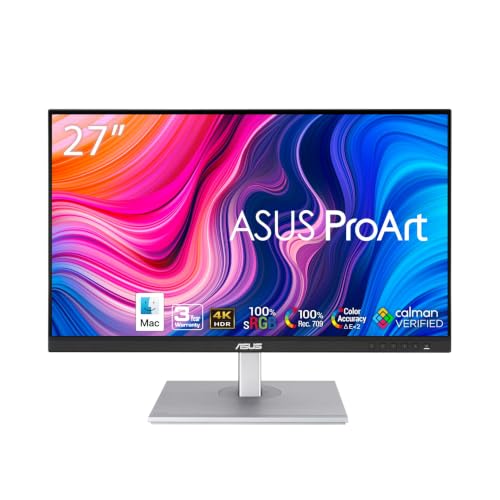
2. ASUS ProArt Display PA279CV — Best IPS Monitor for Creators
- 27-inch IPS panel, 3840 x 2160 (4K UHD) resolution
- 100 percent sRGB and 100 percent Rec. 709 color gamut
- Calman Verified, factory calibrated to Delta E under 2
- 60 Hz refresh rate, 5 ms response time
The ASUS ProArt Display PA279CV is built for people whose work depends on color being right. Every unit is factory calibrated and Calman Verified to a Delta E under 2, which means the colors on screen closely match the colors in the finished file. With full sRGB and Rec. 709 coverage, it is a natural fit for photo editing, video work, and design.
The 4K IPS panel keeps text and fine detail crisp at normal viewing distances, and the 178-degree viewing angle keeps color consistent when a colleague leans in to review a proof. Connectivity is generous for a creator display: DisplayPort over USB-C with 65W Power Delivery, DisplayPort, HDMI, and a USB hub. ASUS Eye Care technology reduces flicker and blue light for long sessions, and the ergonomic stand adjusts for height, tilt, pivot, and swivel.
Key specs:
Pros:
Cons:
3. LG 27UP850-W — Best Value 4K IPS Monitor
- 27-inch IPS panel, 3840 x 2160 (4K UHD) resolution
- 95 percent DCI-P3 color gamut, VESA DisplayHDR 400
- 60 Hz refresh rate, 5 ms response time
- 400 nits brightness, 1200:1 contrast ratio, 178-degree viewing angle
The LG 27UP850-W delivers most of what the premium 4K IPS monitors offer, with a stronger value angle. Its 27-inch 4K IPS panel covers 95 percent of the DCI-P3 color gamut and carries VESA DisplayHDR 400 certification, so photos, video, and everyday content look vivid without the washed-out feel of a narrow-gamut office display.
Where this monitor stands out is its USB-C port, which delivers up to 96W of Power Delivery, enough to charge many full-size laptops over the same cable that carries the video signal. AMD FreeSync support, a Game Mode, and LG features such as Dynamic Action Sync and Black Stabilizer make it a capable casual gaming display as well, even at 60 Hz. The three-side virtually borderless design looks clean on a desk, and the height, pivot, and tilt adjustable stand makes it easy to find a comfortable position.
Key specs:
Pros:
Cons:
4. LG 27GP850-B — Best IPS Gaming Monitor
- 27-inch Nano IPS panel, 2560 x 1440 (QHD) resolution
- 165 Hz refresh rate, 1 ms GtG response time
- 98 percent DCI-P3 color coverage, DisplayHDR 400
- 400 nits brightness, 1000:1 contrast ratio, 178-degree viewing angle
The LG 27GP850-B shows how far IPS gaming monitors have come. Its Nano IPS panel combines the wide viewing angles and color accuracy of IPS with a 165 Hz refresh rate and a 1 ms GtG response time, removing the motion blur that once pushed competitive players toward TN panels. QHD resolution keeps games sharp without demanding as much graphics power as 4K, and the 98 percent DCI-P3 coverage makes colors pop in a way standard gaming panels rarely manage.
NVIDIA G-Sync compatibility and AMD FreeSync Premium keep frames smooth and free of tearing across both major graphics platforms. DisplayHDR 400 adds a modest HDR lift, and the ergonomic stand adjusts for height, tilt, and pivot. For a mixed-use desk where gaming shares time with browsing, streaming, and office work, this is one of the most balanced IPS monitors available.
Key specs:
Pros:
Cons:
5. Acer Nitro XV272U F3 — Best High-Refresh IPS Monitor
- 27-inch IPS panel, 2560 x 1440 (QHD) resolution
- 300 Hz refresh rate, up to 0.5 ms response time
- 99 percent sRGB color coverage, DisplayHDR 400
- 250 nits brightness, 178-degree viewing angle, matte screen
The Acer Nitro XV272U F3 is for buyers who want maximum speed from an IPS panel. Its 27-inch QHD IPS display refreshes at 300 Hz, a rate that makes motion in competitive shooters and racing games look exceptionally smooth, while the 0.5 ms response time keeps ghosting to a minimum. AMD FreeSync Premium keeps the frame rate and refresh rate in sync, and DisplayHDR 400 support adds contrast to bright scenes.
Despite the gaming focus, the color story is solid: 99 percent sRGB coverage means the panel is accurate enough for everyday photo viewing and content work, not just games. The ErgoStand adjusts for height, pivot, swivel, and tilt, built-in speakers save desk space, and connectivity includes DisplayPort 1.4 and two HDMI 2.1 ports.
Key specs:
Pros:
Cons:
IPS Monitor Buying Guide
Why IPS, and what gives it away
IPS stands for in-plane switching, a panel technology in which the liquid crystals rotate parallel to the screen. The practical result is color and contrast that stay stable across a wide viewing angle, usually listed as 178 degrees both ways. If you often share your screen, sit off-center, or mount a second monitor at an angle, IPS is the most forgiving panel type. Its main trade-off against VA panels is contrast: a standard IPS panel typically measures around 1000:1, so blacks can look slightly gray in a dark room. IPS Black panels, such as the one in the Dell U2723QE, address this directly with roughly double the contrast.
4K or QHD
At 27 inches, 4K resolution delivers very sharp text and fine detail, which matters for photo editing, coding, spreadsheets, and reading. QHD is still sharp at this size and is much easier for a graphics card to drive at high frame rates, which is why both gaming picks in this guide use QHD. Choose 4K for clarity and color work, and QHD for frame rate.
Refresh rate and response time
A 60 Hz panel refreshes 60 times per second and is fine for office work, browsing, and creative work. A 165 Hz or 300 Hz panel refreshes far more often, which makes mouse movement, scrolling, and fast games feel smoother. Response time, listed in milliseconds GtG, describes how quickly a pixel changes color; lower is better for reducing blur in motion. For gaming, look for 144 Hz or higher with a 1 ms-class response time.
Color coverage: sRGB, DCI-P3, and Delta E
Color gamut figures describe how much of a color space a monitor can reproduce. Full sRGB coverage is the baseline for accurate web and office work. DCI-P3 coverage matters for video editing and HDR content, and figures in the mid-90s or higher are strong. Delta E measures color error, and a value under 2 means errors are small enough that most eyes cannot spot them. Factory-calibrated monitors such as the ASUS ProArt PA279CV list their Delta E figure on the product page, which is a useful sign that the manufacturer treats accuracy seriously.
Connectivity and USB-C docking
Check the ports before you buy. A USB-C port with Power Delivery lets a laptop connect and charge over one cable, which keeps a desk tidy; 65W is enough for many ultrabooks, while 90W or more covers larger laptops. DisplayPort and HDMI cover desktops and consoles, and a built-in USB hub or KVM switch is worth having if you share one monitor between two computers. HDMI 2.1 matters mainly for high-refresh console gaming.
Ergonomics and eye comfort
A good stand adjusts for height, tilt, swivel, and pivot, so the screen can sit at eye level and rotate into portrait mode for documents or code. Matte screens reduce glare in bright rooms, and low blue light modes help during long sessions, though they are no substitute for regular breaks.
How to choose from the five picks above
Pick the Dell U2723QE for a premium all-rounder with docking built in, the ASUS ProArt PA279CV if color accuracy is the job, and the LG 27UP850-W for 4K IPS quality and strong USB-C charging at a more modest outlay. Gamers get the best balance from the LG 27GP850-B, and the Acer Nitro XV272U F3 takes the speed crown with its 300 Hz panel.
Frequently Asked Questions
Are IPS monitors good for gaming?
Yes. Modern IPS gaming monitors pair wide viewing angles and accurate color with refresh rates of 165 Hz or 300 Hz and response times of 1 ms or faster. The LG 27GP850-B and Acer Nitro XV272U F3 in this guide are both IPS gaming monitors, and they suit competitive play far better than the slow IPS panels of a decade ago.
Is IPS better than VA for everyday use?
For most desks, yes. IPS keeps color consistent from any angle and usually offers better color accuracy, which suits office work, creative work, and shared viewing. VA panels typically offer deeper blacks and higher contrast, which suits dark-room movie watching. The Dell U2723QE narrows that gap with its IPS Black panel, which doubles the contrast of standard IPS.
What size IPS monitor is best?
27 inches is the sweet spot for most buyers, and every monitor in this guide is 27 inches. At that size, QHD looks sharp and 4K looks very sharp, and the screen is large enough for side-by-side windows without dominating a desk. Smaller 24-inch IPS monitors suit tight desks, while 32-inch models need 4K resolution to keep text crisp.
Do IPS monitors suffer from backlight bleed?
IPS panels can show some backlight bleed or glow in dark corners, especially in a dark room with a black screen. It varies from unit to unit and is usually only visible in very dark scenes. Buying from a retailer with a straightforward return policy makes it easy to exchange a unit if the bleed is distracting.
Is a 4K IPS monitor worth it over QHD?
It depends on the work. For photo editing, design, coding, and reading, 4K at 27 inches is noticeably sharper and worth the step up. For gaming, QHD is often the better choice because it is easier to run at high frame rates, and the difference in sharpness is harder to notice in motion.
Conclusion
The best IPS monitor is the one that matches how the desk is actually used. For a premium all-round display with docking built in, the Dell UltraSharp U2723QE leads this list. Creators who need trustworthy color should look at the ASUS ProArt Display PA279CV, while the LG 27UP850-W offers 4K IPS quality and 96W USB-C charging at a friendlier level. Gamers get the best balance from the LG 27GP850-B, and the Acer Nitro XV272U F3 takes the speed crown with its 300 Hz IPS panel.
Whichever pick fits, the shared strengths of IPS remain the same: steady color from any angle, sharp text, and a panel that works as well for a spreadsheet as it does for a game. Check current price on Amazon for the model that matches your setup, and choose the resolution and refresh rate that suit your work first.
FAQ
Are IPS monitors good for gaming?
Is IPS better than VA for everyday use?
What size IPS monitor is best?
Do IPS monitors suffer from backlight bleed?
Is a 4K IPS monitor worth it over QHD?
More from Amazon
Programs that pair well with the guide above. Offers and eligibility are set by Amazon and may change.
Free shipping on eligible items, Prime Video and more. Eligible new members can start with a free trial.
Start a Prime free trialA Prime membership for ages 18-24 with a trial period. Eligibility is set by Amazon.
See Prime for Young AdultsAudiobooks and podcasts to listen to on the go. Eligible new members can start with a free trial.
Try Audible freeAd-free music streaming. Eligible new subscribers can start with a free trial.
Try Music Unlimited freeAs an Amazon Associate we earn from qualifying purchases.