Key takeaways
- Compare three creator cameras for live streaming: mirrorless and compact picks with 4K video, flip screens and USB streaming for clean, sharp broadcasts.
A webcam can get a stream online, but the real decision for a creator camera is how much image quality and control you gain once you step up to a proper sensor and lens. A larger sensor holds up in ordinary room light, autofocus keeps your face sharp while you move, and a screen that faces you makes framing a one-person job. None of that matters if the camera cannot feed your streaming software cleanly, so the connection method deserves as much attention as the picture itself.


This roundup is for streamers and online creators who want one camera that handles live broadcasts and recorded videos from the same desk. Every pick is a mirrorless or compact creator camera, chosen from the streaming and webcam features named in its own Amazon listing: USB streaming support, 4K video, vari-angle screens and creator-focused controls. Webcams are a different product class and are deliberately not mixed in here.
Quick Picks
As an Amazon Associate we earn from qualifying purchases
| Product | Best for | Key spec from title |
|---|---|---|
| Canon EOS R50 with RF-S 18-45mm Lens Kit | Plug-and-play USB streaming | UVC/UAC compatibility for webcam and streaming |
| Sony Alpha ZV-E10 II with 16-50mm Lens | Creators who swap lenses | 26-megapixel APS-C Exmor R CMOS sensor |
| Sony ZV-1 II | Small desks and travel setups | 1-inch sensor with 18-50mm zoom lens |
How to Choose
Connection: USB Streaming or a Capture Card
The simplest streaming setup treats the camera like a webcam: one USB cable carries the picture straight into your software, with no extra hardware in between. The Canon EOS R50 states this directly in its listing, which names UVC/UAC compatibility for webcam and streaming, so it can feed a computer without a capture card. Other cameras may rely on HDMI output and a separate capture device instead, which adds cost and another failure point. Before choosing any camera, confirm exactly how it connects by reading the listing’s own wording, because a camera that looks ideal on paper is the wrong buy if your desk setup cannot accept its output.
Autofocus That Follows a Moving Presenter
Streaming is not still photography: you lean in, hold products up, glance at a second monitor and shift in your chair. Autofocus has to track a face through all of that without hunting or locking onto the background. The R50’s listing highlights Dual Pixel CMOS AF II with 651 zones and subject detection, which is the kind of specification that matters when you move around on camera. A wide zone count and subject detection are worth more here than a long list of still-photo modes. If you present objects or guests, dependable tracking saves you from constantly tapping the screen to refocus mid-stream.
Screens, Microphones and One-Person Operation
Most streamers work alone, so the camera has to be its own monitor. A vari-angle touch screen that flips to face you, like the one on the ZV-E10 II, lets you check framing, focus and exposure without walking around the tripod. Built-in audio deserves the same scrutiny: the ZV-1 II carries an Intelligent 3-Capsule Mic designed for vloggers, which suits a compact desk setup where an external microphone would crowd the frame. Think about where the camera sits, how far your voice travels to it, and whether your room lets a built-in microphone do the job before you plan around extra audio gear.
Video Quality and Session Length
Resolution is only part of the picture. The R50 records 4K movie oversampled from 6K at up to 30 frames per second, uncropped, and Full HD at up to 120 frames per second, which gives you a sharper feed and slow-motion options for recorded content. Just as important for live work, its listing states continuous video recording of up to one hour, so plan show segments and breaks around that figure rather than discovering it mid-broadcast. Compact and mirrorless cameras also reward good lighting: a modest lamp aimed at your face improves the image more than any menu setting, whatever sensor size you choose.
The 3 Best Options
Canon EOS R50 with RF-S 18-45mm F4.5-6.3 IS STM Lens Kit, Black
This is the most straightforward route into camera-based streaming because the listing itself promises webcam behaviour: UVC/UAC compatibility means the camera can present itself to a computer for streaming without a capture card in the chain. Around that convenience sits a capable hybrid body with a 24.2 megapixel APS-C sensor, 4K video oversampled from 6K, and subject-detecting autofocus that suits presenters who move. The bundled 18-45mm kit lens covers the standard desk framing range, so a beginner can set up, connect one cable and go live, then keep the same camera for photos and recorded videos.
Specs
- 24.2 Megapixel CMOS (APS-C) sensor
- DIGIC X processor
- 4K movie oversampled from 6K at up to 30 fps, uncropped
- Full HD video up to 120 fps
- Dual Pixel CMOS AF II with 651 zones and subject detection
- Continuous video recording up to 1 hour as listed
- UVC/UAC compatibility for webcam and streaming
- RF-S 18-45mm F4.5-6.3 IS STM lens kit, RF mount
Best for: New streamers who want USB plug-and-play streaming from a real interchangeable-lens camera.
Watch out for: The listed continuous recording limit is one hour, so structure long broadcasts with breaks or segments in mind.
ASIN: B0BTTV6CT1
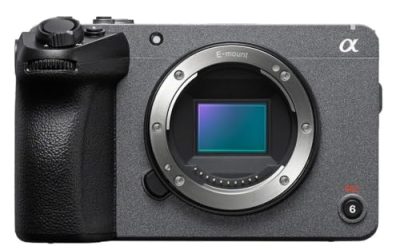
Sony Alpha ZV-E10 II with 16-50mm Lens, Black
Sony builds the ZV line specifically for content creators, and this second-generation body pairs a 26-megapixel APS-C back-illuminated Exmor R CMOS sensor with the BIONZ XR processor for 4K video. The vari-angle touch LCD is the detail a solo streamer will use every day, since it turns toward you for framing and focus checks from the presenter’s chair. Creative Looks and a Cinematic Vlog setting give recorded content a finished style without heavy editing. Because it takes interchangeable E-mount lenses, it is the pick that grows with you: start with the kit lens, then add a wider or faster lens as your channel develops.
Specs
- 26-megapixel APS-C back-illuminated Exmor R CMOS sensor
- BIONZ XR processor
- 4K video
- Interchangeable E-mount lenses
- Creative Looks and Cinematic Vlog setting
- Vari-angle touch LCD
- Supplied with 16-50mm lens
Best for: Creators who stream and record, and who want an interchangeable-lens system that can grow.
Watch out for: Check the live listing for the exact streaming connection wording and box contents before planning a cable-only setup around it.
ASIN: B0D92VDW76
Sony ZV-1 II, Black
Not every streaming desk has room for a mirrorless body and a bag of lenses. The ZV-1 II folds the creator formula into a compact camera with a 1-inch sensor and a wide-angle 18-50mm zoom lens, so the whole setup is the camera, a small tripod and a cable. Its Intelligent 3-Capsule Mic is built for vloggers, which helps when your desk layout leaves no sensible place for a separate microphone. The wide zoom range frames a presenter and their background without pushing the camera far back, a genuine advantage in small rooms. It is the low-fuss option for creators who stream from tight spaces or travel with their setup.
Specs
- 1-inch sensor
- Wide-angle 18-50mm zoom lens (equivalent as listed)
- 4K video
- Intelligent 3-Capsule Mic
- Designed for vloggers and online video creators
Best for: Streamers with small desks, or anyone who wants a compact all-in-one streaming camera.
Watch out for: The lens is fixed, so there is no interchangeable-lens upgrade path if your needs outgrow the built-in zoom.
ASIN: B0C62F451G
Which One Fits Your Situation
You Are Replacing a Webcam for the First Time
Choose the Canon EOS R50. Its listing states UVC/UAC compatibility for webcam and streaming, so the move from a webcam is mostly a cable swap rather than a rebuild of your whole setup. The kit lens covers a normal desk distance, the autofocus detects subjects across 651 zones, and the same body handles photos and recorded videos when the stream ends. Just keep your shows within the listed one-hour continuous recording figure.
You Stream and Publish Recorded Videos Too
Choose the Sony ZV-E10 II. The 26-megapixel APS-C sensor, 4K video and Creative Looks serve edited uploads as well as live shows, and the vari-angle touch screen makes solo recording practical. E-mount lens interchangeability is the long-term argument: the kit lens is a starting point, not a ceiling, so the camera can adapt as your content style changes.
Your Streaming Space Is a Corner of a Room
Choose the Sony ZV-1 II. A compact body with a wide 18-50mm zoom frames you properly from a short distance, and the built-in 3-Capsule Mic removes one more piece of desk clutter. There is nothing to assemble and no lens kit to store, which matters when the streaming corner doubles as living space the rest of the day.
Common Mistakes
- Buying a camera for its photo specifications without confirming how it connects to streaming software.
- Assuming every camera streams over USB; some need HDMI and a capture card, so read the listing wording first.
- Ignoring recording limits and session length, then hitting a cutoff in the middle of a broadcast.
- Placing the camera too far away for its built-in microphone instead of planning audio around your room.
- Choosing a fixed-lens compact when you already know you want to swap lenses later, or the reverse.
Frequently Asked Questions
Do I still need a capture card with these cameras?
Not always. The Canon EOS R50’s listing states UVC/UAC compatibility for webcam and streaming, which means it can connect to a computer over USB and appear as a video source directly. For any camera, the listing’s own wording decides: if it does not state USB streaming, plan on an HDMI capture device and budget for it before you buy.
Is 4K video necessary for live streaming?
Most platforms deliver streams at lower resolutions, but a 4K-capable sensor still helps. It gives you room to crop the frame in software without obvious softness, and the same camera produces sharper recorded videos for uploads. The R50 oversamples its 4K from 6K, which is the kind of detail that keeps a downscaled stream looking clean.
Can one camera handle both streaming and vlogging?
Yes, and that dual role is the point of this creator-camera class. The ZV-E10 II pairs 4K video with a vari-angle screen and Creative Looks for recorded pieces, while the ZV-1 II folds a wide zoom and a 3-Capsule Mic into a pocketable body. Pick based on whether lens swapping or compactness matters more to your routine.
What else should I budget for besides the camera?
Lighting first: a simple lamp facing you improves any of these cameras more than accessories do. Then consider a small tripod or desk mount at the right height, and check whether your room lets a built-in microphone suffice or needs an external one. Finally, confirm cables and connection hardware against the camera’s stated streaming method so nothing is missing on your first broadcast day.
FAQ
Do I still need a capture card with these cameras?
Is 4K video necessary for live streaming?
Can one camera handle both streaming and vlogging?
What else should I budget for besides the camera?
More from Amazon
Programs that pair well with the guide above. Offers and eligibility are set by Amazon and may change.
Free shipping on eligible items, Prime Video and more. Eligible new members can start with a free trial.
Start a Prime free trialA Prime membership for ages 18-24 with a trial period. Eligibility is set by Amazon.
See Prime for Young AdultsAudiobooks and podcasts to listen to on the go. Eligible new members can start with a free trial.
Try Audible freeAd-free music streaming. Eligible new subscribers can start with a free trial.
Try Music Unlimited freeAs an Amazon Associate we earn from qualifying purchases.