Our Short List of 3

- Best for: Players who also spend serious hours in spreadsheets and long documents.
- Sensor: Focus Pro 30K optical
- Switches: Razer Optical Mouse Switches Gen-3
- Scroll wheel: HyperScroll tilt wheel, notched and free-spin
- Connections: HyperSpeed 2.4 GHz wireless, Bluetooth, wired
- Best for: Hybrid workers who swap between a work laptop and a home PC.
- Sensor: PixArt 3395, up to 26,000 DPI
- Connections: 2.4 GHz wireless, Bluetooth 5.1, wired
- Scroll: Infinite scroll wheel plus thumb scroll wheel
- Shape: Ergonomic

- Best for: Desk workers whose hand and wrist comfort decide the purchase.
- Shape: Right-handed ergonomic
- Thumb rest: Extended
- Line: Razer productivity line built on gaming hardware
- Design intent, as listed: Designed for both productivity and gaming
All 3 Picks at a Glance
| Product | Specs | Action |
|---|---|---|
| Razer Basilisk V3 Pro |
| Check price on Amazon |
| Keychron M6 |
| Check price on Amazon |
| Razer Pro Click V2 |
| Check price on Amazon |
Key takeaways
- Three gaming-first mice that also excel at desk work, compared on sensors, tilt and free-spin wheels, tri-mode wireless and shape, from their Amazon listings.
One mouse for both jobs sounds simple until you shop for it. Gaming mice chase sensor speed and low weight, while desk mice chase comfort and a wheel that flies through spreadsheets, and most models only solve one side. The useful middle is a gaming-grade sensor and switches paired with the two or three features that actually matter at a desk: a tilt or free-spin scroll wheel, more than one way to connect, and a shape your hand can hold for eight hours without complaint.
These picks are for players who work at the same desk they game on, and for office workers who want a mouse that does not feel sluggish when the workday ends. All three are gaming-first designs chosen from the sensor, wheel, shape and connection details on their Amazon listings, and each one earns its place for a different reason: outright speed, multi-device flexibility, or long-session comfort.
Quick Picks
As an Amazon Associate we earn from qualifying purchases.
| Product | Best for | Key spec from title |
|---|---|---|
| Razer Basilisk V3 Pro | Fast games plus heavy document work | Focus Pro 30K sensor, HyperScroll tilt wheel |
| Keychron M6 | Switching between work and home machines | PixArt 3395 sensor, tri-mode wireless |
| Razer Pro Click V2 | All-day comfort at the desk | Right-handed ergonomic shape, extended thumb rest |
How to Choose
Sensor Performance That Serves Both Jobs
Start with the sensor, because it is the one part that works in both halves of your life. The Basilisk V3 Pro’s Focus Pro 30K and the Keychron M6’s PixArt 3395, rated up to 26,000 DPI, track fast flicks in a shooter and slow, deliberate drags across a design canvas with the same consistency. Headline DPI is a ceiling, not a setting you will use; what matters is that the sensor does not spin out at speed or jitter at low speeds. Any of the three sensors here clears that bar, so let the wheel and the shape break the tie.
The Scroll Wheel Is the Productivity Feature
The scroll wheel is where a gaming mouse earns its desk hours. Razer’s HyperScroll wheel on the Basilisk V3 Pro tilts for sideways scrolling through wide spreadsheets and unlocks into a free spin for long documents. The Keychron M6 goes further, pairing its main wheel with a separate thumb wheel, so one hand controls vertical and horizontal movement without touching a scrollbar. If your workday is timelines, sheets and hundred-page documents, rank the wheel above RGB and extra buttons; it is the feature you will touch every few seconds.
Connections for Two Machines
Count your machines before you count features. A tri-mode mouse, like the Keychron M6, moves between a gaming PC on its 2.4 GHz connection, a work laptop on Bluetooth, and a wired cable when the battery or the rules demand it, without re-pairing rituals. The Basilisk V3 Pro offers the same three routes. Use the low-latency wireless mode for games, where Bluetooth’s slower report rate can feel soft, and save Bluetooth for the laptop you only type on. One receiver living permanently in the desktop is the setup that survives Monday mornings. Keep the cable in a drawer regardless: it is the fallback that turns a flat battery from a lost afternoon into a two-minute pause, and it doubles as the connection for firmware updates.
Shape and Long-Session Comfort
Shape decides whether the mouse is still comfortable in hour seven. The Pro Click V2 is the comfort specialist here: a right-handed ergonomic shell with an extended thumb rest that supports a relaxed palm grip through long documents. The Basilisk V3 Pro keeps a sculpted gaming shape, while the M6 wraps an ergonomic outline around gaming hardware. Match the mouse to your grip and your hand size, and be honest about which activity fills more of your week; comfort you feel daily beats a shape that only shines in matches.
The 3 Best Options
Razer Basilisk V3 Pro
- Best for: Players who also spend serious hours in spreadsheets and long documents.
- Sensor: Focus Pro 30K optical
- Switches: Razer Optical Mouse Switches Gen-3
- Scroll wheel: HyperScroll tilt wheel, notched and free-spin
- Connections: HyperSpeed 2.4 GHz wireless, Bluetooth, wired
Players who also spend serious hours in spreadsheets and long documents.
This code is the black version, and other colours sit on separate listings; if your hands are small, compare the listing’s dimensions with your current mouse before ordering.
The Basilisk V3 Pro is the no-compromise pick: a flagship gaming mouse that happens to be excellent at desk work. Its Focus Pro 30K optical sensor and Gen-3 optical switches cover the gaming side, while the HyperScroll tilt wheel is the productivity bridge, clicking sideways through spreadsheets and spinning freely through documents. Three connection modes let it live on a gaming PC and a laptop at once, and the 13-zone Chroma RGB is there if your setup already speaks Razer’s language. Buy it if one mouse has to be brilliant at both jobs.
Keychron M6
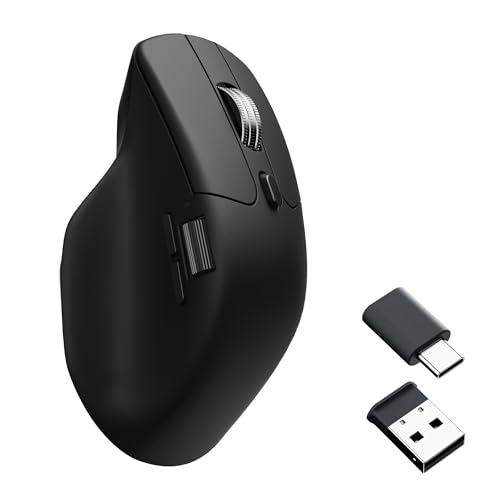
- Best for: Hybrid workers who swap between a work laptop and a home PC.
- Sensor: PixArt 3395, up to 26,000 DPI
- Connections: 2.4 GHz wireless, Bluetooth 5.1, wired
- Scroll: Infinite scroll wheel plus thumb scroll wheel
- Shape: Ergonomic
Hybrid workers who swap between a work laptop and a home PC.
Keychron also sells an 8000 Hz version of the M6 under a different model number, so confirm the listing you open is the standard M6 before ordering.
The M6 is the flexible middle pick, an ergonomic mouse built around a PixArt 3395 sensor that reaches 26,000 DPI, so it never feels out of its depth in a game. Its party trick is control layout: a main wheel with infinite scroll for long pages, a thumb wheel for horizontal movement, and tri-mode connections that hop between two wireless machines and a cable. The ergonomic outline suits longer desk sessions than a flat esports shell, and the listing covers Windows PC and Mac, which makes it the natural pick for mixed households and hybrid workers.
Razer Pro Click V2
- Best for: Desk workers whose hand and wrist comfort decide the purchase.
- Shape: Right-handed ergonomic
- Thumb rest: Extended
- Line: Razer productivity line built on gaming hardware
- Design intent, as listed: Designed for both productivity and gaming
Desk workers whose hand and wrist comfort decide the purchase.
The shape is right-handed only, and a vertical version is sold under a similar name, so check you are on the standard model; confirm the exact connection modes on the live listing before ordering.
The Pro Click V2 comes from Razer’s productivity line, and Razer describes it as designed for both productivity and gaming, which is exactly the brief here. The right-handed ergonomic shell and extended thumb rest are built for full workdays, spreading the load across the hand instead of pinching it around a small gaming shape. Underneath sits hardware from a gaming brand rather than an office-only line, so it answers quickly when the day ends and a game opens. Choose it when comfort is the deciding factor and gaming is the second job.
Which One Fits Your Situation
Your Evenings Are Shooters and Your Days Are Spreadsheets
Take the Basilisk V3 Pro. The sensor and optical switches handle fast, competitive play, and the tilt wheel earns its keep the next morning when a budget sheet runs forty columns wide. It is the one pick here that never asks you to accept a weaker half of the day.
You Swap Between a Work Laptop and a Gaming PC
The Keychron M6 was built for this desk. Its tri-mode connections let the gaming PC keep the 2.4 GHz link while the laptop pairs over Bluetooth, and the thumb wheel speeds up the sideways scrolling that laptop trackpads make miserable. One mouse, two machines, no cable swapping.
Your Hand Aches by Mid-Afternoon
Choose the Razer Pro Click V2. The ergonomic shell and extended thumb rest support a relaxed palm instead of a claw, which is what long document and email days actually demand. It still comes from a gaming brand’s hardware, so it will not feel dull when you play after work.
You Are Replacing Two Mice With One
Any of the three retires the two-mouse desk, but the deciding question is which compromise you refuse to make. Refuse to give up gaming speed and take the Basilisk V3 Pro; refuse to give up multi-device switching and take the M6; refuse to give up comfort and take the Pro Click V2.
Common Mistakes
- Buying on the headline DPI figure alone.
- Picking a tiny ultralight esports shell for eight-hour desk days.
- Ignoring the scroll wheel, then nudging through long documents one notch at a time.
- Gaming over Bluetooth when the mouse also offers a faster 2.4 GHz mode, then blaming the sensor for the lag you feel.
- Assuming every colour and variant shares one listing, instead of checking the exact model on the page.
Frequently Asked Questions
Is Wireless Fast Enough for Competitive Gaming Now?
On the 2.4 GHz gaming modes these mice offer, yes: that class of connection is built for low-latency play and is what the Basilisk V3 Pro and the M6 are designed around. Bluetooth is the slower route, and it is better saved for the work laptop, where its convenience matters more than its report rate.
Does a Higher DPI Number Make a Mouse Better?
Not by itself. DPI is the sensor’s maximum sensitivity, and most people play and work far below the ceiling of either the Focus Pro 30K or the PixArt 3395. What you actually feel is consistent tracking at your chosen setting, with no spin-outs at speed and no jitter in slow, precise movements.
What Does a Tilt or Free-Spin Wheel Do in Office Apps?
A tilt wheel scrolls sideways, which is the fastest way across wide spreadsheets and timelines without dragging a scrollbar. A free-spin mode lets the wheel keep turning through long documents and contracts with a flick. Both appear in this roundup because they save more time in a workday than any lighting effect.
Can These Mice Work With a Mac as Well as a PC?
The Keychron M6 lists Windows PC and Mac support in its own listing title, so it is the safe pick for a mixed desk. The Razer models are aimed at gaming PCs first; if Mac support decides your purchase, read the live listing for the exact model before ordering rather than assuming.
FAQ
Is Wireless Fast Enough for Competitive Gaming Now?
Does a Higher DPI Number Make a Mouse Better?
What Does a Tilt or Free-Spin Wheel Do in Office Apps?
Can These Mice Work With a Mac as Well as a PC?
More from Amazon
Programs that pair well with the guide above. Offers and eligibility are set by Amazon and may change.
Free shipping on eligible items, Prime Video and more. Eligible new members can start with a free trial.
Start a Prime free trialA Prime membership for ages 18-24 with a trial period. Eligibility is set by Amazon.
See Prime for Young AdultsAudiobooks and podcasts to listen to on the go. Eligible new members can start with a free trial.
Try Audible freeAd-free music streaming. Eligible new subscribers can start with a free trial.
Try Music Unlimited freeAs an Amazon Associate we earn from qualifying purchases.