Key takeaways
- Five wired gaming mice with short, narrow shells for small hands, compared by listed length, weight, sensor and cable, with fit notes for each grip.
A wired gaming mouse only works for a small hand if the shell is short enough for your fingers to reach the front buttons without stretching, and narrow enough that your thumb and ring finger can hold the sides without splaying. Most wired gaming mice are built around medium and large shells, so the real decision is which of the few genuinely compact models matches your grip, your preferred weight, and how much you care about cable drag on a wired connection.
This guide is for small-handed players who want a wired mouse for shooters, MOBA titles, and everyday competitive play. The five picks below are the compact wired models whose Amazon listings print short dimensions: the Razer Cobra at 4.71 inches long, the Logitech G203 Lightsync at 4.59 inches, the Glorious Model O- at 4.72 inches, the Corsair Katar Pro XT at 4.56 inches, and the Cooler Master MM711 at about 4.59 inches.
Quick Picks
As an Amazon Associate we earn from qualifying purchases
| Product | Best for | Key spec |
|---|---|---|
| Razer Cobra | Fingertip and claw players who want the lightest modern shell | 58 g, 4.71 x 2.46 x 1.5 inches |
| Logitech G203 Lightsync | An easy fit for smaller hands | 8,000 DPI sensor, 4.59 inches long |
| Glorious Model O- (Minus) | Players who want a honeycomb shell in a compact size | 58 g, Pixart 3360 sensor |
| Corsair Katar Pro XT | Claw grip players who want a higher ceiling sensor | 18,000 DPI Pixart PMW3391, 73 g |
| Cooler Master MM711 | Small hands that want RGB and a 60 g honeycomb body | 16,000 DPI optical sensor, 60 g |
How to Choose
Shell length and width come first
For a small hand, length is the measurement that decides whether a mouse fits at all. A shell around 4.6 to 4.75 inches long lets shorter fingers rest on the main buttons instead of reaching for them, while anything past 4.9 inches usually pushes a small hand into an overextended palm grip. Width matters next: shells near 2.45 to 2.5 inches across, like the Razer Cobra and the Glorious Model O-, let the thumb and ring finger pinch the sides securely. Check the product dimensions printed on the listing rather than trusting a size label, because brands use small, medium, and large inconsistently.
Match the shape to your grip style
Small-handed players usually land on fingertip or claw grip, because a full palm grip needs a longer shell to fill the hand. Fingertip players do best with low, symmetrical shells such as the Razer Cobra and the Cooler Master MM711, where control comes from the fingers alone. Claw players need a slightly taller rear hump to brace against, which the Corsair Katar Pro XT provides with its compact symmetric shape listed for claw and fingertip use. If you rest your whole palm on the mouse, the Logitech G203 Lightsync has the most filled-in profile of this group, though it still suits smaller palms better than larger ones.
Weight changes how a small mouse feels
Every pick here sits between 58 and 73 grams as printed on its listing, and that range feels very different in a small hand. A 58 gram mouse like the Razer Cobra or the Glorious Model O- takes little effort to start and stop, which helps with fast flicks and frequent micro-corrections. A heavier option such as the 73 gram Corsair Katar Pro XT feels more planted and can steady slower, deliberate aim. Because a small hand has less leverage, extra weight shows up as fatigue sooner, so players who lift the mouse often should lean toward the lighter end of this list.
Cable type decides how wired it feels
A wired mouse removes batteries and charging from the picture, but the cable itself becomes part of the handling. Flexible paracord-style cables, including the Razer Speedflex cable on the Cobra, the Ascended cord on the Model O-, and the paracord cable on the Katar Pro XT, bend easily and resist dragging across the desk. Stiffer rubber cables pull against small movements and can nudge a light mouse off line. A mouse bungee helps any of these, but starting with a soft cable matters more for small hands, because there is less grip force available to fight cable tension.
The 5 Best Options
Razer Cobra

The Razer Cobra is the most current compact wired design in this group, and its listing dimensions of 4.71 x 2.46 x 1.5 inches put it squarely in small-hand territory. At 58 grams it is light enough for fingertip control, and the symmetrical shape works for claw grip as well. The 8,500 DPI optical sensor is modest next to the Corsair pick below, but it covers the sensitivity range most players actually use, and the Gen-3 optical switches and Speedflex cable keep clicks and movement feeling direct. Small-handed players who want a modern, no-fuss wired mouse should start here.
Specs
- Dimensions: 4.71 x 2.46 x 1.5 inches
- Weight: 58 g (2.04 ounces)
- Sensor: 8,500 DPI optical sensor
- Switches: Razer Optical Mouse Switches Gen-3
- Cable: Razer Speedflex cable
- Feet: PTFE mouse feet
- Lighting: Chroma RGB with underglow
- Model number: RZ01-04650100-R3U1
Best for: Fingertip and claw players who want the lightest current-generation compact shell.
Watch out for: The 8,500 DPI ceiling is lower than several rivals here, and the side buttons are sized for smaller hands, which larger-handed guests may find cramped.
Logitech G203 Lightsync

The Logitech G203 Lightsync has been a default recommendation for small hands for years because its shell, listed at 1.5 x 2.45 x 4.59 inches, is one of the shortest from a major brand. The shape is a simple, safe curve with no aggressive sculpting, so it suits fingertip, claw, and smaller palm grips without forcing one style. Its 8,000 DPI sensor and six programmable buttons cover everyday competitive needs, and on-board memory stores settings through Logitech G Hub. Players who want a proven wired mouse with wide software support and no learning curve will feel at home with this one.
Specs
- Dimensions: 1.5 x 2.45 x 4.59 inches
- Sensor: 8,000 DPI gaming-grade sensor
- Buttons: 6 programmable buttons
- Lighting: LIGHTSYNC RGB color wave
- Memory: On-board memory for stored settings
- Compatibility: PC and Mac
- Model number: 910-005790
Best for: Small-handed players who want a simple, widely supported wired mouse for mixed gaming and desktop use.
Watch out for: The sensor specification is the oldest in this group, and the standard rubber cable is stiffer than the paracord-style cables on the Razer, Glorious, and Corsair picks.
Glorious Model O- (Minus)
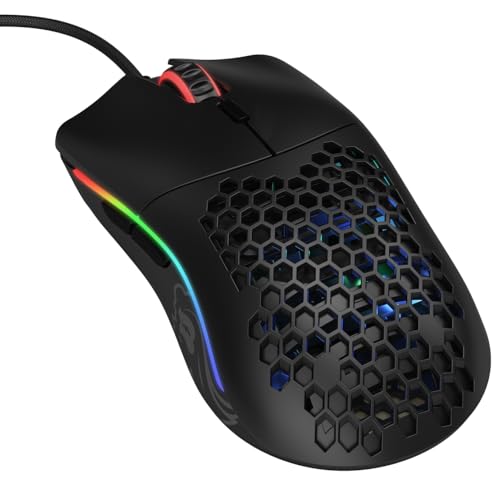
The Model O- is the compact version of the Glorious Model O, and its listing prints dimensions of 4.72 x 2.48 inches with a weight of 58 grams, achieved with a honeycomb shell that keeps the structure stiff while cutting mass. The Pixart 3360 sensor tracks up to 12,000 DPI, and the six buttons use Omron switches. The included Ascended paracord cable is one of the most flexible in this roundup, which suits the low-effort movement style a light mouse encourages. Small-handed players who like an airy, fast-gliding feel and an ambidextrous shape should look closely at this one.
Specs
- Dimensions: 4.72 x 2.48 inches
- Weight: 58 g
- Sensor: Pixart 3360 optical sensor, up to 12,000 DPI
- Buttons: 6, Omron switches
- Cable: Ascended paracord cable
- Shell: Honeycomb design, matte black finish
- Shape: Ambidextrous
- Model number: GOM-BLACK
Best for: Fingertip players who want a honeycomb shell and a very flexible cable in a compact frame.
Watch out for: The open honeycomb shell lets dust and crumbs reach the inside of the mouse, so it needs more frequent cleaning than the solid-shell picks.
Corsair Katar Pro XT
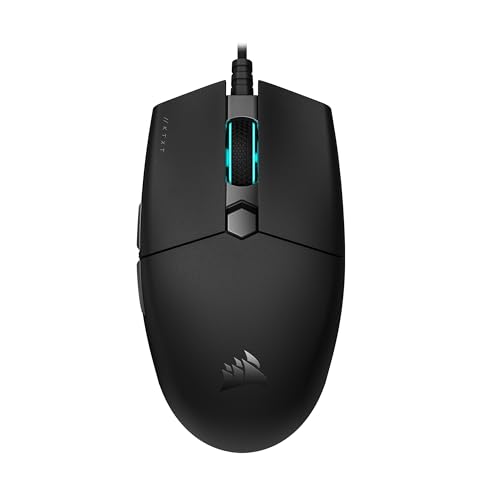
The Katar Pro XT is the shortest mouse in this group on paper, with listed dimensions of 115.8 x 64.2 x 37.8 mm, and Corsair describes its compact symmetric shape as suited to claw and fingertip grips. At 73 grams it is the heaviest pick here, which gives it a steadier feel during slow tracking. The custom Pixart PMW3391 optical sensor reaches 18,000 DPI with adjustment in single DPI steps, the highest ceiling in this list, and the spring-loaded Quickstrike buttons are built to remove the gap between button and switch. Small-handed players who aim with deliberate, controlled movements may prefer this planted feel.
Specs
- Dimensions: 115.8 x 64.2 x 37.8 mm (4.56 x 2.53 x 1.49 inches)
- Weight: 73 g without cable
- Sensor: PixArt PMW3391 optical sensor, up to 18,000 DPI
- Buttons: 6 programmable buttons, Quickstrike main buttons
- Cable: 1.8 m drag-reducing paracord cable
- Polling rate: 1,000 Hz USB report rate
- Software: Corsair iCUE supported
- Model number: CH-930C111-NA
Best for: Claw grip players with small hands who want the strongest sensor specification in a compact shell.
Watch out for: At 73 grams it is noticeably heavier than the 58 to 60 gram picks, which can tire smaller hands during long sessions of constant lifting.
Cooler Master MM711
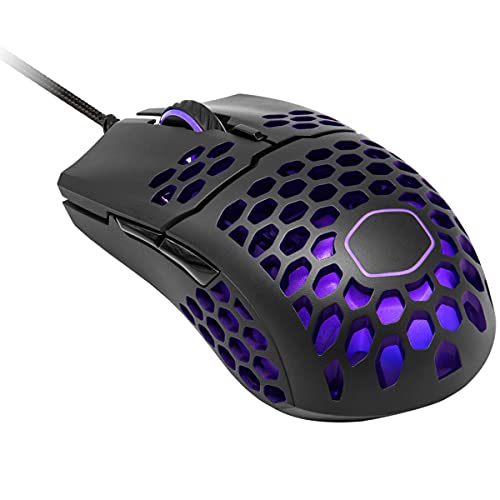
The MM711 packs a 16,000 DPI optical sensor into a honeycomb shell that measures about 116.6 x 62.5 mm and weighs 60 grams, making it one of the shortest and lightest wired options Cooler Master has sold. Omron switches rated for 20 million clicks handle the main buttons, PTFE feet keep the glide smooth, and the Ultraweave cable is designed to stay flexible rather than kink. RGB lighting in the scroll wheel and logo adds some desk presence that the plainer picks skip. Small-handed players who want a light honeycomb mouse with lighting included will find this the most feature-complete older design here.
Specs
- Dimensions: 116.6 x 62.5 mm (about 4.59 x 2.46 inches)
- Weight: 60 g
- Sensor: 16,000 DPI optical sensor
- Switches: Omron switches rated for 20 million clicks
- Cable: Ultraweave cable
- Feet: PTFE feet
- Shell: Ambidextrous honeycomb shell, matte black
- Lighting: RGB in scroll wheel and logo
- Model number: MM-711-KKOL1
Best for: Small-handed players who want a 60 gram honeycomb mouse with RGB and a high DPI ceiling.
Watch out for: This is an older model line, so listings are often fulfilled by third-party sellers rather than Cooler Master directly; check the seller and return terms on the listing before ordering.
Which One Fits Your Situation
You play fast-paced shooters with a fingertip grip
Pick the Razer Cobra. Its 58 gram weight, low symmetrical shell, and flexible Speedflex cable make quick flicks and constant small corrections easy to repeat, and the optical switches keep clicks consistent. The Glorious Model O- is the alternative if you prefer a honeycomb shell and an even softer-feeling paracord cable.
You want one mouse for gaming and everyday work
Pick the Logitech G203 Lightsync. The safe, uncomplicated shape stays comfortable through long desktop sessions, the six programmable buttons cover both game commands and daily shortcuts, and on-board memory keeps your settings when you move between computers. It is the least specialized pick here, which is exactly the point for mixed use.
You use a claw grip and aim with control rather than speed
Pick the Corsair Katar Pro XT. Its compact symmetric shell is listed for claw and fingertip grips, the 73 gram weight steadies slow tracking, and the PMW3391 sensor adjusts in single DPI steps so you can fine-tune sensitivity precisely. The Quickstrike buttons also suit players who rest their fingers on the clicks.
You want the lightest wired mouse with some style
Pick the Cooler Master MM711 if RGB lighting matters, since it pairs a 60 gram honeycomb shell with lit scroll wheel and logo accents. Pick the Glorious Model O- instead if you want the same weight class with a more flexible cable and a cleaner look. Both need a little more cleaning care than solid shells.
Common Mistakes
- Buying by DPI alone: every mouse here tracks accurately at the sensitivities players actually use, so shell fit matters far more than a headline DPI number.
- Judging size from photos: always compare the printed length against your current mouse, because product images make compact and full-size shells look identical.
- Ignoring the cable: a stiff rubber cable can drag a 58 gram mouse off target, so cable flexibility is part of the fit decision on a wired mouse.
- Choosing a palm-grip shape for fingertip play: tall, filled-in humps fight fingertip control, especially on a small hand.
- Skipping the seller check on older models: long-running listings like the MM711 are often sold by third parties, so confirm the seller and returns before ordering.
Frequently Asked Questions
How long should a gaming mouse be for small hands?
A shell between roughly 4.5 and 4.8 inches long suits most small hands, because the fingers can reach the main buttons without stretching and the rear of the mouse stays clear of the palm. Every pick in this guide falls in that range as printed on its listing. Width near 2.5 inches or less also helps the thumb and ring finger hold the sides securely.
Is a lighter mouse always better for small hands?
Not always. Lighter mice around 58 to 60 grams reduce effort and fatigue for fast, lifting-heavy play, which many small-handed players prefer. A slightly heavier mouse like the 73 gram Katar Pro XT can feel steadier for slow, deliberate aim. The right choice depends on grip and game type, so treat weight as a preference to match to your style rather than a score to minimize.
Does a wired mouse still make sense for competitive play?
Yes. A wired connection removes battery weight, charging breaks, and any wireless interference concerns, and modern flexible cables reduce the drag that used to be the main drawback. The trade-off is desk management: the cable needs clear space or a bungee to move freely. For a fixed gaming desk, wired remains a simple and dependable option.
Can left-handed players use these mice?
Most of this group uses symmetrical shells, including the Glorious Model O-, Cooler Master MM711, Corsair Katar Pro XT, and Logitech G203 Lightsync, so they can be held in either hand. The limitation is side buttons: on symmetrical mice these usually sit on the left side for right-thumb use, so left-handed players may not reach them comfortably. Check the button layout on the listing if side buttons matter.
FAQ
How long should a gaming mouse be for small hands?
Is a lighter mouse always better for small hands?
Does a wired mouse still make sense for competitive play?
Can left-handed players use these mice?
More from Amazon
Programs that pair well with the guide above. Offers and eligibility are set by Amazon and may change.
Free shipping on eligible items, Prime Video and more. Eligible new members can start with a free trial.
Start a Prime free trialA Prime membership for ages 18-24 with a trial period. Eligibility is set by Amazon.
See Prime for Young AdultsAudiobooks and podcasts to listen to on the go. Eligible new members can start with a free trial.
Try Audible freeAd-free music streaming. Eligible new subscribers can start with a free trial.
Try Music Unlimited freeAs an Amazon Associate we earn from qualifying purchases.