Key takeaways
- Left-handed gaming mice are rare, so this guide rounds up ambidextrous models with side buttons a left thumb can reach, from Logitech, Corsair and Pulsar.
If you aim with your left hand, the real decision is not sensor speed but button placement. Most gaming mice put their side buttons under a right thumb, which leaves left-handed players reaching across the shell or playing without thumb buttons at all. A genuinely mirrored left-handed mouse solves that, yet almost no major brand sells one, so the practical choice is between the few true left-handed editions and ambidextrous models that put working buttons on the right flank.
This guide is for left-handed PC players who want thumb buttons they can actually press. The picks below are the Logitech G PRO 2 LIGHTSPEED and G903 LIGHTSPEED, the Corsair M75 Wireless, the Pulsar X2A eS, and the Razer Viper Ultimate, chosen because each one is either switchable between hands or carries buttons on both sides, with current gaming sensors from the HERO 2 and PAW3395 down the list.
Quick Picks
As an Amazon Associate we earn from qualifying purchases
| Product | Best for | Key spec |
|---|---|---|
| Logitech G PRO 2 LIGHTSPEED | Competitive FPS in either hand | Up to 4 switchable magnetic side buttons |
| Corsair M75 Wireless | Swappable buttons and long battery | 26,000 DPI optical sensor, 105-hour battery |
| Pulsar X2A eS | Driverless esports features | PAW3395 sensor with OLED display |
| Logitech G903 LIGHTSPEED | Battery life and extra buttons | 140+ hour battery, up to 11 programmable buttons |
| Razer Viper Ultimate | Lightweight ambidextrous classic | Programmable buttons on both sides |
How to Choose
True left-handed shape versus ambidextrous shell
A true left-handed mouse mirrors a right-handed ergonomic shape, so the thumb buttons sit on the right flank and the shell leans into a left palm. The Razer Naga Left-Handed Edition and the Pulsar X3 LHD line are the rare examples, and both are sold mainly through brand stores with patchy marketplace stock. An ambidextrous shell is symmetrical instead, which works in either hand but feels flatter in the palm. For most left-handed players, an ambidextrous model with buttons on the right flank is the realistic buy, while a mirrored shell remains a specialist order.
Side buttons your left thumb can reach
This is the filter that removes most famous gaming mice from a left-handed shortlist. A symmetrical shell alone is not enough: models like the Logitech G PRO X SUPERLIGHT 2 and the Razer Viper V3 Pro carry side buttons on the left flank only, so a left-handed grip leaves them under your ring finger. Look for buttons mounted on both flanks, or magnetic buttons that swap sides, as on the Logitech G PRO 2 LIGHTSPEED and Corsair M75 Wireless. Check the listing photos for the right flank before ordering, because product titles rarely state which side carries the buttons.
Grip style and hand size
Symmetrical shells reward claw and fingertip grips, where the fingers steer the mouse and the palm barely touches. The Pulsar X2A eS is a low, wide-waist shape built for exactly that. Palm grippers rest their whole hand on the shell and usually prefer a taller hump, which the larger Logitech G903 LIGHTSPEED provides at 130 millimeters long. Measure your hand from wrist to middle fingertip and compare it with the listed length: a mouse around 120 millimeters suits medium hands, while smaller hands often control a shorter shell more easily during fast flicks.
Sensor, weight, and connection
Modern optical sensors from Logitech, PixArt, and Razer all track far beyond what a monitor can display, so DPI ceilings matter less than weight and connection. Every pick here is wireless, and each one lists a battery figure on its product page, from 70 hours on the Razer Viper Ultimate to more than 140 hours on the G903 LIGHTSPEED. Weight shapes aim style: the 69-gram Pulsar X2A eS suits quick, low-sensitivity swipes, while the G903 adds an optional 10-gram weight for players who like a steadier glide.
The 5 Best Options
Logitech G PRO 2 LIGHTSPEED

The G PRO 2 LIGHTSPEED is the strongest all-round answer for a left-handed player because its ambidextrous build was designed for either hand from the start. Up to four magnetic side buttons snap on or off, so you can run two buttons under your left thumb, two on the opposite flank, or none at all. The HERO 2 sensor, LIGHTFORCE hybrid switches, and LIGHTSPEED wireless connection match what right-handed professionals use, and the listed 95-hour battery keeps charging breaks rare during a long ranked grind.
Specs
- Shape: ambidextrous, for right- or left-handed use
- Side buttons: up to 4 removable magnetic buttons, switchable between sides
- Sensor: HERO 2, up to 44,000 DPI
- Switches: LIGHTFORCE hybrid switches
- Connectivity: LIGHTSPEED wireless, USB-C charging
- Battery life: up to 95 hours
- Weight: 2.82 ounces as listed
Best for: Competitive FPS players who want a pro-grade wireless mouse that works fully in the left hand.
Watch out for: The highest polling rates need Logitech’s separate receiver setup, and the flat symmetrical shell will not fill a large palm.
Corsair M75 Wireless

Corsair built the M75 Wireless around the same problem: an ambidextrous shape that enables right- and left-handed players to compete with the same hardware. Its side buttons are swappable, so the raised, clickable pair moves to the right flank for a left-handed grip while smooth covers fill the other side. The listing rates the optical sensor at 26,000 DPI and the battery at 105 hours, and at 89 grams the shell stays light enough for FPS while feeling sturdier than the ultralight crowd. Corsair’s iCUE software handles remapping and lighting.
Specs
- Shape: ambidextrous, for right- and left-handed players
- Side buttons: swappable side buttons with smooth cover options
- Sensor: optical, up to 26,000 DPI
- Switches: optical switches
- Connectivity: wireless, iCUE compatible
- Battery life: up to 105 hours
- Weight: 3.14 ounces as listed
Best for: Left-handed FPS players who want swappable buttons, a long battery, and a midweight shell.
Watch out for: Full button and lighting setup runs through iCUE, and the symmetrical shape offers no thumb rest for palm grippers.
Pulsar X2A eS

Pulsar’s X2A eS takes a different route to the same goal: a symmetrical esports shell with detachable side buttons and covers, so the buttons can sit on both flanks or only where your thumb needs them. Its PAW3395 sensor, optical switches, and included 4K wireless dongle target competitive play, while the small OLED display on the shell shows settings and lets you adjust them without opening software. At 69 grams with a low 38-millimeter height, it suits claw and fingertip players who steer with their fingers rather than their palm.
Specs
- Shape: ambidextrous symmetrical, for left and right hand
- Side buttons: detachable side buttons with covers included
- Sensor: PixArt PAW3395, 26,000 DPI, 650 IPS, 50 g acceleration
- Display: OLED display for settings, driverless adjustment
- Polling: 4K wireless with included dongle, 8K wired
- Switches: optical switches
- Battery life: up to 100 hours
- Weight: 69 grams
- Dimensions: 120.4 x 63 x 38 millimeters
Best for: Claw and fingertip players who want esports hardware that adjusts on the mouse itself.
Watch out for: The flat, low shape gives palm grippers little support, and Pulsar is a smaller brand than Logitech or Corsair for support.
Logitech G903 LIGHTSPEED

The G903 LIGHTSPEED is the feature-heavy option. Its ambidextrous body carries a configurable button layout that adjusts for left- or right-handed use, with up to 11 programmable buttons once both flanks are populated. The HERO 25K sensor reaches 25,600 DPI, the rechargeable battery is rated beyond 140 hours, and the shell accepts an optional 10-gram weight if you prefer a heavier glide. It is also the only pick here built for Logitech’s POWERPLAY system, which charges the mouse through a compatible pad while you play.
Specs
- Shape: ambidextrous, configurable for left- or right-handed use
- Buttons: up to 11 programmable buttons
- Sensor: HERO 25K, up to 25,600 DPI
- Connectivity: LIGHTSPEED wireless
- Battery life: 140+ hours, rechargeable
- Weight: 107 grams, plus an optional 10-gram weight
- Extras: POWERPLAY wireless charging compatible, LIGHTSYNC RGB
Best for: Players who want maximum battery life, extra programmable buttons, and optional pad charging.
Watch out for: It is the heaviest pick here at 107 grams, and this is an older B07-series listing, so check the exact configuration before ordering.
Razer Viper Ultimate
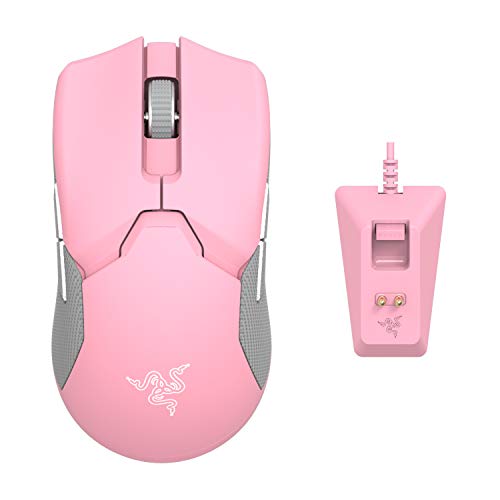
The Viper Ultimate is Razer’s ambidextrous esports design, created for left and right-handed users with accessible, programmable buttons on both sides of the shell. That both-sides layout is exactly what a left-handed player needs, and the Focus+ optical sensor, HyperSpeed wireless connection, and optical switches keep it current for fast shooters. This Quartz listing includes the RGB charging dock and rates the battery at up to 70 hours. At a listed 78 grams it stays light, and the symmetrical shape suits the claw and fingertip grips most left-handed FPS players use.
Specs
- Shape: ambidextrous, for left and right-handed users
- Side buttons: programmable buttons on both sides
- Sensor: Razer Focus+ optical, 20,000 DPI
- Switches: Razer optical mouse switches
- Buttons: 8 programmable buttons
- Connectivity: Razer HyperSpeed wireless
- Battery life: up to 70 hours
- Weight: 78 grams as listed
- Includes: RGB charging dock
Best for: Left-handed FPS players who want buttons on both flanks in a light, proven shell.
Watch out for: This is an older B08-series listing and stock varies by color, so confirm the exact variant and dock bundle before ordering.
Which One Fits Your Situation
You play competitive FPS and want zero compromises
Choose the Logitech G PRO 2 LIGHTSPEED. Its magnetic buttons move to whichever flank your thumb uses, the HERO 2 sensor and LIGHTSPEED connection are current flagship hardware, and the 95-hour battery outlasts a full week of evening sessions. It is the one pick here a right-handed professional could use unchanged, which tells you the left-handed support is genuine rather than an afterthought.
You want buttons on both sides without swapping parts
The Razer Viper Ultimate keeps programmable buttons on both flanks permanently, so there are no magnetic pieces to lose and nothing to configure before your first match. The Pulsar X2A eS takes the opposite approach with detachable buttons and covers, suiting players who enjoy tuning their setup. Pick the Viper for simplicity, or the Pulsar for its OLED display and driverless adjustments.
You play long sessions and hate charging cables
The Logitech G903 LIGHTSPEED runs beyond 140 hours per charge, the longest figure in this guide, and its optional POWERPLAY pad removes charging from the routine entirely. The Corsair M75 Wireless is the lighter alternative at 105 hours, which still covers weeks of casual play. Either way, a left-handed player no longer has to accept a wired mouse just to keep thumb buttons under the correct thumb.
Your hands are small or you grip with your fingertips
Start with the Pulsar X2A eS. At 120.4 millimeters long, 38 millimeters tall, and 69 grams, its low symmetrical shell is built for claw and fingertip control, and the detachable right-flank buttons sit where a smaller left thumb can reach them. The G PRO 2 LIGHTSPEED is the step up if you want the same grip style with a slightly larger shell and Logitech’s software ecosystem behind it.
Common Mistakes
- Assuming every symmetrical mouse is left-handed friendly, when many carry side buttons on the left flank only and leave a left thumb with nothing to press.
- Ordering a right-handed ergonomic mouse and planning to adapt, which usually ends with wrist strain and unused buttons.
- Ignoring the right-flank photos on a listing and trusting the word ambidextrous in the title alone.
- Choosing by DPI ceiling instead of weight, shape, and button placement, which are what your hand notices every minute.
- Forgetting to swap the primary click in Windows or in-game settings after moving the mouse to your left hand.
Frequently Asked Questions
Are there any true left-handed gaming mice?
Very few. The Razer Naga Left-Handed Edition mirrors a full ergonomic shell with a 12-button thumb grid, and Pulsar sells left-handed versions of its X3 line. Both are sold mainly through brand stores, and Amazon stock comes and goes. That scarcity is why this guide focuses on ambidextrous models with buttons a left thumb can reach.
Can I use a symmetrical mouse in my left hand without side buttons?
Yes, and many left-handed players do exactly that for shooters, where the keyboard handles most actions. You lose quick thumb access for melee, grenades, or push-to-talk, though. If your games lean on those binds, choose a model with buttons on the right flank or swappable magnetic buttons, such as the Logitech G PRO 2 LIGHTSPEED.
Should I swap the primary click when I move the mouse to my left hand?
Most left-handed players keep the left button as the primary click and simply move the mouse across the desk, because years of muscle memory are hard to retrain. Windows and most games let you swap the buttons if you prefer your index finger to handle the main click. Try the default layout for a week before changing it.
Is wireless fast enough for competitive play with a left-handed mouse?
Yes. LIGHTSPEED, HyperSpeed, and Pulsar’s 4K dongle all report fast enough that connection type is no longer the limiting factor for ranked play, and every pick in this guide is wireless. Battery life is the real trade-off, ranging from about 70 hours on the Razer Viper Ultimate to more than 140 hours on the Logitech G903 LIGHTSPEED.
FAQ
Are there any true left-handed gaming mice?
Can I use a symmetrical mouse in my left hand without side buttons?
Should I swap the primary click when I move the mouse to my left hand?
Is wireless fast enough for competitive play with a left-handed mouse?
More from Amazon
Programs that pair well with the guide above. Offers and eligibility are set by Amazon and may change.
Free shipping on eligible items, Prime Video and more. Eligible new members can start with a free trial.
Start a Prime free trialA Prime membership for ages 18-24 with a trial period. Eligibility is set by Amazon.
See Prime for Young AdultsAudiobooks and podcasts to listen to on the go. Eligible new members can start with a free trial.
Try Audible freeAd-free music streaming. Eligible new subscribers can start with a free trial.
Try Music Unlimited freeAs an Amazon Associate we earn from qualifying purchases.