
Key takeaways
- Find the best non gaming mouse for gaming, from the MX Master 3S to the Razer Pro Click V2, with polling, weight and comfort checks for casual play.
A lot of people do not want two mice on the desk. They want one comfortable, quiet, professional-looking mouse for work during the day, and they want that same mouse to handle games in the evening without feeling laggy or painful. That is the search behind the best non gaming mouse for gaming, and it is reasonable — provided you are honest about the games you play.
A productivity mouse will never be an esports mouse. Most are heavier, many report their position less often, and their shapes suit a relaxed palm grip rather than fast flicks. For strategy games, RPGs, MMOs, MOBAs, and slower adventures, that is no deal-breaker. For ranked tactical shooters at low sensitivity, it usually is.
The five mice below are all sold as work mice, not gaming mice, yet they differ a lot. One bridges the gap with a gaming-capable sensor and 1,000 Hz wireless, two prioritise comfort and scrolling, one prioritises wrist posture, and one prioritises battery life. Polling and weight explain most of the difference you will feel in game.
As an Amazon Associate we earn from qualifying purchases.
Quick Picks
If you need a short answer first, these are the five non-gaming mice that make the most sense for gaming, split by what each does best.
| Product | ASIN | Best For |
|---|---|---|
| Logitech MX Master 3S | B09HM94VDS | Best overall work-first mouse for casual gaming |
| Logitech MX Anywhere 3S | B0BPY4ZQXG | Best compact pick for laptop and travel gaming |
| Razer Pro Click V2 | B0F72VH42N | Best bridge pick for faster-paced games |
| Logitech MX Vertical | B07FNJB8TT | Best for wrist comfort in slower games |
| Logitech M720 Triathlon | B087Z6LSHW | Best long-battery pick for multi-device desks |
How to Choose
Choosing one starts with accepting the trade-off, then minimising it for your genres. Work through these criteria in order, because the first two can rule a mouse out entirely.
Polling rate and connection mode
Polling rate is how often the mouse reports its position, in hertz. A higher rate feels smoother on a high-refresh monitor. Many Bluetooth productivity mice report at a low, fixed rate that is fine for documents and turn-based games but can feel steppy in a fast shooter. If a listing does not highlight a high rate, assume gaming is secondary.
Bluetooth is convenient for work but usually the slowest option for gaming. A 2.4 GHz receiver feels more responsive, and a wired connection removes wireless delay entirely. Use the receiver or cable for gaming, and reserve Bluetooth for work.
Sensor and DPI range
DPI describes how far the cursor moves relative to your hand. A high maximum alone does not make a mouse good for gaming — clean, predictable tracking matters more. Most players settle far below the maximum, using lower sensitivity for shooters and higher sensitivity for strategy maps.
Also check where the sensor tracks. Several mice here claim tracking on glass — a work feature first, but useful without a mouse pad.
Weight and how it affects aim
Weight is the compromise you will feel fastest. Productivity mice carry larger batteries, metal wheels, and sculpted shells, so they weigh far more than gaming mice. Extra weight can feel steady for strategy and slow aiming, but repeated fast swipes tire the wrist and forearm.
High-sensitivity players notice weight far less than low-sensitivity players who sweep across a large pad. For RPGs and strategy, prioritise comfort; for shooters, favour the lighter options.
Shape, grip, and hand size
Productivity shapes are usually right-handed and sculpted, with a thumb rest and a higher hump for a palm grip. That support suits work and relaxed gaming, but can feel locked-in for fingertip or claw grips. Compact models suit smaller hands; full-size models suit medium to large hands.
Vertical mice are a special case. A handshake shape can make long sessions more comfortable and works well for slower games, but fast aiming feels unfamiliar at first and takes an adjustment period.
Buttons and scroll wheels
This is where non-gaming mice often beat gaming mice. Thumb buttons, gesture controls, horizontal thumb wheels, and app-specific profiles are useful in MMOs, MOBAs, and strategy games with heavy inventory or ability management. Side buttons are easy to rebind for abilities or push-to-talk.
Scroll wheel feel matters too. Free-spinning wheels are great for documents, but can overshoot when swapping weapons in game. Look for a ratcheted mode as well as a fast mode, and check for per-application profiles in the companion app.
Battery life and charging
Long battery life is a defining strength here: models range from weeks to months, and one runs for a very long time on a replaceable AA battery. Ask whether the mouse works while charging and charges over USB-C.
High polling drains batteries faster, so expect shorter life in the most responsive mode. Game on the receiver, work on Bluetooth, and charge during a break.
Software and multi-device switching
Most buyers here use more than one computer, so easy switching between two or three hosts is a core feature, not a bonus. Check how switching works — a button on the underside is slower than one behind the wheel.
Software handles DPI, remapping, and per-app profiles, with support varying between Windows and macOS. Some mice store little on board, so settings may not travel without the app.
5 Best Options
Each pick below is a productivity mouse first. The gaming case for each one is stated plainly, including where it stops being a good idea.
Logitech MX Master 3S

Specs
- Sensor: Darkfield high-precision optical sensor, up to 8,000 DPI
- Tracking: Any-surface tracking, including glass
- Connectivity: Bluetooth and Logi Bolt USB receiver, up to 3 devices
- Battery: Rechargeable via USB-C, rated up to 70 days
- Buttons and scrolling: Quiet Clicks, MagSpeed scroll wheel plus thumb wheel
- Weight: 141 g
- ASIN: B09HM94VDS
Best for: The default recommendation for a work-first desk that also games casually. The sculpted shape, thumb rest, and quiet clicks make workdays easy, while any-surface tracking, side buttons, and a thumb wheel translate well to strategy games, RPGs, MMOs, and simulation titles. Multi-device switching lets it move from a work laptop to a personal PC without re-pairing.
Watch out for: At 141 g it is heavy by gaming standards, and its reporting is built for productivity rather than high-refresh competitive play. Low-sensitivity shooter players will feel both limits quickly, and the shape is right-handed only. Treat it as an excellent casual and slower-paced gaming mouse, not a substitute for a dedicated FPS mouse, and use the receiver rather than Bluetooth when you play.
Logitech MX Anywhere 3S

Specs
- Sensor: 8,000 DPI any-surface tracking sensor
- Tracking: Tracks on glass and other difficult surfaces
- Connectivity: Bluetooth, with Logi Bolt compatibility, multi-device use
- Battery: Rechargeable via USB-C, rated up to 70 days
- Scrolling and clicks: MagSpeed scrolling, Quiet Clicks, programmable buttons
- Form factor: Compact wireless mouse for laptop and travel use
- ASIN: B0BPY4ZQXG
Best for: Laptop players, travellers, and smaller hands. It keeps high maximum DPI, any-surface tracking, fast scrolling, quiet clicks, and programmable buttons in a body that fits a laptop bag and suits a fingertip grip. It suits gaming away from your main desk and strategy and adventure games on the move.
Watch out for: A compact shell offers less palm support, so it can feel less comfortable during very long sessions at a fixed desk. It shares the productivity-first polling limits of its larger sibling, so the same warning about competitive shooters applies. If your hands are large or you rest your whole palm on the mouse, consider the larger shape first.
Razer Pro Click V2

Specs
- Sensor: Razer Focus Pro 30K optical sensor, up to 30,000 DPI, 550 IPS, 40 G acceleration
- Polling: 1,000 Hz over HyperSpeed wireless
- Connectivity: HyperSpeed 2.4 GHz, Bluetooth for up to 3 hosts, and USB-C wired mode
- Buttons: 9 programmable buttons, mechanical switches rated for 60 million clicks
- Battery: Rechargeable, rated up to 3.5 months
- Weight: 110 g
- ASIN: B0F72VH42N
Best for: The bridge pick for faster titles. It is an ergonomic productivity mouse with multi-host connectivity for work, but its sensor, 1,000 Hz wireless, wired option, and lighter weight are in a different league from typical office mice. That makes it the most credible option here for MOBAs and faster action games, while long battery life keeps it practical daily.
Watch out for: It still has a productivity shape and weight, so it will not feel like a lightweight esports mouse, and getting the most from its buttons means using Razer’s software, a different ecosystem from Logitech’s. Its underglow lighting may also clash with a discreet office look, though it can be turned down or off. If you never play anything fast, its extra gaming headroom may be more than you need.
Logitech MX Vertical

Specs
- Sensor: High-precision optical sensor, up to 4,000 DPI, with cursor speed switch
- Shape: Vertical ergonomic design at a 57-degree angle, right-handed
- Connectivity: Bluetooth, USB receiver, and wired connection, up to 3 computers
- Battery: Rechargeable, USB-C charging
- Controls: Programmable buttons and a precision scroll wheel
- Use case: Designed to reduce muscle strain and promote a handshake posture
- ASIN: B07FNJB8TT
Best for: Buyers whose wrists decide the purchase. The vertical handshake posture lets you play strategy, turn-based, adventure, and simulation games longer without the ache a flat mouse can cause. The top DPI switch helps move between careful cursor work and broader camera movement.
Watch out for: Expect an adjustment period. Aiming feels different because your forearm position changes, and fast, precise flicks are hardest to relearn, so this is the weakest pick here for shooters. Its maximum DPI is also the joint-lowest in this group, which is fine for control but leaves less room for very high-sensitivity setups. Give it time in slower games before judging it in anything fast.
Logitech M720 Triathlon
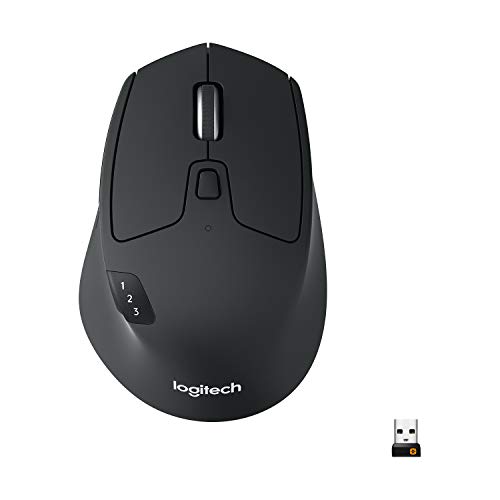
Specs
- Sensor: Optical tracking, 1,000 DPI
- Connectivity: Bluetooth and USB Unifying receiver, Easy-Switch for up to 3 computers
- Battery: 1 AA battery, rated up to 24 months
- Buttons: 8 buttons in total, including side buttons, with 6 programmable buttons listed
- Scrolling: Hyper-fast scroll wheel with tilt for horizontal scrolling
- Shape: Full-size sculpted right-handed shape, about 135 g with battery
- ASIN: B087Z6LSHW
Best for: The low-maintenance workhorse. If your gaming is casual — strategy, point-and-click adventures, simulation, and social games — and your bigger frustration is charging, the M720 makes a persuasive case. Long AA battery life, three-computer switching, hyper-fast scrolling, and a full-size shape cover work and relaxed play with almost no upkeep.
Watch out for: Its 1,000 DPI sensor specification is modest, and this is not a mouse for high sensitivity headroom or fast, precise aiming. It is a convenience and endurance pick, not a performance pick. Moderately fast-paced shooter play will expose its limits immediately, so choose it only if your library is genuinely slow-paced and your priority is a mouse you can forget about.
Which One Fits You
- Work-first, game casually in the evening: Choose the Logitech MX Master 3S for comfort, scrolling, buttons, and reliable tracking across strategy, RPG, and simulation games.
- Play faster games but refuse to buy a gaming mouse: Choose the Razer Pro Click V2, because its 1,000 Hz wireless, high-specification sensor, and wired mode give it gaming headroom the others do not have.
- Game on a laptop and travel often: Choose the Logitech MX Anywhere 3S, which keeps strong tracking and fast scrolling in a compact body for smaller hands and fingertip grips.
- Wrist comfort matters more than aim speed: Choose the Logitech MX Vertical, accept the adjustment period, and enjoy longer sessions in slower-paced genres.
- Use three computers and hate charging: Choose the Logitech M720 Triathlon, whose very long AA battery life and easy switching suit casual gaming across a multi-device desk.
- Mainly play ranked tactical shooters: None of these is the right primary mouse, so use one for work and casual titles and keep a dedicated lightweight gaming mouse for competitive sessions.
Common Mistakes
- Judging by maximum DPI alone: A headline figure of 8,000 or even 30,000 DPI says little about how a mouse feels in game, so weigh polling rate, weight, and shape just as heavily.
- Gaming over Bluetooth when a receiver is available: Bluetooth is convenient for work but usually the least responsive connection, so switch to the 2.4 GHz receiver or a cable for gaming.
- Ignoring weight because the shape feels comfortable at first: A heavy, supportive mouse can feel perfect for five minutes and tiring after an hour of fast swipes, especially for low-sensitivity players.
- Expecting a vertical mouse to aim like a flat mouse on day one: Vertical shapes change which muscles drive movement, so judging one after a single fast match often leads to returning a mouse that would have suited slower games well.
- Forgetting to rebind the productivity buttons: Leaving side buttons and thumb wheels on document functions wastes the main gaming advantage of these mice — the extra controls for abilities, maps, and inventory.
FAQ
Can a non-gaming mouse handle FPS games at all?
Casually, yes, and competitively, usually no. A productivity mouse works in a relaxed single-player shooter, but low Bluetooth polling, heavier weight, and a palm-focused shape cap fast, low-sensitivity play. The Razer Pro Click V2 narrows that gap the most.
Which genres suit a non-gaming mouse best?
Strategy, turn-based tactics, RPGs, MMOs, MOBAs, simulation, city builders, card games, and point-and-click adventures suit these mice very well. Those genres reward comfort, extra buttons, good scrolling, and precise slow tracking more than raw polling speed. Fast twitch shooters are the genre that exposes a productivity mouse fastest.
Does a higher DPI make a work mouse better for gaming?
Not by itself. Most players use sensitivity far below a modern sensor’s maximum, so clean tracking, a suitable polling rate, and a shape and weight you can control matter more than the largest number on the box. Use DPI to set a comfortable sensitivity for each genre, and treat a very high maximum mainly as headroom.
Should I use Bluetooth, a receiver, or a cable for gaming?
Use a cable or the 2.4 GHz receiver for gaming whenever your mouse offers one, because both generally feel more responsive than Bluetooth. Keep Bluetooth for work, travel, and multi-device convenience, where simplicity matters more than the last increment of responsiveness. Switching connection for a gaming session takes seconds and is the simplest improvement most owners can make.
If you want one mouse that looks right in a meeting and still plays well at night, start with the MX Master 3S for comfort or the Pro Click V2 if your games run faster. Match the mouse to the games you play most weeks, use its most responsive connection, and a good non-gaming mouse can cover work and gaming without a second mouse on your desk.
FAQ
Can a non-gaming mouse handle FPS games at all?
Which genres suit a non-gaming mouse best?
Does a higher DPI make a work mouse better for gaming?
Should I use Bluetooth, a receiver, or a cable for gaming?
More from Amazon
Programs that pair well with the guide above. Offers and eligibility are set by Amazon and may change.
Free shipping on eligible items, Prime Video and more. Eligible new members can start with a free trial.
Start a Prime free trialA Prime membership for ages 18-24 with a trial period. Eligibility is set by Amazon.
See Prime for Young AdultsAudiobooks and podcasts to listen to on the go. Eligible new members can start with a free trial.
Try Audible freeAd-free music streaming. Eligible new subscribers can start with a free trial.
Try Music Unlimited freeAs an Amazon Associate we earn from qualifying purchases.









