
Key takeaways
- The best Logitech wireless keyboards for work, travel, and multi-device desks, compared on layout, battery life, backlighting, and connection type today.
The best Logitech wireless keyboards are the MX Keys S for a full-size desk setup, the MX Keys Mini for a compact desk, and the K780 or K380 for multi-device typing across a computer, tablet, and phone. All four connect without a cable, pair with up to three devices, and run on published battery figures that range from ten days of backlit use to two years on a pair of AAA batteries.
Our top pick: Logitech MX Keys S. Runner-up: Logitech MX Keys Mini. This guide compares published specifications only: layout, connection type, battery life, backlighting, and multi-device switching, using the figures Logitech and the Amazon listings state for each model.
At a Glance
| Product | Best for | Key specification |
|---|---|---|
| Logitech MX Keys S | Full-size desk typing | 104 keys, backlit, USB-C rechargeable, Bluetooth LE and Logi Bolt |
| Logitech MX Keys Mini | Compact desks and travel | No number pad, 506 g, backlit, USB-C rechargeable, Bluetooth LE and Logi Bolt |
| Logitech K780 Multi-Device | Typing across phone, tablet, and computer | Built-in device cradle, Bluetooth and Unifying receiver, 2-year battery |
| Logitech K380 Multi-Device | A portable keyboard for tablets and phones | 423 g, Bluetooth, 3-device switching, 24-month battery |
How to Choose
1. Match the layout to the desk
A full-size keyboard with a number pad suits a fixed desk and frequent number entry, while a compact board without a number pad leaves more room for the mouse and fits a small desk or a bag. The MX Keys S and K780 are full-size boards with number pads. The MX Keys Mini drops the number pad, and the K380 is smaller still, with a compact layout built for travel.
2. Check the connection type
Bluetooth Low Energy is the standard connection on the MX Keys S and MX Keys Mini, and both also include a Logi Bolt USB receiver for a dedicated wireless link. The K780 adds a Unifying receiver alongside Bluetooth, and the K380 connects over Bluetooth 3.0 with a stated wireless range of 10 meters. A receiver-based link keeps the keyboard connected when Bluetooth is busy or unavailable, while Bluetooth keeps a USB port free.
3. Count the devices
All four keyboards in this guide pair with up to three devices and switch between them at the touch of a button. That matters when one keyboard serves a desktop, a laptop, and a tablet in the same day. If only one computer is in use, multi-device switching adds little, and layout and key feel matter more.
4. Weigh backlighting against battery life
Backlit keys help in dim rooms, and the MX Keys S and MX Keys Mini both light up when hands approach and adjust brightness to the room. Backlighting shortens battery life: both MX models are rated for up to 10 days on a full charge with backlighting on, or up to 5 months with backlighting turned off. The K780 and K380 have no backlighting and run for up to two years on two AAA batteries.
5. Compare battery types
Rechargeable keyboards charge over USB-C and never need replacement cells, while battery keyboards run on AAA cells that last for years. The MX Keys S and MX Keys Mini use a rechargeable 1500 mAh lithium-polymer battery. The K780 and K380 each use two AAA batteries, with Logitech rating both at up to two years based on an estimated two million keystrokes per year in office use.
6. Look at key feel and shape
Low-profile spherically-dished keys define the MX Keys S and MX Keys Mini, shaped to fit fingertips and reduce mistypes. The K780 uses quiet round keys with a typewriter-like feel, and the K380 uses compact scissor-style keys in a slim frame. Key shape is a matter of habit, so a board that matches the keyboard already in use will feel familiar from the first day.
7. Check operating system support
The MX Keys S works with Windows, macOS, Chrome OS, Linux, iPadOS, iOS, and Android, and the MX Keys Mini lists the same range of systems. The K780 supports Windows, macOS, Chrome OS, iOS, iPadOS, and Android, and the K380 adds Apple TV to that list. The K380 also adapts its layout automatically, mapping keys to match the connected device.
Our Picks
Logitech MX Keys S — ASIN B0BKW3LB2B

The MX Keys S is a full-size wireless keyboard with 104 low-profile keys, spherically-dished keycaps, and smart backlighting that lights up as hands approach and adjusts to the room. It connects over Bluetooth Low Energy or the included Logi Bolt USB receiver, pairs with up to three devices, and supports Flow cross-computer typing with a compatible MX mouse through the Logi Options+ app. The rechargeable battery lasts up to 10 days on a full charge with backlighting on, or up to 5 months with backlighting off, and charges over the included USB-C cable while typing continues.
Best for: A full-size desk setup where backlighting, a number pad, and multi-device switching all matter.
Consideration: At 810 g and 430.2 mm wide, it is a full-size board that needs a full-size desk, and the backlit battery figure drops to ten days when the lighting stays on.
Logitech MX Keys Mini — ASIN B09BD2KSPC
The MX Keys Mini is the compact version of the MX Keys S, keeping the same low-profile spherically-dished keys, smart backlighting, and Logi Bolt receiver while dropping the number pad. It weighs 506 g, measures 295.99 mm wide, and pairs with up to three devices over Bluetooth Low Energy, with a rechargeable battery rated for up to 10 days with backlighting on or up to 5 months with backlighting off. Dedicated dictation, mic mute, and emoji keys sit above the main key rows, and the keyboard charges over USB-C.
Best for: Compact desks, laptop bags, and anyone who wants MX Keys typing without the number pad.
Consideration: The missing number pad means number entry moves to the top row, and the compact frame leaves no room for a built-in wrist rest.
Logitech K780 Multi-Device Wireless Keyboard — ASIN B01LZTBKBG
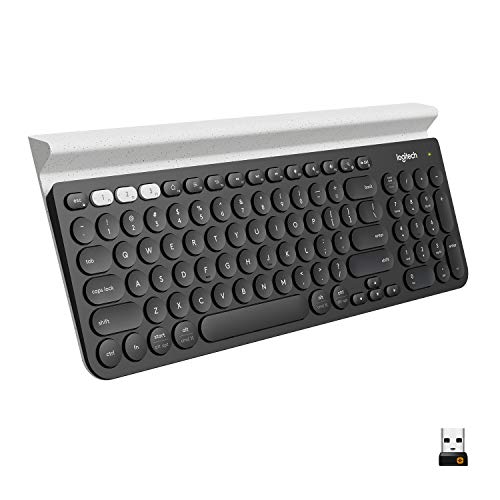
The K780 is a full-size wireless keyboard with a built-in cradle that holds a phone and a tablet at a readable angle while typing on a computer. It connects over Bluetooth Smart or the included Unifying receiver, switches between three paired devices with dedicated Easy-Switch keys, and runs for up to two years on two AAA batteries. The quiet round keys and full-size layout with a number pad suit long typing sessions, and the cradle keeps a second screen visible without a separate stand.
Best for: Multi-device desks where a phone or tablet sits beside the computer and needs to stay visible.
Consideration: There is no backlighting, and the K780 uses AAA batteries rather than a rechargeable cell, so a spare pair belongs in the desk drawer.
Logitech K380 Multi-Device Bluetooth Keyboard — ASIN B014DPR7XU
The K380 is a compact Bluetooth keyboard that pairs with up to three devices and switches between them with the Easy-Switch buttons, with a stated wireless range of 10 meters. It weighs 423 g, runs for up to 24 months on two AAA batteries, and adapts its layout automatically to the connected device, mapping keys for Windows, Mac, Chrome OS, Android, iPad, iPhone, and Apple TV. The slim frame and quiet keys make it easy to carry in a bag alongside a tablet.
Best for: Travel, tablets, and phones, where a light keyboard that lasts for years on one set of batteries matters most.
Consideration: Bluetooth 3.0 is an older standard than the Bluetooth Low Energy in the MX models, and the compact layout has no number pad and no backlighting.
Which One Is Right for You?
Choose the MX Keys S when the keyboard stays on one desk, the number pad gets daily use, and backlit keys matter in a dim room. Choose the MX Keys Mini when desk space is tight or the keyboard travels, and the same typing feel in a smaller frame is the goal. Choose the K780 when a phone and tablet share the desk and the built-in cradle keeps them in view while typing. Choose the K380 when portability and battery life come first, and a light board that pairs with a tablet or phone is enough.
For a shared family desk, the K780 covers the most devices at once. For a work-from-home setup with a single computer, the MX Keys S gives the fullest layout. For a laptop bag, the K380 or the MX Keys Mini fit where a full-size board will not.
Frequently Asked Questions
Which Logitech wireless keyboard is best for typing all day?
The MX Keys S suits all-day typing at a fixed desk, with a full-size layout, a number pad, and low-profile dished keys. The K780 is the quieter alternative when a phone and tablet share the desk, and the K380 suits short sessions on the move.
Do Logitech wireless keyboards work with Mac and Windows?
Yes. The MX Keys S and MX Keys Mini list Windows, macOS, Chrome OS, Linux, iPadOS, iOS, and Android. The K780 covers Windows, macOS, Chrome OS, iOS, iPadOS, and Android, and the K380 adds Apple TV, with automatic layout adaptation per device.
How long do Logitech wireless keyboard batteries last?
The MX Keys S and MX Keys Mini are rated for up to 10 days on a full charge with backlighting on, or up to 5 months with backlighting off, and recharge over USB-C. The K780 and K380 run for up to two years on two AAA batteries.
Can one Logitech wireless keyboard control three devices?
Yes. All four keyboards in this guide pair with up to three devices and switch between them with dedicated keys, so one keyboard can serve a computer, a tablet, and a phone without re-pairing.
What is the difference between the MX Keys S and the MX Keys Mini?
The MX Keys S is a full-size board with a number pad, 104 keys, and a width of 430.2 mm. The MX Keys Mini keeps the same key feel, backlighting, and connection options in a compact frame without a number pad, at 506 g and 295.99 mm wide.
Bottom Line
The MX Keys S is the strongest all-around pick for a full-size desk, with backlighting, a number pad, and three-device switching in one board. The MX Keys Mini brings the same typing feel to a compact desk or a bag. The K780 adds a device cradle and two-year battery life for multi-device desks, and the K380 is the lightest option for tablets and travel. Any of the four keeps typing wireless across up to three devices, so the choice comes down to layout, backlighting, and how the keyboard moves between rooms.
Disclosure: As an Amazon Associate, this site earns from qualifying purchases.
FAQ
Which One Is Right for You?
Which Logitech wireless keyboard is best for typing all day?
Do Logitech wireless keyboards work with Mac and Windows?
How long do Logitech wireless keyboard batteries last?
Can one Logitech wireless keyboard control three devices?
What is the difference between the MX Keys S and the MX Keys Mini?
More from Amazon
Programs that pair well with the guide above. Offers and eligibility are set by Amazon and may change.
Free shipping on eligible items, Prime Video and more. Eligible new members can start with a free trial.
Start a Prime free trialA Prime membership for ages 18-24 with a trial period. Eligibility is set by Amazon.
See Prime for Young AdultsAudiobooks and podcasts to listen to on the go. Eligible new members can start with a free trial.
Try Audible freeAd-free music streaming. Eligible new subscribers can start with a free trial.
Try Music Unlimited freeAs an Amazon Associate we earn from qualifying purchases.









