Our Short List of 3

- Native 3 DoF tracking keeps the virtual screen anchored in space
- Adjustable lens transparency adapts to bright and dim rooms
- Broad compatibility across phones, laptops, and handheld consoles
- 120Hz refresh rate keeps motion smooth in games and video

- Widest field of view in this guide, at 57 degrees
- Largest virtual screen in the XREAL range, at 171 inches
- X1 chip with native 3 DoF tracking
- Two IPD sizes for a better optical fit
- Built-in myopia adjustment, a standout for glasses wearers
- Electrochromic film for on-demand dimming
- Harman audio and 120Hz Micro-OLED panels
- Lightweight at around 77 grams
All 5 Picks at a Glance
| Product | Specs | Action |
|---|---|---|
| XREAL One |
| Check price on Amazon |
| XREAL One Pro |
| Check price on Amazon |
| VITURE Pro XR |
| Check price on Amazon |
 Rokid Max 2 |
| Check price on Amazon |
 RayNeo Air 3s |
| Check price on Amazon |
Key takeaways
- Searching for the best ar headsets? Our guide compares five leading AR glasses for gaming, movies, and portable monitors, with help choosing the right pair.
As an Amazon Associate I earn from qualifying purchases.
The Short Answer
The best ar headsets available today are not headsets in the virtual reality sense. They are lightweight AR glasses that put a large virtual screen in front of your eyes while still letting you see the room around you. They plug into a phone, a laptop, a handheld console, or a desktop PC over USB-C, and the host device does the computing while the glasses handle the display and the sound.
If you want one straightforward recommendation, the XREAL One is the most balanced starting point for most buyers, thanks to its X1 chip, native 3 DoF tracking, and adjustable lens transparency. Gamers who want the widest field of view should look at the XREAL One Pro. Buyers who wear glasses or want built-in myopia adjustment should consider the VITURE Pro XR or the Rokid Max 2, whose adjustment runs from 0.00D to −6.00D. The Rokid Max 2 suits anyone who wants the largest-feeling virtual screen, and the RayNeo Air 3s is the sensible entry point into the category.
One honest note before the details: AR glasses are a niche, premium category. Every model in this guide needs a host device, none of them replaces a standalone VR headset, and the selection on Amazon is thin compared with mainstream headphones or monitors. Confirm compatibility with your exact phone, console, or laptop on the listing before ordering, because USB-C video output support varies by device.
Our Top Picks
- Best overall: XREAL One — balanced display, native 3 DoF, adjustable transparency
- Best field of view: XREAL One Pro — wider 57-degree field of view and larger virtual screen
- Best for glasses wearers: VITURE Pro XR — built-in myopia adjustment and electrochromic dimming
- Best for a big-screen feel: Rokid Max 2 — large virtual display in a glasses form factor
- Best entry point: RayNeo Air 3s — straightforward 120Hz HueView display at a friendlier position in the range
Quick Comparison
| Model | Virtual Screen | Field of View | Refresh Rate | Standout Feature |
|---|---|---|---|---|
| XREAL One | 147-inch | 50 degrees | 120Hz | X1 chip, native 3 DoF, adjustable transparency |
| XREAL One Pro | 171-inch | 57 degrees | 120Hz | X-Prism optics, widest field of view here |
| VITURE Pro XR | 135-inch | 46 degrees | 120Hz | Myopia adjustment, electrochromic film, Harman audio |
| Rokid Max 2 | 215-inch | 50 degrees | 120Hz | Largest virtual screen in this guide |
| RayNeo Air 3s | 201-inch | 46 degrees | 120Hz | Simple, lightweight entry into AR glasses |
Virtual screen sizes are the figures stated on each listing and describe the perceived size of the image at a given viewing distance, not a physical panel measurement.
How to Choose
Start with your host device
Every pair of AR glasses in this guide is a display accessory, not a computer. The glasses connect to a host over USB-C and show whatever that host outputs. Before anything else, confirm that your phone, laptop, handheld, or console supports video output over USB-C. Many Android phones and most modern laptops do. iPhones need a compatible adapter or a model with USB-C video output, and some consoles need a dock or an adapter as well.
Field of view matters more than screen size
Two numbers dominate AR glasses listings: the virtual screen size and the field of view. The field of view is the more useful of the two, because it describes how much of your vision the image fills. A narrow field of view makes the virtual screen feel like a small window floating in front of you, while a wider field of view makes it feel closer to a cinema screen. In this guide the XREAL One Pro leads on field of view, while the Rokid Max 2 and RayNeo Air 3s lead on stated virtual screen size. If immersion matters most to you, prioritize field of view.
Brightness and dimming
AR glasses overlay an image on the real world, so brightness decides how usable they are in a bright room or outdoors. Higher brightness figures help the image hold up against daylight. Dimming control matters in bright rooms: the VITURE Pro XR uses an electrochromic film that darkens the lenses on demand, while the XREAL One has three levels of adjustable lens transparency. Either makes movies far more watchable in bright surroundings. If you plan to use the glasses on a plane, a train, or near a window, dimming is worth prioritizing.
Prescription and comfort
If you wear glasses, check the vision correction options before buying. The VITURE Pro XR has built-in myopia adjustment, which lets many nearsighted users skip prescription inserts entirely. The Rokid Max 2 has it too, adjusting from 0.00D to −6.00D. The XREAL models and the RayNeo Air 3s rely on clip-on prescription lens frames, which are usually sold separately, so confirm availability and fit on the listing. Weight matters too: the glasses in this guide run from 76 grams to 87 grams, which is light enough for a full movie, but nose pad fit and temple pressure vary by face shape.
Audio
All five models in this guide have built-in speakers, so you can watch a video without earphones. Open-ear speakers leak sound to people nearby, so they suit private spaces better than a quiet office or a library. If you watch in shared spaces, plan on using earphones with your host device.
3 DoF and the screen that stays put
Native 3 DoF tracking lets the virtual screen stay anchored in space when you turn your head, instead of following your gaze everywhere. The XREAL One and XREAL One Pro both carry the X1 chip with native 3 DoF. For productivity, where you want a monitor that stays in one place while you glance around, this is a genuine advantage. For pure movie watching, where you sit still and face forward, it matters less.
The Picks in Detail
XREAL One
- Native 3 DoF tracking keeps the virtual screen anchored in space
- Adjustable lens transparency adapts to bright and dim rooms
- Broad compatibility across phones, laptops, and handheld consoles
- 120Hz refresh rate keeps motion smooth in games and video
The XREAL One is the reference point for this category. It pairs an X1 chip with native 3 DoF tracking, a 147-inch virtual display at a 50-degree field of view, and a 120Hz refresh rate. Three levels of adjustable lens transparency let you dial how much of the real world shows through, which is useful when you switch between a focused work session and a glance at your surroundings.
The glasses work with iPhone models, Android phones, Steam Deck, handheld PCs, Mac, and Windows PCs, according to the listing, so one pair can serve as a portable monitor, a private cinema, and a big screen for a handheld console.
Pros
Cons
XREAL One Pro
- Widest field of view in this guide, at 57 degrees
- Largest virtual screen in the XREAL range, at 171 inches
- X1 chip with native 3 DoF tracking
- Two IPD sizes for a better optical fit
View the XREAL One Pro on Amazon
The XREAL One Pro is the step-up model for buyers who want the most immersive image in the XREAL range. It uses the same X1 chip and native 3 DoF tracking as the standard One, but moves to X-Prism optics with a 57-degree field of view and a 171-inch virtual display at 120Hz. That wider field of view is the headline difference, and it is noticeable the first time you put the glasses on.
The One Pro comes in two sizes based on interpupillary distance: size M fits an IPD of 57 to 66 millimeters, and size L fits an IPD of 66 to 75 millimeters. The ASIN linked here is the M size, which suits most adults. Measure your IPD or check the listing guidance before choosing, because the wrong size can leave the image soft at the edges.
Pros
Cons
VITURE Pro XR
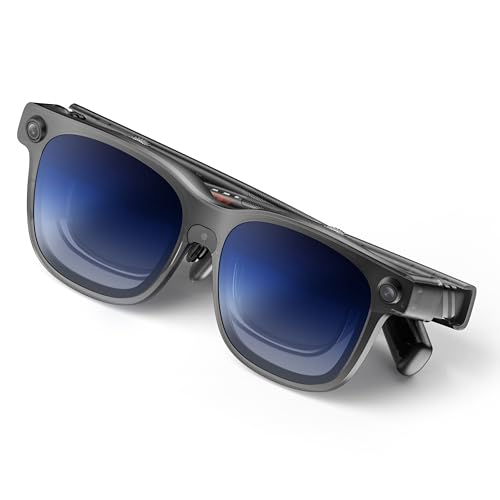
- Built-in myopia adjustment, a standout for glasses wearers
- Electrochromic film for on-demand dimming
- Harman audio and 120Hz Micro-OLED panels
- Lightweight at around 77 grams
View the VITURE Pro XR on Amazon
The VITURE Pro XR is the most glasses-wearer-friendly option in this guide. Its built-in myopia adjustment runs from 0.0D to minus 5.0D on each eye independently, so many nearsighted users can wear the glasses with no prescription inserts at all. An electrochromic film darkens the lenses on demand, and the dual 1080p Micro-OLED panels run at 120Hz with a stated 135-inch virtual display.
Audio comes from Harman-tuned speakers, and the glasses weigh around 77 grams, which keeps them comfortable for long sessions. Compatibility covers iPhone models, Android phones, Mac, Windows PCs, Steam Deck, and gaming consoles, according to the listing. The VITURE Pro XR is the pick for anyone who values vision correction and dimming control over the widest possible field of view.
Pros
Cons
Rokid Max 2
- Largest stated virtual screen in this guide, at 215 inches
- 50-degree field of view with a 120Hz Micro-OLED display
- Broad compatibility with phones, handhelds, and laptops
- Straightforward setup for movie and game use
View the Rokid Max 2 on Amazon
The Rokid Max 2 leads this guide on stated virtual screen size, with a 215-inch Micro-OLED display at a 50-degree field of view and a 120Hz refresh rate. If the cinema feeling is what draws you to AR glasses, this is the model built around it. Brightness is stated at 600 nits, and the glasses connect to smartphones, Steam Deck, handheld PCs, and other USB-C video sources.
Rokid notes that individual prescription lenses are required for farsightedness, astigmatism, or myopia beyond 600 degrees, and that the frames for those lenses are purchased separately. Check the listing for the matching frame before ordering if you need vision correction. For nearsightedness up to 600 degrees, the built-in myopia adjustment (0.00D to −6.00D) covers most wearers without inserts.
Pros
Cons
RayNeo Air 3s
- Large 201-inch virtual display for the category
- 120Hz HueView panel with 650 nits brightness
- Wide device compatibility across phones, consoles, and PCs
- The most accessible entry point in this guide
View the RayNeo Air 3s on Amazon
The RayNeo Air 3s is the entry point in this guide. It has a 201-inch HueView display at 120Hz with 650 nits of brightness and a 1080p image, in a straightforward glasses design that works with Android and iOS devices, consoles, and PCs. It does not carry the X1 chip or native 3 DoF tracking of the XREAL models, and it does not have the myopia adjustment of the VITURE Pro XR, but it covers the core use case, a big private screen anywhere, at a more accessible position in the range. OptiCare dimming adjusts the lenses for bright rooms.
For a first pair of AR glasses, or for a buyer who mainly wants movies and casual gaming on a handheld, the Air 3s is the sensible place to start. If you later decide you want anchored screens or wider fields of view, you will know exactly which upgrade to make.
Pros
Cons
Who Should Choose What
- Most buyers: The XREAL One. It balances display quality, 3 DoF tracking, transparency control, and broad compatibility, and it is the safest first purchase in a niche category.
- Immersion-first buyers: The XREAL One Pro. The wider field of view and larger virtual screen make the biggest difference when you want the image to fill your vision.
- Glasses wearers: The VITURE Pro XR or the Rokid Max 2. Built-in myopia adjustment removes the prescription insert hassle for many nearsighted users, and the VITURE adds electrochromic dimming.
- Movie watchers: The Rokid Max 2. The largest stated virtual screen in this guide suits long films and streaming sessions.
- First-time buyers: The RayNeo Air 3s. It delivers the core AR glasses experience, a large private screen from a pocketable device, without the premium features you may not need yet.
Common Mistakes
Buying AR glasses expecting a standalone VR headset. These glasses have no onboard computer, no built-in apps, and no inside-out room tracking. They show what a connected phone, laptop, or console outputs. If you want standalone virtual reality, you need a VR headset, not AR glasses.
Skipping the compatibility check. Not every USB-C port carries video. Some phones and laptops have USB-C ports that handle charging and data only. Confirm that your exact device supports video output over USB-C, and confirm on the listing that the glasses support your device family.
Choosing the wrong IPD size. The XREAL One Pro comes in M and L sizes tied to interpupillary distance. Ordering the wrong size can make the image look soft at the edges. Measure your IPD or follow the listing guidance before ordering.
Ignoring vision correction. If you are nearsighted beyond the adjustment range of the VITURE Pro XR, or if you choose a model with no built-in adjustment, you will need prescription lens frames. Budget for them and confirm they exist for your model before the glasses arrive.
Expecting total privacy in shared spaces. Built-in speakers leak sound. In a quiet room, people nearby will hear what you are watching. Carry earphones for shared spaces.
Assuming the virtual screen size is a fixed fact. Stated screen sizes depend on the viewing distance each maker assumes, so figures differ between brands even when the experience is similar. Field of view and brightness are the more comparable numbers.
FAQ
Are AR headsets the same as VR headsets?
No. AR glasses overlay a virtual screen on the real world and let you see your surroundings, while VR headsets block out the real world and replace it with a fully virtual environment. AR glasses also need a host device, while many VR headsets are standalone computers. They serve different purposes, and this guide covers AR glasses only.
Do AR glasses work without a phone or computer?
No. Every model in this guide needs a host device connected over USB-C. The host runs the apps and games, and the glasses act as the display and speakers. Some makers sell optional accessories, such as a neckband computer or a pocket TV box, that can act as a host, but the glasses on their own do not run apps.
Can I use AR glasses with an iPhone?
Many AR glasses work with iPhones, but the connection method depends on the model and the iPhone generation. Newer iPhones with USB-C connect more directly, while older models with a Lightning port need an adapter. Confirm your exact iPhone model against the compatibility list on the listing before ordering.
Can I wear AR glasses over my prescription glasses?
Most AR glasses are designed to sit close to the face, so wearing them over standard glasses is usually uncomfortable. The VITURE Pro XR and the Rokid Max 2 have built-in myopia adjustment for nearsighted users, and the XREAL and RayNeo models support clip-on prescription lens frames sold separately. Check the listing for the option that matches your prescription.
Are AR glasses good for work?
They can be, for the right tasks. A pair of AR glasses gives you a large virtual monitor anywhere you can sit with a laptop, which suits writing, coding, and video calls. Native 3 DoF tracking helps here, because the screen stays anchored while you move your head. They are less suited to tasks that need precise color work or long sessions in bright rooms without dimming.
What should I check on the listing before ordering?
Confirm three things: that your exact host device is listed as compatible, that the size or IPD option matches you, and that any vision correction accessory you need is available for that model. Also confirm the contents of the box, since cables, nose pads, and carrying cases vary between listings.
Conclusion
The best ar headsets in this guide are AR glasses, not standalone VR headsets, and that distinction shapes every recommendation here. They are display accessories that turn a phone, laptop, or handheld console into a private cinema or a portable multi-monitor setup, and they do that job well when matched to a compatible host.
For most buyers, the XREAL One is the balanced pick, with the XREAL One Pro ahead for immersion, the VITURE Pro XR ahead for glasses wearers, the Rokid Max 2 ahead for the largest-feeling screen, and the RayNeo Air 3s ahead as an entry point. Whichever you choose, confirm compatibility with your exact devices on the listing first.
FAQ
Are AR headsets the same as VR headsets?
Do AR glasses work without a phone or computer?
Can I use AR glasses with an iPhone?
Can I wear AR glasses over my prescription glasses?
Are AR glasses good for work?
What should I check on the listing before ordering?
More from Amazon
Programs that pair well with the guide above. Offers and eligibility are set by Amazon and may change.
Free shipping on eligible items, Prime Video and more. Eligible new members can start with a free trial.
Start a Prime free trialA Prime membership for ages 18-24 with a trial period. Eligibility is set by Amazon.
See Prime for Young AdultsAudiobooks and podcasts to listen to on the go. Eligible new members can start with a free trial.
Try Audible freeAd-free music streaming. Eligible new subscribers can start with a free trial.
Try Music Unlimited freeAs an Amazon Associate we earn from qualifying purchases.