Our Short List of 3

- Best overall: Klipsch ProMedia 2.1 THX Certified Computer Speaker System — Check on Amazon
- Best for high output: Logitech Z623 400 Watt Home Speaker System, 2.1 Speaker System — Check on Amazon
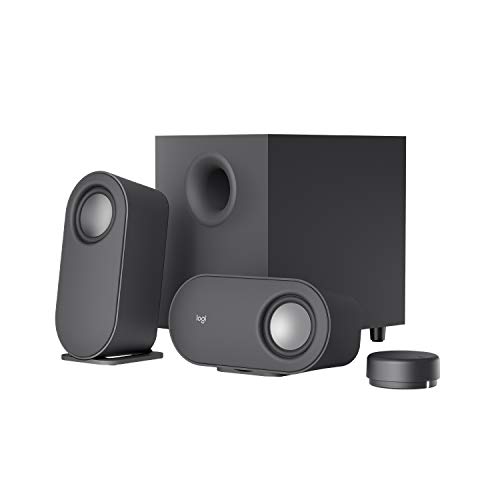
- Best for wireless control: Logitech Z407 Bluetooth Computer Speakers with Subwoofer and Wireless Control — Check on Amazon
- Best for small desks: Creative Pebble Plus 2.1 USB-Powered Desktop Speakers with Powerful Down-Firing Subwoofer — Check on Amazon
All 5 Picks at a Glance
| Product | Specs | Action |
|---|---|---|
| Our Top Picks |
| Check price on Amazon |
| 2. Logitech Z623 400 Watt Home Speaker System, 2.1 Speaker System — Best for High Output | Check price on Amazon | |
| 3. Logitech Z407 Bluetooth Computer Speakers with Subwoofer and Wireless Control — Best for Wireless Control | Check price on Amazon | |
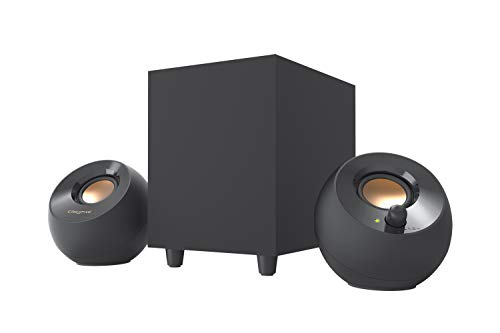 4. Creative Pebble Plus 2.1 USB-Powered Desktop Speakers with Powerful Down-Firing Subwoofer — Best for Small Desks | Check price on Amazon | |
 5. Creative Pebble X Plus 2.1 USB-C Computer Speakers with Subwoofer and Customizable RGB Lighting — Best Compact Modern System | Check price on Amazon |
Key takeaways
- Our guide to the best computer speakers with subwoofer compares five 2.1 desktop systems on bass, inputs, size, and controls so you can match one to your desk.
As an Amazon Associate I earn from qualifying purchases.
The Short Answer
The best computer speakers with subwoofer for most desks are the Klipsch ProMedia 2.1 THX system. It pairs two horn-loaded satellite speakers with a 6.5-inch side-firing ported subwoofer, delivers 200 watts of peak power as Klipsch lists, and includes a control pod with separate volume and subwoofer gain. That covers music, movies, and games from one setup.
If your desk is small, the Creative Pebble Plus is the sensible pick. It runs entirely from a USB connection, its down-firing subwoofer sits on the desk or a shelf, and its total power is 8 watts RMS as Creative lists. It will not fill a large room, but it adds real low end to a laptop or a compact desktop without a power brick.
The Logitech Z407 adds Bluetooth and a wireless control dial for a middle ground. The Logitech Z623 is the loudest system here at 400 watts peak as Logitech lists. The Creative Pebble X Plus rounds out the list with USB-C audio, Bluetooth 5.3, and lighting at 15 watts RMS as Creative lists.
Every system below is a true 2.1 setup: two satellite speakers plus a separate powered subwoofer. No 2.0 pair and no standalone subwoofer appears in this guide.
Our Top Picks
- Best overall: Klipsch ProMedia 2.1 THX Certified Computer Speaker System — Check on Amazon
- Best for high output: Logitech Z623 400 Watt Home Speaker System, 2.1 Speaker System — Check on Amazon
- Best for wireless control: Logitech Z407 Bluetooth Computer Speakers with Subwoofer and Wireless Control — Check on Amazon
- Best for small desks: Creative Pebble Plus 2.1 USB-Powered Desktop Speakers with Powerful Down-Firing Subwoofer — Check on Amazon
Quick Comparison
| System | Configuration | Listed power | Subwoofer | Key inputs | Best for |
|---|---|---|---|---|---|
| Klipsch ProMedia 2.1 THX | 2.1, two satellites plus sub | 200 watts peak | 6.5-inch side-firing ported | 3.5 mm | Most desks, music and movies |
| Logitech Z623 | 2.1, two satellites plus sub | 400 watts peak, 200 watts RMS | 7-inch ported | 3.5 mm, RCA | Loud rooms and gaming |
| Logitech Z407 | 2.1, two satellites plus sub | 80 watts peak | Subwoofer | Bluetooth, USB, 3.5 mm | Wireless control and phones |
| Creative Pebble Plus | 2.1, two satellites plus sub | 8 watts RMS | 4-inch down-firing | USB, 3.5 mm | Small desks and laptops |
| Creative Pebble X Plus | 2.1, two satellites plus sub | 15 watts RMS | Front-firing cube | USB-C, Bluetooth 5.3, 3.5 mm | Compact modern setups |
How to Choose
Start with the subwoofer, not the satellites
In a 2.1 system the subwoofer handles frequencies below roughly 100 to 150 Hz, where kick drums, bass, and movie rumble live. A larger driver moves more air and reaches lower with less effort, so a 6.5-inch sub sounds fuller than a 4-inch sub at the same volume. The trade is floor space: a 6.5-inch ported cabinet must sit under or beside the desk, while a 4-inch down-firing sub can sit on the desk itself. Confirm on the listing whether the subwoofer is front-firing, side-firing, or down-firing, because that decides how close it can sit to a wall.
Match power to room size
Listed peak power tells you how loud a system can get in short bursts, while RMS power describes sustained output. A compact 8-watt RMS system is plenty for near-field listening at arm’s length. A 200-watt RMS system is built for a room, not just a desk. In a shared room, a separate subwoofer gain control matters more than raw power, because you can turn the bass down at night.
Check the inputs against every device you own
Most desktop systems connect through a 3.5 mm cable, which works with almost any computer. Bluetooth adds phones, tablets, and consoles without a cable and lets you switch sources without reaching behind the PC. USB and USB-C audio remove the analog cable entirely but tie the speakers to a computer with a free port. Confirm on the listing that the system has a matching input for each device you plan to connect.
Controls should be within reach
A 2.1 system has two things to adjust: overall volume and subwoofer level. The best layouts put both on a wired control pod, a wireless dial, or the right satellite, so you never have to reach under the desk. Systems that hide the bass control on the back of the subwoofer are workable, but you will adjust them far less often. A headphone jack on the pod or satellite lets you switch to headphones without unplugging anything.
Desk space and cable length
Satellite speakers need a clear path to your ears, ideally at ear height and angled slightly inward. A subwoofer needs floor space and a power outlet. Before ordering, check the cable lengths on the listing: short satellite cables force the subwoofer onto the desk, which wastes space and puts bass right next to your keyboard.
Sound character matters more than the spec sheet
Two systems with the same listed power can sound very different. Horn-loaded tweeters tend to sound bright and detailed, which suits dialogue and acoustic music. Softer dome tweeters sound warmer and less fatiguing over long sessions. A ported subwoofer sounds louder and deeper for its size, while a sealed subwoofer sounds tighter. Music lovers should prioritize clarity in the mids and highs; movie and game fans should prioritize bass impact and a reachable gain control.
The Picks in Detail
1. Klipsch ProMedia 2.1 THX Certified Computer Speaker System — Best Overall
The ProMedia 2.1 has been a desktop staple for years because it does the fundamentals well. Two satellites use 3-inch midrange drivers with Klipsch MicroTractrix horn technology, and the 6.5-inch side-firing ported subwoofer handles the low end. Klipsch lists 200 watts of peak power. A wired control pod puts volume and subwoofer gain at your fingertips, with a 3.5 mm input and a headphone jack.
In everyday use it sounds open and detailed, with clear dialogue and bass you can feel in a small to medium room. The separate subwoofer gain earns it the top spot: dial the bass up for a movie and back down for late-night listening. Two 9.5-foot satellite cables are included, so the subwoofer can live on the floor. The limits are size and connectivity: the cabinet is large, and the single wired input means a phone and a computer need a switch or a splitter.
Pros:
– Clear, detailed sound with a strong sense of space
– 6.5-inch ported subwoofer with a dedicated gain control
– Long satellite cables for flexible placement
– Headphone jack on the control pod
Cons:
– Bulky subwoofer cabinet needs floor space
– Single wired 3.5 mm input, no Bluetooth or USB audio
– No remote beyond the wired pod
2. Logitech Z623 400 Watt Home Speaker System, 2.1 Speaker System — Best for High Output
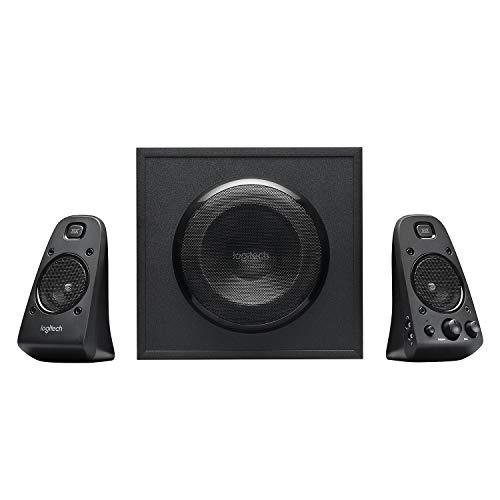
The Z623 is the loudest system in this guide. Logitech lists 400 watts of peak power and 200 watts RMS, with THX certification. The right satellite carries volume and bass controls, two 3.5 mm inputs, an RCA input, and a headphone jack, so up to three devices can stay connected.
Choose it when the room is the audience rather than just the desk. It fills a living room or a large home office with ease, and the bass stays composed at volumes where smaller systems distort. The trade is footprint and age: the subwoofer is a substantial cabinet, and the design has no Bluetooth, no USB audio, and no wireless control.
Pros:
– Highest listed output here, suited to larger rooms
– Three inputs on the right satellite, including RCA
– Bass and volume controls within easy reach
– THX-certified tuning as Logitech lists
Cons:
– Large subwoofer cabinet demands floor space
– No Bluetooth or USB audio
– More power than a small desk setup needs
3. Logitech Z407 Bluetooth Computer Speakers with Subwoofer and Wireless Control — Best for Wireless Control
The Z407 is the most convenient system in this guide. It is a 2.1 setup with two compact satellites and a subwoofer, and Logitech lists 80 watts of peak power. The headline feature is a wireless control dial you can place anywhere on the desk: it adjusts volume, pauses playback, and controls bass. Bluetooth, USB, and 3.5 mm inputs cover a computer, a phone, and a tablet at the same time.
Because the dial sits next to the keyboard, you actually use it, so bass and volume stay matched to what you are doing. Switching between a computer and a phone takes a button press rather than a cable swap. The limitation is output: at 80 watts peak as Logitech lists, this is a desk system, not a room system, and the modest subwoofer delivers bass that is present but not room-shaking.
Pros:
– Wireless dial for volume, bass, and playback
– Bluetooth, USB, and 3.5 mm inputs
– Compact satellites suit crowded desks
– Clean, modern look
Cons:
– Modest listed output next to the larger systems here
– Smaller subwoofer, so deep bass is less forceful
– Wireless dial needs a battery and a clear spot on the desk
4. Creative Pebble Plus 2.1 USB-Powered Desktop Speakers with Powerful Down-Firing Subwoofer — Best for Small Desks
The Pebble Plus is the simplest system in this guide, and that is its appeal. Two small satellites with far-field drivers angled at 45 degrees sit on the desk, and a compact down-firing subwoofer adds the low end. Creative lists up to 8 watts RMS of total power. The whole system runs from a single USB connection for power, with a 3.5 mm cable for audio, so there is no power brick.
For a laptop or a small desk, this is the right scale. The satellites flank a monitor without crowding it, and the subwoofer can sit on the desk or the floor. A High Gain mode increases output with a 5-volt, 2-amp USB adapter, which Creative notes is not included. The limitation is power and depth: 8 watts RMS suits near-field listening only, and the 4-inch subwoofer cannot reach as low as the 6.5-inch units in the larger systems. There is no Bluetooth, no remote, and no separate subwoofer gain control.
Pros:
– Runs entirely from USB power, with no power brick
– Very compact satellites and subwoofer fit small desks
– Angled far-field drivers aim sound at the listener
– One USB cable and one audio cable
Cons:
– Low listed output suits near-field listening only
– Small subwoofer cannot match the depth of larger systems
– No Bluetooth and no separate bass control
– High Gain mode needs an adapter that is not included
5. Creative Pebble X Plus 2.1 USB-C Computer Speakers with Subwoofer and Customizable RGB Lighting — Best Compact Modern System
The Pebble X Plus is the modern version of the Pebble idea. It keeps the compact 2.1 layout and angled satellites, but adds USB-C audio, Bluetooth 5.3, and RGB lighting. Creative lists up to 15 watts RMS of total power, nearly double the Pebble Plus, and the front-firing cube subwoofer is tuned to match the larger satellites.
This is the pick for a desk that already runs on USB-C. A single USB-C cable carries audio and power from a modern laptop, Bluetooth covers a phone without a cable, and the lighting can be switched off entirely. The extra power is audible: the system plays louder without strain, and the bass has more weight at normal listening levels. The limitation is the same as the Pebble Plus, only smaller in degree: 15 watts RMS is still a desk-scale output, and the compact subwoofer cannot match a floor-standing 6.5-inch unit for depth.
Pros:
– USB-C audio and power in a single cable
– Bluetooth 5.3 for phones and tablets
– More listed power than the Pebble Plus, with a fuller sound
– Lighting can be customized or switched off
Cons:
– Still a desk-scale system, not a room-filling one
– Compact subwoofer has less depth than larger systems
– No separate subwoofer gain control
– Lighting may not suit a plain office setup
Who Should Choose What
- Music first, desk or small room: the Klipsch ProMedia 2.1 THX. Its clear satellites and adjustable subwoofer suit long listening sessions.
- Movies and games in a larger room: the Logitech Z623. Its listed output and multiple inputs suit a setup where the speakers serve the whole room.
- A clean desk with a phone and a computer: the Logitech Z407. Bluetooth plus the wireless dial means fewer cables and faster source switching.
- A laptop on a small desk: the Creative Pebble Plus. It needs one USB port and one audio cable, and it disappears into a compact workspace.
- A modern USB-C laptop with a matching setup: the Creative Pebble X Plus. USB-C audio, Bluetooth 5.3, and lighting fit a current desk without extra adapters.
Common Mistakes
Putting the subwoofer in a corner without listening first. A corner boosts bass, sometimes too much, and can make the low end boomy. Start on the floor near the desk, a few inches from the wall, then move it and listen.
Pointing the satellites at the wall. Satellites should face you, at roughly ear height, angled slightly inward. Speakers pushed against a wall or hidden behind a monitor lose clarity. If they sit below ear level, tilt them up.
Buying for peak power alone. Peak power describes short bursts, not everyday listening. A system with modest RMS power and a well-tuned subwoofer often sounds better at normal volume than a louder system with a poor bass balance.
Ignoring cable length. Short cables force the subwoofer onto the desk or the satellites too close together, which narrows the sound. Check the listed cable lengths before ordering.
Forgetting the second device. Many buyers connect a computer and only later realize they also want a phone or a console connected. Count your devices before you buy.
Leaving the bass at maximum. A subwoofer gain control set to maximum sounds exciting for a few minutes, then tiring. Set the bass so it supports the music rather than dominating it, and turn it down for dialogue-heavy content.
FAQ
Do I need a subwoofer for computer speakers?
Not always, but it makes a clear difference for music with bass, movies, and games. A 2.0 pair can sound excellent for dialogue and acoustic music, yet it cannot reproduce the lowest frequencies with the same weight as a separate subwoofer.
Where should I put the subwoofer?
On the floor near the desk is the usual starting point, with a few inches of clearance from the wall. A down-firing subwoofer can also sit on a sturdy shelf or on the desk itself if it is compact. Avoid a closed cabinet, which muffles the sound and traps heat.
Is Bluetooth latency a problem for movies and games?
Bluetooth adds a small delay that most listeners do not notice for music, but it can show in dialogue or fast games. If lip sync matters, use the wired 3.5 mm or USB connection for movies and games, and keep Bluetooth for music.
Can I connect these speakers to a TV or a console?
Most 2.1 desktop systems accept a 3.5 mm or RCA connection, which works with many TVs and consoles through a headphone jack or an adapter. Check the outputs on your TV or console first.
How much power do I need for a desk?
For near-field listening at arm’s length, 8 to 15 watts RMS is usually enough. For a small room, look for 40 watts RMS and above, and for a large room, 100 watts RMS and above with a larger subwoofer. The room matters more than the number.
Do 2.1 computer speakers work with a Mac?
Yes, in most cases. A 3.5 mm connection works with any computer that has a headphone jack, and USB or USB-C audio works with Mac computers that have a free port. Bluetooth systems pair like any other Bluetooth audio device.
Conclusion
The best computer speakers with subwoofer depend on your desk, your room, and how you listen. The Klipsch ProMedia 2.1 THX is the strongest all-round choice, with clear satellites, a 6.5-inch subwoofer, and a control pod that puts bass within reach. The Logitech Z623 is the pick for larger rooms and louder sessions, while the Logitech Z407 suits buyers who want Bluetooth and a wireless dial. For small desks, the Creative Pebble Plus and the Creative Pebble X Plus deliver real bass from compact, USB-powered systems, with the X Plus adding USB-C, Bluetooth 5.3, and lighting.
Measure your space and choose the subwoofer size that fits it. A 2.1 system that fits your desk and your habits will get used every day.
FAQ
Do I need a subwoofer for computer speakers?
Where should I put the subwoofer?
Is Bluetooth latency a problem for movies and games?
Can I connect these speakers to a TV or a console?
How much power do I need for a desk?
Do 2.1 computer speakers work with a Mac?
More from Amazon
Programs that pair well with the guide above. Offers and eligibility are set by Amazon and may change.
Free shipping on eligible items, Prime Video and more. Eligible new members can start with a free trial.
Start a Prime free trialA Prime membership for ages 18-24 with a trial period. Eligibility is set by Amazon.
See Prime for Young AdultsAudiobooks and podcasts to listen to on the go. Eligible new members can start with a free trial.
Try Audible freeAd-free music streaming. Eligible new subscribers can start with a free trial.
Try Music Unlimited freeAs an Amazon Associate we earn from qualifying purchases.