Our Short List of 3
All 3 Picks at a Glance
| Product | Specs | Action |
|---|---|---|
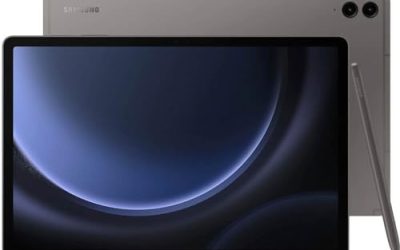
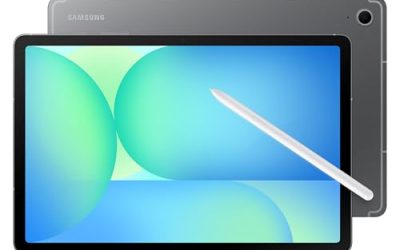
 2. Samsung Galaxy Tab S10 FE (128GB) — Best Android pick | Check price on Amazon | |
 3. Samsung Galaxy Tab S9 FE (128GB) — Best mid-range Android | Check price on Amazon | |
 4. Samsung Galaxy Tab A9+ (128GB) — Best lower-cost pick | Check price on Amazon |
Key takeaways
- Find the best tablets for zoom calls with sharp front cameras, clear speakers and long battery life. Four tablets compared for video meetings at home and work.
As an Amazon Associate I earn from qualifying purchases.
The Short Answer
The best tablet for Zoom for most people is the Apple iPad 11-inch with the A16 chip. Its 12MP front camera sits on the long edge, so you look straight at your callers, and the 11-inch screen keeps gallery view readable. If you want Android, the Samsung Galaxy Tab S10 FE is the strongest alternative, with a 12MP front camera, an S Pen in the box, and a battery the listing puts at up to 20 hours. The Galaxy Tab S9 FE covers the same ground a tier below, and the Galaxy Tab A9+ is the lowest-cost way into a big-screen Zoom setup. Every tablet below runs the Zoom app and works over Wi-Fi.
Our Top Picks
- Apple iPad 11-inch (A16, 128GB) — Best overall. The sharpest front camera here, a bright 11-inch display, and the smoothest Zoom app experience.
- Samsung Galaxy Tab S10 FE (128GB) — Best Android pick. A 12MP front camera, S Pen included, and a battery the listing puts at up to 20 hours.
- Samsung Galaxy Tab S9 FE (128GB) — Best mid-range Android. Nearly the same call quality as the S10 FE, with a 12MP front camera and S Pen.
- Samsung Galaxy Tab A9+ (128GB) — Best lower-cost pick. An 11-inch screen and quad speakers for group calls, with the most modest front camera here.
Quick Comparison
| Tablet | Screen | Front camera | Audio | Battery | Best for |
|---|---|---|---|---|---|
| Apple iPad 11-inch (A16) | 11-inch Liquid Retina display | 12MP, landscape, Center Stage | Built-in speakers and microphones | All-day battery life per the listing | Most Zoom users |
| Samsung Galaxy Tab S10 FE | 10.9-inch LCD, 2304 x 1440, 90Hz | 12MP, landscape | Dual speakers | 8,000 mAh, up to 20 hours per the listing | Android users who want a pen |
| Samsung Galaxy Tab S9 FE | 10.9-inch LCD, 2304 x 1440, 90Hz | 12MP, landscape | Dual speakers with Dolby Atmos | 8,000 mAh, up to 18 hours per the listing | Mid-range Android calls |
| Samsung Galaxy Tab A9+ | 11-inch display | 5MP | Quad speakers | Confirm on the listing | Lower-cost big-screen calls |
How to Choose
Front camera position matters more than megapixels
The biggest difference between a good Zoom tablet and a frustrating one is where the front camera sits. On the long edge, it faces you squarely while the tablet sits in landscape on a desk. On the short edge, you look sideways on screen and eye contact suffers. All four tablets here place the camera for landscape use, and the three 12MP cameras keep your image crisp in normal indoor light. Resolution matters only after placement.
Microphones and speakers decide whether people hear you
Every tablet below has built-in microphones, and in a quiet room they are enough for normal conversation. In a noisy room, or when several people share one tablet, a headset or an external microphone helps, but that is an accessory decision, not a tablet decision. Speakers matter too: quad speakers on the Galaxy Tab A9+ and dual speakers on the S10 FE and S9 FE spread voices across the room, which helps when two or three people gather around one screen.
Screen size and gallery view
A 10.9-inch or 11-inch screen is the sweet spot for Zoom: large enough to show several faces at a readable size in gallery view and to keep a shared screen visible, without being awkward to carry between rooms. Smaller tablets squeeze faces too small to read. All four picks sit in that band.
Wi-Fi and the Zoom app
Every pick here is a Wi-Fi model, the right choice for most Zoom users, since calls usually happen at home or in an office. The Zoom app is available on iPadOS and Android, with the same core features on both: joining by link, gallery and speaker view, screen sharing, virtual backgrounds, and chat. Before you buy, confirm on the listing that the model is the Wi-Fi version and runs a current operating system. A cellular model adds a data plan most people never need.
Battery life for back-to-back calls
Video calls drain a battery faster than reading or browsing, because the camera, microphone, screen, and wireless connection all run at once. The two Samsung FE tablets list 8,000 mAh batteries, with the S10 FE listing up to 20 hours and the S9 FE up to 18 hours. Apple lists all-day battery life for the iPad. Treat those figures as guidance for mixed use, and keep a charger nearby for a day packed with calls.
Storage and multitasking
Zoom itself needs little storage, but recordings, downloaded documents, and the apps you keep open alongside Zoom all take space. The 128GB on every pick here is a comfortable baseline, and the three Samsung tablets add a microSD slot. The iPad has no microSD slot, so confirm on the listing whether a larger storage configuration fits your needs. Split-screen support lets you keep notes open beside your call, and all four tablets handle that.
The Picks in Detail
1. Apple iPad 11-inch (A16, 128GB) — Best overall
The 11-inch iPad with the A16 chip is the most complete Zoom tablet here. Its 12MP front camera sits on the landscape edge and supports Center Stage, which keeps you framed as you shift in your seat. The 11-inch Liquid Retina display is bright and sharp, so faces and shared slides stay readable, and the A16 chip keeps the Zoom app smooth even with a full gallery and a shared screen running at the same time. Wi-Fi 6 keeps the connection steady, Touch ID unlocks the tablet quickly between calls, and USB-C works with common chargers and hubs. Storage starts at 128GB, and the all-day battery life in the listing means a normal run of meetings needs no midday charge.
The iPad runs the full Zoom app for iPadOS, with gallery view, speaker view, screen sharing, and virtual backgrounds, and it pairs cleanly with a stand. The main limitation is the closed ecosystem: no microSD slot, so storage is fixed at purchase, and a keyboard case is a separate purchase.
Pros:
– 12MP landscape front camera with Center Stage keeps you framed naturally
– Bright 11-inch Liquid Retina display keeps gallery view readable
– A16 chip handles large galleries and screen sharing without stutter
– Wi-Fi 6, Touch ID, and USB-C cover the practical details
– All-day battery life per the listing
Cons:
– No microSD slot, so storage is fixed at purchase
– Keyboard case and stand are separate purchases
– The most expensive pick in this guide
2. Samsung Galaxy Tab S10 FE (128GB) — Best Android pick
The Galaxy Tab S10 FE is the Android tablet to buy for Zoom. Its 12MP front camera sits on the landscape edge, so you face the camera head-on, and the 10.9-inch LCD runs at 2304 x 1440 with a 90Hz refresh that keeps scrolling and shared screens smooth. The Exynos 1580 processor and 8GB of RAM handle Zoom alongside a notes app or a browser, and 128GB of storage plus a microSD slot give room for recordings and documents. The S Pen comes in the box, which is genuinely useful on calls: you can annotate a shared document during a meeting without reaching for a separate tool. Battery life is a strong point, with an 8,000 mAh battery the listing puts at up to 20 hours, plus IP68 water and dust resistance, rare in this class.
The Zoom app on Android covers the same core features as on iPadOS, and the S10 FE adds multi-window support, so you can keep a document open beside your call. The screen is an LCD rather than an AMOLED panel, but for video calls that difference is minor.
Pros:
– 12MP landscape front camera for natural eye contact on calls
– S Pen included in the box for notes and annotation during meetings
– 8,000 mAh battery, up to 20 hours per the listing
– 128GB storage plus microSD expansion up to 2TB
– IP68 water and dust resistance
Cons:
– LCD screen rather than an AMOLED panel
– Dual speakers rather than quad speakers
– A keyboard case is a separate purchase
3. Samsung Galaxy Tab S9 FE (128GB) — Best mid-range Android
The Galaxy Tab S9 FE is the previous generation of the S10 FE, and for Zoom it gives up little. The same 10.9-inch 2304 x 1440 LCD with 90Hz refresh, the same 12MP front camera on the landscape edge, and the same S Pen in the box. The Exynos 1380 processor and 6GB of RAM are a step behind the S10 FE, but Zoom is not a demanding app, and the tablet handles gallery view, screen sharing, and a second app beside the call without trouble. The 8,000 mAh battery is the same capacity, with the listing putting battery life at up to 18 hours, and the tablet shares the IP68 water and dust resistance of its successor. Storage is 128GB with microSD expansion up to 1TB.
Where the S9 FE wins is value within the Samsung line: the same call quality, pen, and screen as the newer model, a tier below. The trade-offs are modest — an older processor, less RAM, and a shorter software support window — and none of those affect a Zoom call today.
Pros:
– 12MP landscape front camera, the same as the newer S10 FE
– S Pen included in the box
– 10.9-inch 90Hz display keeps shared screens smooth
– 8,000 mAh battery, up to 18 hours per the listing
– IP68 water and dust resistance
Cons:
– Older Exynos 1380 processor and 6GB of RAM
– Shorter remaining software support window than the S10 FE
– 8MP back camera is modest for document capture
4. Samsung Galaxy Tab A9+ (128GB) — Best lower-cost pick
The Galaxy Tab A9+ is the lowest-cost route to a big-screen Zoom setup here, and it earns its place on its screen and speakers rather than its camera. The 11-inch display is tied for the largest here, which helps when several people share one tablet around a table, and the quad speakers spread voices better than the dual-speaker models, so everyone in the room hears the call clearly. Multi-window support lets you keep a document or a browser open beside Zoom, and 128GB of storage plus microSD expansion leaves room for recordings and files.
The compromise is the front camera: 5MP, against 12MP on the other three picks. In good light, a 5MP camera is adequate for a video call. In dim light, or for a client-facing call, the difference shows. If your calls are internal team check-ins rather than client presentations, the A9+ is more than enough. Confirm RAM and battery details on the listing before ordering, since the listing text varies by configuration.
Pros:
– 11-inch display, tied for the largest screen in this guide
– Quad speakers, the best built-in audio here for group calls
– 128GB storage with microSD expansion
– Multi-window support for notes beside a call
– Slim, light, durable design per the listing
Cons:
– 5MP front camera is a clear step behind the 12MP cameras here
– Weaker in dim light than the other picks
– RAM and battery details vary by configuration; confirm on the listing
Who Should Choose What
- Most people should buy the iPad 11-inch (A16). It has the best front camera and the brightest screen, and it needs no accessories to work well for calls.
- Android users should buy the Galaxy Tab S10 FE. It matches the iPad on camera quality, adds the S Pen and microSD expansion, and its battery is the longest listed here.
- Budget-conscious Android users should buy the Galaxy Tab S9 FE. It gives the same 12MP camera, pen, and screen as the S10 FE, with an older processor Zoom will never stress.
- Group calls on a tight budget point to the Galaxy Tab A9+. The 11-inch screen and quad speakers suit a room full of people, and the 5MP camera is fine for internal calls.
- Frequent travellers should lean toward the S10 FE or S9 FE. IP68 water and dust resistance and long battery life suit a tablet that moves between rooms and offices.
Common Mistakes
Buying a tablet with a portrait front camera. Some tablets still put the front camera on the short edge. In landscape, that camera points at you from the side, and you look away from your callers. Check the camera position in the listing photos before you buy.
Judging a tablet by its back camera. The back camera never appears on a Zoom call. What matters is the front camera, the microphones, and the speakers. A tablet with a superb back camera and a weak front camera is a poor Zoom device.
Skipping the stand. A tablet lying flat on a desk points its camera at your chin. A simple stand that holds the tablet upright at eye level improves your image more than any camera upgrade.
Ignoring the room. A good camera cannot fix a dark room or a bright window behind you. Sit facing a light source, keep bright windows out of the frame, and close the door on background noise.
Choosing a cellular model you will not use. Cellular models add a data plan and a monthly cost. If your calls happen at home or in an office with Wi-Fi, the Wi-Fi model is the right buy, and every pick in this guide is a Wi-Fi model.
Forgetting storage. Zoom recordings, downloaded files, and the apps you run beside Zoom all need space. The 128GB on every pick here is a sensible baseline, and the Samsung tablets add microSD expansion. On the iPad, storage is fixed.
FAQ
Can I use Zoom on any tablet?
Most modern tablets run the Zoom app, including every pick in this guide. The app is available on iPadOS and Android, with joining by link, gallery and speaker view, screen sharing, and chat. Before buying, confirm on the listing that the tablet runs a current operating system.
Do I need a cellular tablet for Zoom?
No, for most people. A Wi-Fi tablet handles Zoom wherever wireless internet is available, which covers home, office, and most public spaces. A cellular model only helps when you regularly take calls away from Wi-Fi. All four picks here are Wi-Fi models.
Is a bigger screen better for Zoom?
Up to a point. A 10.9-inch or 11-inch screen shows gallery view at a readable size and keeps shared slides legible, which is why every pick here sits in that band. Smaller screens squeeze faces too small to read.
Are tablet microphones good enough for Zoom?
In a quiet room, yes. The built-in microphones on all four picks handle normal conversation well. In a noisy room, or when several people share one tablet, a headset or an external microphone improves clarity.
Can I use a Bluetooth headset with a tablet for Zoom?
Yes. All four tablets support Bluetooth, and a headset pairs the same way it does with a phone. A headset helps in noisy rooms, keeps your voice clear when you move away from the tablet, and keeps call audio private in a shared space.
How much storage do I need for a Zoom tablet?
For Zoom alone, very little. The 128GB on every pick here is comfortable for work use, including recordings and files. The Samsung tablets add microSD expansion, while the iPad has fixed storage.
Conclusion
The best tablet for Zoom has a well-placed front camera, clear audio, a screen large enough for gallery view, and a battery that lasts through meetings. The Apple iPad 11-inch with the A16 chip leads this guide because it does all four without fuss, with a 12MP landscape front camera and a bright 11-inch display. The Samsung Galaxy Tab S10 FE is the Android equal, adding an S Pen and the longest listed battery life, and the Galaxy Tab S9 FE delivers the same call quality a tier below. The Galaxy Tab A9+ is the lower-cost pick, trading camera sharpness for a tied-largest screen and the best built-in speakers here. Pick the one that matches your platform, add a stand, face the light, and your next call will look and sound better.
FAQ
Can I use Zoom on any tablet?
Do I need a cellular tablet for Zoom?
Is a bigger screen better for Zoom?
Are tablet microphones good enough for Zoom?
Can I use a Bluetooth headset with a tablet for Zoom?
How much storage do I need for a Zoom tablet?
More from Amazon
Programs that pair well with the guide above. Offers and eligibility are set by Amazon and may change.
Free shipping on eligible items, Prime Video and more. Eligible new members can start with a free trial.
Start a Prime free trialA Prime membership for ages 18-24 with a trial period. Eligibility is set by Amazon.
See Prime for Young AdultsAudiobooks and podcasts to listen to on the go. Eligible new members can start with a free trial.
Try Audible freeAd-free music streaming. Eligible new subscribers can start with a free trial.
Try Music Unlimited freeAs an Amazon Associate we earn from qualifying purchases.