Key takeaways
- Our guide to the best large tablets compares 12-inch and larger screens for work, streaming, notes and drawing, with display, pen, battery and storage notes.
As an Amazon Associate I earn from qualifying purchases.
The Short Answer
The best large tablets have screens of 12 inches or more. That size changes what a tablet can do: two apps sit side by side without feeling cramped, a full document page is readable without constant zooming, and a drawing canvas has room for a palm, a toolbar and the work itself. The trade is size and weight, so the right choice depends on how you plan to carry it and what you plan to do with it most. For most people, the iPad Air 13-inch (M3) is the balanced pick; for demanding creative work, the iPad Pro 13-inch (M4) is the step up; and for Android users, the Galaxy Tab S9 FE Plus is the value pick.
Our Top Picks
- Apple iPad Air 13-inch with M3 chip, 128GB, Wi-Fi 6E, Space Gray — Best overall for most people.
- Apple iPad Pro 13-inch with M4 chip, 512GB, Wi-Fi 6E, Space Black — Best for demanding creative work.
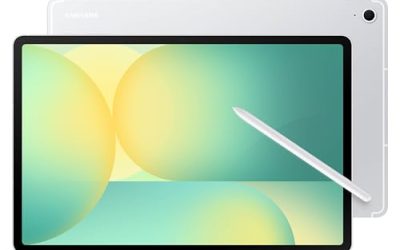
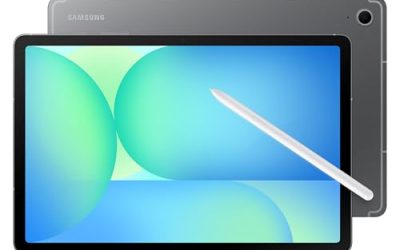
- Samsung Galaxy Tab S9 FE Plus, 12.4-inch, 128GB, Gray — Best value large Android tablet.
Apple iPad Air 13-inch with M3 chip, 128GB, Wi-Fi 6E, Space Gray
Apple iPad Pro 13-inch with M4 chip, 512GB, Wi-Fi 6E, Space Black
Samsung Galaxy Tab S9 FE Plus, 12.4-inch, 128GB, Gray
Quick Comparison
| Tablet | Screen | Chip | Storage | Pen | Best for |
|---|---|---|---|---|---|
| Apple iPad Air 13-inch (M3) | 13-inch Liquid Retina display | M3 chip | 128GB | Apple Pencil support, confirm model on the listing | Most people, work and study |
| Apple iPad Pro 13-inch (M4) | 13-inch Ultra Retina XDR display | M4 chip | 512GB | Apple Pencil Pro compatibility stated on the listing | Demanding creative work |
| Samsung Galaxy Tab S9 FE Plus | 12.4-inch display | Powerful processor stated on the listing, confirm chip on the listing | 128GB, expandable storage | S Pen included | Android users, notes and streaming |
All three tablets in this guide have screens of 12 inches or more and are full tablets with a touchscreen, apps, cameras and wireless connectivity, not pen-only drawing surfaces and not e-readers. Confirm the exact model, storage, colour and included accessories on the listing before ordering.
How to Choose
Start with screen size and weight
Large tablets in this guide range from 12.4 inches to 13 inches. The shape matters as much as the diagonal measurement: a 13-inch tablet in a squarer aspect ratio feels broad and tall, which suits documents and drawing, while a 12.4-inch tablet in a wider aspect ratio feels long and cinematic, which suits films and split-screen work. A large tablet is heavier than a small one, and the difference shows up on a long reading session and when you hold it one-handed. If it will live mostly on a desk or a stand, weight matters less and screen quality matters more. Confirm the weight and dimensions on the listing for the exact configuration.
Match the ecosystem to the devices you already own
An iPad fits naturally with an iPhone and a Mac, with shared apps, notes and file syncing across Apple devices. A Samsung Galaxy tablet fits naturally with a Samsung phone and with Android services. Switching ecosystems is possible, but it means learning new apps, moving files and notes, and sometimes buying new accessories. Accessories are often specific to one model, so check pen and keyboard compatibility on the listing before you assume a pen or case you already own will work. A case made for an 11-inch model will not fit a 13-inch model.
Think about what the screen has to do
All large tablets are good for watching films, but they are not all equal for other tasks. A high-resolution display with accurate colour matters for photo editing and drawing, where the screen is the work surface. A bright display matters for working near a window or outdoors. A smooth refresh rate matters for drawing and for scrolling through long documents. On a large tablet, two apps side by side are genuinely usable: a document on one side and notes on the other, or a reference image on one side and a drawing app on the other. If multitasking is the reason you want a large tablet, a 12-inch or larger screen is the right threshold.
Storage, battery and connectivity
Storage is the hardest specification to change later, because most large tablets do not let you add internal storage after purchase. The Samsung pick lists expandable storage for films, photos and documents, but apps still use internal storage. The Apple picks use fixed internal storage. A 128GB tablet is enough for streaming, browsing, notes, documents and a modest set of apps, especially if most media is streamed. It becomes tight for large games, long video projects or a large offline photo library. A 512GB tablet, such as the iPad Pro pick here, gives far more headroom. The listings describe all-day battery life for the Apple picks and long battery life for the Samsung pick, though actual battery life depends on brightness, wireless use and the apps running. Wi-Fi 6E is listed for the Apple picks; confirm the exact wireless standard, charging port and charger included on the listing for the configuration you order.
The Picks in Detail
1. Apple iPad Air 13-inch with M3 chip, 128GB, Wi-Fi 6E, Space Gray — Best overall for most people
Apple iPad Air 13-inch with M3 chip, 128GB, Wi-Fi 6E, Space Gray
The iPad Air 13-inch with M3 chip is the balanced pick because it puts a large screen and a fast chip into a tablet that is still light enough to carry every day. The listing describes a 13-inch Liquid Retina display, the M3 chip, 128GB of storage, 12MP front and back cameras, Wi-Fi 6E, Touch ID and all-day battery life. That combination covers work documents, study notes, web browsing, streaming, video calls and light creative work, and the M3 chip handles multitasking and large documents without the hesitation a slower chip shows when several apps are open.
The 13-inch display is the defining feature. A full page of a document is readable without zooming, a spreadsheet shows more columns, and two apps side by side are usable rather than cramped. Touch ID on the top button unlocks the device quickly and authorises purchases and sign-ins. The 128GB of storage suits streaming, documents, notes and a moderate app library, with cloud storage covering the rest for most people.
Pros:
- Large 13-inch Liquid Retina display that makes documents, split-screen work and streaming comfortable
- M3 chip handles multitasking, large documents and photo editing smoothly for everyday work
- Touch ID, Wi-Fi 6E and all-day battery life stated on the listing make it a practical daily device
- Fits the Apple ecosystem, with shared apps, notes and files across iPhone, iPad and Mac
Cons:
- 128GB of fixed storage can feel tight for large games, offline media libraries or large creative projects
- Pen and keyboard are separate accessories, so confirm compatibility and the total setup on the listing
- No Face ID on this model, so unlocking relies on Touch ID and a passcode
2. Apple iPad Pro 13-inch with M4 chip, 512GB, Wi-Fi 6E, Space Black — Best for demanding creative work
Apple iPad Pro 13-inch with M4 chip, 512GB, Wi-Fi 6E, Space Black
The iPad Pro 13-inch with M4 chip is the most capable large tablet in this guide, and it is the pick for people whose tablet is a creative tool. The listing describes a 13-inch Ultra Retina XDR display, the M4 chip, 512GB of storage, 12MP front and back cameras, a LiDAR scanner, Wi-Fi 6E, Face ID and all-day battery life, with compatibility for Apple Pencil Pro stated on the listing. That is a professional specification: a display built for colour-accurate work, a chip built for demanding apps, and storage built for large projects.
The Ultra Retina XDR display is the reason to choose this model over the iPad Air. It is designed for high brightness, deep contrast and accurate colour, which matters for photo editing, video editing, illustration and design work where the screen is the reference. The M4 chip supports demanding apps including layered illustration, video editing and 3D work, and the 512GB of storage gives room for large project files and offline media. Face ID unlocks the tablet quickly in any orientation, and the LiDAR scanner supports augmented reality apps and scanning tasks.
Pros:
- Ultra Retina XDR display with the strongest brightness, contrast and colour accuracy in this guide
- M4 chip and 512GB of storage handle demanding creative apps and large project files
- Face ID, LiDAR scanner and Apple Pencil Pro compatibility stated on the listing suit professional creative work
- Thin and light design for a 13-inch tablet, so it still travels well in a bag
Cons:
- Higher tier than the other picks in this guide, so it is more tablet than most people need for streaming and notes
- Pen and keyboard are separate accessories, so confirm compatibility and the total setup on the listing
- 512GB is generous, but very large video libraries can still fill it, so confirm storage needs before ordering
3. Samsung Galaxy Tab S9 FE Plus, 12.4-inch, 128GB, Gray — Best value large Android tablet

Samsung Galaxy Tab S9 FE Plus, 12.4-inch, 128GB, Gray
The Samsung Galaxy Tab S9 FE Plus is the value pick and the Android pick, with a 12.4-inch display, an S Pen included in the box, long battery life stated on the listing, expandable storage and a lightweight durable design. The listing describes a 12.4-inch Android tablet with 128GB of storage, an 8MP rear camera (12MP front), S Pen support, expandable storage and a US version from 2023. That combination is hard to match for Android users who want a large screen without paying for a flagship tablet: the screen is large, the pen is included, and the storage can be expanded.
The 12.4-inch display suits films, reading and note taking, and it is large enough for split-screen work with a document on one side and notes on the other. The included S Pen sets this tablet apart for note takers and students: you can start taking handwritten notes, annotating documents and sketching on the day the tablet arrives, without buying a separate accessory. Expandable storage adds room for films, photos and documents on a memory card, which is useful for travel and offline media. Confirm the exact weight, dimensions, panel type and included accessories on the listing for the configuration you order.
Pros:
- Large 12.4-inch display suits films, reading, notes and split-screen work
- S Pen included in the box, so note taking and sketching work from the first day
- Expandable storage adds room for films, photos and documents without buying a higher storage tier
- Lightweight durable design and long battery life stated on the listing suit daily carrying and travel
Cons:
- 128GB of internal storage can feel tight for large apps and games, even with expandable storage for media
- The processor is described as powerful on the listing, so confirm the exact chip on the listing if demanding apps are a priority
- Camera specification is more modest than the Apple picks, so confirm the camera details on the listing if video calls are a daily task
Who Should Choose What
Choose the iPad Air 13-inch with M3 chip if you want a large tablet for everyday work, study and streaming, and you already use an iPhone or a Mac. It suits students, office workers and households that want one large tablet for shared use. Choose the iPad Pro 13-inch with M4 chip if your tablet is a creative tool and the display and processor are the priority. It suits illustrators, photo editors, video editors and designers who need colour accuracy and a chip that keeps demanding apps responsive. Choose the Galaxy Tab S9 FE Plus if you use Android, want a large screen with a pen included, and want the value pick in this guide. If you are unsure between Apple and Samsung, ask which phone you carry: the tablet that matches your phone will usually give the smoother daily experience.
Common Mistakes
The most common mistake is buying a large tablet for the screen and then discovering that the accessories cost as much as the difference between models. A pen, a keyboard case and a stand are often separate purchases, and they are specific to one model, so check compatibility on the listing before you order. Another common mistake is choosing the smallest storage tier and then filling it in the first months, so check how much storage your current device uses and leave room for growth. A third mistake is assuming that a large tablet replaces a laptop for every task: it can replace a laptop for documents, notes, browsing and streaming, but some desktop software and file management tasks still suit a computer better. Finally, do not ignore the case and the stand. A large tablet is heavy to hold for a long session, so buy a case that fits your exact model and screen size at the same time as the tablet.
FAQ
What counts as a large tablet?
In this guide, a large tablet is a tablet with a screen of 12 inches or more. The picks here have 12.4-inch and 13-inch screens. A tablet with a screen below 12 inches feels noticeably smaller for documents, split-screen work and drawing. If you want a tablet that can show two apps side by side comfortably, a 12-inch or larger screen is the threshold to look for.
Is a 13-inch tablet too big to carry every day?
A 13-inch tablet is larger and heavier than a compact tablet, but it still fits in most laptop bags and backpacks, and it is lighter than most laptops. It is less comfortable to hold one-handed for a long reading session, so a case with a stand or a desk stand helps. If the tablet will travel every day, check the weight and dimensions on the listing first.
Do I need a pen with a large tablet?
A pen is useful for handwritten notes, annotating documents, sketching and drawing, and it is essential for illustration work. It is less useful if your tablet use is mainly streaming, browsing and typing, where a keyboard matters more. The Samsung pick includes an S Pen in the box. The Apple picks support Apple Pencil models, with the exact model to confirm on the listing, and the pen is sold separately unless the listing states otherwise.
Is 128GB of storage enough on a large tablet?
128GB is enough for streaming, browsing, notes, documents and a moderate set of apps, especially if films and music are streamed rather than downloaded. It becomes tight if you download large games, store long video projects or keep a large photo library offline. The Samsung pick lists expandable storage for media. The Apple picks use fixed internal storage, so choose a higher storage configuration of the same model if you keep large files on the device.
Can a large tablet replace a laptop?
A large tablet with a keyboard can replace a laptop for documents, notes, browsing, streaming and video calls, and for many students and office workers it does. It is less suited to desktop software that has no tablet version, to complex file management and to specialised work that needs a full computer. Try your most common tasks on a tablet before you retire a laptop.
Which large tablet is best for drawing?
For drawing, the display, the pen and the apps matter more than the processor alone. The iPad Pro 13-inch with M4 chip is the strongest drawing pick here, with an Ultra Retina XDR display and Apple Pencil Pro compatibility stated on the listing. The iPad Air 13-inch also suits drawing, with a large Liquid Retina display and Apple Pencil support to confirm on the listing. The Galaxy Tab S9 FE Plus suits drawing and note taking too, with an S Pen included in the box.
Conclusion
The best large tablets give you room to work, read, draw and watch without the cramped feeling of a small screen. The Apple iPad Air 13-inch with M3 chip is the balanced pick for most people. The Apple iPad Pro 13-inch with M4 chip is the step up for demanding creative work, with an Ultra Retina XDR display, the M4 chip and 512GB of storage. The Samsung Galaxy Tab S9 FE Plus is the value pick for Android users, with a 12.4-inch display, an S Pen included and expandable storage. Choose the ecosystem that matches your phone and computer, choose storage for the next two years, and confirm the exact model, storage, pen compatibility and accessories on the listing before ordering.
FAQ
What counts as a large tablet?
Is a 13-inch tablet too big to carry every day?
Do I need a pen with a large tablet?
Is 128GB of storage enough on a large tablet?
Can a large tablet replace a laptop?
Which large tablet is best for drawing?
More from Amazon
Programs that pair well with the guide above. Offers and eligibility are set by Amazon and may change.
Free shipping on eligible items, Prime Video and more. Eligible new members can start with a free trial.
Start a Prime free trialA Prime membership for ages 18-24 with a trial period. Eligibility is set by Amazon.
See Prime for Young AdultsAudiobooks and podcasts to listen to on the go. Eligible new members can start with a free trial.
Try Audible freeAd-free music streaming. Eligible new subscribers can start with a free trial.
Try Music Unlimited freeAs an Amazon Associate we earn from qualifying purchases.