Our Short List of 3

- Amazon Fire HD 10 Kids Pro — the strongest all-around choice for homeschool families with children ages 6 to 12, with a slim case, parental controls, and a large content library. View on Amazon
- Amazon Fire HD 10 Kids — the best fit for younger learners ages 3 to 7, with a thicker kid-proof case, larger on-screen buttons, and pre-set age filters. View on Amazon
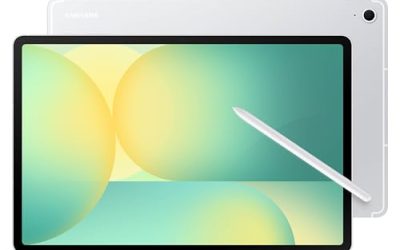
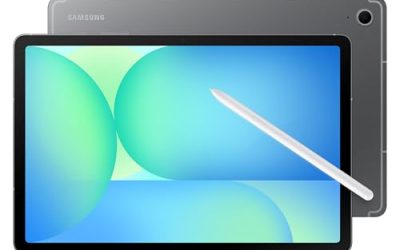
- Samsung Galaxy Tab A9+ — the best choice for older students, with an 11-inch screen, 128 GB of storage, quad speakers, and multi-window support for research and note-taking side by side. View on Amazon

- Thicker kid-proof case built to survive drops from small hands
- Pre-set age filters and larger image-based buttons for ages 3 to 7
- Same strong parental controls and content library as the Pro
- Up to 13 hours of battery life for a full school day

- Large 11-inch screen that suits textbooks, video lessons, and writing
- 128 GB of storage for textbooks, documents, and projects
- Quad speakers for clear video lessons
- Multi-window support for research and note-taking side by side
All 3 Picks at a Glance
| Product | Specs | Action |
|---|---|---|
| Our Top Picks |
| Check price on Amazon |
| 2. Amazon Fire HD 10 Kids — Best for Younger Learners |
| Check price on Amazon |
| 3. Samsung Galaxy Tab A9+ — Best for Older Students |
| Check price on Amazon |
Key takeaways
- Find the best tablets for homeschooling with durable cases, parental controls, and room for lesson apps. Compare three family-ready picks for every age.
As an Amazon Associate I earn from qualifying purchases.
The Short Answer
The best tablets for homeschooling are the Amazon Fire HD 10 Kids Pro for ages 6 to 12, the Amazon Fire HD 10 Kids for ages 3 to 7, and the Samsung Galaxy Tab A9+ for older students who need a larger screen and a full Android app library. If you want one straightforward answer, start with the Fire HD 10 Kids Pro. It pairs a 10.1-inch Full HD display with strong parental controls, a slim kid-friendly case, and a year of Amazon Kids+ content, which covers a wide range of reading, math, and science material without extra setup. Homeschooling asks more of a tablet than casual use: it carries lessons, read-aloud time, and video lessons for several children, so it needs a tough case, a readable screen, enough storage, and controls that let a parent decide what is open and when.
Our Top Picks
- Amazon Fire HD 10 Kids Pro — the strongest all-around choice for homeschool families with children ages 6 to 12, with a slim case, parental controls, and a large content library. View on Amazon
- Amazon Fire HD 10 Kids — the best fit for younger learners ages 3 to 7, with a thicker kid-proof case, larger on-screen buttons, and pre-set age filters. View on Amazon
- Samsung Galaxy Tab A9+ — the best choice for older students, with an 11-inch screen, 128 GB of storage, quad speakers, and multi-window support for research and note-taking side by side. View on Amazon
Quick Comparison
| Tablet | Best for | Screen | Storage | Age range | Parental controls |
|---|---|---|---|---|---|
| Fire HD 10 Kids Pro | All-around homeschool use | 10.1-inch Full HD (1920 x 1200) | 32 GB, microSD up to 1 TB | Ages 6 to 12 | Amazon Parent Dashboard |
| Fire HD 10 Kids | Younger learners | 10.1-inch Full HD (1920 x 1200) | 32 GB, microSD up to 1 TB | Ages 3 to 7 | Amazon Parent Dashboard |
| Galaxy Tab A9+ | Older students | 11-inch display | 128 GB | Middle school and up | Samsung parental controls |
How to Choose
Start with the ages of your children
Age is the first filter. A tablet designed for a 5-year-old looks different from one built for a 13-year-old. Younger children need big buttons, a thick protective case, and content filters that keep them inside age-appropriate material. Older students need a larger screen for reading documents and access to a full app store for curriculum tools. If you homeschool children across a wide age range, plan on more than one device rather than forcing one tablet to serve a first grader and a ninth grader at the same time.
Durability matters more than speed
Homeschool tablets live a rough life. They travel between rooms, ride in backpacks, and survive drops from the kitchen table. A bundled kid-proof case is worth more than a slightly faster processor for most families. Both Fire Kids tablets ship with a case in the box, and the Fire HD 10 Kids carries a thicker bumper made for small hands. For an older student using the Galaxy Tab A9+, add a sturdy case and a screen protector before the first lesson, since it does not ship with a kid-proof case.
Parental controls are a teaching tool, not just a lock
Good controls let you shape the school day. The Amazon Parent Dashboard lets you set daily time limits, block specific content, and set educational goals that must be met before entertainment apps open. That structure turns the tablet into a classroom tool: math practice first, then a video or game. Samsung devices include parental controls and a Kids mode as well, so you can set limits and approve apps for a teen who is ready for more independence but still needs boundaries during school hours.
Screen size and battery life shape the school day
A 10-inch or 11-inch screen is the sweet spot for homeschool work: large enough to read a textbook page and watch a science video without constant zooming, yet light enough for a child to hold. Both Fire Kids tablets list up to 13 hours of battery life, which covers a full school day. For the Galaxy Tab A9+, confirm battery life on the listing, and keep a charger near the study area.
Storage fills up fast with lesson material
Lesson apps, downloaded videos, audiobooks, and photos of completed work add up quickly. The Fire Kids tablets start at 32 GB of internal storage and accept a microSD card up to 1 TB, so you can add room for offline videos and audiobooks later. The Galaxy Tab A9+ starts at 128 GB, which gives an older student far more room for documents and textbooks. Check the listing for storage expansion details if you plan to keep several years of schoolwork on one device.
Check the apps your curriculum needs
Before you buy, list the apps your curriculum uses and confirm each one runs on the tablet you choose. Fire tablets run Fire OS with the Amazon Appstore, which carries the major reading, math, and video apps, plus a web browser for curriculum sites. The Galaxy Tab A9+ runs Android with the Google Play store, which carries the widest app library and works well with Google Classroom, Docs, and other tools many homeschool families use. If your curriculum depends on a specific app, confirm it is available on that tablet first.
Plan for sharing between children
Many homeschool families share devices between siblings. Child profiles keep each learner’s apps, books, and progress separate, and they let you set different time limits for each child. The Fire Kids tablets support multiple child profiles through the Parent Dashboard. On the Galaxy Tab A9+, set up separate user profiles or use Samsung Kids for younger users. Decide who uses the tablet and when before the school year starts, so the schedule is clear.
The Picks in Detail
1. Amazon Fire HD 10 Kids Pro — Best All-Around for Homeschool
The Fire HD 10 Kids Pro is the most complete homeschool tablet for children ages 6 to 12. It is the 13th generation model from the 2023 release, with a bright 10.1-inch Full HD display at 1920 x 1200, an octa-core processor, 3 GB of RAM, and 32 GB of storage that expands with a microSD card up to 1 TB. The listing states up to 13 hours of battery life, which covers a full school day. It ships with a slim kid-friendly case, a USB-C cable, and a 9W power adapter.
What sets the Pro apart for school use is the combination of parental controls and content. The Amazon Parent Dashboard gives you control over screen time, content filters, and educational goals, and the tablet includes a year of Amazon Kids+ content with ad-free books, games, apps, and videos. That library covers a lot of ground for elementary and middle school learners: early readers, math games, science videos, and audiobooks. The slim case suits older kids who find the thicker toddler bumper babyish, while still protecting the tablet from everyday drops.
For homeschool work, the 10.1-inch screen handles reading passages, video lessons, and worksheet apps without strain. The USB-C port makes charging simple, and the microSD slot means you can load audiobooks and videos for car trips and offline days.
Pros:
- Strong parental controls through the Amazon Parent Dashboard, including time limits and educational goals
- Slim kid-friendly case included in the box
- Large ad-free content library with a year of Amazon Kids+ included
- Up to 13 hours of battery life for a full school day
- Expandable storage with a microSD card up to 1 TB
- Bright 10.1-inch Full HD display for reading and video lessons
Cons:
- 32 GB of base storage fills up quickly with downloaded videos and apps
- Fire OS uses the Amazon Appstore, so some apps available on Google Play may not be listed
- The slim case protects against everyday drops but is less rugged than the thicker case on the standard Fire HD 10 Kids
View the Fire HD 10 Kids Pro on Amazon
2. Amazon Fire HD 10 Kids — Best for Younger Learners
- Thicker kid-proof case built to survive drops from small hands
- Pre-set age filters and larger image-based buttons for ages 3 to 7
- Same strong parental controls and content library as the Pro
- Up to 13 hours of battery life for a full school day
The Fire HD 10 Kids is the same 13th generation hardware as the Pro, tuned for children ages 3 to 7. It has the same 10.1-inch Full HD display at 1920 x 1200, the same octa-core processor with 3 GB of RAM, the same 32 GB of storage with microSD expansion up to 1 TB, and the same listed battery life of up to 13 hours. The difference is the experience around the hardware: a thicker kid-proof case, larger image-based buttons, and pre-set age filters for 3 to 7-year-olds.
For a homeschool family with a preschooler or early elementary student, those differences matter. The thick bumper survives drops that would crack an unprotected tablet, and the bigger buttons help a child who is still learning to tap and swipe. The age filters keep the home screen inside material made for young children, and the Parent Dashboard still lets you set time limits and goals. The included year of Amazon Kids+ content covers early reading, phonics games, and read-along books that fit the youngest learners.
This tablet also works well as a second device in a family that already owns a Pro for an older child. The younger child gets a device built for their hands and age, while the older child keeps a tablet that feels like theirs. Both devices share the same charger, the same content library, and the same parent controls, which keeps the household simple.
Pros:
Cons:
View the Fire HD 10 Kids on Amazon
3. Samsung Galaxy Tab A9+ — Best for Older Students
- Large 11-inch screen that suits textbooks, video lessons, and writing
- 128 GB of storage for textbooks, documents, and projects
- Quad speakers for clear video lessons
- Multi-window support for research and note-taking side by side
The Galaxy Tab A9+ is the pick for middle school and high school students who have outgrown a kids tablet. It has an 11-inch display, 128 GB of storage, 8 GB of RAM, quad speakers, and multi-window support, so a student can keep a textbook open on one side of the screen and notes on the other. It runs Android with the Google Play store, which gives access to the widest range of curriculum apps, including Google Classroom, Docs, and video lesson platforms.
The larger screen is the main reason to choose this tablet for an older student. Reading a full textbook page, watching a science demonstration, and typing a short essay are all easier on 11 inches than on a smaller display. The quad speakers make video lessons clear without headphones, which helps during group study time. The 128 GB of storage holds textbooks, documents, and projects with room to spare, and the Android system supports separate profiles and Samsung parental controls for families that still want limits during school hours.
Pros:
Cons:
View the Galaxy Tab A9+ on Amazon
Who Should Choose What
- Families with children ages 6 to 12 should start with the Fire HD 10 Kids Pro. It covers the core elementary and early middle school years with controls, content, and a case in one box.
- Families with a preschooler or early elementary student should choose the Fire HD 10 Kids. The thicker case and age filters match young hands and young learners.
- Families with middle school or high school students should choose the Galaxy Tab A9+. The larger screen, bigger storage, and full Android app library suit research, writing, and video lessons.
- Families with children across a wide age range should consider one Fire Kids tablet for the younger child and the Galaxy Tab A9+ for the older student, rather than asking one device to serve both.
Common Mistakes
Buying one tablet for children of very different ages
A tablet that delights a 5-year-old frustrates a 13-year-old, and a tablet built for a teen overwhelms a young child. Match the device to the child, not to the household. Two well-matched tablets beat one compromise device.
Skipping the case
A homeschool tablet without a case is a repair waiting to happen. The Fire Kids tablets include a case, which is one reason they suit families so well. For the Galaxy Tab A9+, buy the case at the same time as the tablet, not after the first drop.
Ignoring storage until it runs out
Lesson apps, downloaded videos, and audiobooks fill 32 GB faster than most parents expect. Check storage monthly, remove finished material, and use a microSD card on the Fire tablets for offline content. Starting with 128 GB on the Galaxy Tab A9+ avoids the problem for older students.
Forgetting to check the curriculum apps
A tablet is only useful if it runs the apps your curriculum needs. List every app before you buy, then confirm each one is available on Fire OS or Android. This one check prevents the most common homeschool tablet regret.
Setting no schedule for shared devices
When siblings share a tablet, arguments follow unless the schedule is clear. Set time blocks for each child and use child profiles to keep work separate.
FAQ
What age is a tablet right for homeschooling?
It depends on the child and the tablet. The Fire HD 10 Kids is built for ages 3 to 7, with big buttons and age filters. The Fire HD 10 Kids Pro suits ages 6 to 12. Older students do better with a general-purpose tablet like the Galaxy Tab A9+, which handles research and writing. Match the device to the child rather than choosing by age alone.
Can a Fire tablet run Google Classroom and other school apps?
Fire tablets run Fire OS with the Amazon Appstore, which carries many major learning apps, and the built-in browser reaches web-based curriculum tools. If your curriculum depends on a specific app, confirm it is available on Fire OS before buying. Families who need the full Google Play library should choose the Galaxy Tab A9+ instead.
Are parental controls enough for a school day?
Parental controls help, but they work best with a clear routine. Use the Parent Dashboard or Samsung controls to set time limits and educational goals, then pair them with a daily schedule that names when the tablet is for lessons and when it is put away. Controls set the boundaries; the schedule makes them stick.
Can siblings share one tablet?
Yes, with child profiles. Each child gets separate apps, books, and progress, and you can set different time limits per child. Sharing works best with a written schedule that gives each child their own time block. Families with children far apart in age usually do better with a separate device for each child.
Should I buy a keyboard for a homeschool tablet?
For older students who write essays and longer assignments, a keyboard makes a real difference. The Galaxy Tab A9+ pairs well with a Bluetooth keyboard for writing work. Younger children rarely need one, since their lessons rely on touch, tapping, and handwriting practice.
Conclusion
The best tablets for homeschooling match the device to the learner. The Fire HD 10 Kids Pro covers ages 6 to 12 with strong controls, a slim case, and a deep content library. The Fire HD 10 Kids gives younger learners ages 3 to 7 a tougher case and an interface built for small hands. The Galaxy Tab A9+ serves older students with a larger screen, 128 GB of storage, and the full Android app library for research and writing.
Start with your children’s ages and the apps your curriculum needs, then choose the tablet that fits. Add a sturdy case if the tablet does not include one, set up child profiles and time limits before the first lesson, and keep a charger near the study area. With the right device and a clear routine, a tablet becomes a steady part of the homeschool day.
FAQ
What age is a tablet right for homeschooling?
Can a Fire tablet run Google Classroom and other school apps?
Are parental controls enough for a school day?
Can siblings share one tablet?
Should I buy a keyboard for a homeschool tablet?
More from Amazon
Programs that pair well with the guide above. Offers and eligibility are set by Amazon and may change.
Free shipping on eligible items, Prime Video and more. Eligible new members can start with a free trial.
Start a Prime free trialA Prime membership for ages 18-24 with a trial period. Eligibility is set by Amazon.
See Prime for Young AdultsAudiobooks and podcasts to listen to on the go. Eligible new members can start with a free trial.
Try Audible freeAd-free music streaming. Eligible new subscribers can start with a free trial.
Try Music Unlimited freeAs an Amazon Associate we earn from qualifying purchases.