Our Short List of 3

- Best for: Desk-based producers who play two-handed parts and mix in Live
- 49 semi-weighted piano-style keys
- 16 RGB velocity-sensitive pads with polyphonic aftertouch
- 8 endless rotary encoders
- 9 faders
- Best for: Live performers and producers who build songs by launching clips and scenes
- 25 velocity-sensitive mini keys, Gen 2 dynamic keybed
- 40 RGB-backlit pads in a 5×8 clip-launch matrix
- 8 assignable endless rotary knobs
- Dedicated scene launch buttons and 4 directional arrows

- Best for: Traveling producers who want more playing range than a 25-key mini offers
- 37 mini synth-action keys
- 16 pads with polyphonic aftertouch
- OLED display
- Scale Mode and Chord Mode
All 4 Picks at a Glance
| Product | Specs | Action |
|---|---|---|
| Novation Launchkey 49 MK4 White |
| Check price on Amazon |
| Akai Professional APC Key 25 MK2 |
| Check price on Amazon |
| Novation Launchkey Mini 37 MK4 |
| Check price on Amazon |
 Novation Launchkey Mini 25 MK4 |
| Check price on Amazon |
Key takeaways
- Compare MIDI keyboards built for Ableton Live, from clip-launching Akai pads to Novation Launchkey keys, encoders, faders and Live Lite bundles.
Buying a keyboard for Ableton Live is not the same decision as buying a general MIDI controller. A generic board will send notes to any software, but Live work revolves around Session View: launching clips and scenes, tweaking device parameters, and recording ideas without reaching for the mouse. The real choice is how much of that Live workflow the hardware takes over, and how much playing range you give up to get it in a compact body.
This guide serves three groups: newcomers who need Live Lite in the box to start, laptop producers who launch clips from small desks, and players who want full-size keys with mixer control. Every pick below was chosen because its Amazon listing names Ableton Live integration, a Live Lite bundle, or dedicated Live mapping by name.
Quick Picks
As an Amazon Associate we earn from qualifying purchases
| Product | Best for | Key spec from title |
|---|---|---|
| Novation Launchkey 49 MK4 White | Full-size playing plus mixer control at a fixed desk | 49 semi-weighted piano-style keys |
| Akai Professional APC Key 25 MK2 | Clip and scene launching in Session View | 40 RGB pads in a 5×8 clip-launch grid |
| Novation Launchkey Mini 37 MK4 | Portable production with extra playing range | 37 mini synth-action keys |
| Novation Launchkey Mini 25 MK4 | Smallest bag-friendly Live controller | 25 mini synth-action keys |
How to Choose
Depth of Live Integration and Clip Launching
Look first at what the listing says the hardware does inside Live, not just that it works with Live. The APC Key 25 MK2 is pre-mapped for one-to-one integration and mirrors Session View clips on a grid you can scroll with directional arrows. Launchkey models use dedicated DAW scripts for Live, with pads that launch clips and modes for mixer and device control. A controller that only sends standard MIDI notes will play instruments, but you will map every transport, mixer, and launch function yourself before a session feels fluid.
Key Count and Key Action
Decide how you actually play. Mini keys on the 25 and 37-key Minis and on the APC suit one-handed basslines, chord stabs, and melody sketches, and they keep the footprint small enough for a laptop bag. They feel cramped for two-handed piano parts. The Launchkey 49 MK4 White steps up to semi-weighted piano-style keys across four octaves, which suits players recording chords and simple piano lines without constant octave shifting. Count how often you shift octaves on your current setup; frequent shifting is the clearest sign to move up a size.
Pads, Encoders, and Faders
Pads do different jobs in Live, so compare their layout rather than their count alone. A wide grid, like the 40-pad matrix on the APC, is built for launching clips and scenes. Sixteen pads, as on every Launchkey here, split between finger drumming, clip launching, and chord triggering. Encoders matter for device macros and mixer tweaks: all four picks offer eight. Only the 49-key Launchkey adds nine faders, which changes mixing from paging through encoder banks to grabbing channel levels directly, a difference that grows with track count.
Bundled Software Named in the Listing
Check exactly which Live edition the listing includes, because that sets your starting track and device limits. The APC Key 25 MK2 and the Launchkey range include Ableton Live Lite, and current Launchkey listings name Live 12 Lite, which lets you record and perform with a limited track count and a starter set of instruments and effects. If you already own a full Live license, the bundle value shifts to the extra instruments and lessons. If you own no DAW yet, confirm Live Lite is listed before assuming it is included.
The 4 Best Options
Novation Launchkey 49 MK4 White
- Best for: Desk-based producers who play two-handed parts and mix in Live
- 49 semi-weighted piano-style keys
- 16 RGB velocity-sensitive pads with polyphonic aftertouch
- 8 endless rotary encoders
- 9 faders
Desk-based producers who play two-handed parts and mix in Live
Measure your desk depth first; a 49-key body with faders needs a permanent footprint
The Launchkey 49 MK4 White is the pick for producers whose desk stays put and whose sessions involve real playing, not only launching. Its semi-weighted piano-style keys give four octaves for chords and bass together, while the pads handle clips and drums and the faders bring Live mixer channels under your fingers. Novation lists custom integration for Ableton Live, and comparison data drawn from its Amazon listing names Ableton Live as its software. It is the largest controller here, so it rewards a permanent setup rather than travel.
Akai Professional APC Key 25 MK2
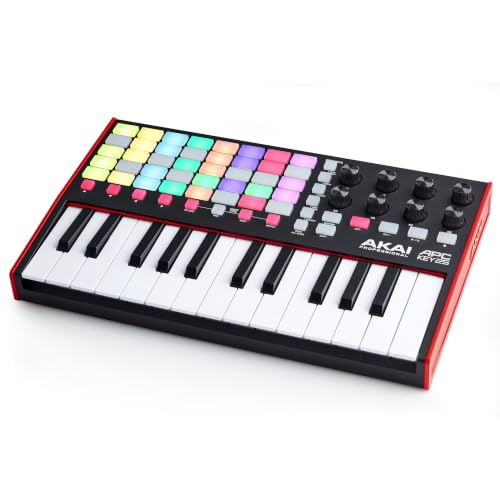
- Best for: Live performers and producers who build songs by launching clips and scenes
- 25 velocity-sensitive mini keys, Gen 2 dynamic keybed
- 40 RGB-backlit pads in a 5×8 clip-launch matrix
- 8 assignable endless rotary knobs
- Dedicated scene launch buttons and 4 directional arrows
Live performers and producers who build songs by launching clips and scenes
Confirm your Live version meets the listing requirement for the pre-mapped integration before buying
The APC Key 25 MK2 is built around Session View itself. Its grid mirrors your clips in rows and columns, with dedicated scene launch buttons and arrows for moving through a large set, so arranging a live performance becomes a hardware task instead of a mouse task. The listing states the controller is pre-mapped for one-to-one integration with Ableton and includes Live Lite. The trade is playing range: the mini keys handle leads and basslines, but this is a launching surface first and a piano second, which is exactly right for clip-driven performers.
Novation Launchkey Mini 37 MK4
- Best for: Traveling producers who want more playing range than a 25-key mini offers
- 37 mini synth-action keys
- 16 pads with polyphonic aftertouch
- OLED display
- Scale Mode and Chord Mode
Traveling producers who want more playing range than a 25-key mini offers
The keys are still mini width, so try the key size expectation against any piano training before ordering
The Mini 37 MK4 stretches the portable formula by adding a third octave of mini keys while keeping the body light enough to travel at just over two pounds. That extra range reduces octave shifting for melodies and chord voicings, and the pads still serve as clip launchers, drum pads, and a step sequencer. Listing data names Ableton Live among its supported software and shows Ableton Live Lite in the box alongside other software. For producers who split time between home and travel, it is the balanced middle size in the Launchkey Mini line.
Novation Launchkey Mini 25 MK4
- Best for: Beginners and laptop producers with the smallest desks or bags
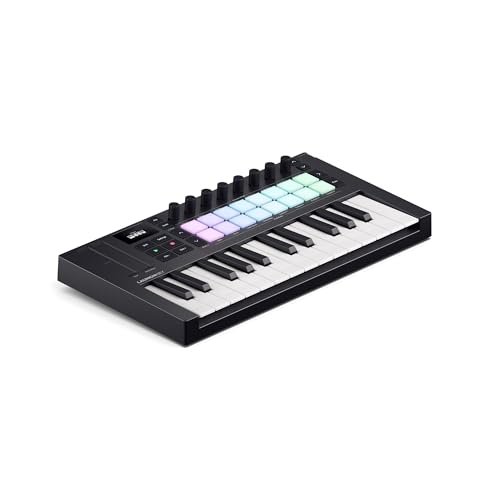
- 25 synth-action mini keys
- 16 RGB velocity-sensitive pads with polyphonic aftertouch
- 8 encoders
- OLED display, 128 x 64 monochrome
Beginners and laptop producers with the smallest desks or bags
Two octaves means constant octave shifting for wide melodies; check the octave buttons fit your playing style
The Mini 25 MK4 is the smallest way into the Launchkey approach to Live: two octaves of mini keys, a full pad section for clips and drums, and encoders mapped through Novation custom DAW script for Ableton Live. Its onboard Scale and Chord modes and generative arpeggiator help sketch ideas quickly, and the listing bundle includes Ableton Live Lite, so a first-time buyer can start in Live without a separate software purchase. It also adds a MIDI out socket for hardware, unusual at this size, which extends its life beyond a laptop-only setup.
Which One Fits Your Situation
You Perform Live by Launching Clips and Scenes
Choose the APC Key 25 MK2. Its grid is laid out like Session View, the pads show clip status in color, and scene launch buttons sit beside the matrix. No other pick here devotes so much surface to launching. Accept the mini keys as a secondary input for basslines and leads, and plan your set around the grid rather than around keyboard parts.
You Record Songs at a Fixed Studio Desk
Choose the Launchkey 49 MK4 White. Four octaves of semi-weighted keys cover chord and bass parts together, the faders map to Live mixer channels, and the pads still launch clips when you arrange. It is the only pick that supports playing, mixing, and launching without paging through control banks, which suits longer writing and mixing sessions at one desk.
You Produce on Trains, Planes, and Hotel Desks
Choose the Launchkey Mini 37 MK4 if you play melodies, or the Mini 25 MK4 if space is the priority. Both are USB powered, light, and scripted for Live. The 37 adds playing range that reduces octave button use, while the 25 disappears into a laptop sleeve. Either way, the pads keep clip launching available away from your main studio.
You Are Buying Your First Controller for Live
Start with the Launchkey Mini 25 MK4 or the APC Key 25 MK2, since both listings include Ableton Live Lite. Pick the Mini if your ideas begin with melodies and chords, using its Scale and Chord modes as learning aids. Pick the APC if your ideas begin with loops and scenes. Either removes the separate software purchase that stalls many first setups.
Common Mistakes
- Buying a general controller with no Ableton mapping named in the listing, then spending sessions hand-mapping basic transport and mixer functions
- Choosing 25 mini keys for two-handed piano playing and fighting octave buttons on every take
- Comparing pad counts without checking layout, when a clip grid and a drum pad section serve different jobs
- Assuming a full Live license is included when the listing only names Live Lite, with its track limits
- Ignoring desk depth and bag size, especially with a 49-key controller that also carries faders
Frequently Asked Questions
Do these controllers need a separate Ableton Live purchase to start?
Not to begin. The APC Key 25 MK2 and the Launchkey models list Ableton Live Lite in their bundles, and current Launchkey listings name Live 12 Lite. Lite limits track counts and bundled devices compared with larger editions, so existing Live owners should register the hardware for its integration and extra instruments rather than for the DAW itself.
Will a Launchkey work with Live versions older than the listing states?
Novation lists its custom DAW script for Ableton Live 11 or later for the Mini 25 MK4, and the APC listing ties its pre-mapping to a specific minimum Live release. Check the exact version named on the product page against your installed version before buying, since older releases may fall back to generic MIDI behavior without the mapped mixer and device control.
Are mini keys good enough for real playing in Live?
They handle basslines, leads, chord stabs, and sketching well, and velocity response keeps dynamics usable. They restrict two-handed parts, wide voicings, and piano technique because of their narrow width and short range. If your writing starts at a piano, the semi-weighted 49-key Launchkey fits better; if your writing starts with clips and loops, mini keys rarely become the bottleneck.
Can these controllers also control hardware synths?
The Launchkey Mini 25 MK4 lists a 3.5mm MIDI out socket and a sustain pedal jack, so it can send notes to external gear with the right adapter cable. The APC Key 25 MK2 is centered on USB control of Live. Check the rear panel connections named in each listing if hardware control matters, because compact controllers often omit MIDI out entirely.
FAQ
Do these controllers need a separate Ableton Live purchase to start?
Will a Launchkey work with Live versions older than the listing states?
Are mini keys good enough for real playing in Live?
Can these controllers also control hardware synths?
More from Amazon
Programs that pair well with the guide above. Offers and eligibility are set by Amazon and may change.
Free shipping on eligible items, Prime Video and more. Eligible new members can start with a free trial.
Start a Prime free trialA Prime membership for ages 18-24 with a trial period. Eligibility is set by Amazon.
See Prime for Young AdultsAudiobooks and podcasts to listen to on the go. Eligible new members can start with a free trial.
Try Audible freeAd-free music streaming. Eligible new subscribers can start with a free trial.
Try Music Unlimited freeAs an Amazon Associate we earn from qualifying purchases.