Our Short List of 3

- 40mm drivers with spatial sound support
- Direct 3.5mm connection to the Xbox Wireless Controller, no batteries required
- Adjustable headband with plush cushioning
- On-ear volume and mute controls

- TriForce 50mm drivers for fuller, more detailed sound
- HyperClear cardioid microphone with noise reduction
- Flowknit memory foam ear cushions
- On-headset controls for volume and mute
- 32mm drivers with clear, balanced audio
- Flip-to-mute boom microphone
- Wired 3.5mm connection for Xbox, PlayStation, Switch, PC and Mac
- Durable over-ear design built for daily use
All 3 Picks at a Glance
| Product | Specs | Action |
|---|---|---|
| 1. Xbox Stereo Headset |
| Check price on Amazon |
| 3. Razer Kaira X |
| Check price on Amazon |
| 4. ASTRO A10 Gen 2 |
| Check price on Amazon |
Key takeaways
- Find the best wired headsets for Xbox Series X with clear chat, strong game audio and comfortable fits. Compare four wired picks built for long sessions.
The best wired headsets for Xbox Series X give you zero-latency game audio, clear team chat and a connection that never needs charging. A wired headset plugs straight into the 3.5mm jack on your Xbox Wireless Controller, so there is no battery to manage, no wireless pairing to troubleshoot and no audio delay when a split-second footstep matters. For players who sit down for long sessions, that simplicity is the whole point.
Wired headsets have also become surprisingly good value. The four picks below cover the full range of what an Xbox Series X owner is likely to need: an official Microsoft headset with spatial sound support, a lightweight budget favourite, a premium-feeling Razer option with large drivers, and a durable ASTRO classic. All four connect through the controller jack, work with Xbox Series X and Series S, and double as headsets for PC and mobile devices with a 3.5mm connection.
This guide explains what to look for before you buy, compares the four picks side by side, and answers the questions Xbox players ask most often about wired headsets.
How to Choose a Wired Headset for Xbox Series X
Connection type
Every headset in this guide uses a wired 3.5mm connection that plugs into the Xbox Wireless Controller. That is the standard way to use a wired headset on Xbox Series X. Avoid headsets that rely only on USB audio for their core connection, because the console does not treat a USB headset the same way, and a 3.5mm plug keeps things simple across Xbox, PC and mobile.
Check the cable length before you buy. A cable around four feet long suits most couch setups, while a longer cable is better if your console sits far from where you play. A detachable cable is a bonus, because a damaged cable is the most common reason a wired headset stops working.
Sound quality and drivers
Driver size is a useful starting point, but it is not the whole story. Drivers between 32mm and 50mm are normal for gaming headsets, and larger drivers tend to deliver fuller bass and a wider soundstage. Just as important is tuning: a headset that emphasises footsteps and directional cues helps in competitive shooters, while a warmer, bass-heavy tuning suits single-player adventures and cinematic games.
Xbox Series X supports spatial sound formats including Windows Sonic, Dolby Atmos and DTS Headphone:X. Several headsets in this guide are compatible with these formats, which can make it easier to tell whether an enemy is above, below or behind you. You enable spatial sound in the console audio settings once the headset is connected.
Microphone quality
Team chat is half the job of a gaming headset. Look for a microphone that sits close to your mouth, picks up your voice clearly and rejects background noise from fans, keyboards and household sounds. A flip-to-mute microphone is the most convenient design, because lifting the boom mutes you instantly without fumbling for a button. A detachable microphone is useful if you also want to wear the headset for music or films.
Comfort for long sessions
A headset that sounds great but hurts after an hour is a bad buy. Weight matters: anything under roughly 300 grams is comfortable for most players, and the lightest headsets here come in well under that. Plush ear cushions, a padded headband and a clamping force that holds the headset in place without squeezing your head are the three things to look for. Over-ear cups that fully surround your ears generally stay comfortable longer than on-ear designs.
Durability and controls
On-ear controls for volume and mute let you adjust audio mid-game without opening a menu. Check that the headband feels sturdy rather than flimsy, and that the ear cushions are made from a material you are happy to wear for hours. Synthetic leather cushions block outside noise well and feel premium, while fabric cushions breathe better in warm rooms.
Top Picks
1. Xbox Stereo Headset
- 40mm drivers with spatial sound support
- Direct 3.5mm connection to the Xbox Wireless Controller, no batteries required
- Adjustable headband with plush cushioning
- On-ear volume and mute controls
The official Xbox Stereo Headset is the most natural first pick for an Xbox Series X owner. It was designed by Microsoft for this console, so compatibility is guaranteed and setup is as simple as plugging the cable into the controller. There are no batteries to charge and no apps to configure.
Sound comes from 40mm drivers that deliver clear highs and solid lows, and the headset supports Windows Sonic, Dolby Atmos and DTS Headphone:X spatial sound, so directional audio in supported games feels precise. The flexible, lightweight design uses an adjustable headband with plush cushioning that spreads pressure evenly, and the large ear cups have accessible on-ear controls for volume and mute.
The microphone tucks away when it is not in use, which keeps the headset looking tidy when you switch to music or films. Because it connects through the standard 3.5mm jack, it also works with Xbox One and Windows PCs. For players who want an official, no-fuss headset that simply works, this is the safest choice on the list.
View the Xbox Stereo Headset on Amazon
2. Turtle Beach Recon 70
The Turtle Beach Recon 70 is the budget champion of this roundup and one of the most popular wired gaming headsets ever sold. It weighs just 232 grams, making it one of the lightest headsets here, and its synthetic leather ear cushions are designed for long sessions without squeezing your head.
Its 40mm speakers deliver crisp highs and thundering lows, and the headset supports spatial sound technologies including Windows Sonic, Dolby Atmos and DTS Headphone:X. The high-sensitivity microphone flips up to mute, which is fast and intuitive during a match, and the master volume wheel sits on the ear cup for quick adjustments.
The Recon 70 connects through a 3.5mm jack with a four-foot cable, and it works across Xbox Series X and S, Xbox One, PlayStation consoles, PC, Nintendo Switch and mobile devices. That versatility makes it a strong pick if you game on more than one platform. For players who want dependable sound and chat at the lowest outlay in this guide, it is hard to beat.
- 40mm speakers with spatial sound support
- Flip-to-mute high-sensitivity microphone
- Lightweight design at 232 grams
- Premium synthetic leather ear cushions
- Four-foot cable with on-ear volume wheel
View the Turtle Beach Recon 70 on Amazon
3. Razer Kaira X
- TriForce 50mm drivers for fuller, more detailed sound
- HyperClear cardioid microphone with noise reduction
- Flowknit memory foam ear cushions
- On-headset controls for volume and mute
The Razer Kaira X is the pick for players who want a more premium feel and bigger sound. Its TriForce 50mm drivers are the largest in this guide, and they are designed to separate bass, mids and treble more cleanly, which gives explosions weight without drowning out dialogue and footsteps.
The HyperClear cardioid microphone focuses on your voice while reducing background noise, which teammates will appreciate in busy lobbies. Flowknit memory foam ear cushions are softer and more breathable than standard padding, and on-headset controls keep volume and mute within easy reach. The headset carries official Xbox licensing, so it is tuned and tested for Xbox Series X and S, Xbox One, PC, Mac and mobile devices.
If your sessions regularly run for several hours and you notice the difference between good and great game audio, the Kaira X justifies its step up from the budget picks. It is the most immersive-sounding wired headset in this comparison.
View the Razer Kaira X on Amazon
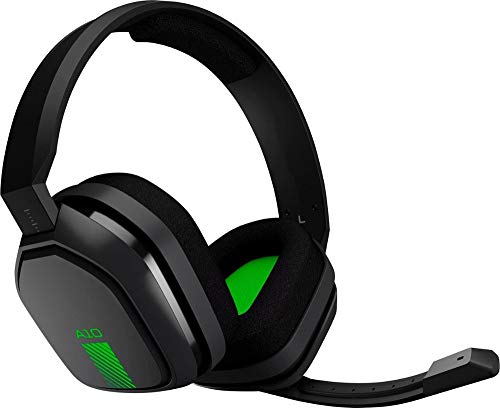
4. ASTRO A10 Gen 2
- 32mm drivers with clear, balanced audio
- Flip-to-mute boom microphone
- Wired 3.5mm connection for Xbox, PlayStation, Switch, PC and Mac
- Durable over-ear design built for daily use
The ASTRO A10 Gen 2 is a durable, no-nonsense headset built for players who value toughness and simplicity. Its 32mm drivers deliver clear, balanced audio, and the flip-to-mute boom microphone is one of the most reliable designs in gaming: flip it up and you are muted, flip it down and you are live.
The A10 Gen 2 uses a wired 3.5mm connection and works with Xbox Series X and S, PlayStation consoles, Nintendo Switch, PC and Mac. Its over-ear design with soft cushioning stays comfortable through long sessions, and the headset is known for surviving drops and daily wear that would damage flimsier models. ASTRO has refined this design over several generations, and the result feels solid rather than flashy.
Choose the A10 Gen 2 if you want a headset you can toss in a bag, hand to a younger player or use every day without worrying about it. It is the most rugged pick in this guide.
View the ASTRO A10 Gen 2 on Amazon
Comparison Table
| Headset | Drivers | Microphone | Weight | Best For |
|---|---|---|---|---|
| Xbox Stereo Headset | 40mm | Tuck-away mic | Lightweight | Official plug-and-play simplicity |
| Turtle Beach Recon 70 | 40mm | Flip-to-mute | 232 grams | Best value and lightest fit |
| Razer Kaira X | 50mm TriForce | HyperClear cardioid | Mid-weight | Biggest, most detailed sound |
| ASTRO A10 Gen 2 | 32mm | Flip-to-mute boom | Mid-weight | Durability and everyday use |
Which Wired Headset Should You Buy?
If you want the simplest possible experience, buy the Xbox Stereo Headset. It is made for this console, supports spatial sound and needs no setup beyond plugging it in.
If budget matters most, buy the Turtle Beach Recon 70. It is the lightest headset here, sounds excellent for its class and works on almost every platform you own.
If you play for hours at a time and care about audio detail, buy the Razer Kaira X. Its 50mm drivers and memory foam cushions make long sessions sound and feel better.
If you need a headset that can take a beating, buy the ASTRO A10 Gen 2. Its rugged build and reliable flip-to-mute mic make it the best everyday workhorse of the four.
Frequently Asked Questions
Do wired headsets work with Xbox Series X?
Yes. Plug the headset cable into the 3.5mm audio jack on the bottom of your Xbox Wireless Controller. The console routes game audio and chat through the headset automatically, and you can adjust the balance between game and chat audio in the console audio settings.
Do I need batteries for a wired Xbox headset?
No. Wired headsets draw their power through the controller connection, so there is nothing to charge. That is one of the main advantages over wireless headsets, which need regular charging and can die mid-game.
Can I use these headsets on PC and mobile as well?
Yes. All four headsets in this guide use a standard 3.5mm connection, so they work with Windows PCs, Macs and mobile devices that have a headphone jack or a compatible adapter. The Recon 70 and A10 Gen 2 also work with PlayStation and Nintendo Switch.
What is spatial sound, and do these headsets support it?
Spatial sound formats such as Windows Sonic, Dolby Atmos and DTS Headphone:X add directional depth to game audio, helping you locate sounds in three-dimensional space. The Xbox Stereo Headset, Turtle Beach Recon 70 and Razer Kaira X all support these formats on Xbox Series X. Enable your preferred format in the console audio settings after connecting the headset.
How do I fix a wired headset with no sound on Xbox Series X?
First, push the 3.5mm plug firmly into the controller jack and check that the headset volume is turned up. Then go to the console audio settings and confirm the headset is selected as the audio output, and check the game and chat mixer balance. If the problem persists, try the headset on another device to rule out a cable fault, and try a different controller to rule out a worn jack.
Conclusion
The best wired headsets for Xbox Series X prove that you do not need to spend a fortune or manage a battery to get great game audio. The Xbox Stereo Headset is the easiest choice, the Turtle Beach Recon 70 is the best value, the Razer Kaira X delivers the most detailed sound, and the ASTRO A10 Gen 2 is the toughest of the four. Pick the one that matches how you play, plug it into your controller and get back to the game.
Disclosure: As an Amazon Associate, we earn from qualifying purchases.
FAQ
Which Wired Headset Should You Buy?
Do wired headsets work with Xbox Series X?
Do I need batteries for a wired Xbox headset?
Can I use these headsets on PC and mobile as well?
What is spatial sound, and do these headsets support it?
How do I fix a wired headset with no sound on Xbox Series X?
More from Amazon
Programs that pair well with the guide above. Offers and eligibility are set by Amazon and may change.
Free shipping on eligible items, Prime Video and more. Eligible new members can start with a free trial.
Start a Prime free trialA Prime membership for ages 18-24 with a trial period. Eligibility is set by Amazon.
See Prime for Young AdultsAudiobooks and podcasts to listen to on the go. Eligible new members can start with a free trial.
Try Audible freeAd-free music streaming. Eligible new subscribers can start with a free trial.
Try Music Unlimited freeAs an Amazon Associate we earn from qualifying purchases.