Our Short List of 3
All 4 Picks at a Glance
| Product | Specs | Action |
|---|---|---|
 1. Bose TV Speaker — Best Compact Soundbar for Dialogue | Check price on Amazon | |
 2. Sonos Beam Gen 2 — Best Overall Smart Soundbar | Check price on Amazon | |
 3. Sonos Ray — Best Entry-Level Sonos Soundbar | Check price on Amazon | |
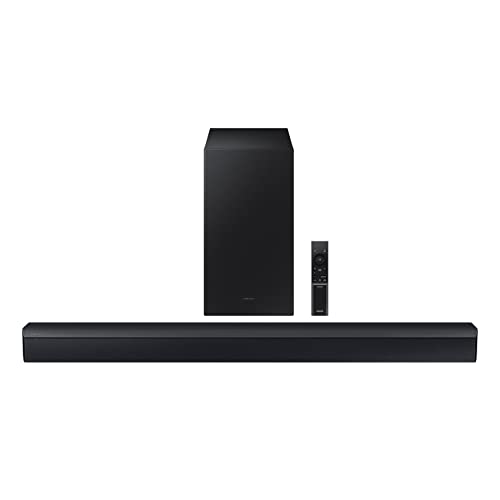 4. Samsung HW-C450 — Best Value Soundbar with Wireless Subwoofer | Check price on Amazon |
Key takeaways
- Looking for the best wireless speakers for TV? Compare top soundbars with Bluetooth, Wi-Fi and HDMI ARC for clearer dialogue, deeper bass and easy setup.
Introduction
The best wireless speakers for tv turn thin, muffled built-in TV audio into sound you can actually enjoy. Modern flat-screen televisions are so slim that their speakers have almost nowhere to go, which is why dialogue often sounds buried and action scenes feel flat. A wireless speaker made for TV use fixes that problem with a single connection, no speaker wire running across the room, and a soundstage that finally matches the picture on screen.
Wireless TV speakers come in several forms. The most common is the soundbar, a long, low speaker that sits in front of the television or mounts on the wall beneath it. Some soundbars pair with a wireless subwoofer for deeper bass, while others connect to rear speakers over a wireless link for surround sound. A few compact models work as standalone bars that stream music over Bluetooth or Wi-Fi when the TV is off, so they earn their place in the living room twice over.
This guide explains what to look for before you buy, then compares four strong options: the Bose TV Speaker, the Sonos Beam Gen 2, the Sonos Ray, and the Samsung HW-C450. Each one is a different answer to the same question, from a compact bar for a bedroom television to a full 2.1-channel system with a wireless subwoofer. By the end, you should know which model fits your room, your television, and the way you actually watch.
How to Choose Wireless Speakers for TV
Start with the connection your TV offers
The connection between the television and the speaker decides how simple daily use will be. HDMI ARC, or its newer version eARC, is the best option on most modern televisions because it carries sound from the TV to the speaker over a single cable and usually lets the TV remote control the speaker volume. Optical audio is the reliable fallback for older televisions, and it works well, although it does not carry the same advanced audio formats. Bluetooth can connect a speaker to a television without any cable at all, but it is better treated as a bonus for streaming music from a phone than as the main TV link, because Bluetooth audio can introduce a small delay that shows up as lip-sync drift.
Before buying, check the back of your television or its specifications page for an HDMI port labelled ARC or eARC. If your television has one, choose a speaker that supports it. If it does not, make sure the speaker you pick includes an optical input and that an optical cable is in the box.
Match the speaker to the size of the room
A compact soundbar suits a bedroom, a small apartment living room, or a television up to about 55 inches. It improves dialogue and adds presence without overwhelming the space. A larger room, or a television of 65 inches and above, benefits from a wider bar or a system with a separate subwoofer, because low frequencies need physical size to develop. A 2.1-channel system, meaning a soundbar plus a subwoofer, fills a medium living room far better than a slim bar alone.
Room shape matters too. Hard floors, bare walls, and large windows reflect sound and can make a bright speaker sound harsh, while carpets, curtains, and soft furniture absorb reflections and warm the sound. If your room is very reflective, look for a speaker with adjustable bass and treble, or a dialogue enhancement mode, so you can tune the sound to the space rather than living with the factory settings.
Decide how much bass you need
Dialogue-driven viewing, such as news, talk shows, and dramas, needs almost no extra bass. A compact two-channel bar handles it well. Movies, sports, and gaming are different: explosions, crowd noise, and game soundtracks all live in the lower frequencies, and a wireless subwoofer makes a real difference there. The subwoofer in a 2.1 system connects to the bar wirelessly, so the only cable it needs is its own power cord, and you can place it anywhere in the room with an outlet.
If you live in an apartment with thin walls, a subwoofer can become a neighbour problem at night. In that case, a bar with a dialogue mode and a night mode, or a model that lets you lower the bass independently, is the more considerate choice.
Check smart features and expandability
Some wireless TV speakers are simple: they play TV audio and accept Bluetooth from a phone. Others are smart speakers in their own right, with Wi-Fi streaming, voice assistants, and multi-room audio. Wi-Fi streaming generally sounds better than Bluetooth and lets the speaker join a wider home audio system, so it is worth having if you listen to music often. A speaker that can add a subwoofer or rear speakers later is also worth considering, because it lets you start with a simple bar and build a surround system over time instead of replacing the whole setup.
Also confirm the practical details. Measure the space in front of your television: the bar should be low enough not to block the screen or the infrared sensor for the TV remote. Check whether wall-mounting hardware is included if you plan to hang the bar. And look at the remote control situation: a speaker that responds to your existing TV remote through HDMI ARC saves you from juggling two remotes every evening.
Understand what “wireless” really means
The word wireless causes more confusion than almost anything else in TV audio. In nearly every TV speaker system, the bar itself still connects to the television with a cable, usually HDMI or optical. Wireless refers to the link between the bar and its subwoofer or rear speakers, and to the Bluetooth or Wi-Fi connection used for music streaming. Every component still needs mains power, so plan for an outlet near the subwoofer and behind the couch if you add rear speakers. Knowing this in advance prevents the disappointment of unboxing a system and discovering cables you did not expect.
Top Picks
1. Bose TV Speaker — Best Compact Soundbar for Dialogue
The Bose TV Speaker is a compact all-in-one soundbar built around one job: making television sound clear. Two angled full-range drivers push sound forward and outward, creating a wider soundstage than the bar’s modest footprint suggests. A dedicated Dialogue mode lifts voices out of the mix, which helps enormously with mumbled movie dialogue and fast-talking drama. The bar is just over two inches tall and under 24 inches wide, so it fits in front of almost any television without blocking the screen, and it can be wall-mounted with optional brackets.
Setup is a single cable: HDMI ARC if your television supports it, or the optical cable included in the box. Bluetooth is built in for streaming music and podcasts from a phone, and the included remote covers power, source selection, volume, mute, Bluetooth, bass, and Dialogue mode. The bar can also accept an optional Bose bass module later, connected by a standard cable, if you decide you want more low-end weight.
This is the right pick for a bedroom or small living room television, and for anyone whose main complaint is that they cannot hear what people are saying. It does not offer Dolby Atmos or surround sound, and it will not shake the room during action movies, but for everyday viewing it is one of the simplest and most effective upgrades available.
View the Bose TV Speaker on Amazon
2. Sonos Beam Gen 2 — Best Overall Smart Soundbar
The Sonos Beam Gen 2 is the most complete single-bar option in this guide. It is a compact smart soundbar with Dolby Atmos support, Wi-Fi streaming, Apple AirPlay 2, and voice assistant compatibility, so it works as both a TV speaker and the centre of a music system. Dialogue stays crisp thanks to a dedicated centre tweeter arrangement and speech enhancement in the Sonos app, while the Atmos processing creates a sense of height and space that a plain stereo bar cannot match.
Connection is through HDMI eARC, with an optical adapter included in the box for televisions that lack an ARC port. The Sonos app handles setup, room tuning through Trueplay, and equaliser adjustments, and the bar can be expanded later with a Sonos Sub and Era rear speakers, all joining over Wi-Fi. Touch controls on top of the bar handle playback and volume, and the system responds to most TV remotes through HDMI.
Choose the Beam Gen 2 if you want one speaker that handles television, music, and future expansion, and if your room is small to medium sized. It is the strongest all-rounder here, and the one most likely to still feel right if you upgrade your television or rearrange the room later.
View the Sonos Beam Gen 2 on Amazon
3. Sonos Ray — Best Entry-Level Sonos Soundbar
The Sonos Ray is the smallest and most affordable way into the Sonos ecosystem, and it is a genuine upgrade over built-in TV speakers despite its size. It connects to the television with an optical cable, which makes it a good match for older televisions or smaller sets that lack HDMI ARC. Inside the compact cabinet, two tweeters and two mid-woofers are tuned for clear dialogue, and the Sonos app offers speech enhancement and a night mode that softens loud effects while keeping voices audible.
Because the Ray runs on Wi-Fi as well as optical, it streams music from all the major services, supports AirPlay 2, and can be grouped with other Sonos speakers around the home. It can also serve as a rear surround speaker paired with a Sonos Arc or Beam if your system grows. Setup is quick: plug in the optical cable, run the Sonos app, and let Trueplay tune the sound to the room.
Pick the Ray for a small room, a secondary television, or a first Sonos speaker. Its optical-only TV connection and lack of HDMI ARC mean it is not the best choice for a large main television, and it has no Dolby Atmos support, but for its size and simplicity it delivers far more than its footprint promises.
4. Samsung HW-C450 — Best Value Soundbar with Wireless Subwoofer
The Samsung HW-C450 is a 2.1-channel system that pairs a soundbar with a wireless subwoofer, and it is the best value pick in this guide for anyone who wants real bass without a big outlay. The bar supports DTS Virtual:X for a wider surround effect, and the wireless subwoofer adds the low-end weight that makes movies and sports feel substantial. Adaptive Sound Lite analyses what is playing and adjusts the tuning, while a dedicated Bass Boost mode and a Game Mode tuned for gaming round out the feature set.
Connectivity covers Bluetooth, HDMI ARC, and optical, and the system supports wireless surround speakers if you want to add rears later. The bar measures about 33.8 inches wide, so it suits medium televisions and living rooms, and the subwoofer needs only a power outlet, placed wherever it sounds best in the room. A remote control is included, and the system works with Samsung televisions through One Remote Control compatibility.
This is the pick for a living room where movies, sports, and gaming matter, and where a separate subwoofer is welcome. It is larger than the compact bars here and it does not offer the smart music ecosystem of the Sonos models, but for sheer impact per unit of cost it is hard to beat.
View the Samsung HW-C450 on Amazon
Comparison Table
| Speaker | Channels | TV Connection | Wireless Features | Best For |
|---|---|---|---|---|
| Bose TV Speaker | 2.0 | HDMI ARC, optical, AUX | Bluetooth streaming | Dialogue clarity in small rooms |
| Sonos Beam Gen 2 | 5.0 virtual with Dolby Atmos | HDMI eARC, optical adapter | Wi-Fi, AirPlay 2, voice assistants | Best overall smart soundbar |
| Sonos Ray | 2.0 | Optical | Wi-Fi, AirPlay 2 | Small rooms and entry-level Sonos |
| Samsung HW-C450 | 2.1 with wireless subwoofer | HDMI ARC, optical | Bluetooth, wireless subwoofer, optional wireless rears | Movies, sports, and gaming on a budget |
Frequently Asked Questions
Are wireless speakers for TV really wireless?
Mostly, but not entirely. The bar itself usually connects to the television with an HDMI or optical cable. Wireless refers to the connection between the bar and its subwoofer or rear speakers, and to Bluetooth or Wi-Fi streaming from a phone. Every component still plugs into a power outlet. Check the connections on both your television and the speaker before you buy so there are no surprises at setup.
Do I need HDMI ARC on my TV?
HDMI ARC is the most convenient connection because it carries audio over one cable and lets the TV remote control the speaker volume. If your television has an ARC or eARC port, choose a speaker that supports it. If it does not, optical audio is a solid alternative, and every speaker in this guide except the Sonos Ray also offers HDMI ARC. The Ray uses optical only, which suits older televisions well.
Will a soundbar fix dialogue I cannot hear?
Yes, in most cases. Dialogue problems usually come from small television speakers that cannot separate voices from background sound. A soundbar with a dialogue or speech enhancement mode, like the Bose TV Speaker or the Sonos models, lifts voices out of the mix. Placing the bar directly below the television and slightly forward, rather than buried inside a cabinet, also helps voices reach the listening position clearly.
Can I use a TV soundbar for music too?
All four speakers in this guide stream music over Bluetooth or Wi-Fi from a phone, tablet, or computer. The Sonos models go further, with multi-room audio and support for the major streaming services through the Sonos app. A soundbar will not replace a dedicated hi-fi system for critical listening, but for everyday music in the living room it is a genuine improvement over a portable speaker.
How do I place a wireless subwoofer?
Place the subwoofer near the television or along the front wall to start, then try a corner position if you want stronger bass, since corners reinforce low frequencies. Avoid putting it inside a closed cabinet, which muffles the sound. Because the subwoofer connects wirelessly to the bar, you can move it around the room freely as long as it stays near a power outlet, so experiment for a few days and keep the spot that sounds best for your usual seat.
Conclusion
The best wireless speakers for tv are the ones that match your room, your television, and the way you watch. The Bose TV Speaker is the simplest fix for unclear dialogue in a small room. The Sonos Beam Gen 2 is the best all-rounder, combining Dolby Atmos, smart music streaming, and room to expand into a full surround system. The Sonos Ray is the compact entry point for smaller televisions and first-time Sonos buyers. The Samsung HW-C450 delivers the most cinematic impact for the money, with a wireless subwoofer that makes movies and sports feel bigger.
Before you order, check your television for an HDMI ARC or eARC port, measure the space in front of the screen, and think about whether you want a simple bar or a system that can grow. Any of the four picks here will be a clear step up from built-in TV speakers, and the right choice is the one that fits the room you actually live in.
Disclosure: As an Amazon Associate, we earn from qualifying purchases.
FAQ
Are wireless speakers for TV really wireless?
Do I need HDMI ARC on my TV?
Will a soundbar fix dialogue I cannot hear?
Can I use a TV soundbar for music too?
How do I place a wireless subwoofer?
More from Amazon
Programs that pair well with the guide above. Offers and eligibility are set by Amazon and may change.
Free shipping on eligible items, Prime Video and more. Eligible new members can start with a free trial.
Start a Prime free trialA Prime membership for ages 18-24 with a trial period. Eligibility is set by Amazon.
See Prime for Young AdultsAudiobooks and podcasts to listen to on the go. Eligible new members can start with a free trial.
Try Audible freeAd-free music streaming. Eligible new subscribers can start with a free trial.
Try Music Unlimited freeAs an Amazon Associate we earn from qualifying purchases.